















Every year, employers in the Philippines need to prepare and validate employee tax data for annual BIR reporting, and one of the required supporting files is the alphalist. Because this submission consolidates payroll and withholding tax information across the year, errors in employee details, income figures, or tax amounts can create filing issues and delay compliance work.
This guide explains what the BIR alphalist is, which alphalist types may apply to your organization, what information needs to be prepared, and how businesses can complete the process more accurately. For reference, employers can check the official BIR Downloadables page for the latest Alphalist Data Entry and Validation Module and related filing resources.
Key Takeaways
|

Table of Contents
What Is the BIR Alphalist and How Does It Work?

The BIR alphalist is a mandatory attachment to the Annual Information Return of Income Taxes Withheld on Compensation and Final Withholding Taxes. It is a structured schedule listing all employees, suppliers, and payees from whom taxes were withheld during the taxable year, giving the tax authorities a granular view of an organization’s withholding activities beyond what the summary returns reflect.
Submissions today are electronic. Organizations must format their payroll and payee data into specific digital file structures, typically a .DAT file generated through the BIR’s official Alphalist Data Entry and Validation Module (ADES). The statutory basis for this requirement is the National Internal Revenue Code (NIRC), updated periodically through Revenue Regulations (RR) and Revenue Memorandum Circulars (RMC), which dictate required data fields, formatting rules, and strict annual deadlines.
At its core, the alphalist is a reconciliation tool. It bridges monthly withholding tax remittances made by the employer against the annual income tax liabilities of each employee. An inaccurate or late submission disrupts this reconciliation for both parties, triggering administrative and legal complications that can take months to resolve
Different Types of BIR Alphalist for Businesses
While human resource professionals are primarily concerned with employee compensation, a comprehensive understanding of corporate compliance requires familiarity with all types of alphabetical lists mandated by the tax bureau. Organizations are typically required to prepare different schedules depending on the nature of the income payments and the type of withholding tax applied.
| Alphalist Type | Attached To | Who Handles It |
| Alphalist of Employees | BIR Form 1604-C | HR / Payroll department, covers all employer-employee relationships |
| Alphalist of Payees (EWT) | BIR Form 1604-E | Accounting / Finance, covers suppliers, contractors, professionals |
| Alphalist of Payees (Final Withholding Tax) | BIR Form 1604-F | Finance, covers fringe benefits, dividends, royalties, interest income |
1. Alphalist of Employees (Attachment to Form 1604-C)
The most common list handled by HR and payroll departments. It covers all individuals with an employer-employee relationship with the filing entity, subdivided into schedules based on employment status, terminated employees, those with no previous employer, those with previous employers within the year, and minimum wage earners exempt from income tax.
2. Alphalist of Payees (Attachment to Form 1604-E)
Managed by the accounting or finance department, this list covers payments made to third-party suppliers, independent contractors, professionals, and lessors. Every income payment subject to expanded withholding tax (EWT) must be recorded here with the payee details, amount paid, and tax withheld.
3. Alphalist of Payees Subject to Final Withholding Tax (Attachment to Form 1604-F)
This list covers income payments subject to final withholding taxes, fringe benefits for managerial or supervisory employees, dividends, royalties, and certain interest income. Though less voluminous than the compensation list, it requires the same level of data accuracy to ensure final taxes are correctly reported against each payee.
What Employers Must Prepare for the BIR Alphalist
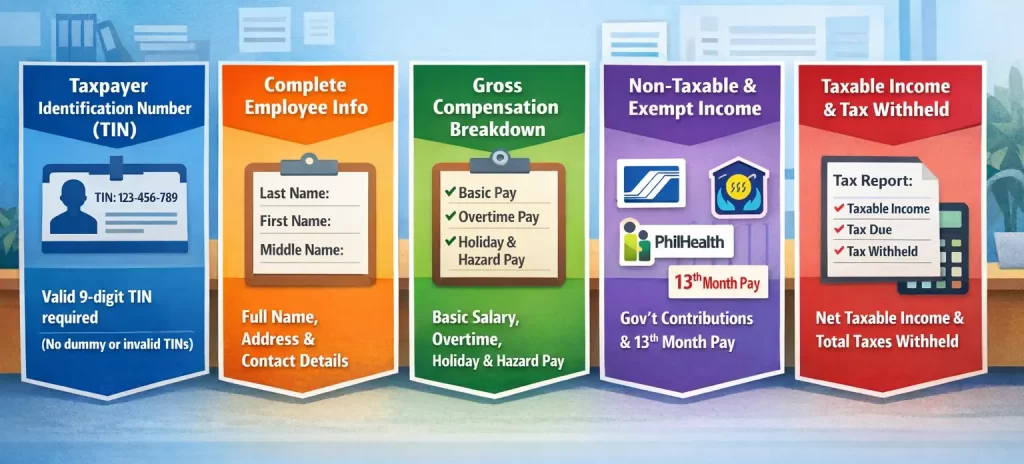
Preparing the annual list of employees requires the aggregation of numerous data points collected throughout the taxable year. Missing or inaccurate information in any of these required fields will result in the rejection of the digital file during the validation process. HR and payroll teams must ensure that their databases are meticulously updated with the following key components.
- Taxpayer Identification Number (TIN)
The TIN is the most critical field in the submission. Every employee must have a valid nine-digit TIN, dummy TINs (e.g., 000-000-000) and formatting errors are among the most common reasons for file rejection. Make TIN collection a mandatory pre-employment requirement.
- Complete Employee Name and Demographics
Names must be broken into separate fields: Last Name, First Name, and Middle Name. Special characters are not allowed unless legally part of the name, and suffixes (Jr., Sr., III) must go in their designated fields. Residential addresses and contact details are also required.
- Gross Compensation Income
A single gross figure is not sufficient. Compensation must be broken down into basic salary, overtime pay, holiday pay, night shift differential, and hazard pay allowing the BIR to verify correct tax treatment for each income type.
- Non-Taxable and Exempt Income
Mandatory government contributions (SSS/GSIS, PhilHealth, Pag-IBIG) and 13th-month pay must be reported separately, clearly distinguishing the tax-exempt portion from any excess that becomes taxable.
- Taxable Income and Tax Withheld
After deducting non-taxable items, the net taxable income must be stated alongside the total tax due and total tax withheld from January to December. Any discrepancy refund due or tax payable must be reflected and settled in the final payroll of the year.
How Philippine HR Teams Submit the BIR Alphalist

Achieving a flawless submission requires a systematic approach, beginning months before the actual deadline.
Step 1: Data Cleansing and Preparation (October – November)
Audit your HR database early. Verify all active employees have valid TINs, ensure names in your payroll system match BIR records exactly, and chase down any missing fields like addresses or middle names.
Step 2: Year-End Tax Annualization (December)
Compute each employee’s annualized income tax during the final payroll run. Compare the annual tax due against taxes already withheld January–November, then adjust the December withholding to close any gap.
Step 3: Generating the Draft File (Early January)
Extract annualized payroll data and map it to the BIR’s required format. Modern payroll systems can export a pre-formatted file automatically, manual spreadsheet users must strictly follow formatting rules (no commas in numeric fields, correct date formats).
Step 4: Running the Validation Module (Mid-January)
Import the draft file into the latest Alphalist Validation Module. The first run will likely produce errors, review the error report, correct the source data, and repeat until you get a zero-error result. Then generate the final .dat file.
Step 5: Electronic Submission and Confirmation
Email the .dat file to esubmission@bir.gov.ph following the required subject line format (TIN, form type, taxable year). Submission is only complete once you receive the Validation Report or “Ticket” back, store it securely as your official proof of receipt.
Common Pitfalls in Alphalist Preparation and How to Avoid Them

- Invalid, Missing, or Dummy Taxpayer Identification Numbers (TIN)
The BIR validation system strictly rejects placeholder TINs like “000-000-000-000.” Make TIN acquisition a mandatory pre-employment step or assist new hires through the BIR’s eRegistration system immediately upon onboarding.
- Discrepancies Between Monthly Remittances and Annual Totals
When alphalist totals don’t match monthly remittance returns (Form 1601-C or 1601-EQ), it flags the submission for audit. Prevent this with monthly reconciliation of payroll registers against BIR filings throughout the year.
- Formatting Errors and Special Character Inclusions
Special characters (ñ, dashes, commas) in name fields and misplaced suffixes (Jr., Sr.) cause validation failures. Sanitize your database to contain only standard alphanumeric characters per BIR data mapping guidelines.
- Improper Categorization of Minimum Wage Earners (MWE)
Incorrect MWE tagging distorts annualized tax computations since the module applies different logic to MWEs. Update payroll systems whenever the RTWPB issues new wage orders to keep employee classifications accurate.
Conclusion
Preparing an accurate BIR alphalist is less about a single January deadline and more about the quality of payroll data maintained throughout the year. Organizations that reconcile monthly, validate TINs at onboarding, and categorize employees correctly have little to fear from the submission window, their data is already clean.
For teams still managing this process through manual spreadsheets, the risk of formatting errors, mismatched totals, and missed deadlines remains high. Reviewing the top payroll and HRIS software options available for Philippine businesses can be a practical next step toward automating the most error-prone parts of the process.
Frequently Asked Questions around BIR alphalist
-
What is the BIR Alphalist Data Entry System?
The BIR Alphalist Data Entry System (ADES) is an official desktop application provided by the Bureau of Internal Revenue for validating and submitting alphalist data. It checks TIN formats, mandatory fields, and mathematical accuracy before generating the encrypted .dat file required for official submission.
-
How do I download the BIR Alphalist Data Entry System?
The ADES can be downloaded from the official BIR website (bir.gov.ph). Always download the latest version, using an outdated version will result in validation errors and rejected files.
-
How do I import data into the BIR Alphalist Data Entry System?
Prepare your payroll data in a CSV or Excel file formatted exactly to the BIR’s required mapping. Open the ADES, use the import function to load the file in batches, then run the validation process. Correct any errors flagged in the error report and re-import until you achieve a zero-error result.
-
How do I validate my BIR Alphalist submission?
After importing your data into the ADES, run the built-in validation check. The software scans for formatting errors, missing TINs, and tax computation discrepancies. Once all errors are resolved, the module will confirm a “Successful Validation” and allow you to generate the final .dat file for submission.














