


















Malaysia has one of the highest smartphone penetration rates in Southeast Asia. According to the Malaysian Communications and Multimedia Commission (MCMC), more than 97% of internet users in the country access the web through a mobile device and a large majority of them use WhatsApp as their go-to communication tool every single day.
Businesses relying solely on email or SMS are missing opportunities in a market that demands fast, personal, and convenient communication. WhatsApp CRM Malaysia bridges this gap by integrating the WhatsApp Business API into a central platform. This setup allows you to manage all conversations in one place, automate key parts of your sales pipeline, and make smarter decisions based on real data.
In this guide, you will learn how WhatsApp CRM works, what features matter most for Malaysian businesses, how to stay compliant with the Personal Data Protection Act (PDPA) 2010, and how to implement it step by step.
Key Takeaways
|
Relying on manual WhatsApp processes for customer engagement can result in missed leads, inconsistent service, data loss during staff transitions, and unintended policy violations challenges that scale with your business and compound over time.

What Is WhatsApp CRM and How Does It Work?
WhatsApp CRM is the integration between Meta’s WhatsApp Business API and a company’s Customer Relationship Management (CRM) system. To be clear, this is different from the standard WhatsApp Business app that small business owners typically use on their phones. The API operates as a backend communication protocol it connects directly to your company’s database without a native front-end interface.
In simple terms, here is what happens when a customer sends your business a message:
- The API captures the incoming message and routes it to your central database.
- The system identifies the sender by their phone number.
- It either creates a new lead profile or adds the message to an existing customer record.
- Your sales or support team immediately sees the full conversation history on their dashboard.
This process relies on webhooks automated triggers that push real-time updates every time a message is sent, delivered, or read. As a result, your team never needs to manually enter chat data into a spreadsheet or database again. Everything syncs automatically.
4 Key Features of WhatsApp CRM That Matter Most for Malaysian Businesses
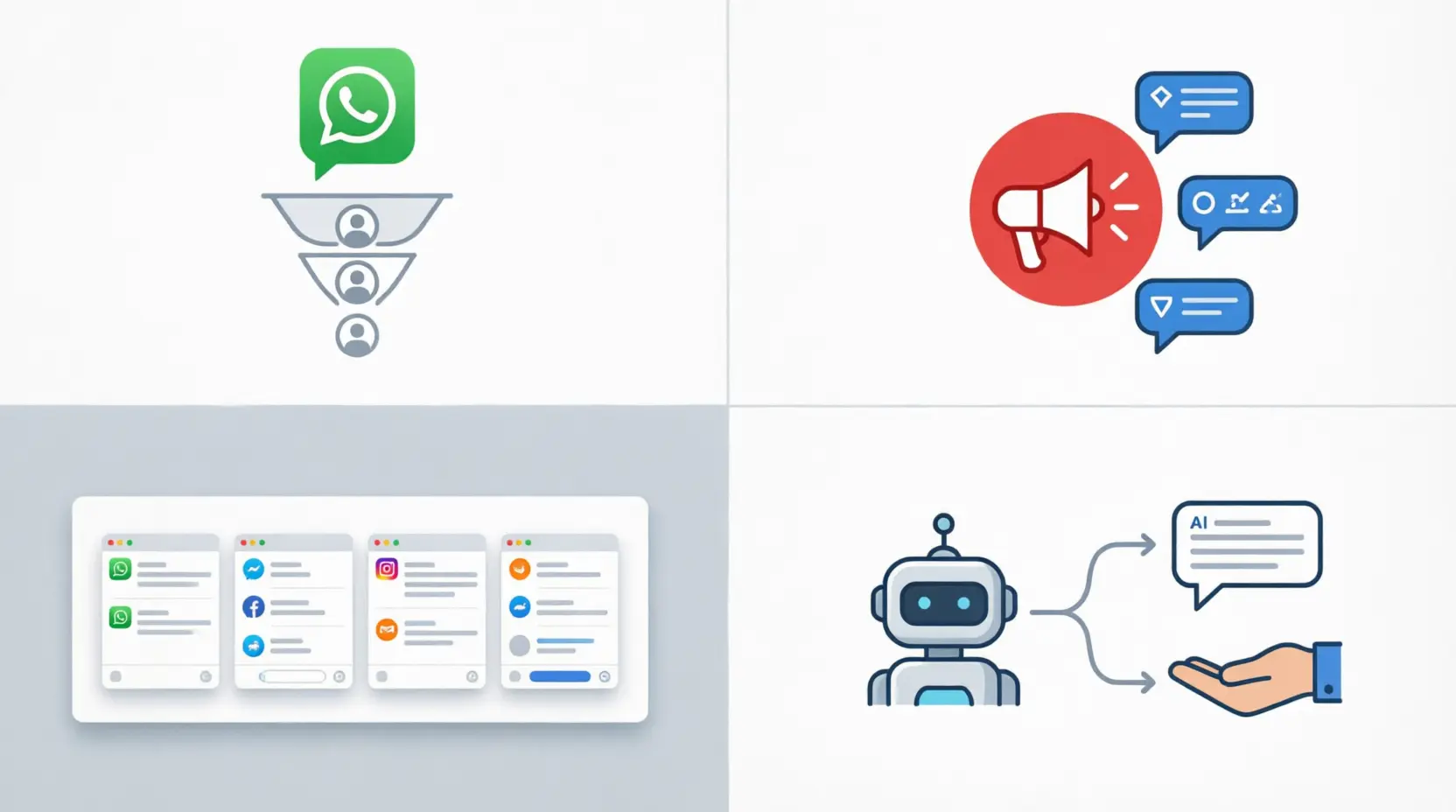 Once WhatsApp is connected to your CRM, you get access to a set of features that go well beyond basic two-way messaging. Many of these features work through workflow automation here are the 4 that tend to make the biggest difference for businesses in Malaysia.
1. Automated Lead Management and Sales Pipeline
The system instantly creates a lead profile the moment a prospect messages, applying routing rules to direct “price” queries to sales or “complaints” to support. As the conversation progresses, it automatically updates sales funnel stages and triggers follow-up reminders, drastically reducing admin work so your team can focus exclusively on closing deals
2. Segmented Broadcast Messaging
Unlike traditional SMS blasting, WhatsApp API broadcasts allow you to filter contacts by purchase history, location, or engagement level to drive specific actions via interactive buttons. To prevent spam and protect the user experience, Meta requires all outbound, business-initiated messages to use pre-approved templates, ensuring your outreach remains high-quality and compliant.
3. Centralised Omnichannel Inbox
For businesses managing multiple channels like email, live chat, social media, and WhatsApp a centralized inbox consolidates everything onto one screen. Instead of switching between apps, agents view the full history of every interaction in one continuous thread. This unified setup minimizes mistakes, accelerates performance and response times, and ensures consistent service across the entire team.
4. AI Chatbot for 24/7 Customer Support
AI-powered chatbots help businesses provide 24/7 customer support by handling routine inquiries like order tracking, store hours, and product availability automatically. With Natural Language Processing (NLP), chatbots can also understand customer intent and deliver more natural conversations, making them an important part of AI in workflow automation.
When a query is too complex for the chatbot to handle, the system transfers the conversation to a human agent along with the full chat history. The customer does not need to repeat themselves, and your agent already has the full picture before saying a word.
Why WhatsApp CRM Gives Malaysian Businesses a Real Edge
Beyond the features, there are three business benefits that stand out most clearly for companies operating in the Malaysian market.
- Faster Response Times, Happier Customers:
Speed correlates directly with higher conversion rates. By utilizing automated routing and a centralized dashboard, your team can dramatically cut response times, building immediate trust through instant acknowledgments from the very first interaction. - Personalized Communication at Scale:
Detailed CRM histories enable high-scale, targeted messaging, such as back-in-stock alerts that significantly outperform generic blasts. This level of personalization, delivered across thousands of contacts, consistently lowers your overall customer acquisition cost over time.
- All Customer Data Stays in One Secure Place:
When your sales team uses personal devices to chat with clients, critical business data gets scattered and becomes impossible to monitor or recover. A CRM integration fixes this by storing every conversation securely within your corporate database.Even if an employee leaves the company, their full interaction history stays with the business not with them. This also gives your team the foundation they need to build a proper customer loyalty program built on real data, not guesswork.
PDPA Compliance and Meta’s Policies You Need to Know
Running a WhatsApp CRM strategy in Malaysia means you have two sets of rules to follow at the same time: local data privacy law and Meta’s own platform policies.
- Malaysia’s PDPA 2010:
Under the Personal Data Protection Act (PDPA) 2010, any business that collects, stores, or processes personal data including phone numbers and chat content must follow strict data handling principles. Most importantly, you cannot initiate a promotional conversation or store a customer’s data for marketing purposes without their explicit consent.In practice, this means you need a clear opt-in mechanism at every customer touchpoint: a checkbox on your website form, a consent prompt during checkout, or an initial automated message that asks permission before subscribing the customer to future updates.
- Meta’s 24-Hour Service Window:
Meta also enforces a 24-hour messaging window. Once a customer sends your business a message, you have 24 hours to reply freely. After that window closes, you can only reach out again using a pre-approved message template. This policy encourages businesses to respond quickly and prevents customers from receiving unwanted follow-ups long after a conversation has ended.
- Data Security Best Practices:
While WhatsApp uses end-to-end encryption for messages in transit, the responsibility for securing data once it reaches your servers falls entirely on you. This includes encrypting stored data, setting strict access controls so only authorised staff can view sensitive customer records, and maintaining detailed audit logs of who accesses or modifies data.
How Different Industries in Malaysia Are Using WhatsApp CRM
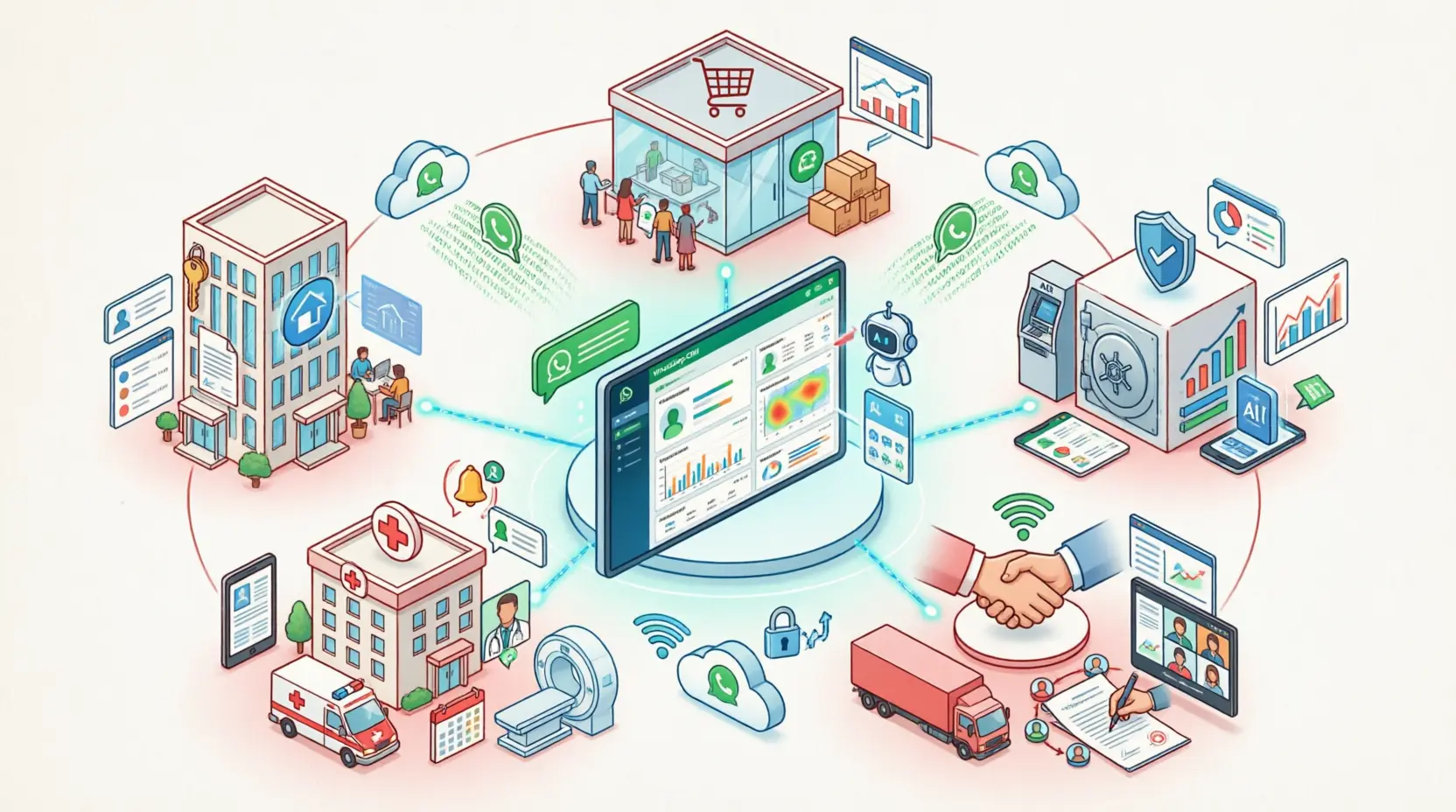
One of the best things about WhatsApp CRM is how well it adapts to different business types. Here is a quick look at how several key sectors in Malaysia are putting it to work.
| Industry | Key Use Cases |
| Retail & E-Commerce | Abandoned cart recovery messages, real-time order tracking updates, personalised product recommendations based on purchase history |
| Real Estate | Automated lead qualification, sharing property brochures and virtual tour links, scheduling viewing appointments and sending reminders |
| Financial Services & Insurance | Policy renewal reminders, secure document submission, instant claim status updates |
| Healthcare | Appointment scheduling, automated no-show reminders, post-consultation care instructions |
| B2B Services | Project status updates, invoice reminders, contract renewal notifications |
How to Implement WhatsApp CRM: 4 Phases to Follow
Getting this integration right takes more than just signing up for an API. To avoid disruptions and make sure your team actually adopts the new system, follow these four implementation phases.
Phase 1: Assess Your Needs and Choose the Right API Tier
Start by identifying your communication bottlenecks. Do you need multi-agent access? High message volumes? Advanced automation? If you are a micro-enterprise with simple needs, the standard WhatsApp Business app may be enough. However, if you are managing a larger sales or support team, the WhatsApp Business API is the right choice.
Phase 2: Select a PDPA-Compliant CRM Partner
Not all CRM platforms are built the same way. When choosing a system, look for one that integrates cleanly with the WhatsApp API, stores data within compliant infrastructure, and actively supports your team in meeting PDPA requirements. The wrong platform can create legal exposure you do not want to deal with later.
Phase 3: Map Your Workflows and Migrate Your Data
Before going live, map out the ideal customer journey in detail. Define your automated routing rules, build quick-reply templates for frequently asked questions, and make sure your existing customer database is migrated accurately into the new system.
A good migration also means reviewing your data quality accurate historical records will later support better demand forecasting and smarter segmentation. Data loss or errors at this stage can undermine the entire rollout.
Phase 4: Train Your Team Thoroughly
Technology on its own does not produce results your people do. Run hands-on training sessions for your sales, marketing, and support teams so they understand how to use the new dashboard effectively.
Tying system usage to your regular performance management process is one of the best ways to drive adoption. If your team does not adopt the system, your investment will not pay off.
3 Common Mistakes to Avoid When Using WhatsApp CRM
Even with the best intentions, many businesses make avoidable mistakes when setting up their WhatsApp CRM. Here are the three most common ones to watch out for.
1. Over-Automating Customer Interactions
Automation is great for handling routine queries and initial triage. However, complex, sensitive, or high-value customer issues still need a human touch. If customers feel they are talking to a wall of automated responses, frustration builds quickly. The key is to strike the right balance automate the repetitive parts, but make it easy for customers to reach a real person when it matters.
2. Skipping the Opt-In Step
This is arguably the most serious mistake a business can make. Sending outbound promotional messages without documented opt-in consent is a direct violation of PDPA. Beyond the legal risk, it can also get your WhatsApp Business account permanently banned. Always build opt-in collection into every customer touchpoint before launching any campaign.
3. Sending Generic, Untargeted Broadcast Messages
If your messages are not relevant to the person receiving them, they will block your account. And once a significant number of users block your number, Meta’s algorithm flags your account and reduces your messaging limits.
To avoid this, send only well-targeted, value-driven messages to segmented lists not blanket promotions to your entire database.
What Is Coming Next for WhatsApp CRM in Malaysia
The technology behind WhatsApp CRM is moving fast. Here are three trends that are already shaping the next generation of customer communication for Malaysian businesses.
- Smarter AI That Understands Local Language:
Generative AI models are getting much better at understanding context, tone, and local language patterns including Manglish. In the near future, automated assistants will be able to handle complex sales conversations and technical troubleshooting in a way that feels genuinely human, not scripted.
- Predictive Outreach Before Customers Even Ask:
Machine learning leverages CRM data to predict customer needs like auto-sending reorder reminders without manual input. This evolves business process automation from reactive service into proactive customer engagement, identifying opportunities before the customer even reaches out.
- A Truly Connected Omnichannel Experience:
The lines between different digital channels are already blurring. In the coming years, customers will expect to start a conversation on social media, continue it on WhatsApp, and complete a transaction on your website without losing any context along the way. CRM platforms that can manage this seamlessly will become the standard, not the exception.
Conclusion
WhatsApp CRM is no longer just a nice-to-have for Malaysian businesses. Given how deeply embedded WhatsApp is in daily life across the country, having a system that connects your customer conversations directly to your business data is one of the most practical investments you can make in 2026.
To get the most out of it, you need three things in place: the right CRM platform, a clear plan for PDPA compliance, and a team that knows how to use the tools they have been given. Start with an honest assessment of where your biggest communication gaps are, then build from there.
By assessing your communication gaps now, you can build a more resilient operation. HashMicro offers a tailored solution designed for the local market-bridge your efficiency gaps and see how it fits your specific needs by booking a free demo today.

FAQ About CRM Whatsapp Malaysia
-
What is the difference between WhatsApp Business App and WhatsApp CRM, and when should I upgrade?
WhatsApp Business App is for solo users on one device with basic features. WhatsApp CRM uses the Business API for multi-agent teams, automated workflows, PDPA-compliant data storage, and integrations with e-commerce or ERP systems. Upgrade when you need team collaboration, lead automation, or scalable messaging.
-
How do I ensure PDPA 2010 compliance when using WhatsApp for customer communication?
Always get explicit opt-in consent before sending promotional messages. Clearly state message purpose and frequency, include an easy opt-out option, and keep consent records for audits. Respect Meta’s 24-hour window: reply freely within 24 hours of customer initiation, then use only pre-approved templates for follow-ups.
-
How can I prevent my WhatsApp Business account from being flagged or banned for spam?
Only message opted-in contacts, segment audiences for relevance, and use Meta-approved templates for outbound messages. Monitor block/report rates closely, and balance promotions with useful updates like order confirmations or personalized recommendations to maintain engagement.
-
If a staff member leaves the company, do we lose their customer conversation history?
No. WhatsApp CRM stores all conversations centrally in your corporate database, not on personal devices. When staff leave, their access is revoked but conversation history remains intact and accessible to authorized team members, ensuring seamless handovers and business continuity.
-
How do I measure the ROI or business impact of implementing WhatsApp CRM?
Track four key metrics: Average Response Time (should decrease with automation), Lead Conversion Rate (percentage of chats turning into sales), Customer Retention (repeat purchases from WhatsApp-engaged users), and Operational Efficiency (time saved on manual tasks). Set baselines before launch and review monthly via your CRM dashboard.





















