






More than 70% of ERP projects will fail by 2027. A Gartner study found that most ERP implementation initiatives won’t reach their business goals because they use a rigid and outdated approach, like monolithic systems. That’s why upgrading gets a lot of attention, but that’s only part of the solution. To make your system migration work, you need to stabilize it.
Moving to a new system has its own risk. You need to set up and stabilize the software. If you don’t, your business might reject it. So you need to know how to stabilize it.
Key Takeaways
|
What is an ERP Upgrade and Stabilization?
An ERP upgrade is the process of migrating to a new version of a software, leaving behind your legacy systems. As business grows, ERP systems must grow alongside them. Without that, your system will just slow you and your business operations down.
ERP stabilization is the process that happens after upgrading. Starting with the hypercare period, you familiarize your company with the new system. You must fix underlying issues and acclimate your employees to the software. This way, you ensure that your upgraded system can run smoothly and your business workflow returns to normal.
ERP Upgrade Risks You Need to Prepare for


Once the upgrade is complete, your ERP system will enter a vulnerable support period. It will face multiple problems during the stabilization period, so you need to secure your ERP in the next few months. Here are some destabilizing risks you need to anticipate for:
1. Data Issues
Data issues can migrate to the new system if you don’t audit it beforehand. Duplicate entries will take up space in the upgraded system. On top of that, incorrect data forces you to redo your financial statements. Avoiding this requires monitoring the data migration process and manually moving lost or corrupted data.
2. Poor Planning
Poor planning restricts your company’s ability to handle any problems during the hypercare period. If you don’t test your system before it goes live, you won’t be able to fix any issues. To avoid this, plan for months on how to run the stabilization process and ways to fix any potential problems.
3. Software Issues
System performance issues hurt your business. Your problem can start from the go-live date, when a high number of users logging in at the same time cause a system downtime. If you don’t solve this problem right away, it will grow. With enough time, your business operations will be interrupted by frequent crashes and shutdowns.
4. Workers’ Resistance
Staff might resist the new system because they’re tired of changes. They will feel indifferent because nothing feels permanent in the office. That kills morale and productivity. To avoid passive resistance, you must show how the new system will improve their work experience.
How to Stabilize Your ERP System from the Inside
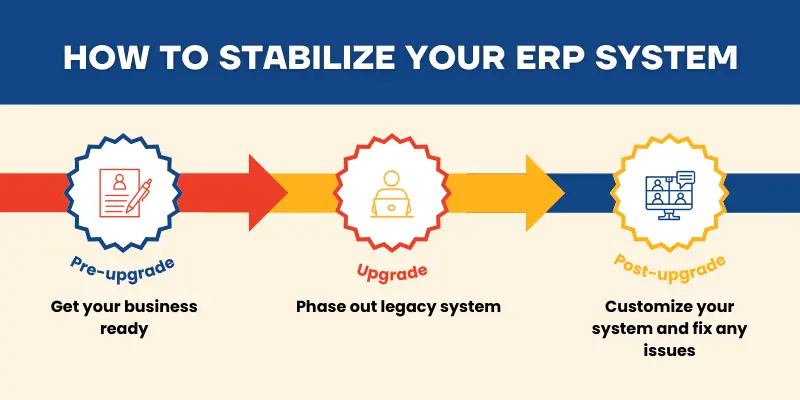
Failed post-go-live stabilization is a real risk to your business. If you don’t make your ERP system stable during the hypercare period, it can hurt your business operations. Below are the steps to stabilize your ERP migration:
1. Pre-Upgrade
Before you start the upgrade process, get your business ready first. Train your employees on the new system to eliminate the learning curve. Check your data’s validity and delete any incorrect entries. It’s important that all mistakes in the old system don’t get carried over to the new system, so audit your business.
2. Upgrade
As the system migration begins, start phasing out your old ERP system. Run the old and new systems at the same time to ease the transition. Test it to make sure the new system runs well. Pick a SuperUser to help you manage and support your upgraded system. Your focus now should be on onboarding employees to the new system.
3. Post-Upgrade
After the old ERP system is fully phased out, customize the new system to your business’ needs. Monitor its performance and fix any problems that come up. Create a technical support team to help resolve any issues after the upgrade and go-live date. Do this until the system runs smoothly, without manual interference.
Now that we have reviewed those steps, are we finished? In reality, you might need to repeat some actions. Something may look great, but actually still needs support. That said, I made a checklist to help you see if your system is stable.
| No. | Issue | True/False |
| 1. | Clients often complain about incorrect documents | |
| 2. | Key business processes take longer than they did in the old system | |
| 3. | Remote workers have trouble logging in and using the system on mobile | |
| 4. | The system can’t track who changes specific documents | |
| 5. | The system made other company apps slower | |
| 6. | The system often lags or crashes during work | |
| 7. | Your staff often finds corrupted or missing data | |
| 8. | Your staff has to use a workaround to make the system work | |
| 9. | Your staff has to manually fix errors on system-generated documents | |
| 10. | Your staff keeps getting ‘sync error’ when using the new system | |
| 11. | Your staff often complain about the new system | |
| 12. | Your technical support team has too many support requests |
Regulations to Remember when Stabilizing ERP
Throughout the stabilization process, you need to remember some rules. In the Philippines, ERP usage is controlled by several regulations. Now, you must check if your ERP system complies with these rules to avoid legal troubles:
1. Data Privacy Protection
Republic Act No. 10173, Series 2012 states that all companies that collect personal information must protect it from threats, like misuse and unauthorized disclosure. Under the watch of the National Privacy Commission (NPC), they must comply with people’s requests to delete or block access to their personal information. If any data breaches happen, companies must inform NPC within the first 72 hours and submit a full report in five days.
As someone who has access to your staff and clients’ personal information, you need to implement data protection measures in your ERP system. Your new system must clearly show how it manages and processes personal information. If you are moving that data around, it must be encrypted. Failure to do so will result in penalties from NPC.
2. Financial Compliance
Philippine Financial Reporting Standards (PFRS) enforce good financial reporting practices. It requires companies to follow PFRS when they file their financial statements, using one of the three main frameworks according to the size of the company. They must annually submit their audited financial statement to the Philippine Securities and Exchange Commission (SEC).
In the first few weeks after the upgrade, you must spot-check your invoices to make sure they’re PFRS compliant. If there’s any mistakes, you must manually fix them. This ensures your company’s compliance with the national standard for filing financial reports.
3. Tax Compliance
Revenue Regulations No. 011-2025 requires all invoices to be electronic. They must be issued from software that the Bureau of Internal Revenue (BIR) has approved. These invoices are only called e-invoices if their data can be extracted and sent to BIR for tax validation. Any invoices that can’t do that are seen as a manually issued invoice.
To gain BIR’s approval, you must first upgrade your ERP system. Check your software to make sure it fits BIR’s requirements. If you meet the criteria, but haven’t been approved, apply to BIR right now. You have until December 31, 2026 to comply with this rule.
Conclusion
Simply put, upgrading your system is only half of the solution. While it’s important to upgrade your ERP system, it’s also equally important to stabilize it. You need to make sure that your ERP system runs smoothly and follows the rules. Only then can your ERP project be successful.
Frequently Asked Questions
-
When should I upgrade my ERP system?
You should upgrade your ERP system if you are experiencing problems while using it. For example, your ERP system should be able to integrate with new technologies and be used on hardware systems other than laptops. If using your system takes too much time and money, it’s time to upgrade it.
-
How do I upgrade an ERP system?
First, you must evaluate your business and legacy system. Identify any problems and determine what features you need in your new ERP system. After that, choose the vendor that best fulfils your needs. Develop your implementation plan and execute it when you get your ERP system. Plus, don’t forget to test it before the go-live date.
-
When is the stabilization process complete?
The stabilization process is complete when your business has no problems using it. Your system should work normally, and your staff should understand how to use it. It shouldn’t face any problems that need manual intervention.