






In modern commerce, cashless transactions have become the expected method of payment. To support a wide range of digital payment methods, merchants use credit card terminals at retail counters, restaurant tables, and mobile storefronts worldwide. A modern terminal is not just a card reader. It is a sophisticated, cutting-edge computing device equipped with advanced encryption protocols, multi-network connectivity, and seamless software integration capabilities.
A full understanding of these devices is essential for any business seeking to optimize its checkout experience, safeguard sensitive financial data, and maintain a competitive edge in an increasingly cashless world.
Table of Contents
Key Takeaways
|
Understanding the Modern Credit Card Terminal
A credit card terminal is a specialized hardware device designed to interface with payment cards to make electronic funds transfers. A modern payment terminal reads customer card details, sends the data securely to the payment provider or acquiring bank for approval, and shows whether the transaction is approved or declined.
It runs on its own operating system, memory, network interface, and complex cryptographic processors. It supports multiple payment methods, including EMV chip dipping, MICR for traditional checks, NFC for contactless payment, and mobile wallets.
The Evolution of Payment Processing Hardware
To truly appreciate the sophistication of today’s payment devices, it is helpful to look back at the technological evolution of payment processing hardware:
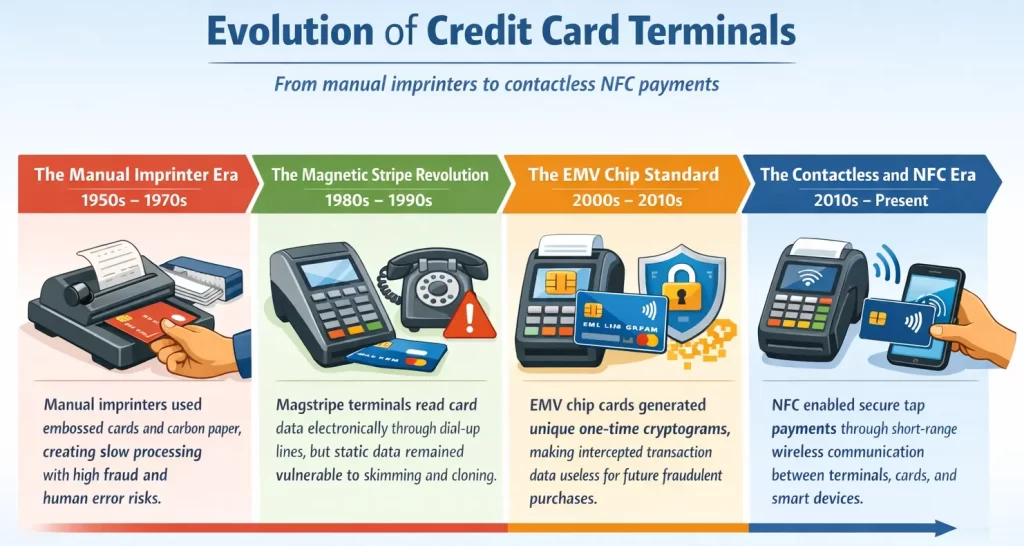
The journey from manual, paper-based systems to instantaneous wireless transactions spans several decades of continuous innovation. Those innovations in credit card terminals led to the mass use of cashless payments. It brought benefits to both customers and sellers. That is why, as merchants, you have to keep in touch with the newest innovation; time will move on with or without you.
How a Credit Card Terminal Works: The Transaction Lifecycle
Behind that one or two seconds when a customer inserts or taps a card is a highly complex, multi-party communication process that occurs in milliseconds. It is crucial to understand the transaction lifecycle for troubleshooting payment issues and knowing the fees associated with processing. The lifecycle is generally divided into three main phases: Authorization, Batching, and Clearing/Settlement.
Phase 1: Authentication and Authorization
The authorization phase is the real-time process that occurs while the customer is standing at the counter waiting for the receipt to print. It involves verifying that the card is valid and that the customer has sufficient funds or credit to complete the purchase.
- Data Capture: The process begins when the credit card terminal reads the cardholder’s data via NFC, EMV chip, or magnetic stripe. The terminal immediately encrypts this sensitive data to ensure it cannot be intercepted in transit.
- Routing to the Processor: The terminal sends the encrypted transaction details (including the card number, expiration date, transaction amount, and merchant ID) over a secure network connection to the merchant’s payment processor or payment gateway.
- Forwarding to the Card Network: The payment processor identifies the specific card brand (e.g., Visa, Mastercard, Discover, UnionPay) and routes the transaction data to the appropriate card network.
- Contacting the Issuing Bank: The card network forwards the authorization request to the financial institution that issued the card to the consumer (the Issuing Bank).
- Verification and Response: The issuing bank instantly checks the card number, CVV, account status, available funds or credit, and fraud risk. Based on these checks, the Issuing Bank generates an authorization response. It can either be an approval code or a specific decline code (e.g., insufficient funds, expired card, suspected fraud).
- Relaying the Decision: This response travels back through the same chain in reverse: from the Issuing Bank, to the Card Network, to the Payment Processor, and finally back to the credit card terminal. The terminal then displays “Approved” or “Declined” and prints or emails the receipt. This entire six-step process typically takes less than three seconds.
Phase 2: Batching
Authorization does not mean that the money has moved. The merchant has simply received a guarantee from the Issuing Bank that the funds are available and have been placed on hold. Throughout the business day, the credit card terminal stores all of these approved authorizations in its memory (or in the cloud-based payment gateway it connects to).
This collection of approved transactions is known as a “batch.” At the end of the business day, the merchant performs a “batch out” or “settlement” process, instructing the terminal to send the entire batch of authorized transactions to the payment processor to initiate the actual transfer of funds.
Phase 3: Clearing and Settlement
The clearing and settlement phase is the backend financial process where the money actually moves from the customer’s bank account to the merchant’s bank account.
- Clearing: The payment processor receives the batch and routes the individual transaction data to the respective card networks. The card networks then route the data to the respective Issuing Banks. The Issuing Banks prepare to transfer the funds, subtracting their designated interchange fees (the cost the issuing bank charges for processing the transaction and assuming the credit risk).
- Settlement: The Issuing Banks transfer the remaining funds to the merchant’s bank (the Acquiring Bank) via the card networks. The Acquiring Bank then deposits the funds into the merchant’s designated business bank account, minus any acquiring or processing fees. Depending on the processor and the merchant’s agreement, this settlement process can take anywhere from a few hours (next-day funding) to several business days.
Types of Credit Card Terminals Available Today

The physical design and functional capabilities of payment terminals have diversified significantly to meet the varied needs of different business models. Selecting the right hardware requires a thorough understanding of the distinct categories available on the market.
1. Traditional Countertop Terminals
A countertop terminal is a stationary payment device commonly used at checkout counters in retail stores. It connects to power and the internet through Ethernet or Wi-Fi, with some older models still using dial-up as backup. These terminals are durable, include physical keypads and receipt printers, and work well for businesses where customers pay at a fixed location.
2. Wireless and Mobile POS (mPOS) Terminals
For businesses that require mobility, wireless and mPOS terminals offer unparalleled flexibility. These devices operate on rechargeable batteries and connect to payment networks via Wi-Fi, Bluetooth (pairing with a smartphone or tablet), or built-in 4G/5G cellular data plans.
Businesses can choose between two mobile payment options. Dedicated wireless terminals let staff accept payments at the table or in store aisles without cables. Meanwhile, mPOS card readers connect to smartphones or tablets through an app, giving food trucks, pop-up shops, contractors, and delivery drivers a portable, affordable way to process payments anywhere.
3. Smart POS Terminals
Smart terminals combine payment processing with business tools in one device. They use large touchscreens and customized Android systems. The defining feature of a smart credit card terminal is its ability to run sophisticated third-party applications directly on the device. They allow merchants to accept payments, manage timesheets, track inventory, run loyalty programs, and review sales data directly from the terminal. This setup helps businesses handle daily operations faster and with fewer separate tools.
4. Virtual Terminals
A virtual terminal is a secure web-based tool that lets merchants process credit card payments through a computer, tablet, or smartphone browser. Merchants sign in to a payment processor portal and manually enter the customer’s card number, expiration date, CVV, and billing address. Businesses that rely on MOTO (Mail Order/Telephone Order), B2B sales, freelancing, or professional services often use it for remote payments.
5. Unattended Payment Terminals
Unattended terminals are robust, highly secure devices designed to operate without any merchant supervision. They are heavily weather-proofed, vandal-resistant, and integrated directly into self-service machines. You will commonly find these terminals built into vending machines, parking garage ticketing systems, self-serve car washes, laundromats, and automated retail kiosks. These terminals focus heavily on contactless and EMV chip acceptance and are engineered for maximum uptime and durability in harsh environments.
Core Features to Look for in a Payment Terminal
When choosing a terminal, you must look beyond basic payment acceptance and consider a holistic set of features that impact both security and operational efficiency:
- Comprehensive Acceptance Capabilities: A modern terminal should support multiple payment methods to keep transactions smooth and flexible. Besides a magnetic stripe reader as backup, it needs a fast EMV chip reader to reduce waiting time, strong NFC support for contactless cards, digital payment, and QR code payments, which are highly popular in various international markets.
- Advanced Connectivity Options: A terminal needs a stable connection to the payment processor to avoid disruptions during checkout. That is why better devices offer more than one connection option, such as Ethernet, Wi-Fi, and built-in 4G LTE backup, so businesses can continue accepting payments even if the main network goes down.
- Store and Forward (Offline Mode): Some terminals can still record transactions when they lose connection to the payment processor. In this mode, the device encrypts and stores payment data locally, then sends it automatically once the network returns, helping businesses continue operating during outages or in remote areas.
- User Interface and Accessibility: The terminal’s interface affects how easily customers can complete payments. Bright screens improve visibility in dim settings, physical keypads help visually impaired users enter PINs, and large touchscreens support features like digital signatures, tipping prompts, digital receipts, and promotional messages during checkout.
- POS integration: Credit card terminals that connect to the POS ecosystem can send totals automatically, confirm payments instantly, close transactions, update inventory and accounting records, and reduce manual input errors. As a result, businesses speed up checkout, improve data accuracy, reduce admin work, and deliver a smoother customer experience.
The hardware chosen will directly dictate the speed of checkout, the types of customers a business can serve, and the level of vulnerability to fraud.
Security Standards and Compliance in Payment Processing

Credit card terminals are the frontline defense against payment fraud and data breaches. Because they handle highly sensitive Personally Identifiable Information (PII) and financial data, they are subject to stringent, globally recognized security standards. Failing to utilize compliant hardware can result in massive fines, legal liability, and catastrophic reputational damage for a merchant.
1. PCI DSS Compliance
The Payment Card Industry Data Security Standard (PCI DSS) is a comprehensive set of security mandates created by the major card networks (Visa, Mastercard, Discover, UnionPay, and JCB). Any business that accepts, processes, stores, or transmits credit card information must comply with PCI DSS.
The hardware must meet PCI PTS standards to ensure strong physical and logical security. Modern terminals also include anti-tamper switches. If someone tries to open the device and install a skimmer, the terminal erases its cryptographic keys and disables itself permanently.
2. The EMV Liability Shift
Historically, if a fraudulent transaction occurred (e.g., a criminal used a cloned magnetic stripe card), the financial institution that issued the card absorbed the cost of the fraud. However, with the global rollout of EMV technology, the card networks instituted the “EMV Liability Shift.”
Under this rule, whichever party has the lesser technology bears the liability for counterfeit fraud. If a customer presents a highly secure EMV chip card, but the merchant’s credit card terminal only has a magnetic stripe reader, the merchant—not the bank—is financially responsible for the chargeback. This makes upgrading to EMV-capable terminals a financial imperative.
3. Point-to-Point Encryption (P2PE) and Tokenization
Point-to-Point Encryption (P2PE) protects card data from the moment a customer taps or dips a card. The terminal encrypts the data before it enters the merchant’s POS system or internal network. It stays encrypted until the payment processor decrypts it on secure servers. Even if hackers breach the merchant’s Wi-Fi network, they only steal unreadable encrypted data.
Tokenization complements P2PE by replacing stored card numbers with a secure token after authorization. The processor sends this token to the merchant’s system instead of the actual card number. Merchants can use it for refunds or recurring billing within that specific processor relationship. If stolen, the token has no value because hackers cannot use it elsewhere.
Cost Structures and Fees Associated with Payment Terminals
Implementing a credit card terminal involves understanding a complex web of costs, which are generally divided into hardware acquisition costs and ongoing processing fees. Navigating these costs effectively is crucial for maintaining healthy profit margins.
1. Hardware Acquisition: Buying vs. Leasing
Merchants can buy a terminal outright for around ₱9,045 to ₱36,180, which usually gives better long-term value. They can also lease one for about ₱1,508 to ₱4,523 per month, but total costs often end up much higher. Some providers also offer free terminals, though they usually lock businesses into specific processing contracts with higher transaction rates.
2. Transaction Processing Fees
Every credit card terminal transaction comes with fees, so merchants need to understand how each one affects total costs. Interchange and assessment fees come from banks and card networks, while processor markup varies by provider. Processors usually apply flat-rate, interchange-plus, or tiered pricing. Among these options, interchange-plus gives the clearest structure, while tiered pricing often costs more and offers less transparency.
3. Chargeback Fees
When a customer disputes a transaction, the processor initiates a chargeback process. Regardless of the outcome, merchants are typically charged a chargeback fee ranging from ₱900 to ₱6,000 per dispute. High chargeback ratios can trigger account reviews and even termination of processing privileges, making fraud prevention and clear billing practices essential for protecting both revenue and processing relationships.
Industry-Specific Use Cases for Credit Card Terminals
While the fundamental mechanism of processing a payment remains consistent across the board, the specific application and feature requirements of a credit card terminal vary wildly depending on the industry. Leading hardware manufacturers now design specialized devices tailored to the unique operational workflows of different business sectors:
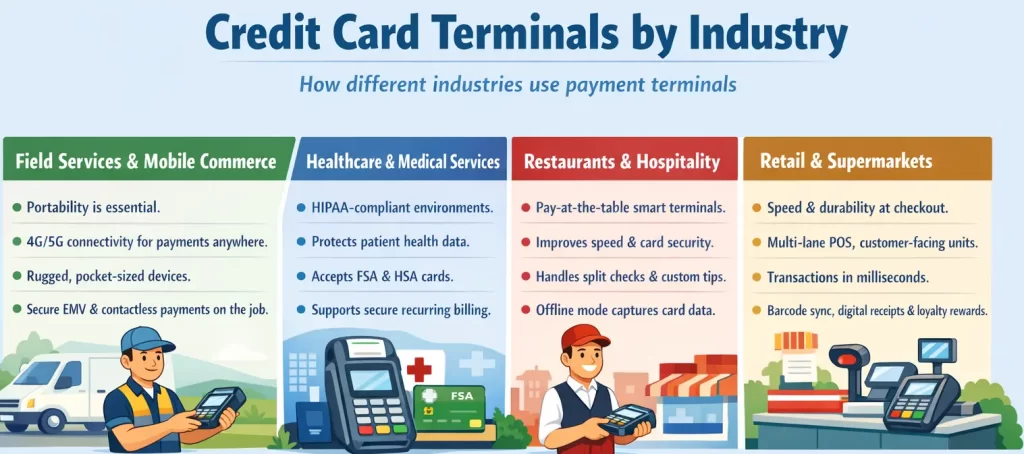
Understanding the different ways it can be tailored will give you the best knowledge on how to optimize your credit card terminal system for the industry you are in.
Step-by-Step Implementation Guide
Deploying a new credit card terminal requires careful planning. A rushed installation can lead to network vulnerabilities, accounting errors, and frustrating checkout experiences. Follow these implementation steps to ensure a seamless rollout:
Step 1: Hardware Evaluation and Selection
Begin by assessing your physical checkout environment and business model. Determine whether you need a wired countertop terminal, a Wi-Fi-enabled portable device, or a cellular mPOS system. Ensure the chosen hardware supports the latest payment methods, including NFC (Apple Pay, Google Pay) and EMV chip cards. It is also crucial to verify that the terminal is natively compatible with your existing POS software and merchant account provider.
Step 2: Network Configuration and Security Segmentation
Before plugging in the device, prepare your network. Payment terminals should never share a network with public guest Wi-Fi or general back-office computers. Implement a Virtual Local Area Network (VLAN) specifically dedicated to payment processing. This network segmentation isolates transaction data, drastically reducing the risk of a data breach if another part of your network is compromised. Ensure your firewall is configured to allow traffic only to and from your specific payment processor’s IP addresses.
Step 3: POS System Integration and Parameter Downloading
Once connected to the secure network, the terminal must be integrated with your POS system. This usually involves pairing the device via an IP address, Bluetooth, or a physical USB/serial connection. After pairing, the terminal will perform a “parameter download” from the merchant service provider. This download installs your specific merchant ID, encryption keys, accepted card types, and custom interface settings (like tip prompts or custom logos) onto the device.
Step 4: Comprehensive Testing and Staff Onboarding
Never deploy a terminal to the public without rigorous testing. Process several test transactions using different payment methods (swipe, dip, tap). Practice voiding transactions, issuing partial and full refunds, and closing out the daily batch to ensure funds route correctly. Finally, conduct hands-on training sessions with your staff. Employees must know how to reboot the terminal, change receipt paper, handle declined cards professionally, and manually key in transactions if a card chip fails.
Common Pitfalls to Avoid

Even with advanced hardware, merchants frequently make operational errors that compromise security and efficiency. Avoiding these common pitfalls is essential for maintaining a healthy payment ecosystem.
- Neglecting Firmware and Software Updates: Terminal manufacturers regularly release patches to address newly discovered security vulnerabilities and improve processing speeds. Ignoring these updates leaves your terminal susceptible to malware and compliance violations. Schedule automatic updates during non-business hours.
- Inadequate Fallback Procedures: Internet outages happen. If a merchant relies solely on a single broadband connection without a cellular backup or offline processing capabilities, a simple local outage can halt all sales. Always have a secondary connectivity plan.
- Overlooking PCI DSS Compliance: The Payment Card Industry Data Security Standard (PCI DSS) mandates strict rules for handling card data. A common pitfall is allowing staff to write down credit card numbers on paper if the terminal is acting up, or storing full card numbers in an unencrypted digital format. This violates PCI compliance and can result in devastating fines.
- Ignoring Terminal Physical Security: Terminals are prime targets for tampering and skimming devices. Failing to physically inspect terminals daily for attached overlays, hidden cameras, or broken tamper-evident seals puts your customers’ financial data at severe risk.
Conclusion
A modern credit card terminal is not only a device for cashless payment. It is also a tool that helps businesses speed up checkout, protect data, reduce manual errors, and support daily operations. Merchants must choose the right terminal, understand the fees, follow security standards, and integrate it properly with the best POS system. Merchants that do can create a smoother payment experience while protecting profit and staying ready for a more cashless market.
FAQs for Credit Card Terminal
-
Which credit card terminal is the best?
The best credit card terminal depends on your business needs. Choose a countertop terminal for fixed checkouts, a mobile reader for flexible payments, or a smart terminal for built-in POS features.
-
What are the 4 types of credit?
The four main types of credit are revolving credit, charge cards, installment credit, and service credit. Credit cards usually use revolving credit, while loans use installment credit.
-
Which network is best for a credit card?
No single credit card network works best for every business. Most businesses should accept Visa, Mastercard, American Express, and Amex to cover more customers.
-
What is the main difference between a POS and a terminal?
A payment terminal only processes card payments. A POS system does more than that. It handles payments, tracks sales, manages inventory, records customer data, and generates reports. In short, the terminal is one part of the POS system.