

















Every store has a beating heart that keeps everything running, and the POS inventory system keeps the blood flowing. A POS inventory system is the technology that connects your point-of-sale (POS) terminal to your supply chain. Every sale updates stock levels automatically. Low inventory triggers purchase orders, and online purchases instantly adjust in-store shelf counts. Without this infrastructure, businesses guess instead of act, and in retail, those mistakes cost money.
This guide covers everything you need to know: how these systems work, which features matter most, and how to implement one successfully.
Table of Contents
Key Takeaways
|
What is a POS Inventory System?
At its most basic level, a Point of Sale (POS) is the time and place where a retail transaction is completed. Historically, this was simply a cash register. Conversely, inventory management is the back-office process of ordering, storing, tracking, and controlling a company’s stock. For decades, these two functions operated in silos. Sales were recorded at the front of the house, while inventory was reconciled in the back office, often days or weeks later.
A modern POS inventory system combines software and hardware to process sales, update stock levels instantly, and give retailers a real-time view of inventory. It also manages vendors, purchase orders, profit margins, e-commerce integrations, and forecasting, turning transaction data into clear business intelligence. With this visibility, businesses can track fast and slow-moving products, control stock more accurately, and make better purchasing decisions.
The Evolution of Point of Sale and Inventory Management
The journey to the sophisticated POS inventory system we rely on today is a fascinating study in technological advancement and operational necessity. Understanding this evolution provides critical context for why modern features are designed the way they are, and why legacy systems are no longer viable in today’s fast-paced market.
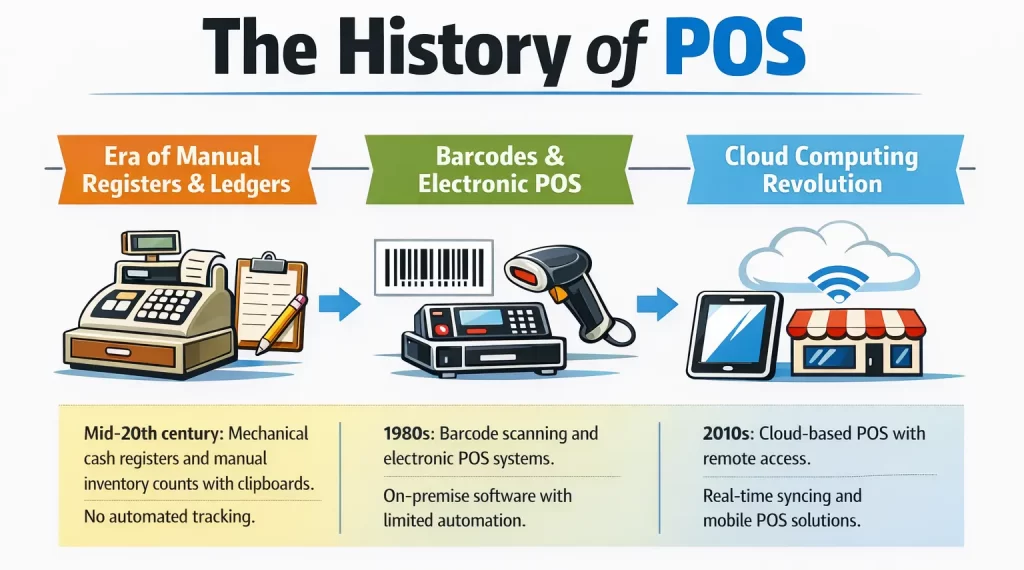
Today, we reached further heights and entered the era of unified commerce. It is a central hub that connects physical retail with e-commerce platforms, mobile apps, and social media marketplaces. Whether a customer buys an item in-store, purchases it online for home delivery, or uses a “Buy Online, Pick Up In Store” (BOPIS) workflow, the centralized inventory system updates instantaneously across all channels, ensuring complete accuracy and the sale of an item online that has already been purchased in-store.
Core Mechanics: How Does a POS Inventory System Work?

To fully leverage a POS inventory system, business leaders must understand the underlying mechanics of how data flows through the architecture. It is a complex ballet of database management, Application Programming Interfaces (APIs), and hardware triggers.
The Centralized Database Architecture
The system relies on a central database, often called the item master or product catalog, to store product details such as SKU, barcode, cost, price, supplier data, tax codes, variants, and current stock levels. In cloud-based systems, remote servers host this database and continuously process updates from registers, e-commerce platforms, and warehouse scanners.
The Transactional Data Flow
When a transaction occurs, a highly coordinated sequence of events takes place in fractions of a second. Let us trace the lifecycle of a single sale:
- Item Identification: The cashier scans the barcode of a product using a laser or imaging scanner. The scanner translates the optical code into a digital string of numbers (the UPC or EAN).
- Database Query: The POS software instantly sends a query to the central database, asking, “What is this item, and what is its current price?”
- Data Retrieval: The database returns the product name, price, and any applicable tax or discount rules to the POS terminal, displaying it for the cashier and customer.
- Transaction Execution: The customer pays via credit card, cash, or digital wallet. The payment gateway processes the funds, and the POS finalizes the digital receipt.
- Inventory Deduction: The moment the transaction is finalized, the POS sends a critical “write” command back to the central database: “Deduct one unit of SKU 12345 from Location A.”
- Omnichannel Synchronization: The central database updates its master stock level. If the business has an integrated e-commerce website, the database uses an API to instantly push the new stock level to the online store. If the stock level drops to zero, the e-commerce site automatically marks the item as “Out of Stock,” preventing overselling.
Receiving and Procurement Mechanics
During receiving, warehouse staff scan incoming boxes with handheld devices, and the POS inventory system checks them against the original purchase order. After confirming the shipment matches the order, the system updates the database, increases stock levels, and makes the items immediately available for sale both in-store and online.
Essential Features of a Modern POS Inventory System
Enterprise-grade solutions provide a vast array of sophisticated tools designed to automate complex supply chain workflows. When evaluating a POS inventory system, several essential features must be scrutinized:
- Real-time inventory tracking and visibility: Modern systems update stock levels the moment teams sell, return, or receive an item. This instant visibility helps multi-location businesses check availability across branches, save potential sales, and improve customer satisfaction.
- Automated reorder points and low stock alerts: Strong POS inventory systems let managers set reorder thresholds for every SKU. When stock falls below the limit, the system sends alerts and can even generate draft purchase orders with supplier details and recommended quantities.
- Matrix inventory and variant management: Retailers that sell products in multiple variations use matrix inventory to manage them efficiently. The system groups variants under one parent item, making it easier to track stock, adjust prices, and analyze performance without losing detail.
- Composite items, kitting, and bundling: Businesses selling bundles need a system that automatically deducts the right component items from inventory, keeping stock records accurate and preventing errors when teams track bundles as separate, standalone products.
- Multi-location and warehouse management: Growing businesses need a system that shows stock across stores and warehouses while also giving location-specific visibility. It should also support smooth stock transfers, track goods in transit, and update balances once teams receive the items.
- Unit of measure (UOM) conversions: Businesses that buy in bulk and sell in smaller units rely on UOM conversion to keep inventory accurate. The system tracks the purchase unit and automatically calculates stock deductions and costs when staff sell a smaller quantity.
- Serial number and batch/lot tracking: The system should record serial or lot numbers to support warranty claims, product recalls, traceability, and fraud prevention for businesses that sell high-value or regulated products.
Inventory Valuation and Accounting Integration

A POS inventory system is not just an operational tool; it is a critical financial instrument. The goods sitting on store shelves and in warehouses represent a massive portion of a company’s tied-up capital. Accurately valuing this inventory is legally required for tax purposes and practically required for understanding the true profitability of the business.
Understanding Cost of Goods Sold (COGS)
Every time an item is sold, the business generates revenue, but it also incurs a cost of acquiring that item. The difference between the revenue and the Cost of Goods Sold (COGS) is the gross profit. A highly capable pos inventory system automatically calculates COGS in real-time. Because the system tracks the exact purchase price of every item received from suppliers, it can accurately determine the profit margin of every single transaction.
Valuation Methods: FIFO, LIFO, and Weighted Average
The complexity arises when a business purchases the same item multiple times at different price points. If a retailer buys 10 widgets in January for $5 each, and 10 more widgets in March for $7 each, and then sells one widget in April, what is the COGS for that sale? Is it $5 or $7? The POS inventory system manages this through standardized accounting valuation methods:
- First-In, First-Out (FIFO): The system assumes that the oldest inventory (the first items purchased) is sold first. In the example above, the COGS would be recorded as $5. FIFO is the most common method as it closely mirrors the actual physical flow of goods.
- Last-In, First-Out (LIFO): The system assumes that the newest inventory is sold first. The COGS would be recorded as $7. LIFO is often used to reduce tax liabilities during periods of inflation, as it results in a higher COGS and lower reported profit.
- Weighted Average Cost: The system calculates a rolling average cost of all units in stock. In the example, the total value of the 20 widgets is $120. The weighted average cost is $6 per unit. This method smooths out price fluctuations over time.
Enterprise-grade solutions offer robust financial back-ends that seamlessly handle these complex valuation methods, ensuring that the inventory data perfectly aligns with the company’s general ledger and accounting software.
The Financial Impact: Why Retailers Need Integrated Inventory POS
Investing in a sophisticated pos inventory system requires capital expenditure and time for implementation. However, the Return on Investment (ROI) is typically swift and substantial. The financial impact of poor inventory management is often hidden but devastating, eroding profit margins from the inside out.
1. Eradicating Deadstock and Overstocking
How many stocks do you have that are just collecting dust in your warehouse? Those are called deadstocks, and it is detrimental to a business as it means that the capital that was spent to acquire the goods is not being recuperated. Holding deadstock can be costly with ongoing holding costs, including warehousing space, insurance, and depreciation.
A POS inventory system combats this by providing deep visibility into product velocity. Managers can easily run “slow-moving inventory” reports to identify products that are stagnating. Armed with this data, they can execute targeted markdowns, bundle the slow-moving items with high-velocity products, or return them to the vendor before they become entirely obsolete.
2. Minimizing Stockouts and Lost Sales
The inverse of deadstock is the stockout, running out of a product that customers actively want to buy. A stockout not only means a loss of revenue but also damages the customer relationship, which is worse in the long-run. Consistent stockouts teach your customers to shop at your competitor. POS inventory maximizes revenue capture by automating reorder points, syncing real-time data, and demand forecasting, which ensures that optimal stock levels are maintained for high-demand items.
3. Reducing Shrinkage and Phantom Inventory
Shrinkage is the retail industry term for inventory that is lost due to theft (shoplifting or employee theft), administrative errors, or supplier fraud. Phantom inventory occurs when the computer system thinks an item is in stock, but it is not. This leads to frustrated customers and broken automated reordering.
A POS inventory system dramatically reduces shrinkage by establishing strict accountability. Every transaction, return, and inventory adjustment is logged to a specific employee profile. Regular, system-guided cycle counts help identify discrepancies between the database and the physical shelves immediately, allowing managers to investigate and rectify the root causes of shrinkage before they escalate.
4. Optimizing Cash Flow
Ultimately, inventory management is cash flow management. Buying too much inventory ties up cash that could be used for marketing, expansion, or payroll. Buying too little inventory chokes off revenue. A POS inventory system provides the exact data needed to achieve the “Goldilocks zone” of inventory, purchasing exactly what is needed and when it is needed. This optimization of the purchasing cycle ensures that cash remains fluid and the business remains agile.
Industry-Specific Use Cases for POS Inventory Systems
Every industry presents its own unique operational demands. A highly capable POS inventory system must have industry-specific applications, adapting to these nuanced requirements:
| Industry | Inventory Needs | Key POS Inventory Capabilities | Main Business Benefit |
| Retail & Apparel | Managing products with multiple variants, such as size, color, fit, and material | Matrix inventory, parent-child SKU structure, seasonal markdowns, bulk promotional pricing, and returns that automatically restore stock | Helps retailers track variant availability faster, organize stock better, and respond quickly to demand |
| Food & Beverage | Tracking raw ingredients and recipe usage in precise quantities | Ingredient-level deduction, dynamic recipe management, low-stock alerts, spoilage tracking, and COGS monitoring for perishable goods | Reduces food waste, improves stock accuracy, and prevents menu items from running out during peak hours |
| Grocery store | Handling large SKU volumes, loose produce, and fast stock movement | Rapid checkout scanning, weight scale integration, expiration date tracking, bulk breaking, vendor promotion management, and real-time inventory visibility | Minimizes shrinkage, improves shelf availability, and helps stores protect thin profit margins |
Strategic Steps for Successful Implementation

Transitioning to a new POS inventory system is a major operational shift. A structured, methodical implementation strategy is vital to minimize downtime, prevent data loss, and ensure a smooth rollout across the organization.
- Phase 1: Do a comprehensive needs assessment before selecting a software vendor. Identify daily pain points, map out required third-party integrations, and evaluate hardware compatibility. Document exactly what you need the system to achieve, whether that is better multi-location syncing or more granular profit reporting.
- Phase 2: The new system will only be as effective as the data it holds. Before migrating, take the time to clean up your existing inventory databases. Remove duplicate SKUs, standardize naming conventions, update supplier costs, and conduct a full physical inventory count to establish an accurate, baseline stock level. Migrating messy data will immediately compromise the new system’s reporting capabilities.
- Phase 3: Ensure hardware configuration and network setup. Make sure your physical infrastructure is robust, secure, and properly integrated. Modern cloud-based systems rely on continuous data syncing, so a highly reliable internet connection is non-negotiable. Implementing cellular backup options is highly recommended to prevent transaction interruptions during localized internet outages.
- Phase 4: Rigorous staff training is needed to make your teams operate advanced technology efficiently under pressure. Conduct comprehensive training sessions tailored to different user roles. Cashiers need to master the front-end transaction interface, split payments, and returns. Conversely, back-office managers must deeply understand purchase ordering, receiving workflows, reporting dashboards, and stock reconciliation features.
- Phase 5: Instead of a massive, overnight overhaul, consider a soft launch or a phased rollout if you operate multiple locations. Monitor the system closely during the first few weeks, running parallel checks against legacy systems if necessary. This allows management to catch, isolate, and rectify any synchronization errors or user-behavior issues immediately.
Common Pitfalls to Avoid During Deployment
Even with a solid plan in place, businesses often stumble during the deployment of a new inventory framework. Recognizing and anticipating these common traps can save significant time, capital, and frustration.
- Garbage In, Garbage Out: As mentioned in the implementation phase, migrating inaccurate data into a brand-new POS inventory system is the most frequent and damaging mistake. If your starting stock levels are wrong, the system’s automated reordering algorithms will generate flawed purchase orders. This inevitably leads to immediate overstocking of slow-moving items or critical stockouts of your bestsellers.
- Neglecting Employee Buy-In and Compliance: When staff members are inadequately trained or resistant to change, they often resort to manual workarounds or bypass system protocols entirely, destroying inventory accuracy. For example, a cashier might scan the same barcode twice instead of scanning two different flavors of a product to save time. While the system records the revenue correctly, the cashier distorts variant tracking and disrupts automated reorder points.
- Overlooking Future Scalability: Choosing a system based solely on current needs or strict budget constraints can be disastrous in the long run. As your business expands to new brick-and-mortar locations, launches an international e-commerce channel, or introduces new product lines, a rigid, entry-level system will quickly break down. Always invest in software architectures with open APIs, multi-location capabilities, and a proven track record of scaling with growing enterprises.
Advanced Practices for Masterful Inventory Control
To truly leverage a POS inventory system as a competitive advantage, forward-thinking businesses are moving beyond basic stock counting and adopting advanced, technology-driven inventory management practices.
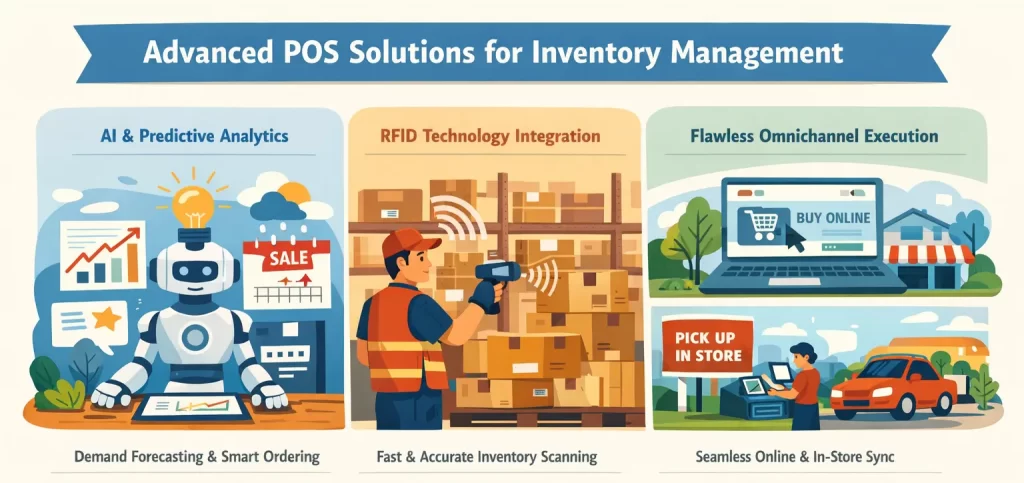
- Artificial Intelligence and Predictive Analytics: Modern systems are increasingly incorporating machine learning algorithms to forecast demand with unprecedented accuracy. Ensuring you can carry the exact amount of stock needed to meet consumer demand without tying up precious working capital in excess inventory.
- RFID Technology Integration: Radio Frequency Identification (RFID) takes inventory tracking far beyond the limitations of the traditional barcode by applying RFID tags to products. Staff can conduct comprehensive cycle counts in a matter of minutes using handheld scanners. It dramatically reduces the labor costs associated with physical audits and pushes overarching inventory accuracy to near 100%.
- Flawless Omnichannel Execution: Advanced POS systems provide a single, unified source of truth across all sales channels. If a customer purchases the last available unit of an item online, the in-store POS immediately removes it from the physical floor’s available inventory. This instantaneous sync prevents the catastrophic customer service failure of double-selling an item that is no longer in stock.
Conclusion
A Point of Sale (POS) brings many advantages for businesses in the modern day. What was once a simple mechanical cash register became a complex inventory system. Everything from physical retail to digital commerce is connected into a It is a central hub. These connections allow the POS inventory management system to optimize stocks and cash flow.
Implementing a POS has its own challenges that you have to account for. The step-by-step process can take a long time to successfully utilize a POS. Every business also has its own unique needs that require a POS that fits its needs. For that reason, it is necessary for you to find the right POS inventory system that is in tune with your business needs.
FAQ for POS Inventory System
-
What are the four inventory systems?
The four common inventory systems are periodic, perpetual, barcode-based, and RFID-based. The first two describe how stock is recorded, while barcode and RFID describe how inventory is tracked and updated.
-
How much does a POS system cost in the Philippines?
It varies a lot. Entry plans can start at around ₱1,500 to ₱2,790 per month, while more advanced setups may require hardware from about ₱21,339 plus recurring software fees.
-
Is POS a CRM tool?
Not exactly. A POS mainly handles sales and transactions. However, many POS platforms include built-in CRM features or connect with CRM tools to manage customer profiles, loyalty, and marketing.
-
Which software is used in POS?
Businesses use retail, restaurant, mobile, traditional, or cloud POS software. Common examples include Square, Shopify POS, Lightspeed, HashMicro, Clover, and Revel, depending on the business type and features needed.
-
Is POS without a monthly fee?
Yes, sometimes. Some providers offer free POS plans with no monthly software fee, but you may still pay transaction fees, hardware costs, or add-on charges for advanced features.














