






Tax compliance in the Philippines starts with one critical step issuing the right receipt. For businesses that process daily transactions, even a small mistake in your invoice, POS setup, or receipt details can quickly turn into a compliance problem.
The Bureau of Internal Revenue (BIR) imposes strict rules on how commercial transactions should be documented. From the type of document you issue to the numbering format and the software used to generate it, every detail matters. The Ease of Paying Taxes (EOPT) Act also introduced major changes, making it even more important for businesses to keep up.
This guide explains what those changes mean in practice. You will learn the updated role of the Sales Invoice, how to register your POS system properly, what information must appear on every receipt, and which mistakes can expose your business to penalties or audits.
Table of Contents
Key Takeaways
|
Understanding the BIR Official Receipt Landscape
 The Bureau of Internal Revenue (BIR) is the main agency responsible for collecting taxes in the Philippines. To track business activity and determine taxes such as VAT, Percentage Tax, and Income Tax, it requires businesses to use proper commercial documents for each transaction.
For many years, Sales Invoices and Official Receipts served as the main basis of this documentation system. Understanding how these documents were used helps explain today’s tax rules and why POS systems must be set up carefully to stay compliant.
The Historical Distinction Between Goods and Services
For many years, the Philippine tax code required businesses to use different documents based on what they sold. Businesses selling physical goods, such as supermarkets, hardware stores, or car dealers, had to issue a Sales Invoice as the main proof of sale and for VAT reporting.
Meanwhile, businesses that provided services or leased property had to issue an Official Receipt once payment was received. This often confused businesses that sold both goods and services, since they had to manage separate documents or POS settings.
The Role of Supplementary Documents
Besides Sales Invoices and Official Receipts, the BIR also recognized supporting documents that gave more details about a transaction. These included Delivery Receipts, Order Slips, Billing Statements, Statements of Account, and Collection Receipts, but they could not be used to claim input VAT.
For service businesses, the Official Receipt remained the key tax document. A Billing Statement alone was not enough, so businesses had to issue an Official Receipt once payment was made and make sure their POS or accounting system could track both documents properly.
The Drive Toward Digitalization and Standardization
As the Philippine economy expanded and daily transactions increased, the BIR saw that manual, paper-based receipting was no longer practical. It opened the door to fake receipts, tax evasion, and heavier administrative work for both businesses and the government.
Because of this, the BIR pushed for digital systems and began regulating Cash Register Machines, POS systems, and Computerized Accounting Systems more strictly. Any system that could generate tax documents had to be registered and approved to make sure sales data stayed secure, traceable, and ready for audit.
The Ease of Paying Taxes (EOPT) Act and Its Monumental Impact
 The Ease of Paying Taxes (EOPT) Act, or Republic Act No. 11976, took effect in early 2024 and introduced major changes to tax documentation in the Philippines. It is one of the biggest updates in recent years and directly affects how businesses issue receipts and configure their POS systems.
One of the biggest changes is that the Sales Invoice is now the main proof of sale for both goods and services. This replaces the old rule where goods used a Sales Invoice and services used an Official Receipt.
As a result, service-based businesses must now issue a Sales Invoice instead of an Official Receipt. The law also shifts revenue recognition for services from payment collection to billing or completion of the service, which means many POS systems need to be updated.
The Official Receipt is now treated only as a supporting document for payment or collection. To help businesses adjust, the BIR allowed unused printed receipts to be revised manually and required POS or CAS users to coordinate system updates, since failure to comply can lead to penalties and tax issues.
Step by Step Guide to BIR POS Registration
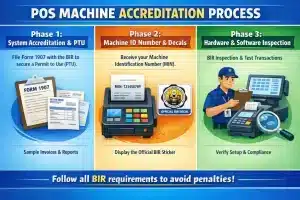 Deploying a new POS system in the Philippines is not as simple as purchasing software, installing it on a computer, and immediately ringing up customers. It is illegal to use an electronic system to generate commercial documents without prior authorization from the BIR. The registration process is highly structured and requires meticulous attention to detail. This process is generally divided into several distinct phases.
- Phase 1: System Accreditation and Securing the Permit to Use (PTU)
Before using a POS machine, a business must secure a Permit to Use from the BIR through Form 1907. The application is filed with the registered RDO and usually includes sample invoices or receipts, system reports, and supporting documents from the vendor.
- Phase 2: Machine Identification Number (MIN) and Decals
Once the PTU is approved, the BIR assigns each POS terminal a unique Machine Identification Number (MIN). This number must appear on every receipt, and the official BIR sticker must be displayed on the machine. If a terminal operates without that sticker, the business may face fines or even equipment confiscation.
- Phase 3: Hardware and Software Inspection
In some cases, the BIR may inspect the site before or after approval to check if the installed POS matches the declared setup. They may run test transactions, review security controls, confirm proper numbering and sales totals, and make sure the machine stays at the registered branch, since moving it without BIR approval is a serious violation.
Essential Components of a Valid BIR Official Receipt / Sales Invoice
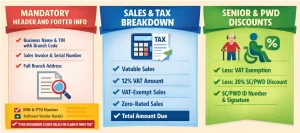 A receipt generated by a POS system is not merely a piece of paper handed to a customer; it is a legally binding tax document. The BIR dictates exactly what information must be present on the document, how it must be laid out, and how the financial figures must be calculated. Failure to include any of these mandatory components renders the document invalid, subjecting the issuer to penalties and preventing the buyer from claiming tax credits.
1. Mandatory Information on the Header and Footer
The receipt header identifies the business issuing the document. A compliant POS system should automatically print the registered business name, trade or franchise name if different, TIN with branch code plus VAT or Non-VAT status, the full branch address, the correct document title such as Sales Invoice, and a serial number that runs in proper sequence without gaps.
At the bottom, the receipt should show the regulatory details needed for verification. These include the Machine Identification Number (MIN), Permit to Use (PTU) number and issue date, and the software vendor’s name, address, TIN, and accreditation number. For Non VAT businesses or supplementary receipts, the receipt must also state: “THIS DOCUMENT IS NOT VALID FOR CLAIM OF INPUT TAX.”
2. The Mathematical Breakdown of Sales and Taxes
The most technical part of a BIR-compliant POS receipt is the tax breakdown. For VAT-registered businesses, the receipt must clearly show how the total was computed, especially the VAT portion.
The summary should list vatable sales, 12% VAT, VAT-exempt sales, zero-rated sales, and the total amount due.
3. Handling Senior Citizen and PWD Discounts
A compliant POS system must correctly apply Senior Citizen and PWD discounts. It should remove the 12% VAT first, then apply the 20% discount to the VAT-exclusive amount.
The receipt must show “Less: VAT Exemption” and “Less: 20% SC/PWD Discount” as separate lines. It should also include the SC/PWD ID number and the customer’s signature. Errors in this format often lead to BIR audit penalties.
Navigating the Technical Requirements for POS Software
Beyond the visual formatting of the physical receipt, the BIR mandates rigorous technical specifications for the backend architecture of the POS software. These requirements are designed to guarantee the integrity, permanence, and auditability of the financial data generated by the business.
Data Retention and Storage Policies
Philippine tax rules require businesses to keep accounting records for 10 years. For companies using POS systems, this includes all electronic transaction data, from sales records to voids, discounts, and daily reports.
A compliant POS system must store this data securely and keep it accessible even if the terminal is replaced or damaged. During an audit, the BIR may ask for old transaction records, so businesses can face penalties if their system deletes data too early.
Tamper Proofing and Security Features
The BIR does not allow businesses to edit or delete finalized transactions. If a cashier makes a mistake, the system must require a void or credit memo so the change is still recorded.
The grand total sales counter must also stay tamper-proof. Since the BIR uses it to track total revenue, any attempt to reset or manipulate it can lead to serious tax violations.
Common Pitfalls to Avoid
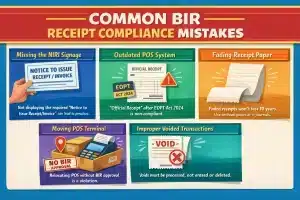 Even well intentioned businesses can fall into compliance traps if they do not carefully monitor their receipting processes. Penalties for documentation errors can be severe, ranging from hefty fines to the suspension of business operations.
- Failing to display the NIRI signage.
The BIR requires businesses to clearly display the “Notice to Issue Receipt/Invoice” at every point of sale. Even if your POS system is compliant, missing this sign can still lead to penalties during a surprise inspection.
- Not updating the system after regulatory changes.
Many businesses installed POS systems years ago and never updated them. After the EOPT Act took effect in 2024, any system still printing “Official Receipt” as the main transaction document became non-compliant, so businesses need to coordinate with their POS vendor whenever new BIR rules affect receipt formats or tax settings.
- Using receipt paper that fades.
The BIR requires businesses to keep accounting records for 10 years. Since thermal paper receipts usually fade within a few years, businesses need archival-grade paper or a digital e-Journal to preserve transaction records properly.
- Moving a POS terminal without BIR approval.
A registered POS machine is allowed only at the branch address listed in its Permit to Use. Moving it to another location without notifying the BIR is a violation, and the MIN on the receipt can quickly expose the mismatch during an audit.
- Improper handling of voided transactions.
Cashiers should never delete or overwrite transactions. Any correction must go through a void or credit memo process, since missing receipt numbers can raise red flags during a BIR audit.
Conclusion
BIR compliance goes beyond issuing receipts. Every detail, from format to tax calculation and system setup, must be accurate to avoid penalties and audit risks .
As rules continue to change, your POS system must stay updated and properly configured. Treat it as a compliance tool, not just for transactions, so your business runs smoothly without issues.
FAQ About BIR POS Compliance
-
What is the main document required under the EOPT Act?
The Sales Invoice is now the primary proof of sale for both goods and services. Official Receipts are no longer used as the main document and are treated only as supporting documents for payments.
-
What information must appear on a POS receipt?
A valid receipt must include the business name, TIN with branch code, address, document title, serial number, MIN, PTU details, and vendor information. Missing any of these can make the receipt non-compliant.
-
Why is the tax breakdown important on receipts?
The BIR requires clear computation of VAT. Receipts must show vatable sales, VAT amount, VAT-exempt sales, zero-rated sales, and the total due to ensure transparency and accurate tax reporting.
-
How should Senior Citizen and PWD discounts be applied?
The system must first remove the 12% VAT, then apply the 20% discount on the VAT-exclusive amount. The receipt must show both deductions separately along with the ID number and signature.
-
What are common POS compliance mistakes businesses should avoid?
Common issues include missing NIRI signage, outdated POS settings, using fading receipt paper, relocating terminals without approval, and deleting transactions instead of processing voids.