






In retail and hospitality, the POS is where service and sales meet. At the center of it is the cash drawer, which still matters because many businesses still handle physical cash every day.
A cash drawer is more than a place to store bills and coins. It connects with the POS system to support secure payments, faster checkout, and more accurate cash handling. This article explains its role, how it works, and why it still matters in modern business.
Table of Contents
Key Takeaways
|
What Is a Cash Drawer and Why Does It Matter?
 A cash drawer is a secure box businesses use to store cash, coins, receipts, and checks during daily operations. It usually sits under the POS terminal or receipt printer, so cashiers can access money quickly while keeping it protected.
Modern cash drawers also connect to the POS system and usually open only during a cash sale or when staff enter a command. Inside, a removable till separates bills and coins, while the steel body is made for frequent daily use.
How Does a Cash Drawer Work?
A modern cash drawer combines simple mechanics with low voltage electronics. In most setups, it connects to the receipt printer through an RJ11 or RJ12 cable, not directly to the POS terminal.
When a cashier completes a transaction, the POS sends a command to the printer. The printer then sends a short electrical pulse to the drawer, which activates the solenoid and releases the latch.
A micro switch also helps the system detect whether the drawer is open or closed. This allows the POS to track drawer status, reduce mistakes, and support better cash control.
Inside a Cash Drawer: Main Parts and Functions
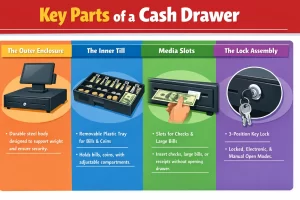 A high quality cash drawer is built to withstand immense abuse. In a busy supermarket, a drawer might be slammed shut thousands of times a week. To survive this, the hardware relies on several robust components.
1. The Outer Enclosure
The chassis is the outer shell of the unit. It is typically constructed from heavy gauge cold rolled steel. The thickness of the steel directly correlates to the security and durability of the unit. The enclosure must be rigid enough to support the weight of heavy POS monitors or terminals placed on top of it without bowing, which could bind the internal rollers.
2. The Inner Till
The till is the removable insert inside a cash drawer that holds bills and coins, and it is usually made from durable ABS plastic. It includes bill compartments, coin cups, and spring-loaded clips that keep cash in place when the drawer opens, while some models also offer adjustable sections to fit different currency sizes or business needs.
3. Media Slots
Most modern enclosures feature one or two narrow slits on the front face, known as media slots. These allow cashiers to slide checks, large denomination bills (like $100s), credit card slips, or coupons directly into the drawer without having to open it. The media slides under the removable till into a hidden compartment, keeping high-value items out of sight and secure.
4. The Lock Assembly
The front lock on a cash drawer usually has three or four key positions: locked closed, online or electronic mode, and manual open. In normal use, the drawer stays in electronic mode so it opens only when the POS sends a signal, while the other positions are used to fully lock it or open it manually during emergencies or power outages.
Different Types of Cash Drawers
While the fundamental purpose remains the same, the method by which the hardware connects and operates varies significantly based on the technological environment of the business.
| Type | Description |
| Printer Driven Drawers | This is the most common setup. The drawer connects to the receipt printer through an RJ11 or RJ12 cable, making it reliable, affordable, and widely supported by POS systems. |
| USB Driven Drawers | USB drawers connect directly to a computer or tablet. They work well for paperless counters but usually need drivers and a bit more setup. |
| Serial / RS-232 Drawers | These are older models that connect through a computer’s serial port. They still appear in legacy retail or industrial systems that have not been upgraded. |
| Wireless and Bluetooth Drawers | These drawers support mobile POS setups by connecting through Wi-Fi or Bluetooth. They are useful when staff process sales on tablets away from the counter. |
| Manual Drawers | Manual drawers open with a key or push mechanism and do not connect to POS software. They are often used in pop-up stores, temporary counters, or backup setups. |
Slide-Out vs. Flip-Top Designs
Beyond connectivity, physical form factor is a major differentiator.
- Slide-Out: The traditional design where the drawer slides horizontally toward the cashier. This requires adequate horizontal clearance behind the counter.
- Flip-Top: Often used in European supermarkets and high-volume grocery stores, flip-top drawers save counter space, let cashiers work closer to the scanner, and help block customers from seeing the cash inside.
Why You Still Need a Cash Drawer in a Cashless Era
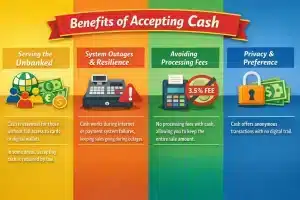 With digital payments dominating headlines, a common question among new business owners is whether they need to invest in cash management hardware at all. The definitive answer, for the vast majority of brick-and-mortar businesses, is a resounding yes. Here is why physical currency management remains non-negotiable.
1. Serving the Unbanked and Underbanked Populations
Many people still do not have full access to cards or digital wallets, so cash remains important for everyday transactions. In some places, retailers are also required by law to accept cash to support economic inclusion.
2. System Outages and Resilience
Digital payment systems can fail when the internet, payment processor, or banking network goes down. With a cash drawer, businesses can still accept cash, keep sales moving, and avoid turning customers away during outages.
3. Avoiding Processing Fees
Card payments can reduce profit because processing fees usually apply to every transaction. Cash does not carry those extra charges, so businesses keep the full sale amount.
4. Privacy and Consumer Preference
Some customers still prefer cash because it offers more privacy. Unlike digital payments, cash does not leave a transaction trail that can be tracked or analyzed.
Selecting the Right Cash Drawer for Your Business
Choosing the right cash drawer depends on your daily sales volume. A quiet boutique may do fine with a standard-duty model, while a busy supermarket or fast-food outlet needs a heavier unit built for constant use.
Size also matters. Before buying, check your counter space and make sure the drawer fits your setup without making the checkout area cramped.
You should also confirm that the drawer matches your POS or receipt printer connection and voltage requirements. Extra security features, such as lock slots or hidden manual release access, can also help protect cash during daily operations.
Integrating a Cash Drawer with Your POS System
After choosing the hardware, the next step is connecting it properly to the POS setup. The drawer should sit on a flat, stable surface, and the cable should be connected neatly to the receipt printer without being pulled too tightly.
The software also needs the right settings. Staff should enable the cash drawer in the POS system and decide when it should open, such as during cash payments but not for card or digital transactions.
After setup, the drawer should be tested right away. It should open when expected, and the system should also detect whether the drawer is still open before the next transaction starts.
Cash Drawer Security Best Practices and Mistakes to Avoid
| Security Practice | Explanation |
| Set role based access | Only the assigned cashier should open the drawer during a sale. No sale opens and cash drops should require manager approval or a PIN. |
| Use blind balancing | Cashiers should count the till without seeing the expected total first. This makes shortages and overages easier to detect and review. |
| Avoid overstuffing the drawer | Receipts, coupons, and loose items can cause jams. Keep the till tidy and never force the drawer open. |
| Control keys and no sale access | Store the override key with a manager and use it only when needed. Limit no sale opens to protect the audit trail. |
Conclusion
A cash drawer may seem simple, but it remains an important part of secure and organized daily transactions. For many retail and hospitality businesses, it still helps support accurate cash handling and smoother checkout operations.
With the right setup and clear security practices, a cash drawer can help reduce errors, protect revenue, and keep operations running more reliably.
FAQ About Cash Drawers
-
What is a cash drawer used for?
A cash drawer is used to store cash, coins, receipts, and checks during daily business operations. It helps businesses keep money organized, secure, and easier to manage at the checkout counter.
-
How does a cash drawer work with a POS system?
In most setups, the cash drawer connects to the receipt printer through an RJ11 or RJ12 cable. When a cashier completes a cash transaction, the POS sends a command to the printer, which then triggers the drawer to open.
-
What are the main types of cash drawers?
The most common types include printer-driven, USB-driven, serial, wireless or Bluetooth, and manual cash drawers. Each type works differently depending on the business setup and the POS hardware being used.
-
Why do businesses still need cash drawers?
Many businesses still need cash drawers because some customers prefer or rely on cash. Cash drawers also help businesses continue selling during payment system outages and avoid card processing fees on cash transactions.
-
How can businesses improve cash drawer security?
Businesses can improve cash drawer security by limiting access to assigned cashiers, requiring manager approval for no-sale opens, using blind balancing, and keeping override keys under strict control.