


















Table of Contents
Running a business in the Philippines involves managing multiple functions at once, from finance and operations to HR and procurement. Each department plays a critical role, making system integration essential to keep workflows efficient and data consistent.
An ERP solution helps bring these functions together in one platform, reducing manual work and improving visibility across the organization. With the right system, businesses can streamline processes, improve coordination, and support long-term growth.
However, choosing an ERP Software can be challenging given the wide range of solutions available in the Philippine market. Each platform offers different features, strengths, and limitations, so understanding your business needs is key to finding the most suitable option.

Key Takeaways
|
Quick Overview of Best ERP Software Philippines



Best Because
Best for modern manufacturers needing cloud-based MRP and remote accessibility

Best Because
Best for manufacturers needing deep industry functionality and IoT-enabled shop floor visibility
Best Because
Best for manufacturers with complex processes needing AI-driven planning and multi-site support

Best Because
Best for businesses wanting seamless Microsoft ecosystem integration



Best Because
Best for large enterprises needing real-time analytics and AI-driven operations

Best Because
Best for companies needing scalable ERP with configurable manufacturing modules
Quick Guide Based on Business Size
To make the shortlist easier, start by grouping ERP options based on your business size and operational needs.
- Small businesses / SMEs: ERPNext, ECOUNT, Zoho, and Hooman
- Mid-market businesses: HashMicro, Acumatica, Dynamics 365, and Odoo
- Enterprise-level businesses: SAP, Oracle NetSuite, and Infor LN
What is Enterprise Resource Planning (ERP) Software?
Enterprise Resource Planning (ERP) software connects finance, HR, inventory, and sales into a single platform, helping businesses in the Philippines streamline daily operations and reduce manual work.
Whether you’re running a retail chain in Metro Manila, managing a manufacturing facility in CALABARZON, or operating a distribution network across Visayas, the right system can make a real difference in how efficiently your teams collaborate.
According to Inkwood Research, the Philippine enterprise software market is growing at around 12% annually from 2022 to 2028. This reflects how more local companies are moving toward integrated management systems to improve reporting accuracy.
The Bureau of Internal Revenue requires Computerized Accounting System (CAS) accreditation for businesses using digital accounting tools. Key requirements include:
- Electronic Invoicing/Receipting System (EIS) capability,
- eSales and ePurchases report generation,
- Proper audit trail maintenance,
- VAT and withholding tax computation accuracy. When evaluating ERP vendors, verify their CAS accreditation status.
19 Best ERP Software for Business in Philippines 2026
Below, we’ve compiled 19 enterprise management platforms worth evaluating for Philippine businesses, assessed based on their features, local support, and overall fit for different company sizes.
1. HashMicro
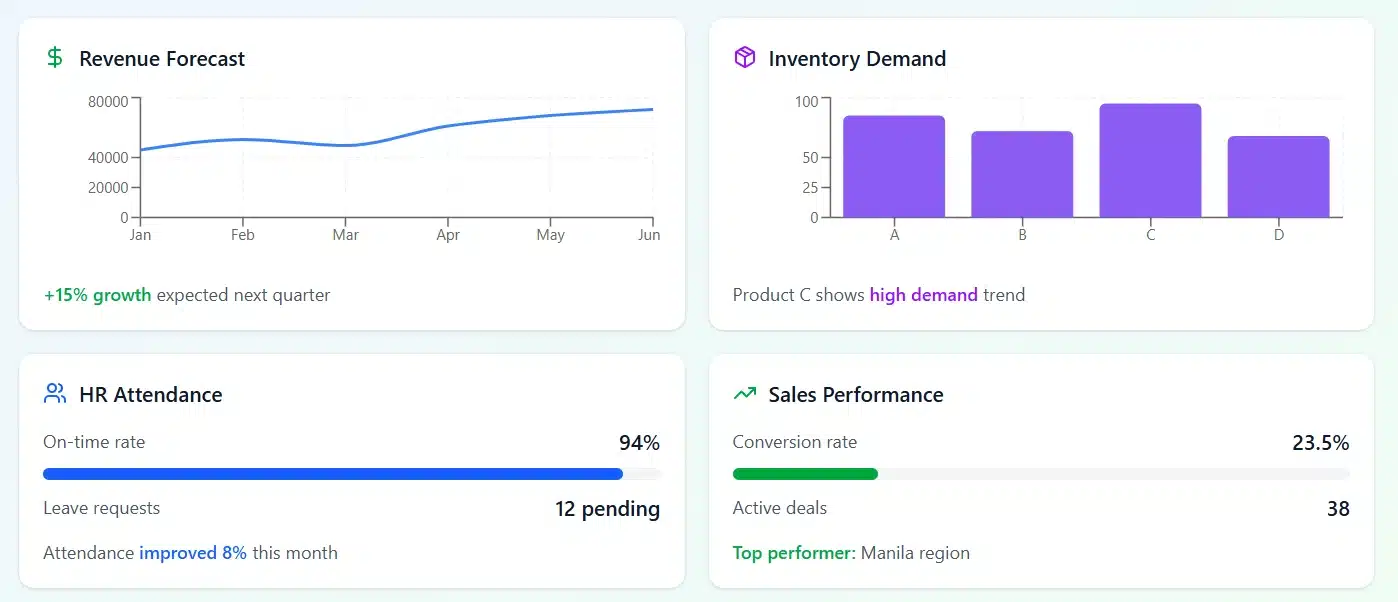
HashMicro is a strong contender for mid-sized to enterprise-level businesses across various industries seeking a fully integrated management system with robust core modules and customizable features suited to Philippine operations.
HashMicro smart suite simplifies business management by integrating key processes like finance, inventory, and HR into one smart platform. With AI-powered tools and a modular design, it adapts to 25+ industries, like packaging, finance, and more!
HashMicro offers various ERP modules for every company’s needs, including:
- Customer Relationship Management: The CRM module allows for prospect management, sales tracking, follow-up scheduling, invoice creation, report generation, and effortless customer data analysis.
- Accounting: The accounting software module offers users to automatically record and generate bookkeeping, budgeting, and cash flow forecasting, which complies with BIR (Bureau of Internal Revenue).
- Inventory: This module automates stock transfers, forecasts inventory, manages suppliers, and tracks deliveries, integrating with accounting and barcode systems for efficiency.
- Human Resource Management: HashMicro’s HR software module Simplifies salary management, recruitment, attendance tracking, leave, and tax management, enhancing HR performance.
- Procurement: This module can streamline purchasing processes, vendor management, invoicing, and communication between vendors and purchasing staff.
| Pros | Cons |
|
|
HashMicro ERP Solutions: An integrated and customizable ERP solution for mid-sized to enterprise businesses across various industries.
HashMicro pricing: Pricing is available through free consultation based on business needs.
Local support & Philippines clients: HashMicro has direct operations in the Philippines, and its Philippine ERP page positions the product for local businesses and for client proof.

2. Acumatica ERP Software
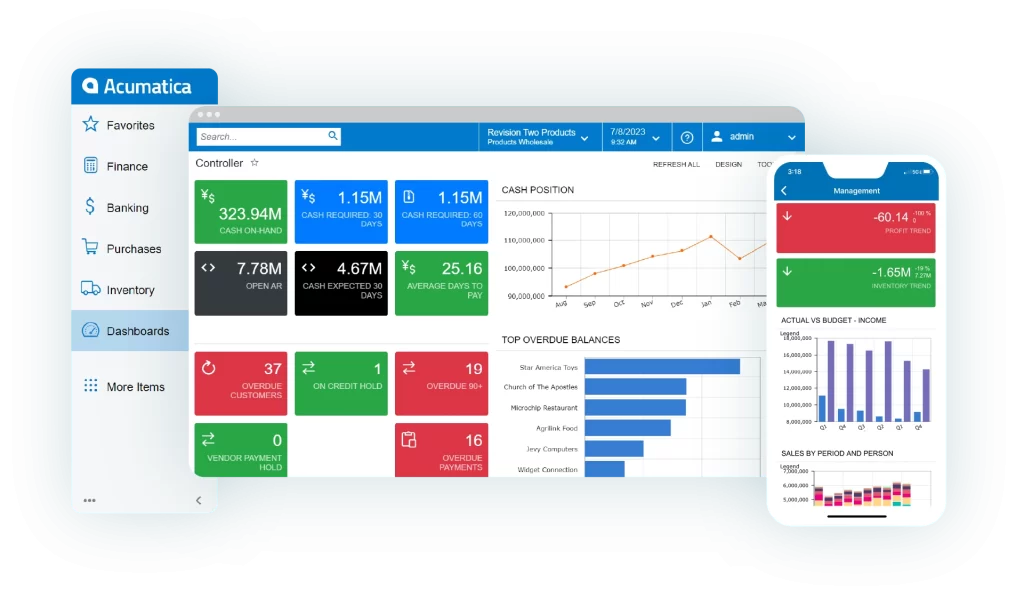
Acumatica is a cloud-based enterprise solution tailored for small to large businesses, particularly those experiencing rapid growth. It offers adaptable cloud hosting choices, encompassing public and private cloud options.
Available in five distinct editions: General Business, Distribution, Manufacturing, Retail, and Construction, Acumatica cloud ERP overview caters to specific industry demands. Moreover, its modular architecture allows users to select and license only the necessary modules.
Acumatica key features:
- Financial management and accounting
- Customer relationship management
- Manufacturing and distribution management
- Project accounting and field service management
| Pros | Cons |
|
|
Who it’s for: Acumatica suits SMBs seeking a flexible, cloud-based solution that scales with growth, ideal for manufacturing, distribution, retail, construction, and services.
Acumatica pricing: Contact Acumatica to get a customized pricing quote.
Local support & Philippines clients: Acumatica has a documented Philippines customer story through Marikina Food Corp., while local deployment appears to be partner-led rather than through a clearly surfaced direct Philippines office.
3. Epicor ERP Software
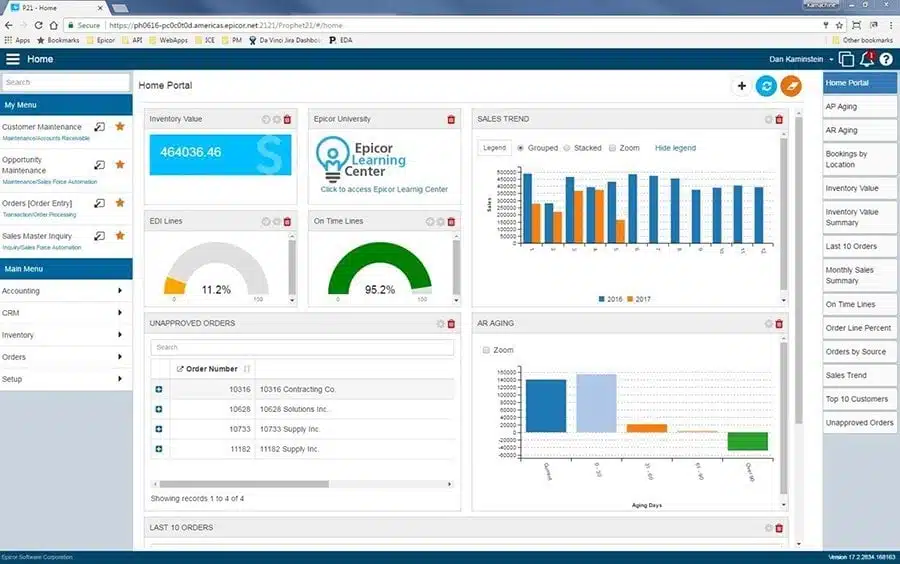
Epicor ERP is an industry-specific, modular enterprise system designed to manage business processes across an entire organization. It effectively handles accounting and finance, human resources, customer management, and manufacturing production management.
Epicor software is accessible both on-premises and as a cloud-based SaaS ERP solution, and it provides Business Management Platforms tailored to specific industries.
Epicor key features:
- Manufacturing execution system (MES)
- Supply chain management
- Financial management
- Human capital management (HCM)
- Enterprise content management (DocStar ECM)
- eCommerce & point of sale
| Pros | Cons |
|
|
Epicor ERP Philippines: Epicor is ideal for small to medium-sized enterprises in industries such as manufacturing, automotive, retail, and distribution that require industry-specific solutions.
Epicor pricing: Contact the vendor for a quote.
Local support & Philippines clients: Epicor support appears to be handled through its global office and partner network, and while Epicor says it is investing in the Philippines market, a named Philippines customer was not clearly confirmed in the official sources reviewed.
4. Infor LN ERP
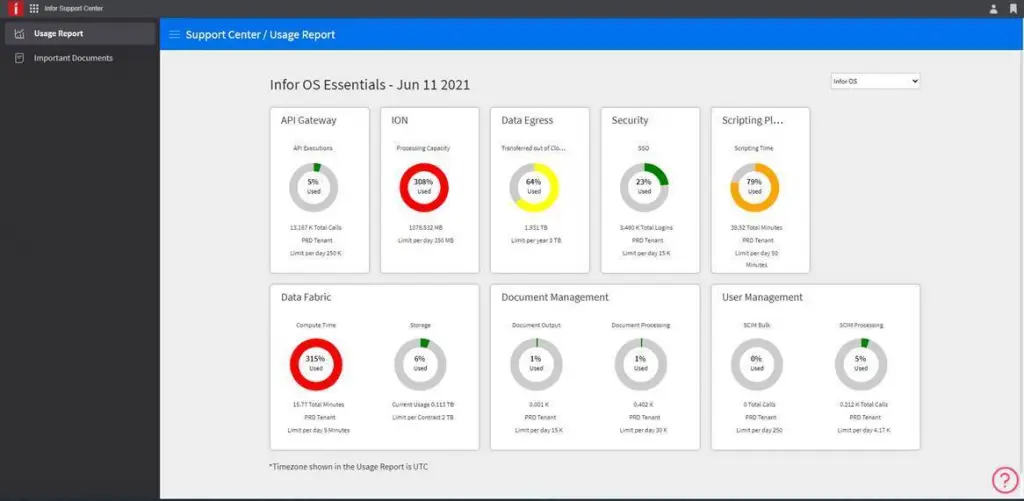
Infor LN ERP Philippines is industry-specific software for accounting and financial management, supply chain, and business process management across various functional areas. It operates company-wide on the cloud and supports multi-tenancy.
Infor offers intelligent business modules covering financial management, supply chain management, project management, and customer relationship management.
Infor LN key features:
- Task scheduling optimization
- Extensive quality management and traceability capabilities
- Efficient adherence to regulatory and compliance mandates
- Mobile enablement, business collaboration, and workflow management
- Inventory management
- Equipment rental management
| Pros | Cons |
|
|
Infor ERP Software: Infor is best for mid to large enterprises in manufacturing, distribution, healthcare, and public sectors.
Infor LN pricing: Contact the vendor for a customized pricing quote.
Local support & Philippines clients: Infor clearly maintains global contact and customer-story channels, but a dedicated Philippines office or named Philippines customer was not clearly confirmed from the official sources reviewed.
5. Microsoft Dynamics 365
 Microsoft Dynamics 365 is one of the most comprehensive ERP systems available, offering advanced solutions for businesses of all sizes. With its cloud-based platform, companies can integrate operations and improve decision-making across all departments.
Microsoft Dynamics 365 stands out for its flexibility, allowing businesses to scale and customize features according to their needs. Its seamless integration with Microsoft Office tools further enhances productivity and collaboration.
Microsoft Dynamics 365 key features:
- Financial management
- Customer relationship management (CRM)
- Supply chain management
- Project management
- Human resources management
| Pros | Cons |
|
|
Microsoft Dynamics 365 ERP System: Best for businesses of all sizes needing a cloud-based productivity suite with tools like Word, Excel, PowerPoint, and Teams for seamless collaboration.
Microsoft Dynamics 365 pricing: Starts at ₱6,099.00/year or ₱609 per month
Local support & Philippines clients: Dynamics 365 support in the Philippines is typically partner-led, and Microsoft provides official partner discovery, support access, and Philippines localization options through its ecosystem.
6. Oracle NetSuite
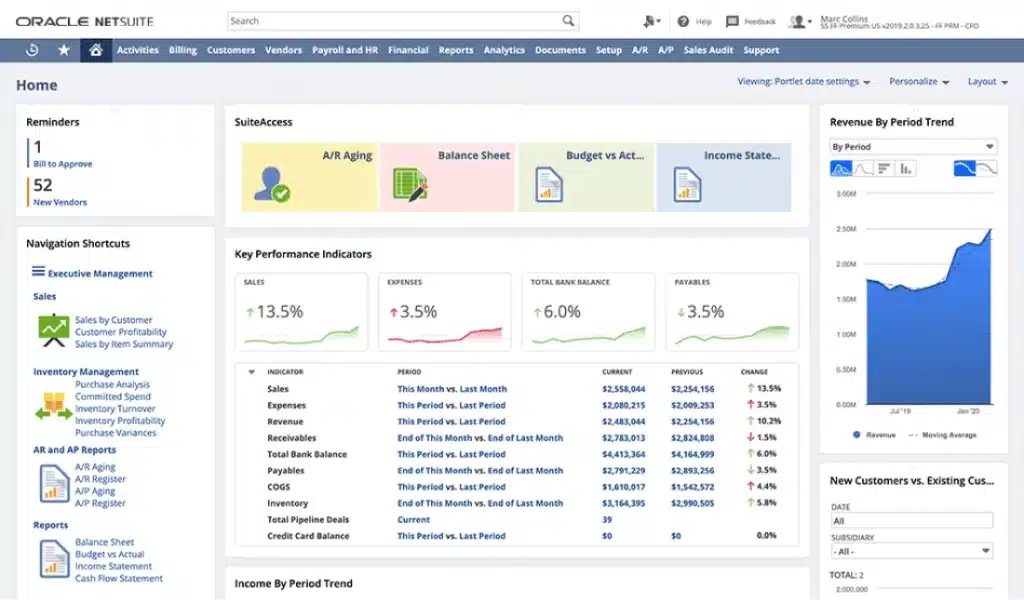
NetSuite is an Oracle cloud-based ERP solutions, aids businesses in automating and managing diverse aspects through its feature-rich modules. It offers real-time insights into financials, CRM, inventory, and sales.
Spanning various industries like manufacturing, restaurant, retail, software, and e-commerce, Netsuite caters to a wide array of domains. Moreover, its advanced reporting and analytics make it adaptable for businesses of any size in the Philippines.
Oracle NetSuite key features:
- Accounting software
- Inventory management
- Order management
- Supply chain management
- Procurement
| Pros | Cons |
|
|
Oracle NetSuite ERP: NetSuite is best for growing businesses, mid-sized companies, and corporate subsidiaries that need integrated finance, CRM, inventory, and project management.
Oracle NetSuite pricing: Contact the vendor directly for pricing details.
Local support & Philippines clients: Oracle NetSuite has a Makati office in the Philippines, and Oracle also publishes an official customer story for Coca-Cola Foundation Philippines, which strengthens its local credibility.
7. Odoo
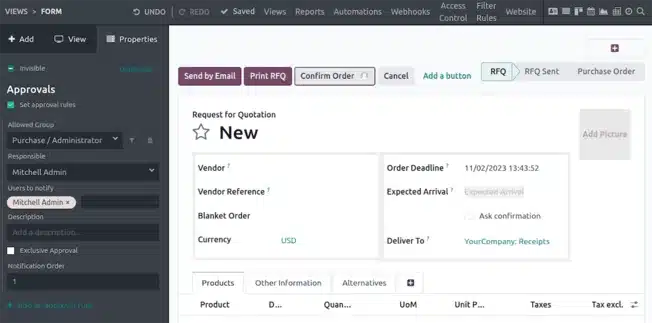
Odoo is a popular open-source platform that helps companies manage operations in an integrated manner. By Odoo ERP solution assessment, companies can integrate existing programs so that all departments can access them according to their needs.
Odoo ERP Philippines provides pre-built apps covering various functions, including customer relationship management (CRM) and VOC program, point-of-sale (PoS), time off requests, expense reporting, publishing, and live chats.
Odoo key features:
- Customer relationship management
- E-commerce integration
- Sales management
- Project management
- Event management
- Manufacturing management
| Pros | Cons |
|
|
Odoo ERP Solutions: Odoo ERP fits businesses of all sizes, especially small and medium enterprises (SMEs), startups, and expanding companies.
Odoo pricing: Free (for 1 app) and starts from $7.25/user/month.
Local support & Philippines clients: Odoo has official partner coverage in the Philippines and also shows Philippine customer references on its official pages, so local implementation support is easier to validate than many global-only options.
8. Sage X3
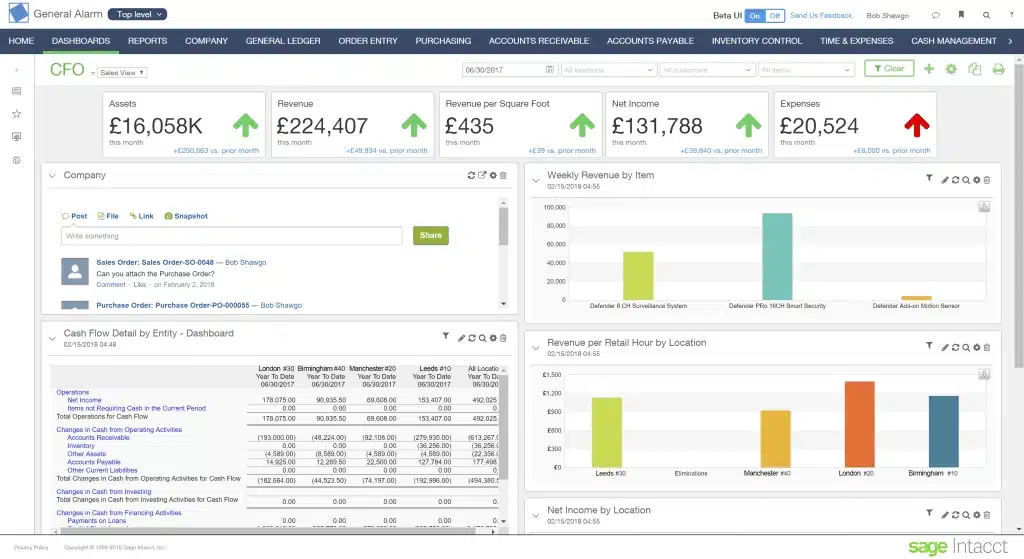
Sage x3 is a cloud ERP Philippines tailored for small and mid-sized businesses. It focuses on providing a financial management system that offers flexibility and scalability without needing an extensive IT infrastructure.
Sage x3’s robust automation capabilities streamline critical finance and accounting processes like invoicing and expense management, reducing manual errors and ensuring compliance with accounting standards.
Sage X3 key features:
- General ledger and configurable accounting features
- Inventory management
- Order management
- Security features
- Payroll management
| Pros | Cons |
|
|
Who it’s for: Sage X3 suits middle-scale businesses in food & beverage, process and discrete manufacturing, distribution, chemicals, and services that need real-time insights and automation.
Sage X3 pricing: Starts at $25,000 before implementation.
Local support & Philippines clients: Sage X3 local support and named Philippines client references were not clearly confirmed from the official pages reviewed, so this point is best marked for vendor verification before publication.
9. SAP ERP
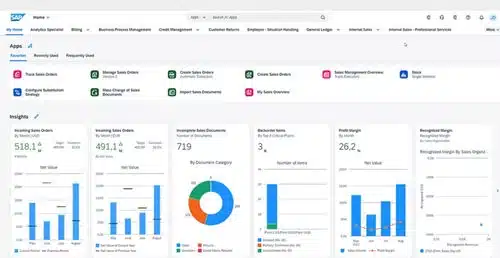
SAP ERP is a globally recognized ERP software designed for large enterprises, providing advanced tools for end-to-end business management. Its modular approach allows businesses to adopt specific functionalities as needed, making it highly versatile.
SAP ERP Philippines excels in providing in-depth analytics, enabling companies to gain insights into their operations and make data-driven decisions. It is widely used in industries such as manufacturing, finance, and logistics.
SAP key features:
- Financial accounting and management
- Supply chain optimization
- Production planning
- Asset management
- Business analytics
- Financial analysis.
- Document management.
- Inventory management.
| Pros | Cons |
|
|
Who it’s for: SAP suits large enterprises handling complex business processes across multiple industries, providing advanced tools for finance, supply chain, and operations.
SAP pricing: Contact the vendor for a quote.
Local support & Philippines clients: SAP has a registered Philippines office and official Philippines-specific localization resources. It also has publicly identifiable Philippine customer references, including Toyota Motor Philippines and Maya Philippines, which makes SAP one of the easier global ERP vendors to validate for local market presence.
10. SYSPRO ERP Software
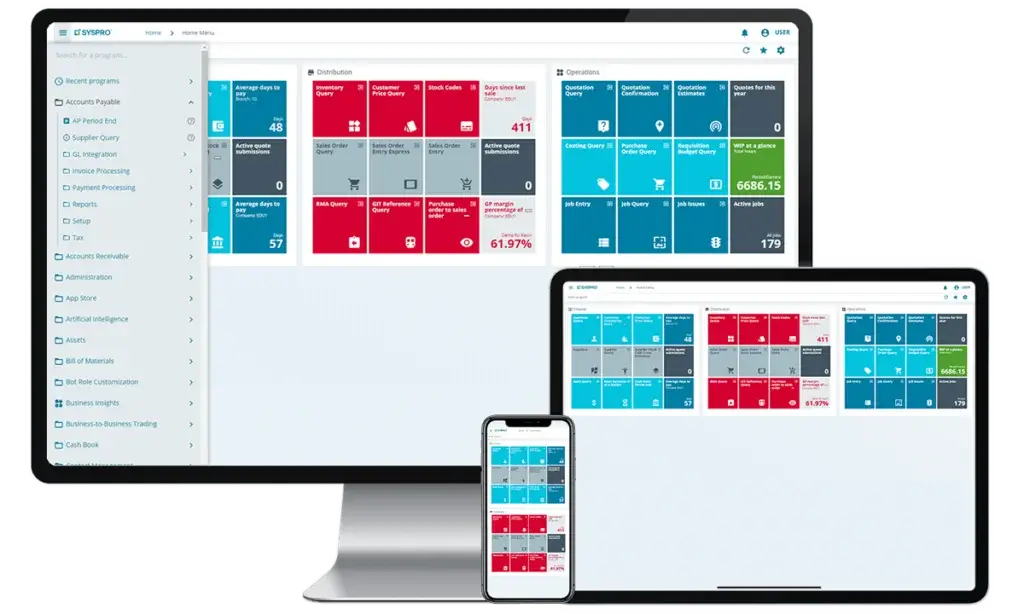
SYSPRO is a reliable pick for Enterprise Resource Planning (ERP) tools, especially those geared towards manufacturing ventures. With its strong suite of automated inventory monitoring software, SYSPRO shines among small to medium-sized businesses (SMBs).
Although it might come with a slightly higher price tag than some competitors, its user-friendly feature menu makes it a worthy investment.
SYSPRO key features:
- Order management
- Planning and scheduling
- Capacity planning
- Supply chain
- Production control
- Inventory management
| Pros | Cons |
|
|
SYSPRO ERP System: SYSPRO caters to small, mid-sized, and enterprise-level businesses, particularly in manufacturing and distribution sectors.
SYSPRO pricing: $150 to $5,000 per concurrent user per month
Local support & Philippines clients: SYSPRO has a clearly listed Philippines office in Makati and a dedicated Philippines site, so local support is easier to validate than many vendors in this list.
11. ERPNext
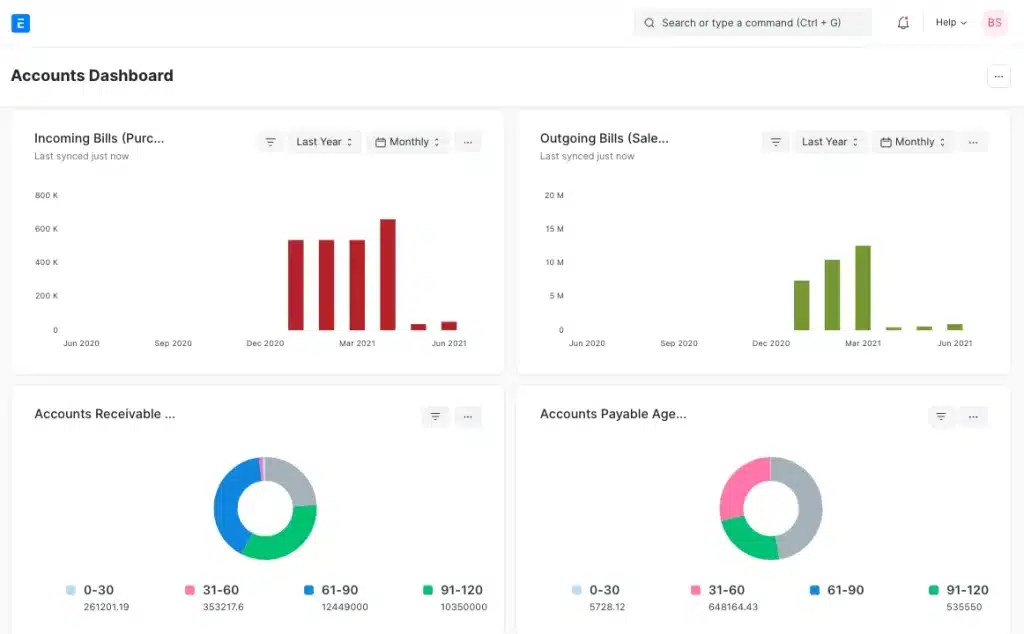
ERPNext is an open-source ERP platform designed for small to medium-sized businesses, offering an affordable and customizable solution. It enables companies to manage accounting, HR, inventory, and other operations in one integrated system.
As an open-source software, ERPNext is known for its flexibility and ability to adapt to various industries. Businesses can enjoy the freedom of customization without compromising performance.
ERPNext key features:
- Accounting and finance management
- Inventory tracking
- Manufacturing operations
- HR and payroll management
- Customer Relationship Management
| Pros | Cons |
|
|
ERPNext Solutions: ERPNext is ideal for small to mid-sized companies across industries looking for a free, open-source ERP to manage accounting, inventory, sales, and manufacturing.
ERPNext pricing: $5 to $200 US dollars per month.
Local support & Philippines clients: ERPNext can be supported through its partner ecosystem, and it also has an official Philippines customer story featuring Union Global, which gives this entry stronger local relevance.
12. Blue Link ERP Software
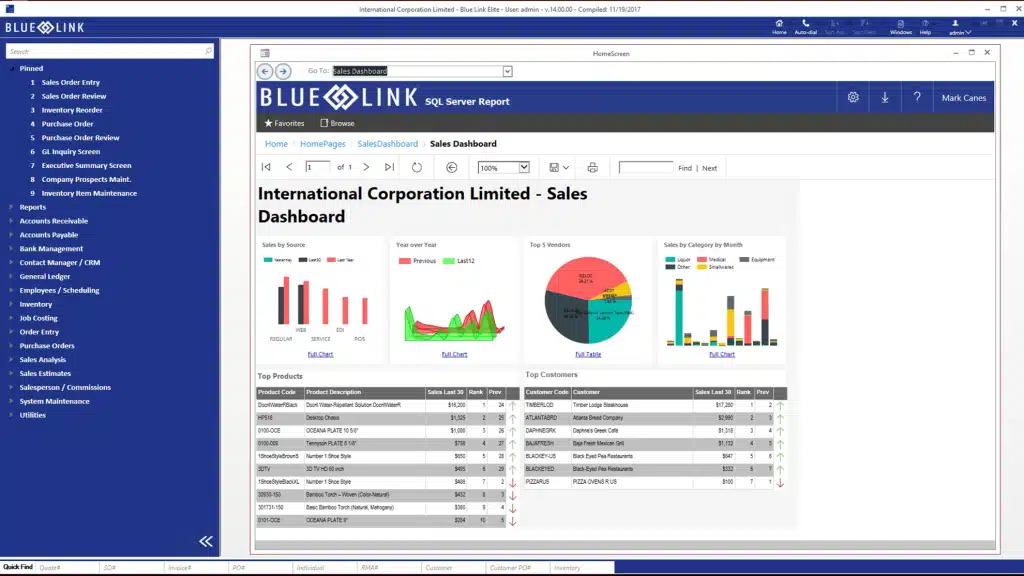
Blue Link is a comprehensive ERP solution designed to streamline and automate business operations for wholesalers and distributors. Furthermore, it focuses on inventory management, accounting, and order processing,
Blue Link provides tools to help businesses improve efficiency and reduce costs. Its modular design allows customization to meet each business’s needs, ensuring a tailored solution that maximizes productivity.
Blue Link key features:
- Accounting management
- Inventory management
- Contact management
- Warehouse management
| Pros | Cons |
|
|
Blue Link ERP: Blue Link ERP is suitable for small to medium wholesale and distribution businesses that need integrated inventory management and accounting in one system.
Blue Link pricing: Starts at $500 per month.
Local support & Philippines clients: Blue Link publicly positions itself for North America and the Caribbean. However, a named Philippines Enterprise client was not clearly surfaced in the official pages reviewed.
13. ECOUNT ERP Software
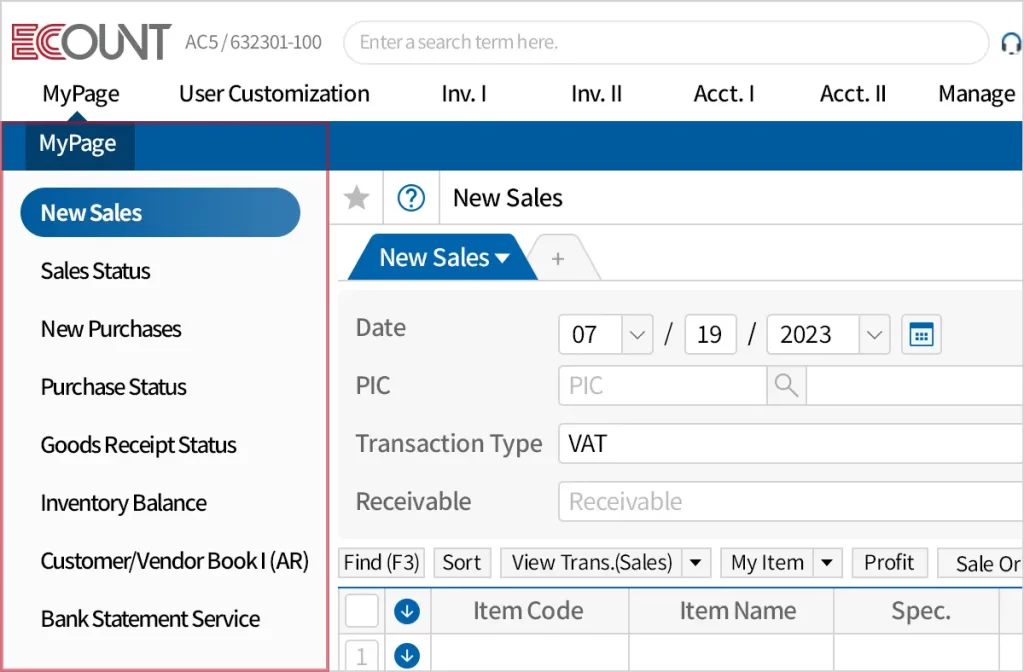
ECOUNT ERP is a cloud-based ERP solutions in the Philippines that aids users in managing their sales, production, purchasing, finance, and human resources in a single platform, especially for businesses in the Philippines.
ECOUNT ERP software offers extensive features, including Accounting, Manufacturing, Purchasing, Inventory, Sales, and Business modules. The platform is also accessible anytime, anywhere, across any device.
ECOUNT key features:
- Inventory management
- Production management
- Accounting management
- Sales management
- Purchasing management
- Payroll management
| Pros | Cons |
|
|
ECOUNT ERP: ECOUNT is best for small to mid-sized businesses seeking a fully integrated, web-based solution to manage accounting, inventory, sales, purchasing, and production processes.
ECOUNT pricing: $55/month
Local support & Philippines clients: ECOUNT has a Philippines branch in Makati and publishes local phone and support information on its Philippine site, making its local support position much clearer than many international vendors.
14. DynamIQ
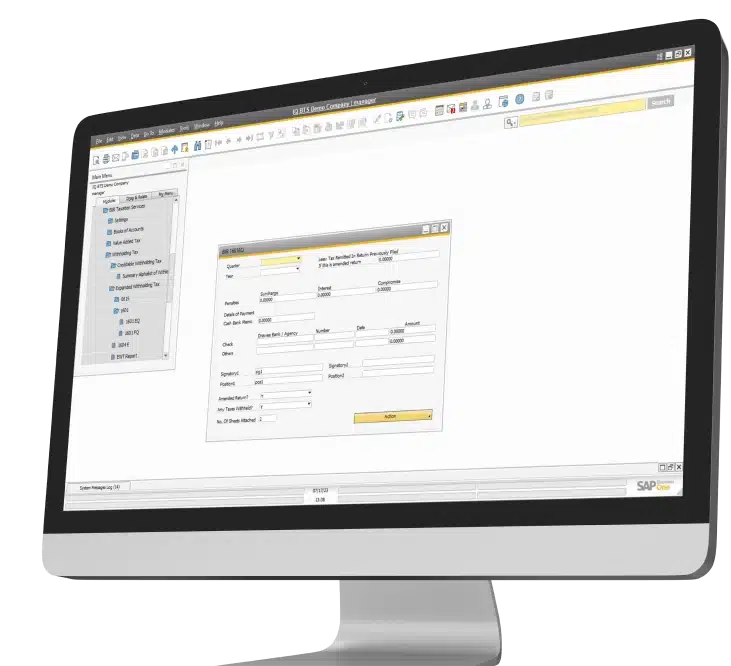
DynamIQ is a local ERP software from the Philippines that collaborates with SAP’s ERP platform for growing companies to implement its system. It provides business solutions for small and medium enterprises and has complete and adequate features for small business needs.
DynamIQ key features:
- Financial management
- Sales and customer management
- Purchasing management
- Inventory management
- Analytics and reporting
| Pros | Cons |
|
|
DynamIQ ERP Solutions: DynamIQ offers SAP Business One ERP in the Philippines, delivering extensive features and customizable solutions tailored to different business departments.
DynamIQ pricing: Contact the vendor for a quote.
Local support & Philippines clients: DynamIQ is a Philippine-based ERP consultancy, promotes SAP Business One and BIR-CAS support locally, and also publishes client testimonials from Philippine implementations.
15. Hooman Design ERP
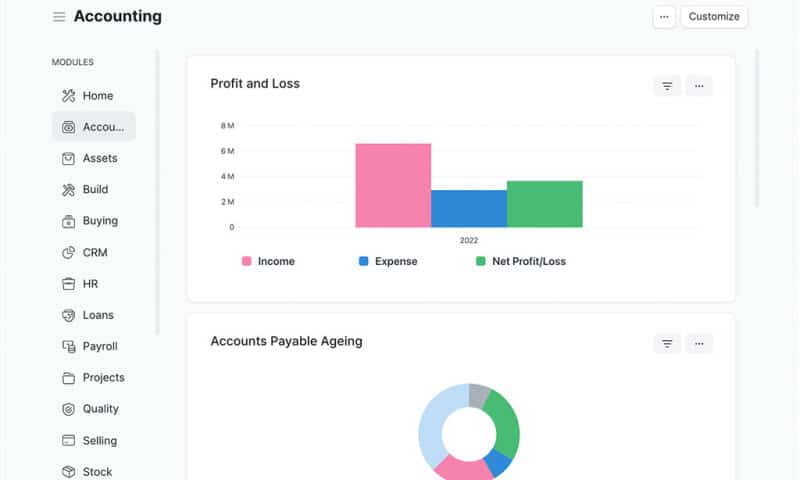
Hooman ERP is a startup ERP software from the Philippines, tailored to meet the specific needs of small and medium businesses (SMBs). With a focus on local businesses, Hooman ERP offers a range of services aimed at enhancing operational productivity.
From accounting processes to inventory management, Hooman ERP Philippines provides SMEs with the tools they need to succeed in today’s competitive market. Its user-friendly interface and customizable features make it a practical choice for businesses looking to improve their workflow.
Hooman key features:
- Advanced reporting
- Inventory management
- Advanced pricing
- Asset and stock management
- Project management
- Sales and purchasing
| Pros | Cons |
|
|
Hooman Design ERP: Hooman Design is suitable for distributors, manufacturers, educators, service providers, retailers, and freight forwarders that need customizable ERP systems.
Hooman pricing: Starts at ₱3000/Month.
Local support & Philippines clients: Hooman is Philippines-based, is positioned as an official Frappe partner in the country, and its project pages highlight Philippine organizations and brands, which helps support its local-market relevance
16. Focus 9
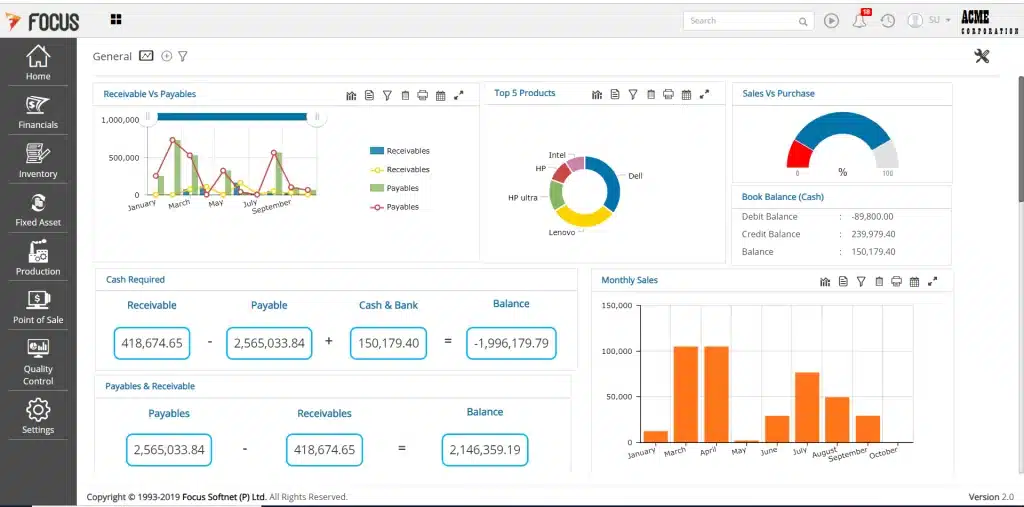
Focus 9 ERP application is a comprehensive business management solution for various industries. It offers finance, sales, purchasing, inventory, and more modules. Focus 9 ERP is designed to streamline operations and drive growth for businesses of all sizes.
With its user-friendly interface and customizable features, Focus 9 ERP provides a tailored solution to meet each organization’s unique needs. Additionally, Focus 9 ERP offers features such as CRM and HR management, making it a versatile tool for modern businesses.
Focus 9 key features:
- General ledger
- Accounts payable/receivable
- Procurement and vendor management
- Order management and fulfillment
- Warehouse and inventory control
- Budgeting and forecasting
| Pros | Cons |
|
|
Focus 9 ERP: Focus 9 ERP Software suits businesses seeking a comprehensive ERP solutions to manage various aspects of their operations, including finance, inventory, sales, and human resources.
Focus 9 pricing: Starts around $75 per month
Local support & Philippines clients: Focus 9 is actively marketed by Focus Softnet Philippines and positioned as available across major Philippine cities, though named Philippines client references were not clearly surfaced on the official pages reviewed
17. Zoho ERP System Software
Zoho ERP is a cloud-based enterprise resource planning solution designed to cater to businesses of all sizes, offering a comprehensive suite of applications to streamline various business processes.
With a focus on flexibility and scalability, Zoho ERP Philippines provides tools that enhance operational efficiency and productivity across multiple departments.
Zoho key features:
- Accounting and finance
- Human resources
- Customer relationship management (CRM)
- Inventory and order managemet
- Project management
- Sales and purchasing
| Pros | Cons |
|
|
Zoho ERP System: Zoho caters to small, mid-sized, and enterprise-level businesses, particularly in manufacturing, distribution, retail, construction, and professional services.
Zoho pricing: Starts at $29 to $249 per month
Local support & Philippines clients: Zoho appears to rely on its wider partner ecosystem rather than a clearly surfaced dedicated Philippines ERP office page. However, a named Philippines Enterprise client was not clearly surfaced in the official pages reviewed.
18. QuickBooks Enterprise
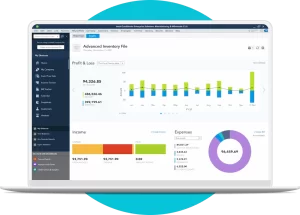 QuickBooks Enterprise is a comprehensive accounting software solution designed to meet the complex needs of growing businesses. It offers a robust suite of features that streamline financial management like demand-based pricing and operational processes, making it a versatile tool for various industries.
QuickBooks key features:
- Advanced Reporting
- Inventory Management
- Customer relationship management (CRM)
- Advanced Pricing
- Payroll Management
| Pros | Cons |
|
|
QuickBooks Enterprise System: it’s ideal for manufacturing, wholesale, construction, and distribution companies in middle-scale.
QuickBooks pricing: Contact the vendor for a quote.
Local support & Philippines clients: QuickBooks has a dedicated Philippines site and local sales and support numbers, so local commercial support is easy to verify. However, a named Philippines Enterprise client was not clearly surfaced in the official pages reviewed.
19. Multiview ERP Software
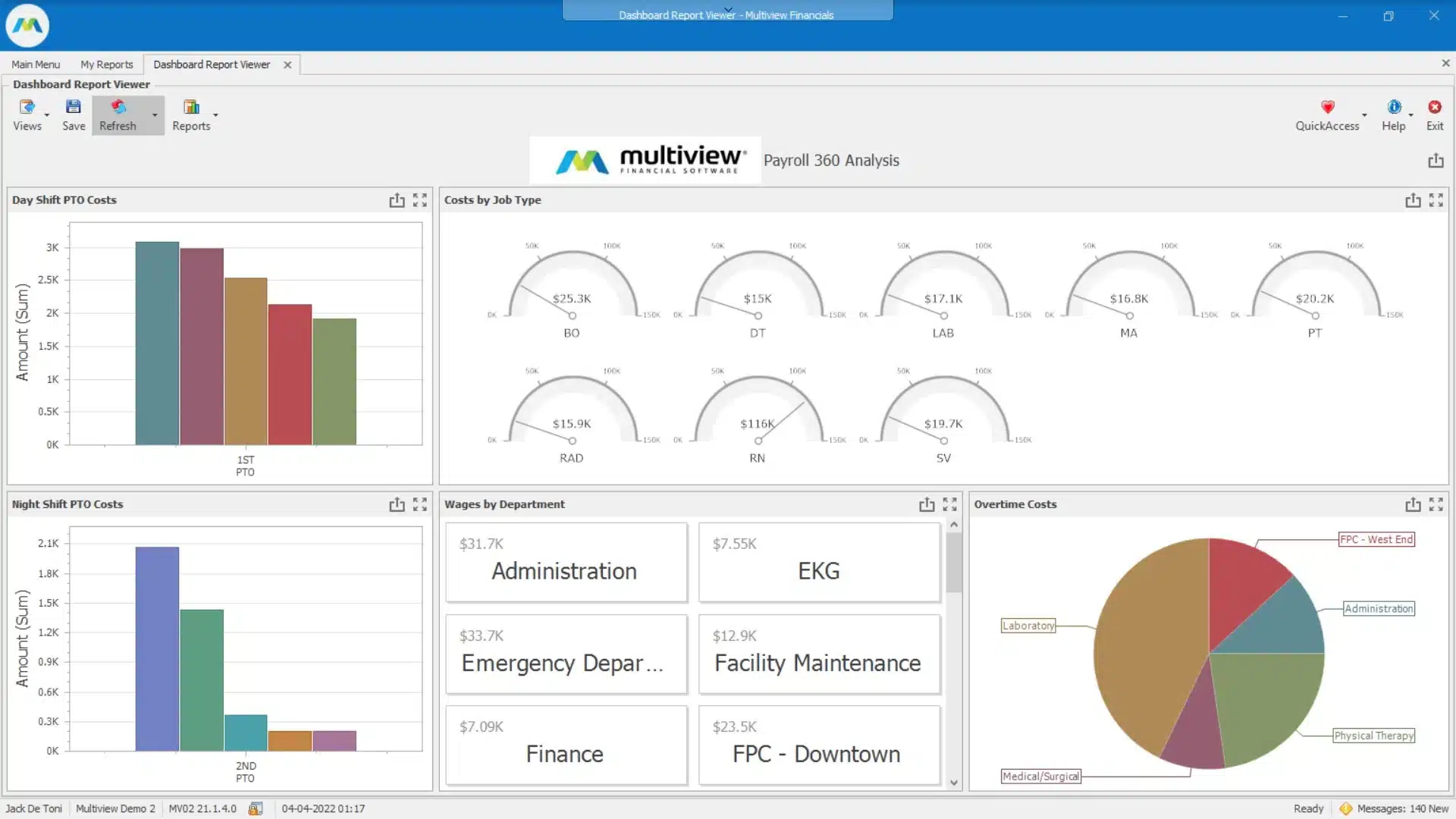
Multiview ERP Philippines is a comprehensive financial management solution designed to enhance operational efficiency for medium to large-sized organizations across various industries. It offers a suite of integrated modules that streamline accounting processes and provide robust reporting capabilities.
Multiview key features:
- General ledger
- Accounts payable and receivable
- Financial reporting
- Budgeting and forecasting
- Inventory and order management
| Pros | Cons |
|
|
Multiview ERP System: it’s ideal for medium to large enterprises seeking to streamline their accounting and operational processes.
Multiview pricing: Contact the vendor for a quote.
Local support & Philippines clients: Multiview’s public materials focus heavily on North American healthcare customers. However, a named Philippines Enterprise client was not clearly surfaced in the official pages reviewed.
Types of ERP Systems
ERP systems are commonly categorized based on how they are deployed and managed. Understanding these types helps businesses choose the right solution that aligns with their operational needs, budget, and IT capabilities. The three main types are:
1. On-premise ERP
On-premise ERP is installed and maintained on a company’s own servers and infrastructure. This model offers complete control over data, system security, and customization, making it suitable for organizations with strict compliance requirements or complex internal processes.
2. Cloud ERP
Cloud ERP is hosted on the vendor’s servers and accessed via the internet. It provides greater flexibility and lower initial investment than on-premises systems. With automatic updates and scalability, cloud ERP is ideal for growing businesses that want real-time access and reduced IT burden.
3. Hybrid ERP
Hybrid ERP combines both on-premise and cloud deployments, allowing companies to run certain core functions locally while leveraging cloud-based modules for flexibility and scalability.
This approach bridges traditional control with modern agility, enabling businesses to transition to the cloud gradually without disrupting existing operations.
The Functions of the ERP System
An ERP system serves as the backbone of business operations by centralizing data, coordinating workflows, and supporting daily processes across multiple departments. It connects finance, HR, and other core functions into one unified environment.
Here are the main functions of an ERP system:
1. Operational Coordination
ERP synchronizes interdepartmental processes so data flows smoothly from one team to another. This function ensures that departments like sales, purchasing, and inventory always operate using the same updated information.
2. Workflow Automation
The system automates routine tasks such as approvals, postings, scheduling, and document routing. Automation reduces manual steps and ensures every process follows consistent, standardized pathways.
3. Real-Time Data Visibility
ERP delivers up-to-date information across business units, enabling leaders and staff to view transactions, stock levels, financial activity, and end-to-end project handling statuses instantly.
4. Integrated Reporting & Analytics
The system compiles data from multiple departments to produce unified reports, dashboards, and insights. This function helps monitor performance, identify irregularities, and track operational efficiency.
5. Compliance & Process Control
ERP enforces standardized workflows and stores complete audit trails. This function helps businesses align with tax requirements, documentation rules, and industry compliance standards.
6. Scalability Support
As businesses grow, ERP systems allow the addition of modules, processes, and users without disrupting daily operations. This ensures the system continues to support more complex workflows.
BIR Compliance on ERP
For Philippine businesses, BIR compliance is a critical factor when selecting ERP software. The Bureau of Internal Revenue requires Computerized Accounting System (CAS) accreditation for businesses using digital accounting tools. Key requirements include: (1) Electronic Invoicing/Receipting System (EIS) capability, (2) eSales and ePurchases report generation, (3) Proper audit trail maintenance, (4) VAT and withholding tax computation accuracy. When evaluating ERP vendors, verify their CAS accreditation status and ask for documentation of successful BIR audits from existing clients.
Key Features of an ERP System
ERP systems include several core features that support essential business operations. These features provide the tools needed to automate processes, manage data, and maintain operational consistency across departments.
1. Unified Database & Real-Time Reporting
ERP systems store all organizational data in a centralized database, ensuring consistency across finance, HR, sales, and inventory. Real-time dashboards and reporting tools allow teams to track performance, monitor KPIs, and generate accurate insights instantly.
2. Automation & Workflow Management
Automation features handle tasks like approvals, payroll runs, inventory updates, and bookkeeping entries. These built-in tools streamline workflows, reduce manual effort, and ensure standard operating procedures are followed across departments.
3. Integrated Financial, Inventory, and HR Tools
ERP platforms combine essential modules, such as accounting, inventory control, supply chain, and HR, into one system. These integrated tools support end-to-end operations, from tracking stock and managing procurement to processing payroll and handling employee records.
4. Security, Access Control & Customization
ERP systems offer role-based access, data encryption, and audit trails to protect sensitive information. They also support modular customization, allowing businesses to configure workflows, forms, and features according to their operational needs.
Full Comparison of the Best ERP Solutions For You
The following table presents a comprehensive comparison of leading ERP solutions, outlining each platform’s primary use case, key advantages, limitations, and pricing structure.
| Brand | Best for | Pros | Cons | BIR-CAS Ready |
| 1) Odoo | Best for businesses needing ultimate customization | 1) Uses open-source development 2) User-friendly modern interface 3) Comprehensive features |
1) Hidden costs for additional services 2) Standard features are less customizable |
Needs verification |
| 2) HashMicro | The best end-to-end solution for all types of business needs | 1) Unlimited users without extra fees 2) Accessible on desktop, smartphone, and tablet 3) Customizable 4) Integrates with other systems |
1) Implementation duration varies by company needs 2) Some features may be more suitable for larger enterprises |
Confirmed |
| 3) Sage X3 | Best for powerful accounting solutions | 1) Comprehensive accounting module 2) Customizable to business needs 3) Intuitive and easy to use |
1) Overseas customer support may mean slower response time 2) Basic features outside the accounting module |
Needs verification |
| 4) Oracle NetSuite | Best for seamless operations across industries | 1) Customizable 2) Suitable for different business sizes |
1) Cannot capture historical MRP runs 2) Report building can require IT support |
Needs verification |
| 5) SAP | Best for growing businesses | 1) Comprehensive enterprise functionality 2) Strong analytics capabilities |
1) Expensive for smaller companies 2) Complex implementation process |
Needs verification |
| 6) Acumatica | Best for growing businesses with cloud access | 1) Highly scalable 2) User-friendly interface 3) Multi-company management |
1) High cost for smaller businesses 2) Limited industry-specific features 3) Limited mobile capabilities 4) No free trial |
Needs verification |
| 7) Dynamics 365 | Best for Microsoft ecosystem integration | 1) User-friendly interface with robust features 2) Excellent integration with Microsoft tools |
1) Higher pricing for small businesses 2) Advanced features require training |
Needs verification |
| 8) ERPNext | Best for budget-friendly open-source ERP | 1) Cost-effective and highly customizable 2) Suitable for various industries |
1) Limited support compared to paid ERP systems 2) Requires technical expertise for customization |
Needs verification |
| 9) Blue Link | Best for wholesale and distribution | 1) Reliable customer service 2) Customizable to business needs |
1) Standard reports are basic 2) Clunky database management 3) Limited front-office functionality |
No public PH claim found |
| 10) Infor LN | Best for supply chain optimization | 1) User-friendly and easy to implement 2) Easily customizable 3) Responsive customer support |
1) Security issues 2) Functionality issues 3) Integration with add-on software is not always smooth |
Needs verification |
| 11) ECOUNT | Best for small to mid-sized businesses seeking a fully integrated, web-based solution | 1) Advanced warehouse management 2) Unified platform 3) Affordable pricing |
1) Limited customization 2) Occasional performance issues 3) Steep learning curve |
Needs verification |
| 12) DynamIQ | Best for small and medium enterprises with complete and adequate features | 1) Complete business management solution for SMEs 2) Simplified UI and easy to use |
1) Lacks pricing transparency 2) Some features feel outdated 3) Pricier than some alternatives 4) Customer support complaints |
Confirmed |
| 13) Epicor | Best for SMEs in manufacturing, automotive, retail, and distribution | 1) Robust financial management 2) Intuitive interface 3) Flexible customization |
1) Needs expert or IT team to maintain 2) Slow reporting performance 3) Unreliable support experience |
Needs verification |
| 14) SYSPRO | Best for small, mid-sized, and enterprise-level businesses, especially in manufacturing and distribution | 1) Advanced inventory management 2) Scalable modular system 3) Easy to use |
1) Security issues 2) Outdated interface and programming 3) Disorganized system |
Needs verification |
| 15) Hooman | Best for distributors, manufacturers, educators, service providers, retailers, and freight forwarders | 1) Low-cost service 2) Open-source ERP with consistent development |
1) More suitable for SMBs | Needs verification |
| 16) Focus 9 | Best for businesses seeking a comprehensive ERP solution to manage various aspects | 1) User-friendly interface 2) Comprehensive features 3) Easy to use |
1) Overseas support team 2) Complex customization 3) Clunky database management |
Needs verification |
| 17) Zoho | Best for small, mid-sized, and enterprise-level businesses | 1) Customizable for business needs 2) Easy to use 3) Affordable pricing |
1) High learning curve 2) Advanced features cost extra |
Needs verification |
| 18) QuickBooks Enterprise | Best for manufacturing, wholesale, construction, and distribution companies in middle-scale | 1) Scalable modular system 2) Industry-specific editions 3) Comprehensive support |
1) Limited cloud functionality 2) No native e-commerce integration 3) Slow performance on large data sets |
Needs verification |
| 19) Multiview | Best for medium to large enterprises seeking to streamline accounting and operational processes | 1) User-friendly interface 2) Customizable reporting 3) Responsive customer support |
1) Performance issues 2) Complex report building 3) Steep learning curve |
No public PH claim found |
ERP Recommendations Based on Specific Business Needs
- For businesses needing a complete end-to-end ERP solution: HashMicro
- For companies prioritizing high customization and open-source flexibility: Odoo and ERPNext
- For organizations with strong accounting and financial management requirements: Sage X3 and Multiview
- For enterprises seeking cross-industry scalability and global operations: Oracle NetSuite and SAP
- For growing businesses that prefer cloud-based ERP access: Acumatica and Dynamics 365
- For wholesale, distribution, and supply chain–focused businesses: Blue Link, Infor LN, SYSPRO, and Epicor
- For small to mid-sized businesses with budget considerations: ECOUNT, Zoho, Hooman, Focus 9, and DynamIQ
- For businesses primarily focused on accounting-driven operations: QuickBooks
Conclusion
Choosing an ERP system in the Philippines can be challenging due to the wide range of providers, each with different capabilities and focus areas. This makes it essential to assess how well a solution aligns with your specific operational needs.
As businesses expand and workflows become more complex, considerations such as scalability, system flexibility, and industry relevance become critical. A reliable ERP should be able to support growth and adjust to changing processes seamlessly.
Rather than focusing solely on features or pricing, ERP selection should prioritize long-term suitability. Ensuring alignment with business objectives and a free consultation can help clarify which solution best supports sustainable growth.
FAQ About ERP Software
-
What is ERP Software?
ERP can reduce risk. It helps companies manage daily operations by preventing data duplication and inaccuracies and maximizing overall efficiency. Another benefit is improved efficiency, as ERP automates business processes across departments, eliminating costly and unnecessary repetitions.
-
What are the examples of ERP software?
Examples of ERP systems include Productive for Professional Services, Hashmicro, Sage Intact, Multiview, Acumatica, BizAutomation, and Infor ERP. These platforms help optimize operations, enhance efficiency, and aid in decision-making.
-
What is the difference between ERP and CRM?
A customer relationship management (CRM) system helps you manage customer interactions and relationships. In contrast, an enterprise resource planning (ERP) system enables you to oversee multiple facets of your business, including finances and customer journeys, in a single centralized platform.
-
What is the best ERP software?
The best ERP software solutions offer features like automation, AI-driven analytics, and seamless integration with other business tools, making them ideal for companies seeking to enhance productivity and achieve digital transformation.














