
















In today’s competitive market, digital transformation has shifted from a luxury to a mandatory requirement for sustainable business growth. Central to this evolution is ERP software, which functions as a unified digital hub to integrate finance, HR, and supply chain operations. However, purchasing a high-end license is only the first step, as the ultimate success depends entirely on the quality of the software deployment.
A strategic implementation converts technical features into measurable business value through meticulous planning and expert change management. When executed effectively, this process optimizes workflows and provides real-time visibility across all departments to drive operational excellence. Conversely, neglecting the complexities of a rollout can result in costly budget overruns and significant disruptions to your daily business activities.
This guide provides the essential insights and strategic frameworks you need to make informed decisions throughout your ERP development journey.
Key Takeaways
|
What is ERP Deployment for Business?
ERP deployment is the technical process of installing and activating the system within a company’s operational framework. This stage focuses on software configuration and data migration, acting as the specific execution phase within the broader implementation lifecycle.
While implementation covers the entire journey from software selection to long-term planning, deployment is the actual setup for live use. IT teams and system integrators collaborate during this phase to ensure the environment is correctly configured on cloud or on-premise platforms.
The process requires precise coordination to migrate legacy data and validate records across all business functions. The ultimate goal is a stable transition to the “go-live” stage, allowing the company to run daily transactions with minimal operational impact.
Key Approaches to ERP Deployment
There is no one-size-fits-all approach to deploying an enterprise system. The architecture you choose will fundamentally dictate how the software is installed, accessed, maintained, and scaled. Today, organizations generally choose from four primary deployment models: Cloud, On-Premise, Hybrid, and Two-Tier. Each model presents unique advantages, resource requirements, and strategic implications.
1. Cloud-Based ERP Deployment
Cloud-based ERP deployment has become a popular option for many organizations. In this model, the ERP software and data are hosted on remote servers managed by vendors or cloud providers such as AWS, Microsoft Azure, or Google Cloud. Users access the system through a web browser with a stable internet connection.
This deployment model is usually delivered through a Software-as-a-Service (SaaS) subscription. Companies do not need to invest heavily in servers or internal infrastructure because the provider manages the system environment. Businesses instead pay recurring subscription fees, which helps make IT spending more predictable.
Cloud ERP deployment also allows companies to expand system capacity easily as the business grows. Organizations can add users, increase storage, or activate new modules without installing additional hardware. System updates, maintenance tasks, and security improvements are typically handled by the vendor.
2. On-Premise ERP Deployment
On-premise ERP deployment is still widely used by organizations that require full control over their systems. In this model, companies purchase ERP software licenses and install the system on servers located within their own facilities. Internal IT teams are responsible for managing the infrastructure and maintaining the system.
A major advantage of this approach is complete ownership of data and technology resources. This level of control is especially important for industries that operate under strict regulatory requirements, such as aerospace, defense, and certain financial sectors. These industries often require sensitive data to remain within company-controlled infrastructure.
On-premise systems also allow extensive customization to support specialized business processes. Organizations can modify configurations and adapt the system environment to meet complex operational requirements. However, this deployment model requires significant investment in hardware, IT personnel, and system maintenance.
3. Hybrid ERP Deployment
Hybrid ERP deployment combines elements of cloud and on-premise systems. In this model, organizations may keep critical systems or sensitive data within internal infrastructure while running selected ERP modules in the cloud. For example, companies may use cloud platforms for CRM, HR, or e-commerce functions.
This approach is particularly useful for organizations that are gradually modernizing their technology environment. It allows businesses to benefit from cloud capabilities while still using existing infrastructure that required significant investment. As a result, companies can update their systems without replacing everything at once.
Hybrid ERP deployment also provides flexibility in managing IT resources. Businesses can decide which systems remain internal and which functions move to the cloud. This gradual transition helps reduce operational risks during large technology upgrades.
4. Two-Tier ERP Deployment
Two-tier ERP deployment is commonly used by multinational companies with several subsidiaries or regional offices. In this structure, headquarters operates a comprehensive Tier 1 ERP system that supports global financial management, reporting, and corporate planning. This system is often highly customized and may run on internal infrastructure.
Subsidiaries typically implement a lighter Tier 2 ERP system, which is usually cloud-based and faster to deploy. These systems are designed to support local operations, regulatory requirements, and regional languages. The Tier 2 systems then send operational data to the main corporate system.
This approach allows large organizations to maintain centralized oversight while giving regional teams more flexibility in managing their operations. It also prevents smaller business units from using overly complex enterprise systems that may not match their needs. As a result, companies can maintain consistent reporting while supporting efficient local operations.
The Strategic Phases of ERP Deployment
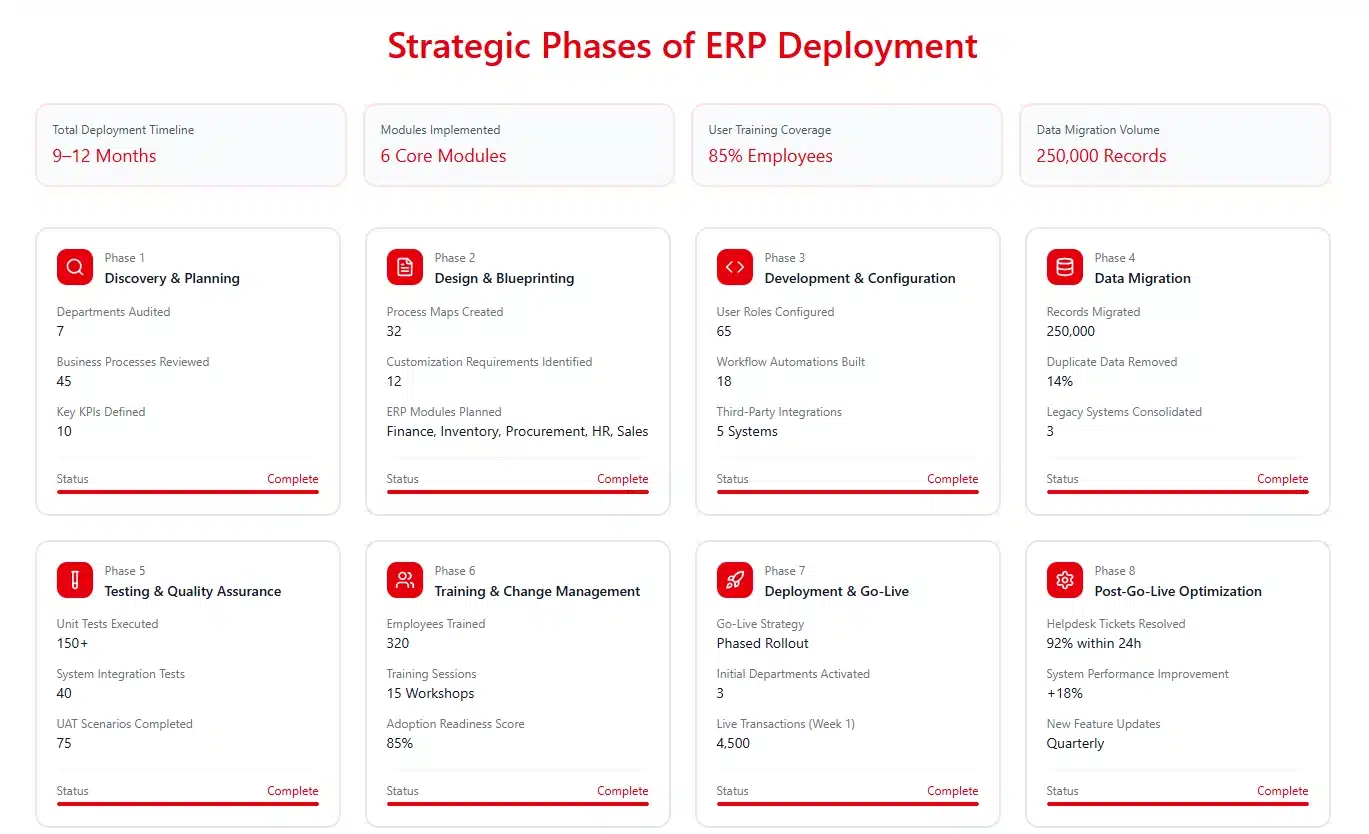
Deploying an enterprise resource planning system is a marathon, not a sprint. It requires a structured, phased approach to ensure that every technical and operational detail is addressed. While specific methodologies may slightly alter the sequence, a standard, highly effective deployment lifecycle consists of several critical phases.
Phase 1: Discovery and Planning
A successful deployment begins with a meticulous discovery and planning phase, driven by a dedicated team of executive sponsors, IT specialists, and subject matter experts. This group establishes the project’s core scope and objectives while defining Key Performance Indicators (KPI) to measure future success.
During this stage, the team audits existing workflows to identify bottlenecks and data silos, creating a detailed gap analysis. By incorporating the different phases of the ERP life cycle into the project charter, the team ensures that the timeline accounts for budget constraints and long-term maintenance.
Phase 2: Design and Blueprinting
With a clear plan in place, the deployment moves into the design phase. Project team collaborates with software vendors or system integrators to map the company’s specific business workflows to the new ERP software. This involves creating detailed process maps and determining how the software needs to be configured to support daily operations.
If the software cannot accommodate a critical business process out-of-the-box, the team must decide whether to modify the business process to fit the software or to customize the software to fit the process. The result of this phase is a comprehensive blueprint document that serves as the architectural master plan for the entire system configuration.
Phase 3: Development and Configuration
Based on the design blueprint, developers and technical consultants begin configuring the software environment. This includes setting up organizational structures defining user roles and security permissions, and building out specific workflows and approval routing.
Simultaneously, if customizations or specific third-party integrations were approved during the design phase, developers write the necessary code and build the Application Programming Interfaces (APIs). This phase requires meticulous attention to detail, as errors in configuration can lead to cascading functional issues down the line.
Phase 4: Data Migration
Data migration is arguably the most critical and high-risk component of an ERP deployment. An ERP system is only as intelligent as the data it processes. Migrating data involves extracting historical records (customers, vendors, inventory items, financial balances) from legacy systems, transforming it to fit the new database structure, and loading it into the new ERP.
Before data can be loaded, it must be rigorously cleansed. Organizations must identify and purge duplicate records, correct formatting errors, and archive obsolete data that is no longer needed for daily operations. Attempting to migrate “dirty” data into a new system will immediately compromise the integrity of the new software, leading to inaccurate reporting and user frustration.
Phase 5: Testing and Quality Assurance
Before a system can be introduced to the broader organization, it must undergo exhaustive testing to ensure it functions exactly as designed. Testing is conducted in multiple stages:
- Unit Testing: Developers test individual modules and custom code to ensure basic functionality.
- System Integration Testing (SIT): The team tests the end-to-end flow of data across different modules (e.g., from creating a sales order to generating an invoice) and ensures that integrations with external systems are functioning correctly.
- User Acceptance Testing (UAT): This is the most critical testing phase. Key end-users navigate the system using real-world business scenarios to validate that the software supports their daily tasks. UAT must be formally signed off by department heads before the project can proceed to Go-Live.
Phase 6: Training and Change Management
Even the most perfectly configured system will fail if the employees do not know how to use it or actively resist the change. Comprehensive training programs must be developed, utilizing a mix of classroom sessions, hands-on workshops, and e-learning modules.
Training should be role-based, focusing on the specific tasks each user will perform rather than overwhelming them with the entire system’s capabilities. Leadership must communicate the benefits of the new system clearly and frequently, addressing employee anxieties and fostering a culture of adaptability.
Phase 7: Deployment and Go-Live
The Go-Live stage represents the final transition from legacy tools to the new system, marking the peak of months of technical preparation. Depending on the chosen rollout strategy, this critical shift can occur instantly over a single weekend or progress gradually over several months.
During this period, the project team and support staff remain on high alert within a “war room” environment. Their primary focus is to immediately troubleshoot and resolve any unexpected issues that arise as users begin processing real-time transactions in the live environment.
Phase 8: Post-Go-Live Support and Optimization
The deployment process continues well beyond the initial launch, requiring a period of intensive hyper-care support. A dedicated helpdesk must remain available to provide rapid assistance as users encounter learning curves or minor system bugs. This proactive approach ensures operational stability and helps resolve any functional gaps that appear during real-world usage.
Over the long term, the system enters a phase of continuous optimization. As the business evolves, the ERP must evolve with it. The team will continually assess system performance, gather user feedback, and implement updates and new features to maximize the return on investment.
Three Effective Ways to Manage an ERP System Rollout
When it comes to the actual transition, organizations must choose a rollout strategy that balances speed, cost, and risk tolerance. There are three primary methodologies for rolling out an ERP system.
1. The Big Bang Strategy
This approach executes a total, simultaneous switch to the new system across all locations to eliminate legacy costs and maintenance instantly. By avoiding the need for temporary software links, organizations can achieve a faster transition during off-peak hours like weekends.
However, this method carries the highest operational risk since any failure during the launch can disrupt the entire business. Success depends on flawless preparation, rigorous testing, and an organization that is fully ready for immediate, large-scale change.
2. The Phased Rollout Strategy
A more conservative method, the phased rollout introduces the system incrementally by department, location, or specific functional modules. This strategy lowers risk by isolating potential issues to a single segment, allowing the team to resolve problems before the next stage.
The trade-off for this added security is a significantly longer project timeline and higher development costs. Teams must often build and maintain data bridges to keep the new framework connected with remaining legacy components during the transition.
3. The Parallel Adoption Strategy
Parallel adoption involves running both the legacy and new systems simultaneously to verify data accuracy through direct comparison. This provides the highest level of security, as the old system remains fully operational as a backup if the new platform encounters errors.
Despite the safety net, this is the most expensive and labor-intensive methodology to implement. The doubled workload for employees can lead to rapid burnout, making it ideal only for mission-critical sectors like healthcare or finance.
Selecting the Optimal ERP Deployment Strategy
Selecting the ideal deployment model and rollout strategy is a foundational decision that dictates the project’s long-term success. This choice requires a thorough evaluation of organizational goals and technical capabilities to ensure an effective ERP software integration.
1. Assessing Organizational Size and Complexity
Business size strongly influences the choice of an ERP deployment strategy. Small and medium-sized enterprises (SMEs) with simpler operations often prefer cloud-based or SaaS ERP deployment because it requires lower upfront costs and minimal IT infrastructure. With fewer users and less complex data, many SMEs can adopt a Big Bang deployment approach.
Large multinational companies, however, usually manage complex processes and legacy systems. They often choose on-premise or hybrid ERP deployment models for greater system control and customization. Because of their operational scale, these organizations typically implement ERP systems through a phased deployment strategy to reduce risk.
2. Evaluating IT Infrastructure and Internal Capabilities
Evaluating internal IT capabilities is essential to determine whether the organization can manage complex infrastructure or if a cloud model is more practical. While a highly skilled team can support on-premise systems, cloud solutions allow smaller departments to shift their focus from server maintenance to strategic business growth.
3. Budgeting: CapEx vs. OpEx
Budgetary considerations and accounting preferences are central to choosing the right deployment model. On-premise solutions demand a heavy upfront Capital Expenditure (CapEx) for hardware and licenses that depreciate over time, requiring significant initial investment.
In contrast, cloud models utilize a predictable Operational Expenditure (OpEx) through subscription fees, which protects cash flow and maintains fiscal agility. Decision-makers must collaborate with the CFO to ensure the chosen ERP software integration aligns with the company’s long-term financial strategy.
4. Regulatory Compliance and Data Security
Industry regulations often dictate the choice of architecture, as sectors like healthcare and defense must adhere to strict data sovereignty mandates such as HIPAA or ITAR. In jurisdictions where data cannot legally cross borders or reside on multi-tenant servers, organizations must utilize private clouds or on-premise systems to ensure full compliance and avoid severe legal penalties.
Common Challenges in ERP Deployment and How to Overcome Them
Despite the best planning, ERP deployments are notoriously challenging. They disrupt the status quo and force organizations to confront long-standing operational inefficiencies. Anticipating these challenges and proactively developing mitigation strategies is the hallmark of a successful project.
| Section | Challenges | Solutions |
|---|---|---|
| Resistance to Change and Low User Adoption | Employees often resist new ERP systems because they are accustomed to legacy tools, spreadsheets, and manual workflows. This resistance can slow productivity and reduce user adoption during the early stages of deployment. | Implement strong change management by clearly communicating the purpose of the ERP system, involving key users in testing, and providing continuous training and support. |
| Data Migration Complexities | Legacy data frequently contains duplicates, outdated records, and inconsistent formats. Migrating inaccurate data can compromise the integrity of the new ERP system. | Begin data cleansing early in the project by assigning data stewards, standardizing datasets, and running multiple test migrations before go-live. |
| Scope Creep and Budget Overruns | Project requirements may expand beyond the original plan due to excessive customization requests. This can cause delays and increase implementation costs. | Apply strict project governance with clearly defined scope and an approval process for changes. Prioritize standard ERP functionality before considering customization. |
| System Integration Roadblocks | ERP systems must connect with other business applications such as CRM, e-commerce platforms, or logistics systems. Poor integration can create data silos and manual data entry issues. | Design a strong integration architecture using APIs or middleware to enable reliable data exchange between the ERP and external systems. |
By embedding these requirements into the initial blueprint, organizations can transform back-office operations from a simple support function into a strategic asset through a robust ERP software integration. This structural foresight ensures that every department operates on a single source of truth, creating a resilient foundation that supports long-term growth and complex data exchange.
The Role of System Integrators and Consultants

ERP deployment projects are complex and often require expertise beyond what internal teams can provide. For this reason, many organizations work with system integrators and ERP consultants to support the deployment process.
1. System Integrators
System integrators manage the technical side of ERP deployment. They handle configuration, development, and data migration based on industry experience.
2. Technical Expertise
Experienced integrators use proven methods to manage complex ERP projects. This helps reduce risks and avoid common implementation mistakes.
3. External Perspective from Consultants
ERP consultants provide an objective view of business processes. They help identify inefficiencies and recommend improvements based on industry best practices.
4. Improving Project Success
Although they increase initial costs, integrators and consultants help ensure a smoother ERP deployment. Their expertise supports better system performance and long-term business value.
Working with experienced ERP professionals helps organizations reduce risks and achieve a more effective ERP deployment.
Essential ERP Deployment Steps for Successful System Implementation
A successful ERP deployment requires a structured and carefully planned process. Organizations must follow a clear sequence of steps to ensure the system is properly configured, data is accurately transferred, and users are prepared to operate the new platform.
1. Discovery and Planning
This initial phase focuses on defining clear business objectives and determining how the ERP system will support operational needs. Project teams identify system requirements, evaluate existing workflows, and establish a realistic implementation timeline. A well-structured plan helps organizations avoid delays and ensures all stakeholders understand the deployment strategy.
2. Design and Configuration
During this stage, the ERP platform is configured to match the company’s operational processes. Teams map business workflows such as finance, procurement, and inventory into the system to ensure the software supports daily activities. The goal is to adapt the configuration to business needs while minimizing unnecessary customization that could increase system complexity.
3. Data Migration
Data migration involves transferring historical records from legacy systems into the new ERP database. Before migration takes place, organizations must clean and standardize data to remove duplicates, outdated entries, and inconsistencies. Proper data preparation ensures that the ERP system starts with accurate and reliable information.
4. Testing and Validation
Comprehensive testing is essential before the system becomes operational. This stage includes unit testing, system integration testing, and User Acceptance Testing (UAT) to ensure every module functions correctly. Testing helps identify technical issues, workflow gaps, and data errors before the final rollout.
5. Deployment and Go-Live
The deployment phase officially transitions the organization from legacy systems to the new ERP platform. Employees begin using the system to manage transactions, reporting, and daily operations. After go-live, companies typically enter a hypercare period, where technical teams provide immediate support to resolve issues and maintain system stability.
By following these structured steps, organizations can reduce risks and improve the overall success of an ERP deployment. Careful planning, thorough testing, and strong user support help ensure the new system delivers long-term operational value for the business.
Advanced ERP Deployment Practices to Improve System Performance
As ERP technology continues to evolve, many organizations are adopting advanced practices to improve the efficiency and reliability of their deployment strategies. These approaches help reduce risks, accelerate implementation, and ensure the ERP system performs well in a complex business environment.
1. Agile Deployment Methodology
Many organizations now use agile deployment methods instead of traditional waterfall approaches. This allows ERP modules to be implemented in smaller phases or iterative sprints. As a result, companies can gain faster value and continuously improve the system based on user feedback.
2. AI and Machine Learning for Data Migration
Artificial Intelligence and machine learning can improve the data migration process during ERP deployment. These technologies help identify data anomalies, detect duplicates, and map complex legacy datasets more accurately. This reduces errors and increases the speed of data preparation.
3. Automated Continuous Testing
Automated testing tools help ensure the ERP system remains stable during and after deployment. They automatically check system performance whenever updates, patches, or integrations are applied. This reduces the risk of technical issues and operational downtime in the post-deployment phase.
By adopting these advanced deployment practices, organizations can improve the stability, efficiency, and long-term performance of their ERP systems. Modern tools and flexible methodologies help businesses manage complex implementations while maintaining operational reliability.
Conclusion
Selecting the right strategy for ERP software integration is a pivotal decision that defines a company’s digital trajectory. Organizations must balance the absolute control of on-premise systems against the rapid agility of cloud-based environments to meet specific operational needs. This strategic alignment ensures the technical architecture provides a sturdy foundation for all future business activities.
Executing a methodical rollout plan minimizes operational risks and prevents costly project delays. Success requires a commitment to thorough data preparation and comprehensive user training to foster high adoption rates across the enterprise. Ultimately, a well-planned ERP software integration transforms fragmented data into a unified, actionable asset for sustainable growth.
Experience the benefits firsthand by scheduling your free demo today to see how our solution transforms your operations.
FAQ about ERP Deployment
-
How long does it typically take to deploy an ERP system?
The duration of ERP deployment can vary widely depending on the complexity of the organization, the ERP system chosen, and the scope of the implementation. Generally, it can take anywhere from a few months to over a year to fully deploy an ERP system.
-
What challenges might organizations face during ERP deployment?
Organizations may encounter challenges such as resistance to change from employees, data migration issues, insufficient training, budget overruns, and a lack of clear objectives for the deployment.
-
What is the role of user training in ERP deployment?
User training is crucial in ERP deployment as it equips employees with the necessary skills to effectively use the system, minimizes errors, and enhances user adoption, ultimately leading to a more successful implementation.





















