

















Malaysia’s e invoicing mandate has introduced a range of new compliance requirements across all industries, and one of the most commonly misunderstood elements is the classification code. Every e invoice you submit through the MyInvois portal must include a specific code that accurately categorises the product or service you bill. Whether you run a retail shop, deliver services, work as a contractor, or manufacture goods, assigning the wrong code, or leaving it blank, can lead to MyInvois rejecting your submission, trigger penalties, and disrupt your operations.
Understanding how these codes work is not just about ticking a compliance checkbox. It is about building a foundation for accurate tax reporting, cleaner financial records, and smoother audits. In this guide, you will get a thorough breakdown of every classification code defined by the Inland Revenue Board of Malaysia (LHDN), learn how to apply them correctly, and see common pitfalls to avoid as the e invoicing rollout expands across all business sizes in 2026 and beyond.
Key Takeaways
|
What Is an E-Invoice Classification Code?
An e invoice classification code is a mandatory data field you must include in every e invoice you issue in Malaysia under the national e invoicing framework governed by LHDN. This code works as a standardised identifier that categorises the product or service you are billing. When you raise an invoice, the system reads this code to understand what kind of transaction you are recording, whether you are selling goods, providing a service, or dealing with a specific category such as construction materials or breastfeeding equipment.
Do not confuse the classification code with the tax code or the unit of measurement code. The classification code only describes the type of item or service you sell. Based on LHDN official MyInvois SDK documentation, there are currently 45 defined classification codes that cover a wide range of commercial transactions in Malaysia. Each e invoice must include at least one valid classification code that matches the line items in your document.
Why One Wrong Code Can Turn Into a Tax Headache
The Full List of 45 LHDN Codes, In One Clean Table
The following is the official and complete list of classification codes defined by LHDN for use in Malaysia’s e invoicing system. Each code is a three digit number with a matching description. You should familiarise yourself with the codes that apply to what you sell and how you bill your customers.
| Code | Description |
|---|---|
| 001 | Breastfeeding equipment |
| 002 | Child care centres and kindergartens fees |
| 003 | Computer, smartphone or tablet |
| 004 | Consolidated e-Invoice |
| 005 | Construction materials (as specified under Fourth Schedule of the Lembaga Pembangunan Industri Pembinaan Malaysia Act 1994) |
| 006 | Disbursement |
| 007 | Donation |
| 008 | E-Commerce – Goods than those covered in other classifications |
| 009 | E-Commerce – Services other than those covered in other classifications |
| 010 | Education fees |
| 011 | Goods & Services Tax (GST) |
| 012 | Gym membership fees |
| 013 | Insurance – Education and medical benefits |
| 014 | Insurance – Life insurance (including Takaful) |
| 015 | Insurance – Medical and health insurance |
| 016 | Interest and financing expenses |
| 017 | Internet subscription |
| 018 | Land and building |
| 019 | Levy |
| 020 | Maintenance |
| 021 | Medical equipment |
| 022 | Medical examination for self |
| 023 | Medical examination or vaccination expenses for employees |
| 024 | Motor vehicle |
| 025 | Others |
| 026 | Parking |
| 027 | Petroleum products |
| 028 | Professional services by accountants, auditors, or tax consultants |
| 029 | Professional services by lawyers |
| 030 | Reimbursement |
| 031 | Rental of motor vehicle |
| 032 | Repair and maintenance of motor vehicle |
| 033 | Research and development |
| 034 | Retirement scheme or pension fund |
| 035 | Road toll charges |
| 036 | Sales Tax |
| 037 | Service Tax |
| 038 | Subscription of books, journals, magazines, newspapers, or other similar publications |
| 039 | Telecommunication |
| 040 | Tourism, accommodation, hotel, and lodging fees |
| 041 | Training and education fees for own employees |
| 042 | Transportation of goods |
| 043 | Transportation of passengers |
| 044 | Utilities |
| 045 | Waste management |
This table includes all 45 classification codes that are currently active. LHDN may update the list over time, so you should check the official MyInvois SDK documentation from time to time for any new codes or changes.
The Codes People Misuse Most, And How You Should Treat Them
While the table above provides a quick reference, several codes require deeper explanation due to their nuanced scope or frequent misuse. Below is a closer look at some of the most commonly used and most commonly misapplied codes.
Code 004 – Consolidated e-Invoice
This code is specifically designated for consolidated e-invoices, which are a special document type used by businesses that deal with high volumes of small transactions from individual consumers who do not require individual e-invoices. For example, retailers and food and beverage businesses may issue a single consolidated e-invoice at the end of the day, week, or month to capture all such transactions in aggregate. This code must only be used in this specific context and should not be applied to regular B2B invoices.
Code 006 – Disbursement
Disbursements refer to costs incurred by a service provider on behalf of a client that are passed on at actual cost without any markup. For example, if a legal firm pays court filing fees on behalf of a client and recovers exactly the same amount, this is classified as a disbursement. It is distinct from a reimbursement (Code 030), which involves the recovery of costs already incurred and paid by the service provider. There is a difference between reimbursement and disbursement and mixing these two codes is a common error.
Code 025 – Others
This is the catch-all category for transactions that do not fit into any of the 44 other defined classifications. While it may seem like a convenient default, businesses should use this code sparingly and only after genuinely assessing that none of the other 44 codes apply. Overuse of Code 025 can attract scrutiny from LHDN, as it suggests that the business has not made a genuine effort to classify its transactions accurately.
Code 008 and 009 – E-Commerce Goods and Services
These two codes are specifically for transactions conducted through e-commerce platforms. Code 008 covers physical goods sold online that do not fall under more specific categories, while Code 009 covers digital services and other online service transactions. Businesses operating marketplaces or digital platforms need to apply these codes carefully to ensure they are not using a more specific code where the e-commerce codes are more appropriate, and vice versa.
Codes 011, 036, and 037 – Tax-Related Codes
These three codes (GST, Sales Tax, and Service Tax respectively) are for recording tax amounts charged as separate line items in an invoice. These are not general-purpose codes; they should only be used when the invoice explicitly separates the tax amount from the base price as a distinct line item. Most businesses will not use these codes in typical transactions.
How You Pick the Right Code Without Overthinking It
Picking the right classification code takes a methodical approach. Below is a step by step process you can follow to keep your code selection consistent and accurate across every e invoice you issue.
Step 1: Define Your Core Goods and Services
Start by listing every product and service you offer. For each item, write a clear, plain language description of what it is and which sector it fits into. This simple step helps you avoid a common mistake: choosing codes based on internal labels instead of what you actually sell.
Step 2: Match Against the Official Code List
Cross reference your product and service descriptions against the 45 classification codes. Aim for the most specific match. If you provide internet services, Code 017 (Internet subscription) fits. If you sell petroleum related products, Code 027 fits. Only use Code 025 (Others) after you have genuinely ruled out the rest.
Step 3: Consider the Context of the Transaction
The same item can fall under different codes depending on context. For example, if you sell laptops in a physical shop, Code 003 (Computer, smartphone or tablet) applies. If you sell the same laptops through an online marketplace, you may need to assess whether Code 008 (E Commerce goods) fits better. Sounds annoying, right? But context matters, so use LHDN guidance for borderline cases.
Step 4: Check LHDN Official Resources
If you hit a grey area, refer to LHDN guidance, FAQs, and the MyInvois SDK documentation for extra clarity. You can also speak with your tax advisor or accountant, especially when you handle bundled offers, multi category products, or complex service arrangements.
Step 5: Configure Your Invoicing System
Once you map your products and services to the right codes, configure your invoicing system so it applies the codes automatically. Many modern invoicing tools let you set default classification codes at the catalogue level, so you do not need to key them in line by line every time.
Businesses that still manage invoices manually, or rely on outdated systems, should consider upgrading to a solution that supports the full requirements of MyInvois. Exploring trusted invoicing software choices for Malaysia based businesses can help you shortlist tools that include built in classification code support and automated e invoice submission features.
Credit Notes Refund Notes Self Billed, How Code Matching Works
The classification code requirement goes beyond standard invoices and also applies to other document types in Malaysia’s e invoicing ecosystem. If you want full compliance, you need to understand how codes work across these documents too.
Credit Notes and Debit Notes
When you issue a credit note or debit note to adjust a previously submitted e invoice, use the same classification code as the original invoice you reference. If you change the code in an adjustment document without a valid reason, you can create inconsistencies that lead to MyInvois validation errors.
Refund Notes
Refund notes document returned goods or refunded services. Just like credit notes, your refund note should use the same classification code as the original invoice it refers to. If you process refunds regularly, set your system to auto populate the original code so you do not depend on manual entry. It also helps to keep a simple internal checklist for refunds, because one wrong code can lead to avoidable validation issues later.
Self-Billed E-Invoices
Self billed e invoices work differently because the buyer issues the invoice on behalf of the seller. You will see this in agency arrangements, commission based payouts, e commerce platform settlements, and certain procurement workflows. Even in this setup, the classification code must still reflect the transaction from the seller’s perspective. If you sell mixed items or bundle charges, align your code mapping early to avoid MyInvois validation issues. For details, refer to how self billed e invoices work.
Consolidated E-Invoices
As noted earlier, consolidated e invoices use Code 004 only. These documents group multiple small B2C transactions and are commonly used by high volume consumer facing businesses. Since a consolidated e invoice does not itemise each transaction the same way a standard invoice does, the document still needs Code 004 as the classification for the overall submission.
Six Code Mistakes I See Often, And How You Avoid Them
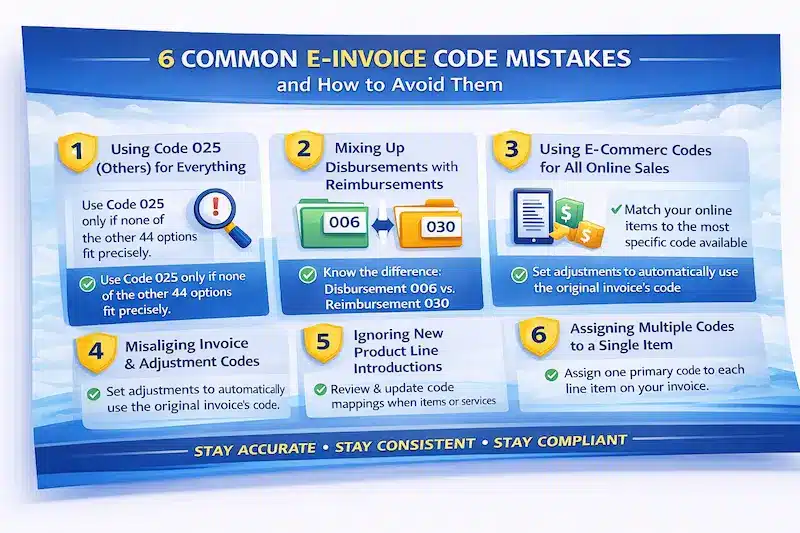
Based on common pain points Malaysian businesses face during the e invoicing transition, here are the most frequent classification code mistakes and how you can prevent them.
Mistake 1: Defaulting to Code 025 (Others) Too Quickly
Many businesses treat Code 025 as a default because it feels safe and non committal. But that defeats the point of classification and can invite closer review by LHDN. Before you use Code 025, make sure you have genuinely checked that none of the other 44 codes fit. In most cases, a more specific option exists.
Mistake 2: Confusing Disbursements and Reimbursements
Code 006 (Disbursement) and Code 030 (Reimbursement) often get mixed up. A disbursement is a cost you pay on behalf of your client and recover without markup. A reimbursement is a cost you pay first as the service provider, then recover later from the client. The outcome may look similar in your books, but they are legally different and can carry different tax implications.
Mistake 3: Using E-Commerce Codes for All Online Sales
Not every online sale should use Code 008 or 009. If a more specific code fits, such as Code 003 for computers or Code 010 for education fees, use that code even when the sale happens through a digital platform. The e commerce codes are fallback categories for cases where no better match exists.
Mistake 4: Inconsistent Codes Between Original Invoices and Adjustments
When you issue credit notes, debit notes, or refund notes, you might accidentally assign a different classification code from the original invoice. That mismatch can cause validation failures or audit flags. To avoid this, configure your system to carry forward the original code automatically.
Mistake 5: Not Updating Codes When Product Lines Change
When you expand your product or service offerings, your old code mapping can become outdated fast. If you do not update it, new items may inherit irrelevant codes. Run a quick review of your code mapping whenever you launch a new line, adjust pricing bundles, or change how you package services.
Mistake 6: Applying Multiple Codes to a Single Line Item Incorrectly
Each line item in an e invoice must have one classification code. If one product spans multiple categories, pick the primary classification and keep it consistent. If you try to assign multiple codes to one line item, expect a validation error.

Updating Codes Inside Your Product Catalogue Without Chaos
When Manual Coding Breaks, And What Software Fixes
A Practical Checklist You Can Use Before You Go Live
To help you put everything in this guide into action, here is a practical checklist for classification code compliance.
Conclusion
Classification codes are not just a formality. They shape how LHDN interprets your transactions and how smoothly your e invoices move through MyInvois. If you map codes carefully, choose the most specific option, and keep the same code consistent across invoices and adjustment documents, you reduce validation issues and keep your records clean.
With e invoicing expanding to more businesses in Malaysia, it makes sense to tighten your process now, not later. Automate code mapping in your invoicing system, train your team on the common mistakes, and review your catalogue regularly so new products do not inherit the wrong codes. Do this early, and you will avoid disruptions, maintain a reliable audit trail, and stay ready for future updates.
If you want to make this easier from day one, you can book a free demo to see how automated classification code mapping works inside your invoicing workflow, how adjustments keep the same codes as the original documents, and how your team can reduce MyInvois validation errors without relying on manual checks.
Frequently Asked Questions About E Invoice Classification Codes
-
What is an e invoice classification code in Malaysia?
It is a required field in every MyInvois e invoice that tells LHDN what type of product or service you are billing. You need at least one valid code that matches each line item.
-
What happens if you use the wrong classification code?
You may face MyInvois validation errors, rejected submissions, delays, and higher compliance risk if the code does not match the actual transaction.
-
Is the classification code the same as the tax code or unit of measurement code?
No. The classification code describes the type of item or service. Tax codes and unit codes serve different purposes, so do not mix them up.





















