


















Malaysia is moving quickly with e invoicing, and you cannot treat it as a future problem anymore. If you handle payouts, procurements, or distributions, you will run into situations where you must document a payment even when the payee cannot issue the invoice for you.
Self billing is the part that trips people up the most because it flips the usual workflow. You do not wait for the supplier to invoice you. You create the compliant record yourself, then you submit it for validation. If you miss this step in the wrong scenario, you create a compliance gap that can come back during review.
In this article I will walk you through what self-billed e-invoicing means in Malaysia, the exact scenarios where you need it, and the steps you can follow to submit and store it properly. Read until the end because I will also include practical examples that you can mirror inside your own payment runs.
Key Takeaways
|
What Is a Self-Billed E-Invoice?

A self billed e invoice is an electronic invoice you create as the buyer and submit for validation on behalf of the payee. In a regular invoicing flow, the supplier issues the invoice after delivering goods or services. In a self billed flow, you take responsibility for creating the invoice record because the payee cannot issue a compliant document through Malaysia’s system, or the rules place that obligation on you.
Once the portal validates the document, you can treat it as an official tax record. You will receive a unique reference number and a QR code linked to the validated record. That validated file supports your expense claim and gives the payee a formal record of the income.
This is not a workaround. The tax authority recognises self billing as a regulated mechanism, and it applies only to specific payment categories. If you make payments in those categories and you skip the self billed document, you risk gaps in documentation and potential issues when you claim deductions.
If your team still uses preliminary pricing documents, make sure everyone understands the difference between proforma invoice and a tax invoice, because a preliminary document will not replace a validated e invoice in Malaysia.
Self-Billed E-Invoice vs Regular E-Invoice Key Differences
If you only remember one thing, remember this. In a regular flow, the supplier starts the document. In a self billed flow, you start it. That one switch changes how you collect data, when you submit, and what you need to prepare before payment goes out.
| Dimension | Regular E-Invoice | Self-Billed E-Invoice |
|---|---|---|
| Who creates the document | Supplier / Seller | Buyer / Payer |
| Typical trigger | Goods delivered or services rendered | Payment made to a party unable or not required to issue an e-invoice |
| Supplier TIN required | Yes — supplier’s own TIN | Yes if available; placeholder EI00000000010 used for foreign suppliers |
| Submission to MyInvois | By the supplier | By the buyer |
| Validation authority | LHDN via MyInvois | LHDN via MyInvois (same portal) |
| Legal status post-validation | Fully compliant tax document | Fully compliant tax document |
| Common use cases | B2B product/service sales, retail | Agent commissions, foreign purchases, individual payments, e-commerce payouts |
One detail matters here. Self billing does not replace a supplier obligation in cases where the supplier is capable of issuing a validated invoice through the portal. When you receive a valid invoice from the supplier, you should not duplicate the record.
When Is a Self-Billed E-Invoice Required? All Scenarios
LHDN lists nine special payment categories where you need to issue a self billed e invoice. This obligation does not apply to every supplier that delays invoicing. It applies only to these prescribed scenarios.
1. Payments to Agents Dealers and Distributors
When you pay commissions, fees, or similar compensation to agents, dealers, or distributors, you need to create a self billed document for each payment cycle. This shows up frequently in insurance, direct selling, automotive distribution, and property agencies.
If your company pays a large network monthly, you should not rely on manual entry. Build a repeatable process that links commission calculations to validated records.
2. Purchases from Foreign Suppliers Cross Border
When you purchase goods or services from a foreign supplier, the supplier usually cannot issue a Malaysia compliant invoice through the portal. In this case you create the self billed document on their behalf.
You can use the allowed placeholder supplier TIN EI00000000010 for foreign suppliers without a Malaysia TIN, then you still capture the supplier name, country, currency, and any invoice reference you received from them.
3. Purchases from Individuals Not Conducting a Business
When you pay an individual who is not running a registered business, you should not expect them to issue an invoice through the system. Common examples include private rent paid to an individual landlord, one off professional work, or ad hoc purchases from private individuals.
You create the self billed record to support your expense documentation. Collect identification details you are permitted to keep and store them securely.
4. E Commerce Transactions
If you operate a marketplace or platform and you remit settlement amounts to sellers, you may need to issue a self billed document for each settlement payout. This becomes challenging when you process large volumes daily or weekly.
If you run scheduled payouts, align your documentation with recurring payment structures so each settlement cycle produces the correct validated records.
5. Profit Distribution Dividends
When you distribute profits to shareholders, including dividends, you may need to issue a self billed e invoice for each distribution. You should plan this inside your corporate calendar so documentation does not lag behind the actual fund transfer.
6. Interest Payments
When you pay interest to lenders, bondholders, or related parties, you may need to issue self billed documentation for the interest portion. Separate principal and interest clearly so your record remains consistent with your agreements.
7. Insurance Claims and Compensation Payments
When you pay claims or compensation, you may need to issue a self billed e invoice to document the payout. This often applies to insurers and also to businesses that make settlement payments or ex gratia compensation.
8. Foreign Income Received in Malaysia
In some situations, when you receive foreign sourced income and the foreign payer cannot issue a Malaysia compliant invoice, you may need to self bill to document that income. This can be nuanced, so you should check current LHDN guidance relevant to your income type.
9. Betting and Gaming Payouts
Licensed betting and gaming operators need to issue self billed e invoices when paying out winnings. Winners do not issue invoices, so the operator documents each payout through the same validation channel.
Exemptions When Self Billed Is Not Required
Self billing does not apply to every payment.
If the transaction does not fall within the nine prescribed categories, you generally do not need to issue a self billed document. If the supplier issues a valid invoice through the portal, your self billing obligation does not apply for that transaction.
LHDN may also publish exemptions or clarifications through official updates. You should monitor changes and update your internal payment matrix so your team does not over document or under document.

How to Issue a Self Billed E Invoice Step by Step
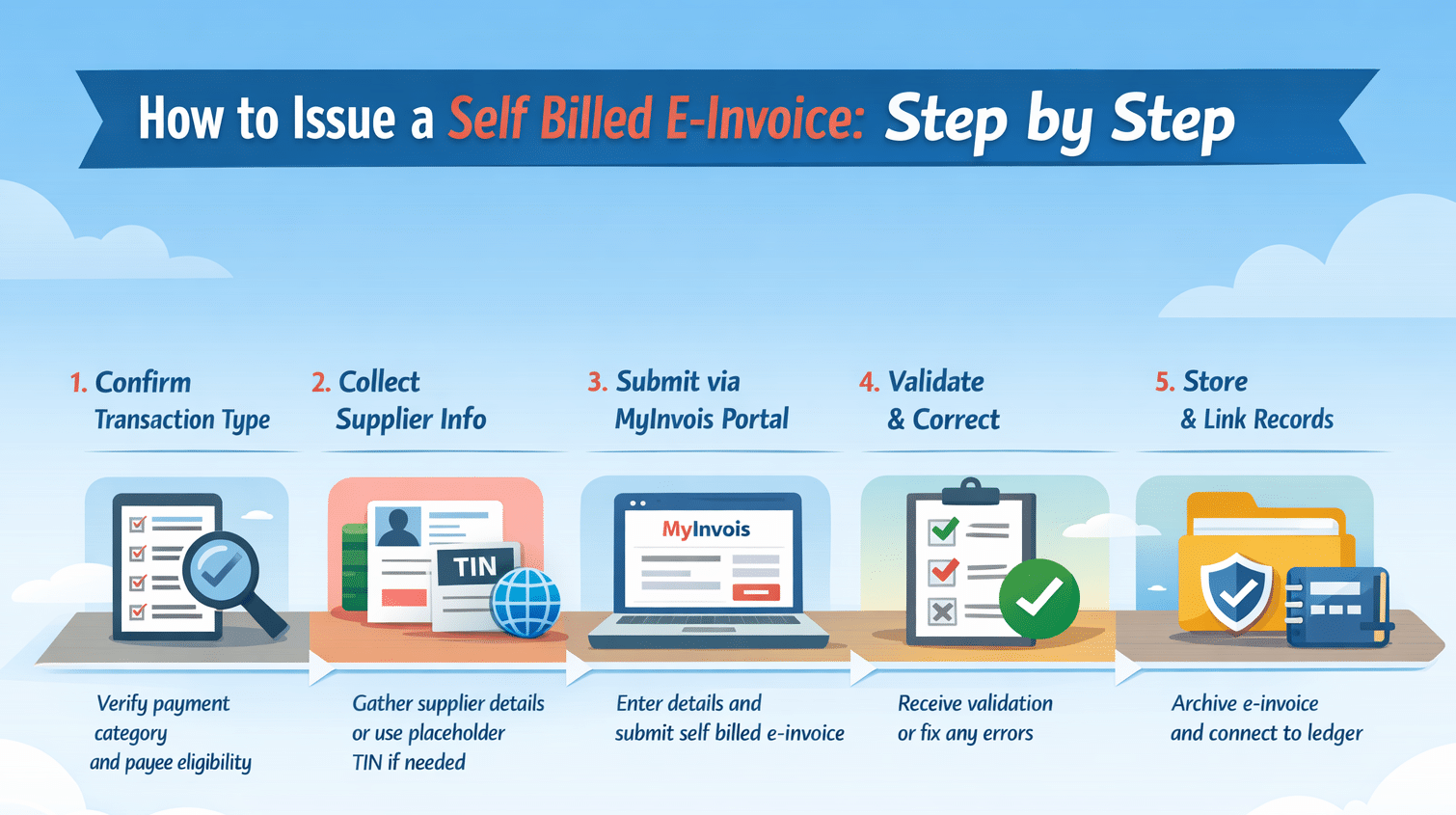
Self billing follows a structured workflow that mirrors a regular submission, but you take responsibility for data preparation.
Step 1 Identify the Transaction Type
Start by confirming that the payment matches one of the prescribed categories. Look at the payee type, the payment purpose, and whether the payee can issue an invoice through the portal. If it does not match, stop and reassess.
Step 2 Gather Supplier Details
Prepare the payee details you will insert as supplier information. Capture the name, address, and identifiers where available. Use the placeholder only when the payee genuinely lacks a Malaysia TIN, such as a foreign supplier.
For Malaysian entities, use real identifiers. For individuals, use accurate identification details and keep your records tidy.
Step 3 Create and Submit Through MyInvois
Log in to the portal and select the self billed document type. Fill in your buyer details as issuer and input the payee details as supplier.
Describe the transaction clearly. Add line items that reflect the payment reason such as commission, subscription, interest, dividend, settlement, or claim. If you pay in foreign currency, record the foreign amount and the ringgit equivalent based on your applied exchange rate.
If you handle high volume submissions, connect your internal system through the MyInvois API so you can submit in batches and avoid repetitive manual entry.
Step 4 Validation by the Portal
After submission, the portal checks the document. If it validates, you receive the reference number, validation timestamp, and QR code. If it rejects, fix the issue and resubmit immediately. Do not treat a rejected record as compliant.
Step 5 Store for Record Keeping
Malaysia requires you to retain tax records for long periods, so store the validated file with its reference. Link it to the payment transaction and ledger entry. This will save you time during audits and reconciliation.
Data Checklist That Prevents Portal Rejections
Before you submit any self billed document, pause for a quick internal check. Most validation issues do not come from complex tax rules. They come from incomplete or inconsistent data.
If you clean your input before submission, you reduce rejection cycles and save your team from unnecessary rework.
For Malaysian Companies and Registered Businesses
Make sure you confirm the correct tax identification number. Use the official SSM registration number exactly as registered. Enter the registered business address, not a branch address unless it is officially recorded. Double check spelling of the legal entity name. Even minor variations can create confusion in reconciliation.
For Malaysian Individuals
Use the full name as per identification records. Ensure identification details match your internal payment records. Confirm the address if required for your documentation standard.Do not assume that individual payees do not need accurate data. Inconsistent identification details often lead to documentation mismatches during review.
For Foreign Suppliers
Use the legal entity name exactly as stated in the supplier invoice.
Insert the country of origin clearly. Apply the allowed placeholder tax identifier only when the supplier genuinely does not have a Malaysia TIN. Record both the foreign currency amount and the ringgit equivalent using your applied exchange rate.
Internal Consistency Check
Make sure the payment amount matches the document amount exactly. Confirm the transaction description reflects the actual purpose of payment such as commission, subscription, dividend, or settlement. Ensure the submission timing aligns with your payment release schedule.
A few extra minutes spent reviewing these fields can prevent repeated submission attempts. If your team processes high volumes, building this checklist into your approval workflow will significantly reduce validation friction.
Conclusion
Self billing in Malaysia is not an edge case. It is part of the mainstream e invoicing framework, and it affects more payment types than many teams initially expect. When you understand the nine prescribed categories, prepare accurate payee data, and submit documents through the portal at the right time, you protect both your tax position and your audit trail.
Instead of treating self billing as an administrative burden, treat it as a structured finance control. When your process is clear and consistent, documentation stops being reactive and becomes part of your standard payment discipline.
Frequently Asked Questions About Self Billed E-Invoice
-
When do you need a self billed e invoice in Malaysia?
You need to issue a self billed e invoice only when the payment falls under one of the nine prescribed categories listed by LHDN. If the transaction does not fall within those categories, self billing does not apply.
-
What if the supplier can issue a validated invoice?
If the supplier is able to submit a valid invoice through MyInvois, you should use that validated document and avoid creating a duplicate self billed record.
-
What information should you prepare before submission?
Prepare the payee’s legal name, address, and tax identifiers where available. Use the placeholder EI00000000010 only for foreign suppliers who do not have a Malaysia TIN.
-
What should you do if MyInvois rejects your submission?
Review the error message, correct the inaccurate or incomplete fields, and resubmit the document until it is validated. A rejected record is not considered compliant.
-
How can you manage self billing at high volume?
Build a repeatable workflow and use batch submission through the MyInvois API to keep payment processing and validation status aligned, especially when handling recurring payment structures.





















