
Running a successful coffee shop takes more than great beans and skilled baristas. Daily operations at the counter and behind the bar strongly affect profit and customer satisfaction. When the morning rush hits, every second matters.
A dedicated cafe POS helps keep everything running smoothly. It acts as a platform for automating cafe operation, connecting customer orders, cashier input, barista preparation, and payment processing in one system. This coordination reduces mistakes and speeds up service.
Modern POS systems do far more than act as digital cash registers. Cloud-based tools now handle custom drink orders, split bills, and track sales in real time. With the right system, café owners can manage operations better and grow their business efficiently.
Key Takeaways
Learn how a cafe POS combines hardware and software to manage orders, payments, and daily operations efficiently.
Discover how POS systems speed up ordering, streamline kitchen communication, and support fast payment processing.
Learn how modifiers, table management, and split billing help cafés manage complex orders smoothly.
Understand how POS systems help cafés handle morning rush hours with faster service and fewer order errors.
What Is a Cafe POS System?
A cafe POS system combines software and hardware designed for coffee shops, bakeries, and small cafés. Unlike basic retail systems that only process payments, a café POS manages fast orders, custom drink requests, and busy service hours. Staff use it to enter orders and send details directly to baristas or kitchen teams.
Most modern cafe POS systems run on cloud technology. Owners can update menu prices, add seasonal drinks, and monitor sales from anywhere using a phone or laptop. Changes appear instantly across all terminals, which keeps operations consistent across the café.
The system usually includes a touchscreen terminal, payment reader, cash drawer, and receipt printer. Many cafés also use kitchen display screens to organise incoming orders. Beyond processing payments, a cafe POS can track inventory, record staff hours, and support loyalty features such as a built-in coffee shop loyalty program.
How POS Supports Daily Cafe Operations
"A reliable cafe POS system does far more than process payments. It connects orders, staff communication, and business insights into one platform, helping café owners run faster, smarter, and more profitable operations."
Running a café requires speed, accuracy, and smooth communication. A cafe POS helps staff manage orders, send them to preparation areas, and process payments efficiently. This system keeps daily operations organised, especially during busy morning rush hours.
Taking Orders Quickly at the Counter
The counter is often the busiest part of a café. A cafe POS uses a visual menu with categories like hot drinks, iced beverages, teas, and pastries. Staff can tap items quickly without scrolling through long lists.
Colour-coded buttons and images help cashiers recognise items instantly. Many systems also place popular drinks like flat whites on the main screen. This setup speeds up service and helps new staff learn the system faster.
Sending Orders to the Kitchen
After a cashier confirms an order, the system sends the details directly to the barista or kitchen. Coffee orders go to the barista station, while food items reach the kitchen team. This keeps communication clear and reduces mistakes.
Many cafés now use kitchen display screens instead of paper tickets. These screens organise orders clearly and highlight special requests like oat milk or extra hot drinks. Timers also help staff keep track of waiting times.
Processing Payments Efficiently
Modern POS systems support multiple payment methods such as cards, mobile wallets, and contactless payments. The system sends the exact amount to the terminal automatically, which reduces manual errors.
Customer-facing displays also allow quick tipping before payment. Some systems include offline mode, so the café can continue accepting payments even if the internet temporarily drops.
Features Designed for Cafe Workflows
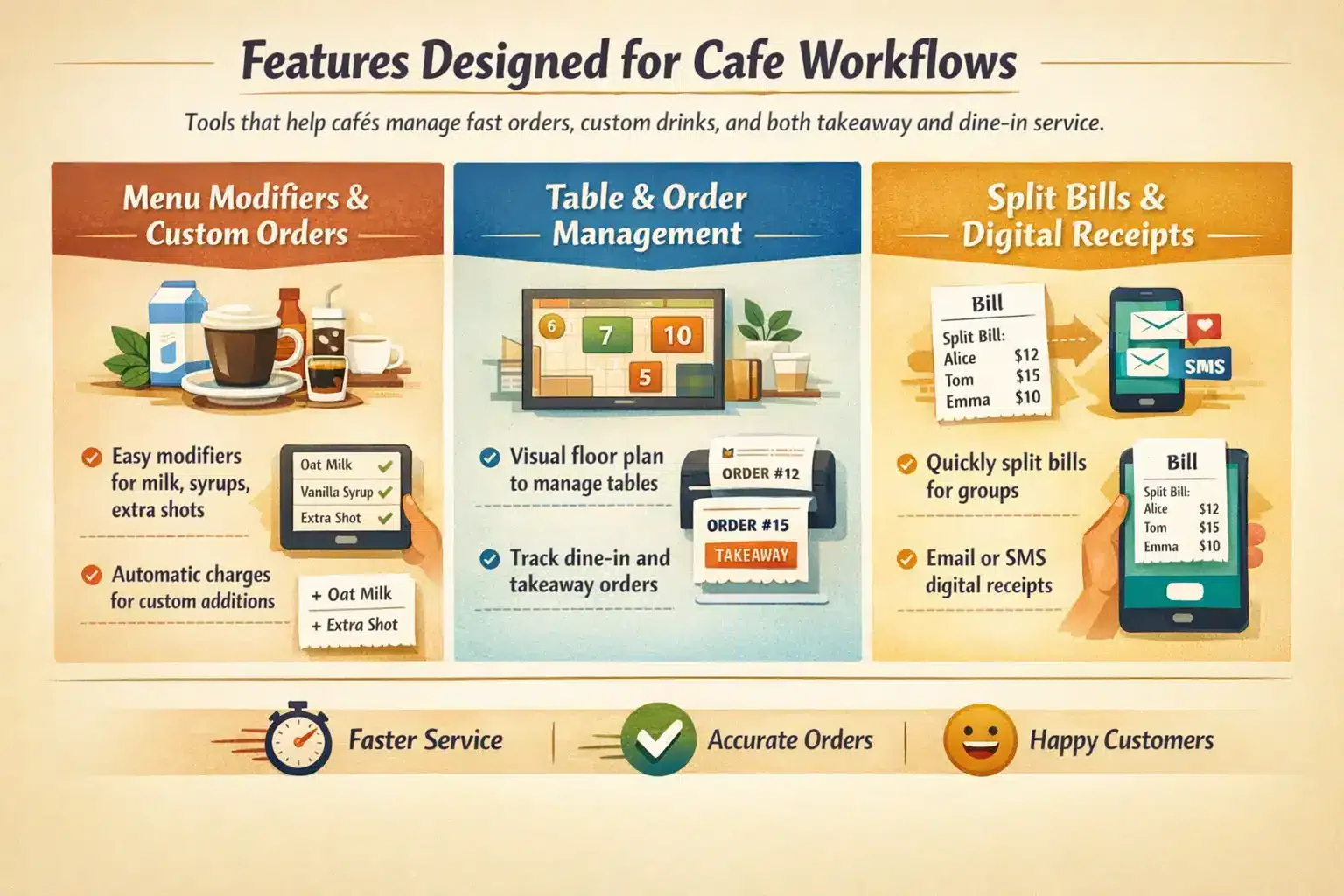
Cafés handle fast orders, custom drinks, and both takeaway and dine-in service. A specialised cafe POS includes features built for these workflows. These tools help staff manage complex orders without slowing service.
Menu Modifiers and Custom Orders
Coffee drinkers often customise their orders with milk alternatives, syrups, or extra espresso shots. A cafe POS includes menu modifiers that guide staff through these options step by step. This ensures orders are accurate and priced correctly.
The system automatically adds charges for extras like oat milk or additional shots. Baristas also see clear instructions on their screen or ticket. This reduces mistakes and ensures customers receive exactly what they ordered.
Table and Order Management
Many cafés offer both takeaway service and dine-in seating. A cafe POS can display a visual floor plan where staff open and manage tables easily. Orders go directly to the kitchen while the system tracks table status.
Staff can move orders between tables if customers change seats. The system also separates dine-in and takeaway orders. This keeps service organised and prevents confusion during busy periods.
Split Bills and Digital Receipts
Splitting bills can slow service when groups want to pay separately. A cafe POS lets staff divide the total evenly or assign items to each guest in seconds. This removes manual calculations and reduces queues at the counter.
After payment, customers can choose a digital receipt by email or SMS. This reduces paper waste and helps cafés collect contact details for marketing or loyalty programs.
Managing Peak-Hour Service With POS
Morning rush hours are the biggest test for any café. Between 7 AM and 9 AM, many shops process a large portion of daily sales. A reliable cafe POS helps staff manage high demand without delays or confusion.
Faster Checkout During Rush Hours
A fast POS interface allows cafés to process orders quickly. Some cafés also use tablets as a portable POS system to take orders while customers wait in line. Orders are sent straight to the barista, reducing queues and improving service flow.
Reducing Order Errors
Speed matters during rush hours, but accuracy is just as important. A cafe POS displays orders on a customer-facing screen so customers can confirm details before paying. Clear digital tickets also help baristas read modifiers like oat milk or extra shots easily, which reduces mistakes and wasted drinks.
Improving Staff Coordination
During peak periods, clear communication between staff keeps service smooth. A cafe POS allows managers to update menu items instantly, such as marking products out of stock. The system can also control staff permissions so cashiers, supervisors, and managers each access only the tools they need.
Industry Use Cases: Tailoring the POS to Your Cafe Model
Different café models operate in different ways. A flexible POS adapts to each workflow while maintaining consistent software for cafe operations.
Drive-Thru Coffee Stands
Drive-thru cafés focus heavily on speed of service. Staff often use handheld tablet POS devices to take orders from cars waiting in line. The system sends orders straight to the barista so drinks can be prepared before the customer reaches the window.
Hybrid Bakery-Cafes
Bakery cafés manage both drinks and freshly prepared food. A cafe POS helps track ingredients like flour, butter, and coffee beans as items sell. Kitchen display screens also send drink orders to the bar while food orders go to the kitchen.
Multi-Location Roasteries
Roasteries that run several cafés rely on centralised POS reporting. Owners can compare sales across locations and manage menus from one dashboard. Many systems also track customer loyalty and wholesale orders in the same platform.
Step-by-Step Implementation: Rolling Out Your New Cafe POS

Transitioning to a new cafe POS system or installing one for the first time requires meticulous planning. A rushed deployment can lead to barista frustration, lost sales, and a poor customer experience. Following a structured implementation process ensures a seamless transition.
Phase 1: Pre-Deployment Planning and Network Assessment
• Check that your café has a stable internet connection for cloud POS use.
• Use a dedicated router for business operations, separate from guest Wi-Fi.
• Plan the counter layout to place terminals, printers, and payment devices efficiently.
Phase 2: Menu Engineering and Modifier Setup
• Build a digital menu with clear categories such as coffee, tea, and pastries.
• Set up modifiers for milk options, syrups, drink size, and espresso shots.
• Use colour-coded buttons and logical prompts to speed up order entry.
Phase 3: Hardware Installation and Integration Testing
• Install terminals, printers, cash drawers, and payment readers.
• Test that orders reach the correct preparation station.
• Run payment tests using cards, mobile wallets, and gift cards.
Phase 4: Comprehensive Staff Training
• Train staff outside business hours using practice orders.
• Teach them how to process refunds, void items, split bills, and apply discounts.
• Practice busy scenarios so staff feel confident during real rush hours.
Phase 5: The Soft Launch and Optimization
• Launch the system during a slower period of the week.
• Let staff adjust to the POS without peak-hour pressure.
• Gather feedback and refine menu buttons or modifier flows if needed.
Common Pitfalls to Avoid with Cafe POS Systems
Even with the best technology, operational missteps can hinder your cafe’s success. Being aware of common POS pitfalls allows you to proactively safeguard your business.
Overcomplicating the Menu Screen
Many cafe owners place every item on the main POS screen. This makes the interface messy and slows staff during busy periods. Cashiers should not scroll through several pages just to find a standard coffee.
Keep the most popular drinks and food items on the home screen. Place seasonal or less common products in clear sub-menus so staff can still access them quickly.
Ignoring Offline Functionality
Internet outages still happen, even in busy city areas. If the POS cannot work offline, your café may stop taking orders or payments.
Choose a POS that stores transactions locally when the internet drops. Staff should also know how to sync payments once the connection returns.
Neglecting Data Security and User Permissions
Some cafes allow every employee to access the same POS permissions. This creates risks such as accidental refunds, unauthorised discounts, or cash drawer misuse.
Set role-based permissions for each staff member. Only supervisors or managers should approve refunds, voids, or large discounts.
Failing to Leverage Analytics
Many owners use their POS only to process payments. They ignore the sales data that could help improve staffing and inventory decisions.
Regularly review reports such as hourly sales and product performance. These insights help reduce waste and improve planning for busy periods.
Advanced Practices: Maximizing Your Cafe POS Investment
Once your team becomes comfortable with the POS, you can use advanced features to improve efficiency and customer loyalty. These tools help cafes run smarter and make better decisions using real data.
Predictive Inventory and Automated Ordering
Modern POS systems analyse past sales to forecast inventory needs. This helps cafes estimate how much milk, beans, and ingredients they will require each week.
Some platforms also generate purchase orders automatically. Suppliers receive these orders directly, saving managers time and reducing stock shortages.
Omnichannel Loyalty Programs
Customers interact with cafes across multiple channels. A modern POS can connect in-store purchases with online orders and mobile apps.
When loyalty points sync across every platform, customers enjoy a smoother experience. This encourages repeat visits and builds long-term customer value.
API Integrations for Accounting and Marketing
POS systems work best when connected with other business tools. API integrations allow your POS to sync directly with accounting or marketing platforms.
Sales data can automatically transfer to accounting software, reducing manual work. Customer emails collected from digital receipts can also flow into marketing campaigns.
Dynamic Pricing and Seasonal Menu Automation
Some cafes use POS tools to automate pricing changes and seasonal menus. For example, iced drinks can receive afternoon discounts during slower hours.
Managers can also schedule seasonal menus in advance. The POS updates items automatically, helping staff promote new drinks without manual changes.
Conclusion
Running a café becomes much easier when the right POS system supports daily operations. From fast order entry to accurate payments and kitchen communication, a well-configured system helps staff serve customers quickly while reducing mistakes.
A modern cafe POS also provides valuable insights that help owners improve inventory planning, staffing, and promotions. When used correctly, it becomes a powerful tool for long-term growth. If you want to implement the right system for your café, consider booking a free consultation to explore the best POS solution for your business.