

















A busy cafe during the Saturday lunch rush quickly turns into a crisis when the WiFi fails. Many businesses lose sales because their tools stop working without a stable internet connection. The Malaysian Department of Statistics (DOSM) confirms that while the digital economy is growing connection stability still haunts many local shops when the network goes down.
Reliable POS systems fix this by staying active during network drops to keep your transactions moving. This guide groups tools by their actual strengths so you can find a fit that works in real world conditions. You can finally match your system expectations with your daily operational reality to ensure long term success.
Picking a tool that handles peak hour stress is the first step toward better control. This article explains the best options to help you stay open when the internet is down. Read on to find the right choice for your business needs.
Key Takeaways
|
Without the right POS system, Malaysian businesses often face inaccurate sales data, inventory blind spots, and difficulty managing multiple locations efficiently. If these challenges sound familiar, see how the right POS system can streamline your operations from day one.
Shortlisted POS System
A modern POS system streamlines inventory tracking, payments, and customer data far better than outdated setups. With cloud adoption already mainstream, IT Desk reports that 96% of organizations already use cloud-based software, which is why cloud-powered POS tools now deliver real-time visibility for faster, smarter decisions. Based on that, I’ve shortlisted the best POS systems for 2026 that balance performance and ease of use across retail, F&B, and hospitality.


Best Because Real-time inventory sync, e-commerce integration, customizable receipts.

Best Because Cross-platform POS with sales tracking and CRM tools.


Best Because Unified with Shopify e-commerce, mobile checkout, sales analytics.

After reviewing the top 6 POS software options above, you may want a clearer comparison of how each system differs. With many choices available, it can be difficult to identify which one truly fits your business needs. The table below provides a quick overview to help you decide more easily.
Quick Overview POS System
| Software | Best For | Strength | Why We Choose This Software | Malaysia Support | Status |
|---|---|---|---|---|---|
HashMicro POS System |
Retail, F&B, Multi-outlet, Enterprise | End-to-end POS with strong ERP integration and multi-outlet management | Supports complex business operations with centralized control and scalability | Strong local presence and support | Fully Supported |
ConnectPOS |
Retail, Omnichannel | Omnichannel POS with real-time sync between online and offline sales | Ideal for businesses managing both eCommerce and physical stores | Available with regional support | Supported |
Shopify |
Retail, Omnichannel | Powerful eCommerce ecosystem with integrated POS capabilities | Best for businesses prioritizing online-first sales with offline extension | Available but limited local compliance support | Supported |
Marvelsoft Solutions |
Customization, Local Businesses | Customizable POS tailored for specific business needs | Suitable for businesses requiring flexible and localized system adjustments | Strong local vendor support | Fully Supported |
AutoCount POS System |
Retail, Accounting-focused, Enterprise | POS with strong accounting and financial integration | Ideal for businesses needing accurate financial tracking and reporting | Well-established local support | Fully Supported |
Dinesoft |
F&B, Restaurant | Restaurant-focused POS with table and order management features | Designed for full-service dining operations and complex workflows | Available with local support | Supported |
Red Zone Solution |
Customization, Local Businesses | Custom POS systems with industry-specific implementations | Good fit for businesses needing tailored solutions and hands-on support | Strong local presence | Fully Supported |
Eat365 |
F&B, Restaurant | F&B POS with delivery and kitchen workflow integration | Supports restaurant operations with online delivery platforms | Widely used in Malaysia | Fully Supported |
StoreHub |
Retail, SME | User-friendly POS with built-in CRM and loyalty tools | Suitable for SMEs looking to improve customer engagement | Strong presence in Malaysia | Fully Supported |
Loyverse POS System |
Retail, SME, Budget | Free POS with basic inventory and sales tracking | Ideal for small businesses or startups with limited budget | Available but limited local support | Supported |
POSERVA |
Retail, Multi-outlet | POS with multi-location and operational management features | Suitable for growing businesses needing centralized visibility | Available with regional support | Supported |
IRS Software |
Accounting-focused, Enterprise | POS with strong accounting and business management capabilities | Useful for businesses focusing on financial accuracy and compliance | Local support available | Fully Supported |
Slurp |
F&B, Restaurant | Cloud-based F&B POS with QR ordering and integrations | Supports modern dining experiences and digital ordering | Popular in Malaysia F&B sector | Fully Supported |
Sapaad |
F&B, Multi-outlet | Cloud POS for restaurants with multi-branch management | Designed for scalability across multiple outlets | Available with regional support | Supported |
Genius POS System |
Customization, Local Businesses | Flexible POS with customizable modules for different industries | Suitable for businesses needing tailored workflows | Local vendor support available | Fully Supported |
EasyStore |
Retail, Omnichannel, SME | Omnichannel platform combining eCommerce and POS | Great for SMEs managing online and offline sales together | Strong presence in Malaysia | Fully Supported |
What a POS System Actually Does
A Point of Sale (POS) system is a tool designed to handle sales transactions and support business operations. It enables efficient payment processing and is essential for smooth operations in retail, F&B, and hospitality industries.
A modern POS does more than just process payments:
- Tracks your stock: When you sell something, the system updates your inventory. You can see what’s running low before you run out.
- Shows your sales data: Daily sales, best-selling items, slow movers, peak hours. This helps you make better decisions about what to stock and when to schedule staff.
- Manages customers: Some systems track who buys what, store contact details, and run loyalty programs so customers come back.
- Connects to other tools: Good POS systems link to your accounting software, e-commerce store, or food delivery apps so you don’t enter the same data twice.
- Works across outlets: If you have more than one shop, you can see all locations from one dashboard.
Cloud POS vs Unified POS: What’s the Difference?
While both systems aim to streamline sales operations, each offers a different level of integration and functionality within a business. Here is a difference between cloud POS and unified POS.
| Feature | Cloud-Based POS | Unified POS |
|---|---|---|
| How It Works | Operates online and stores data securely in the cloud; syncs across devices in real time. | Integrates sales from physical stores, e-commerce, and mobile channels into one system. |
| Best For | Businesses needing scalability and real-time access. | Businesses managing multiple sales channels. |
| Key Strength | Automatic updates, easy access, low upfront cost. | Full visibility, loyalty tools, and a streamlined customer journey. |
What Are the Benefits of POS Systems?
POS systems speed up transactions, track inventory in real time, and automate reporting, improving operational efficiency and data accuracy.
- Optimal Stock Levels and Reduced Wastage: Real-time inventory tracking ensures businesses maintain the right stock levels, reducing waste and preventing stockouts.
- Improved Customer Experience: Faster checkouts, personalized services, and loyalty programs enhance customer satisfaction, leading to stronger relationships and repeat visits.
- Secure Transactions: POS systems offer secure payment processing, protecting sensitive customer information and ensuring compliance with security standards.
- Enhanced Employee Management: Employee management features help businesses track work hours, sales performance, and optimize staff schedules.
Overall, POS system Malaysia helps streamline operations, improve accuracy, and enhance customer experiences, giving businesses a competitive edge.
Top 16 POS Systems in Malaysia
With many feature-rich options in Malaysia, choosing the right POS system software malaysia can be challenging. To help, we’ve compiled the top 16 POS systems Malaysia for 2026.
1. HashMicro POS System
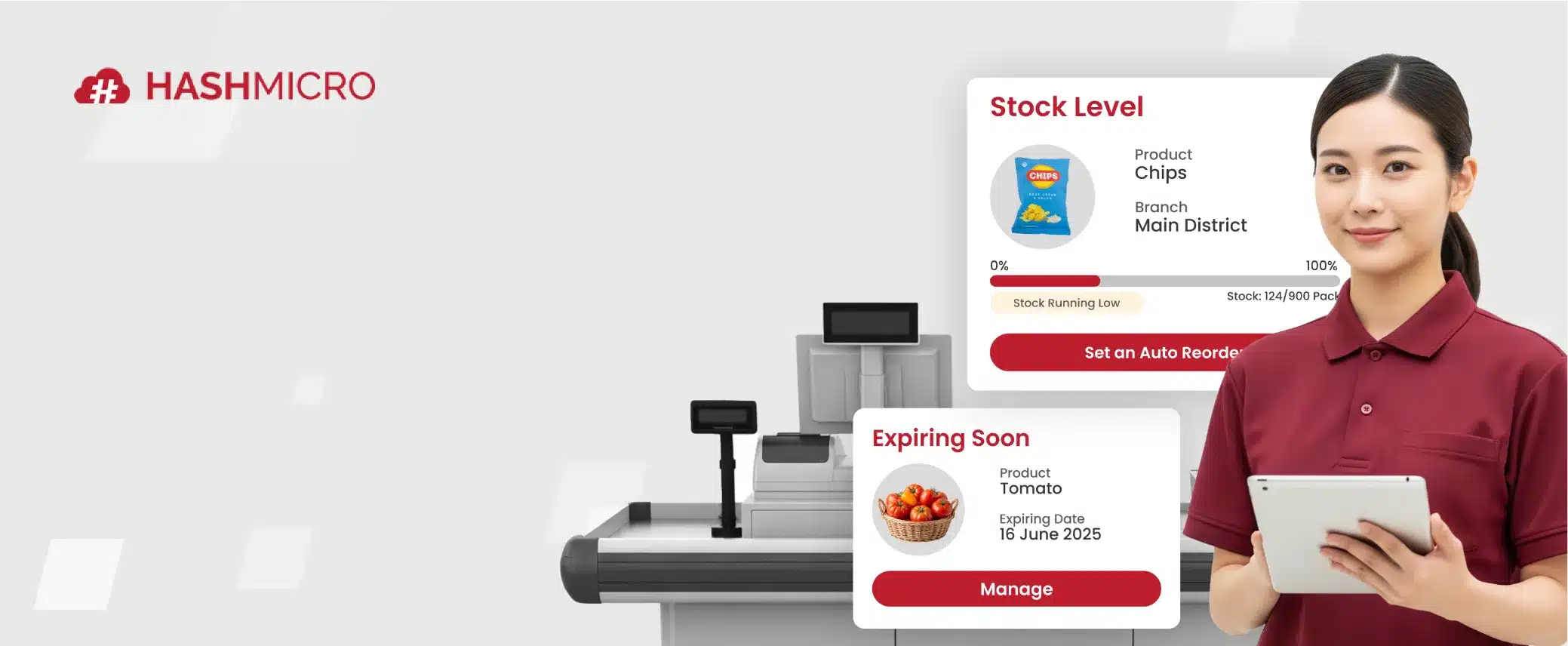
HashMicro offers a POS platform for retail and F&B operations in Malaysia that connects sales, inventory, and reporting in one flow. By syncing transactions with stock movement and basic financial records, it helps teams cut manual updates and keep daily replenishment more controlled, especially when operations get busy.
Key capabilities include inventory-linked stock alerts and reorder points, receipt and end-of-day report templates, product variants and bundles, multiple payment methods including e-wallet support, cashier and salesperson activity tracking, loyalty points, and audit-style reporting for price changes.
Why HashMicro POS System: Businesses choose it for its full ERP integration, real-time inventory tracking, multi-branch management, and user-friendly interface that supports both online and offline operations.
Retail, food and beverage (F&B), and multi-branch businesses that require smooth integration between sales, inventory, and accounting.
| Pros | Cons |
|---|---|
|
|
With these strong features, the HashMicro POS System empowers businesses to optimize their operations, enhance customer satisfaction, and drive growth. Click the banner below to view the pricing scheme.

2. ConnectPOS
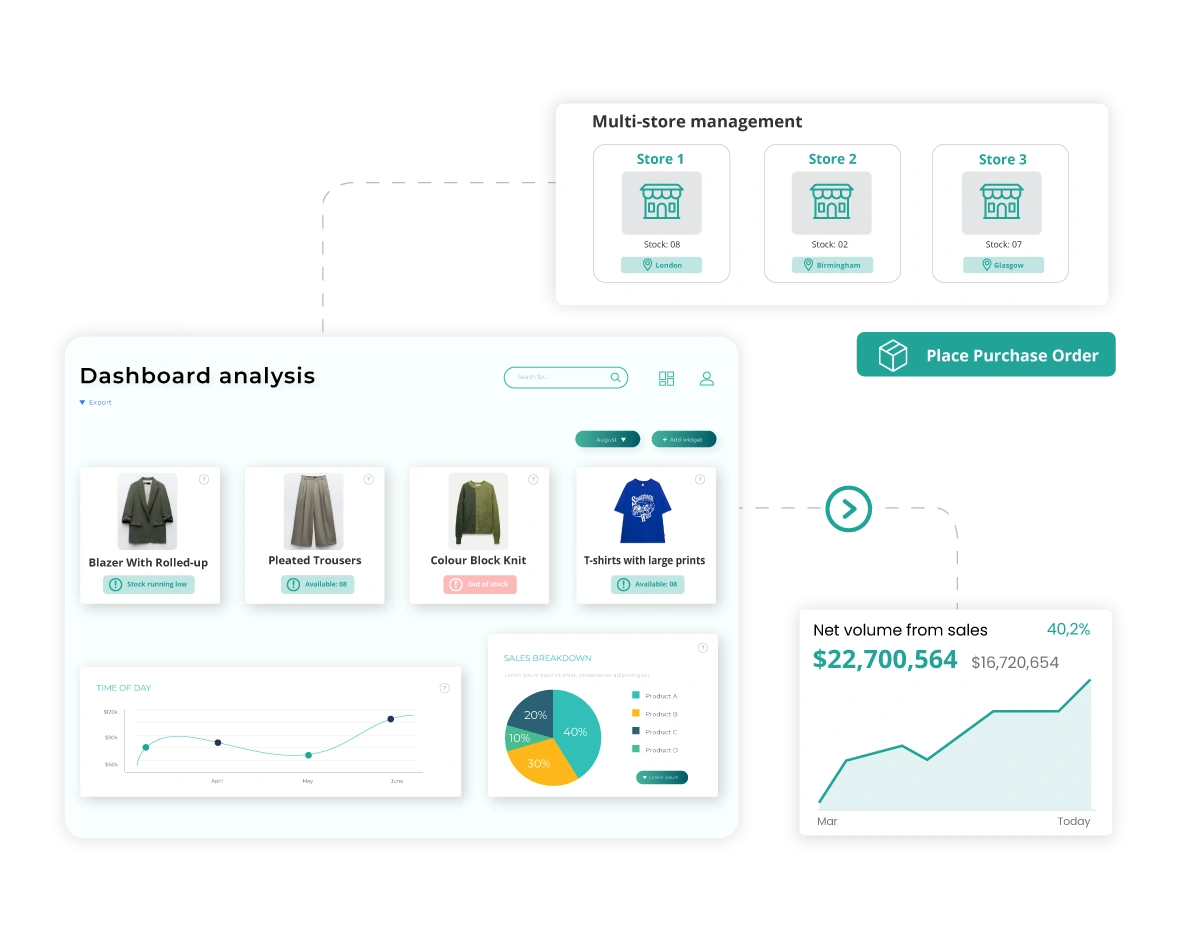
ConnectPOS is a POS system software for restaurant designed to cater to businesses of all sizes.This system integrates perfectly with various e-commerce platforms, allowing businesses to manage their online and offline sales channels from a single system. This software offers features such as real-time synchronization of inventory, customizable receipts, and detailed sales reports.
Best for: Ideal for retail businesses that operate both online and offline, especially those needing multi-location stock management, real-time sync between e-commerce platforms and physical stores, and flexible checkout options.
Pricing: Starts from around RM160 per month (from $39/month)
Businesses choose ConnectPOS because it offers a cloud-native, API-open architecture that supports omnichannel operations, including multiple devices, currencies, and warehouses, while enabling smooth integration with major e-commerce systems.
| Pros | Cons |
|---|---|
|
|
3. Shopify
 Shopify POS is a solid retail POS software integrated with the Shopify e-commerce platform. It allows businesses to manage their online and offline sales from a unified system. Key features include inventory management, customer profiles, mobile checkout, and comprehensive sales analytics.
Why Shopify POS: Businesses choose Shopify POS because it offers a perfect integration between online and in-store operations.
Pricing: Starts from roughly RM120 to RM1,230 per month, depending on plan (from $29–$299/month)
Retailers who operate both e-commerce and brick-and-mortar stores and want one unified platform to manage sales, inventory, customer profiles, and fulfilment across all channels.
| Pros | Cons |
|---|---|
|
|
4. Marvelsoft Solutions

Marvelsoft Solutions provides a Malaysian POS system software tailored for various industries, including retail, hospitality, and F&B. The system is known for its reliable inventory management, sales tracking, and reporting features. It also supports multiple payment methods and integrates with other business management software
Why Marvelsoft Solutions: Businesses choose Marvelsoft Solutions because it combines a strong in-house development and support team with regional service centers, and flawless connectivity between POS, AutoCount accounting, and CRM modules.
Pricing: Available upon request from Marvelsoft.
Retail and F&B businesses in Malaysia and the region that require a fully integrated POS system tied into accounting, CRM, and touch-screen hardware.
| Pros | Cons |
|---|---|
|
|
5. AutoCount
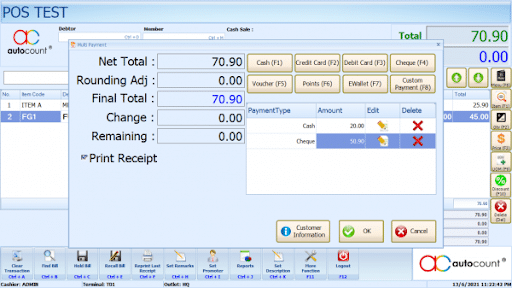
AutoCount POS System is a highly reliable POS solution that is widely used in Malaysia. It offers comprehensive features, including inventory management, customer loyalty programs, and detailed financial reports. AutoCount POS software is known for its integration with accounting software, making it a preferred choice for businesses that require precise financial management.
Why AutoCount POS: Users choose AutoCount POS because it offers offline-capable transactions with real-time sync, compliance with Malaysian tax and electronic invoicing requirements., reliable inventory and stock-control features, and tight integration with AutoCount’s accounting modules.
Pricing: One-time licence from RM2,000 to RM2,800, depending on edition.
Retail and F&B businesses in Malaysia, particularly those with multiple outlets or branches, seeking comprehensive integration between cashier operations, inventory, and accounting.
| Pros | Cons |
|---|---|
|
|
6. Dinesoft

Dinesoft is a specialized POS system for restaurants that offers features such as table management, order tracking, kitchen display systems, and integration with various payment methods. This POS software aims to streamline restaurant operations, improve order accuracy, and enhance customer service.
Why Dinesoft: Businesses choose Dinesoft because it offers a comprehensive suite of modules built for food & beverage and retail workflows, including tablet ordering, self-ordering, and cloud-based back-office reporting.
Pricing: Starts from RM180 per month.
Restaurants, cafés, fast-food outlets, and multichannel retail operations that require advanced table management, kitchen display integration, and real-time inventory control.
| Pros | Cons |
|---|---|
|
|
7. Red Zone
 Red Zone Solution is a Point of Sales system in Malaysia designed for various industries, including retail and hospitality. It provides inventory management, sales tracking, and customer relationship management features. Red Zone Solution POS software also offers strong technical support and training for businesses to maximize the system’s potential.
Why Red Zone Solution: Businesses choose Red Zone Solution because it couples POS software with compatible hardware and local support.
Pricing: Available upon request.
Retail businesses in Malaysia and the region that require a one-stop provider for POS software, as well as barcode and hardware solutions (including printers, scanners, and displays).
| Pros | Cons |
|---|---|
|
|
8. Eat365
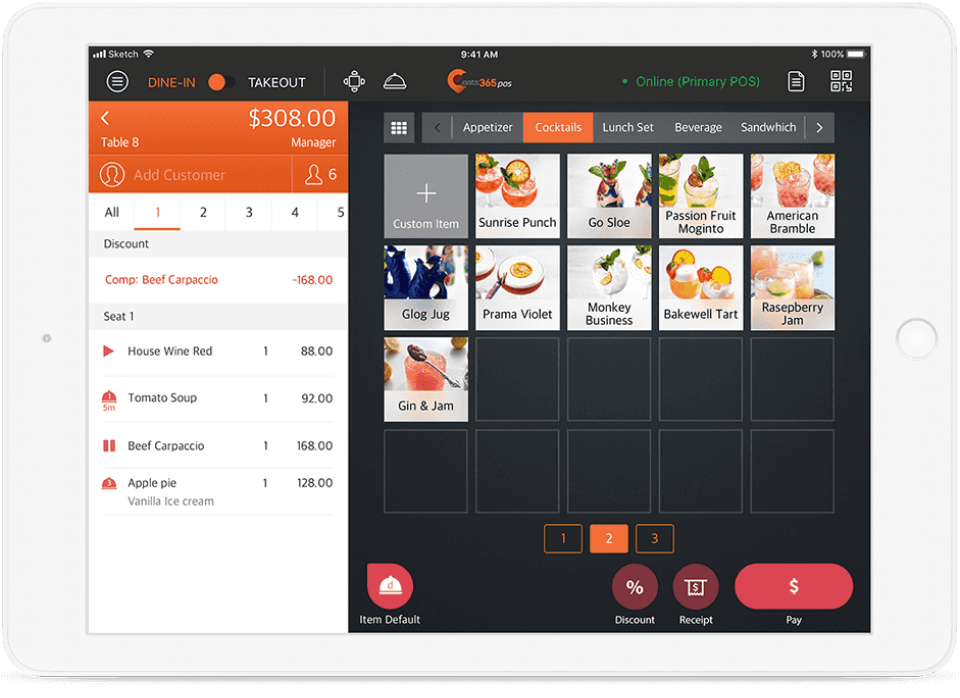 Eat365 is a cloud POS system in Malaysia explicitly designed for the food and beverage industry. It offers features like online ordering integration, kitchen display systems, and customer loyalty programs. By streamlining operations from order taking to payment processing, Eat365 aims to enhance restaurant efficiency and customer experience.
Why Eat365: It offers a unified, cloud-based platform that connects front-of-house, back-of-house, and online operations, supports diverse dining formats and devices, and gives real-time analytics and integrations.
Pricing: Starts from RM99 per month for the Basic plan.
F&B businesses that require an end-to-end solution covering POS, kitchen workflows, online ordering, and multi-location management.
| Pros | Cons |
|---|---|
|
|
9. StoreHub
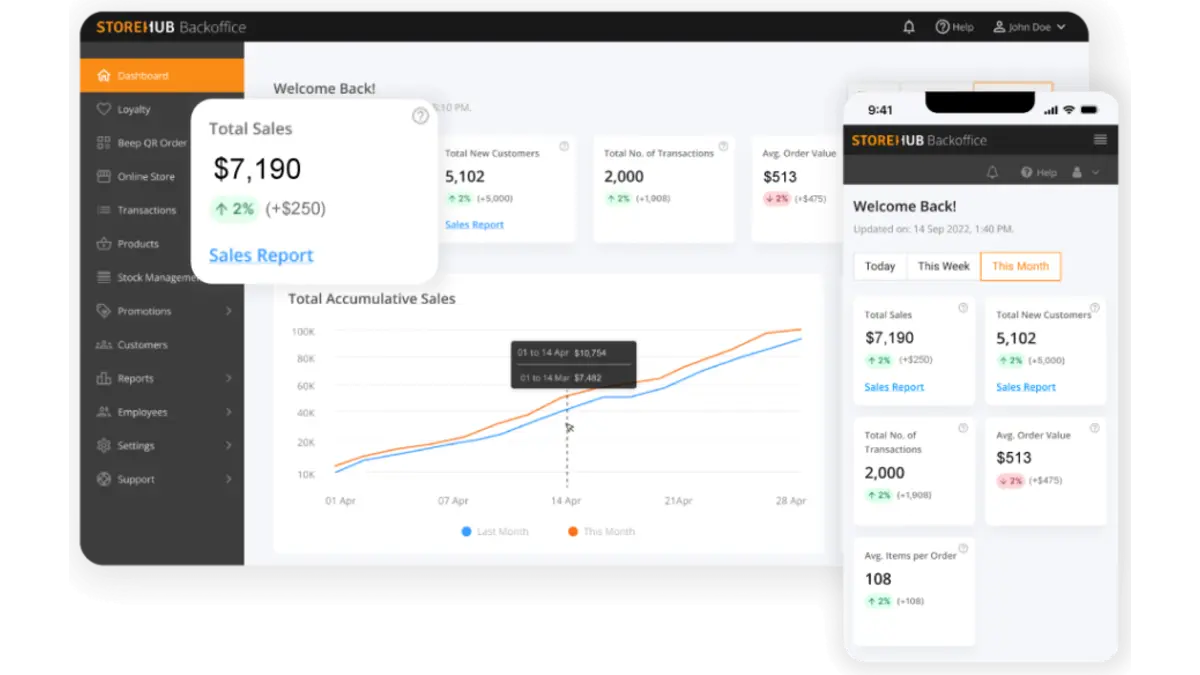 StoreHub is one of the best POS systems designed for retail and F&B businesses. It offers features such as inventory management, sales analytics, customer loyalty programs, and employee management. StoreHub’s cloud-based platform ensures real-time data access and remote management capabilities.
Why StoreHub: It combines real-time inventory tracking, multi-outlet management, integrated loyalty and e-commerce features, and a user-friendly interface that can be used without heavy IT support.
Pricing: Starts from RM102 per month.
F&B and retail businesses in Southeast Asia that need a unified cloud-based POS system to manage in-store sales, inventory across multiple locations, and online/offline channels.
| Pros | Cons |
|---|---|
|
|
10. Loyverse
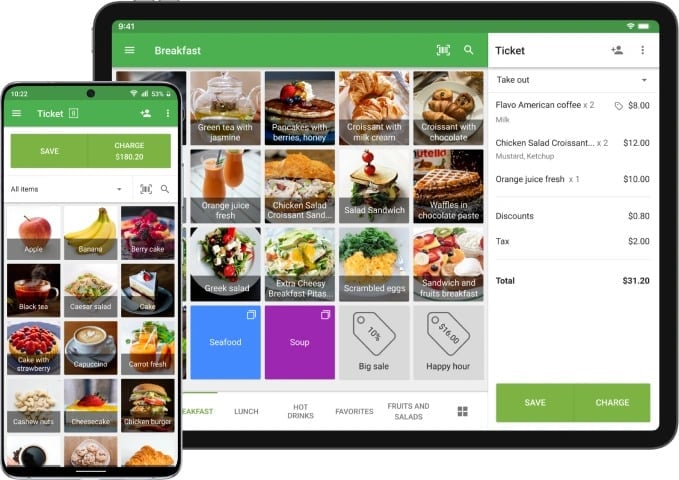
Loyverse POS retail system is designed to meet the needs of businesses across various industries, including retail, food and beverage, and services. The core functionalities of Loyverse point of sales Malaysia include sales tracking, inventory management, and customer relationship management (CRM).
Why Loyverse: It offers an intuitive interface, works offline when internet connectivity is unreliable, supports multiple devices and locations under one account, and includes built-in loyalty and inventory management.
Pricing: Starts from around RM21 per month (from $5/month).
Retail stores, cafés, takeaways, and other small to medium multi-location operations that need a mobile-friendly POS with core features like sales, inventory, and customer loyalty in one system.
| Pros | Cons |
|---|---|
|
|
11. POSERVA

POSERVA offers a solid POS machine in Malaysia designed for retail and F&B businesses. It includes features such as sales tracking, inventory management, customer loyalty programs, and detailed reporting. POSERVA POS system for retail emphasizes ease of use and scalability, making it suitable for businesses of various sizes.
Why POSERVA: It offers AI/IoT-enhanced features like predictive analytics and smart integrations, works offline when needed, and is designed to scale across outlets.
Pricing: Available upon request.
Restaurants, cafés, food trucks, and service-oriented businesses that require a modern POS solution with cloud-based reporting and device flexibility.
| Pros | Cons |
|---|---|
|
|
12. IRS Software
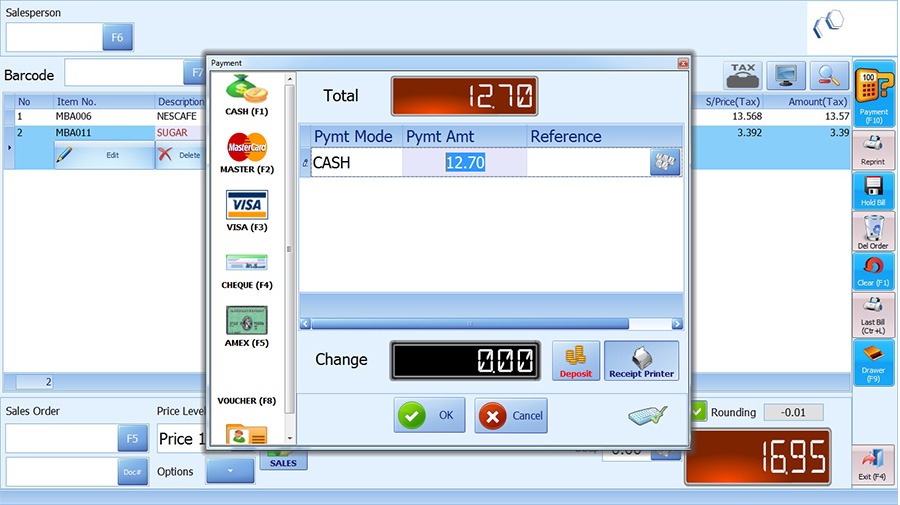 IRS Software is a Malaysian POS system suitable for a range of industries, including retail and F&B. It offers good inventory management, sales tracking, and customer relationship management features. IRS POS Software is known for its reliability and comprehensive support services, making it a trusted choice for many businesses.
Why IRS Software: It offers a long-established presence, strong local support and dealer network, easy-to-use interface, and modules including real-time stock alerts, multi-store synchronization, and e-invoicing compliance.
Pricing: From RM3,200 for the IRS POS System software.
Malaysian retail and F&B businesses seeking a fully-featured POS system with inventory, membership, and multi-store consolidation capabilities.
| Pros | Cons |
|---|---|
|
|
13. Slurp
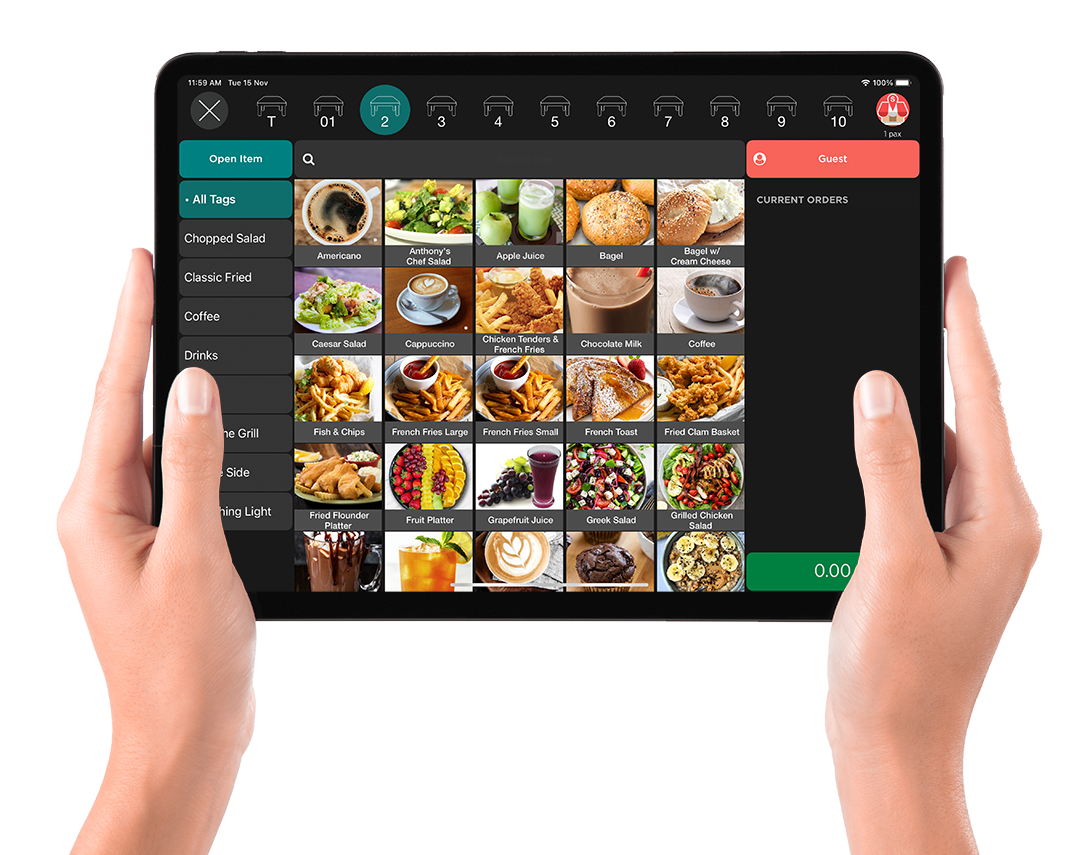 Slurp is a mobile POS system designed for the food and beverage industry. It offers features such as table management, order tracking, and kitchen display integration. Slurp POS software aims to streamline restaurant operations, improve order accuracy, and enhance the customer dining experience.
Why Slurp!: It offers a cloud-enabled, user-friendly platform tailored for F&B operations, supports offline transactions when needed, handles multi-outlet management with real-time monitoring, and integrates effortlessly with ordering, kitchen display, and payment modules.
Pricing: Starts from RM3,990.
Cafés, restaurants, food-courts, kiosks, and other F&B outlets that require full front-of-house to back-kitchen workflow support, including table layout/management, QR ordering, and real-time analytics.
| Pros | Cons |
|---|---|
|
|
14. Sapaad
 Sapaad is an F&B POS system that offers features such as online ordering integration, kitchen display systems, and detailed sales reports. Sapaad’s point of sales system in Malaysia is designed to enhance restaurant efficiency and customer satisfaction by streamlining operations from order taking to payment processing.
Why Sapaad: It delivers a user-friendly interface, strong support services, and comprehensive integrations.
Pricing: Starts from around RM165 per month (from $39.99/month).
Restaurants, cafés, and food & beverage operations that want a cloud-based POS system with integrated inventory, online ordering, and real-time reporting.
| Pros | Cons |
|---|---|
|
|
15. Genius
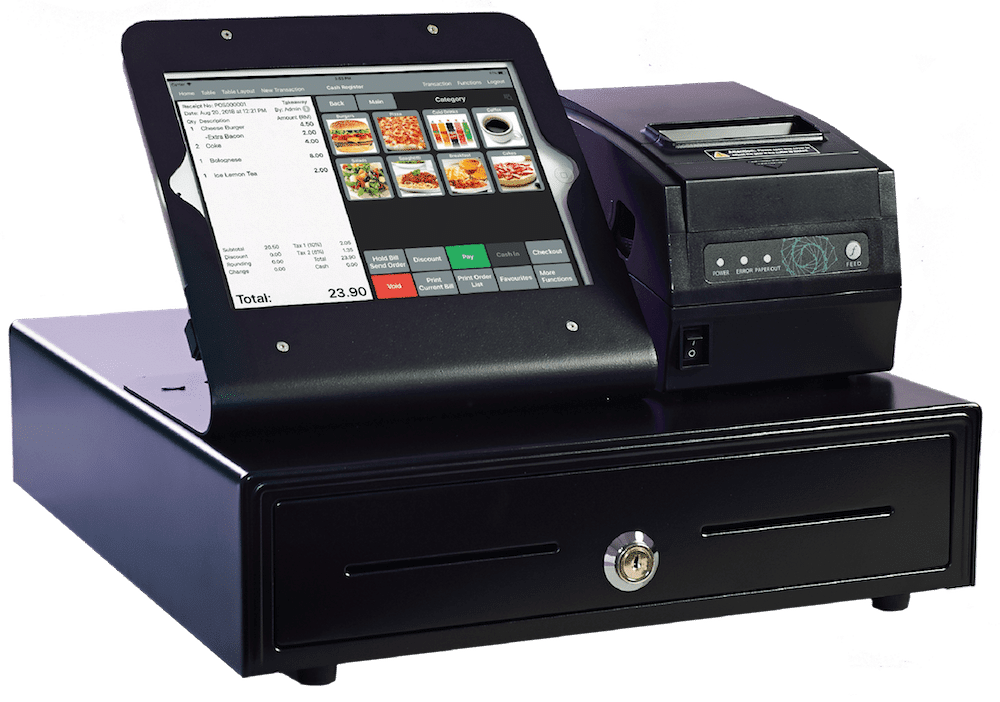
Genius POS System software is a comprehensive POS solution designed for various industries, including retail and food, and beverages. This POS software offers features such as sales management, inventory tracking, customer relationship management, and employee management.
Why Genius POS: It offers user-friendly setup, strong local support, offline capability, and tailored features for F&B and retail workflows.
Pricing: Available upon request.
Restaurants, cafés, fast-food outlets, and retail locations in Malaysia that need an intuitive iPad-based POS solution with table management and cloud reporting.
| Pros | Cons |
|---|---|
|
|
16. EasyStore
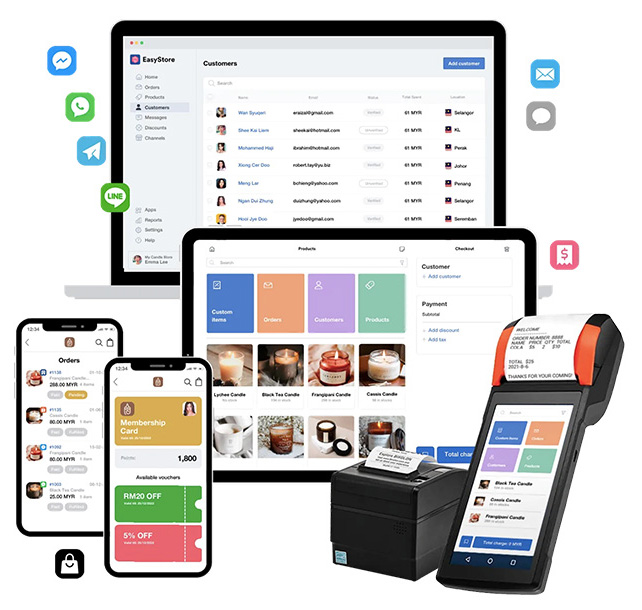
EasyStore is a versatile POS system designed for retail businesses. It offers features such as sales tracking, inventory management, and customer relationship management. EasyStore point of sales Malaysia is known for its integration capabilities, making it a preferred choice for businesses looking to manage both online and offline sales from a single system.
Why EasyStore: It provides a unified commerce platform, letting you turn mobile, tablet, or desktop into a POS, sync inventory in real-time across sales channels, engage loyalty members smoothly, and scale effortlessly from pop-ups to full stores.
Pricing: Standard plan from RM199 per month.
Retailers who operate both online and physical stores, especially those needing cross-channel management of inventory, sales, and customer data across devices and outlets.
| Pros | Cons |
|---|---|
|
|
Overall Comparison of POS System for Malaysia Businesses
| Provider | Inventory Management | Payment Integration | Ease of Use | Data Enrichment |
|---|---|---|---|---|
| HashMicro | ||||
| ConnectPOS | ||||
| Shopify | ||||
| Sapaad | ||||
| Loyverse POS |
Key Features to Look for in a Malaysian POS System
A retail POS system in Malaysia should do more than just process payments; it also helps control inventory, support loyalty programs, and accelerate decision-making through real-time data. If your business handles purchasing and finance, connecting POS data with an ERP system helps reduce duplication and keep numbers aligned.
| Key Feature | Description | Business Benefit |
|---|---|---|
Real-Time Reporting & Analytics |
Provides live sales data, best-selling products, profit margins, and outlet performance tracking through dashboards. | Helps retailers make faster decisions, identify slow-moving products, and improve purchasing strategies. |
Inventory Control & Omnichannel Ready |
Automatically updates inventory across stores, online platforms, and marketplaces in real time. | Reduces stock mismatches and overselling while ensuring consistent inventory visibility across channels. |
Customer Loyalty & Promotions Tools |
Includes loyalty programs, promotions, and customer purchase tracking features. | Encourages repeat purchases and enables more targeted and personalized marketing campaigns. |
Ease of Use & Offline Capability |
Features an intuitive interface and allows transactions even during internet disruptions. | Minimizes staff training time, reduces cashier errors, and ensures business operations continue smoothly offline. |
Multi-Outlet & Staff Management |
Supports centralized management, role-based access, pricing control, and employee performance monitoring. | Improves operational consistency and simplifies management across multiple retail branches. |
Reliable Local Support & Training |
Offers responsive local customer support and structured onboarding or staff training. | Reduces downtime during implementation and helps businesses maximize system usage faster. |
e-Invoice & Local Multi-payment Support |
Supports Malaysian e-invoicing requirements and multiple payment methods such as cash, cards, and e-wallets. | Enhances customer convenience, speeds up checkout, and ensures compliance with local regulations. |
Role of POS Software in Malaysian Business
Across Malaysia, businesses of all sizes rely on POS software to streamline transactions, manage inventory, and improve customer experiences. By streamlining digital order tickets and kitchen workflows, a dedicated F&B POS minimizes operational chaos and cross-contamination risks, supporting your staff in maintaining rigorous restaurant sanitary guidelines.
1. Retail Industry
Retailers in Malaysia face the challenge of managing multi-location stock, seasonal demand, and high transaction volumes. A centralized POS system allows real-time stock monitoring, barcode scanning, and automated reporting. Solutions like an ERP POS system in Malaysia help retailers make data-driven sales decisions and minimize human errors.
2. F&B, Restaurant, and Café
F&B businesses operate in a fast-paced environment where speed and accuracy are critical. POS software supports table management, order synchronization, and split billing for restaurants and cafés. HashMicro’s POS integrates kitchen displays and e-menu ordering, ensuring smooth service during peak hours.
3. Franchise and Multi-Outlet Businesses
For franchises and multi-branch operations, manual coordination can cause data inconsistencies. A cloud-based POS enables centralized monitoring, unified pricing, and consolidated reports across all outlets. With HashMicro POS, business owners can track performance from any location in real time.
4. Cloud Kitchen and Food Truck Operations
The rising trend of cloud kitchens and mobile food trucks in Malaysia demands a flexible and portable POS system. Integrated cloud-based software supports multiple ordering channels, delivery coordination, and payment gateways. HashMicro’s solution ensures a perfect integration between order management and accounting.
In summary, POS systems boost operational efficiency, improve customer satisfaction, and provide insights for smarter decision-making, contributing to retail success in Malaysia.
Common Mistakes When Choosing POS
- Choosing based on price alone. The cheapest option might not have the features you need. The most expensive might have features you’ll never use. Match features to your actual workflow.
- Ignoring offline capability. Test what happens when internet goes down. Can you still take cash payments? Will the system save transactions and sync later? This matters during busy periods.
- Not testing with your actual products. If you sell items with variants (sizes, colors, modifiers), test how the POS handles them. Some systems make this easy. Some make it painful.
- Forgetting about support. When something breaks at 7pm on a Saturday, can you get help? Check support hours and response times. Local support often matters more than features.
- Skipping the integration check. If you use accounting software, check if the POS connects to it. If you sell online, check if inventory syncs. Manual data entry between systems wastes time and creates errors.
POS System Decision Matrix Based on Business Needs
Selecting the right POS system is not just about features or pricing, but about how well it fits your specific business operations. Different industries and business sizes require different capabilities, from basic transaction handling to advanced integrations and reporting. This decision matrix helps you identify which POS solutions align best with your needs based on real-world use cases.
| Business Scenario | Recommended POS | Why It Fits |
|---|---|---|
| Small retail (1–2 outlets) with basic needs | Loyverse POS, StoreHub, EasyStore | Suitable for simple operations, quick setup, and minimal training with essential sales and inventory features |
| Retail with omnichannel (online + offline) | Shopify, ConnectPOS, EasyStore, HashMicro POS | Helps synchronize online and offline sales channels while keeping inventory and order data consistent |
| Growing retail with 2–5 outlets | StoreHub, AutoCount POS, HashMicro POS | Supports multi-outlet operations with centralized monitoring, reporting, and better inventory control |
| F&B café or small restaurant (basic POS) | Loyverse POS, StoreHub, Slurp | Designed for fast-paced transactions with simple interfaces and easy menu management |
| Restaurant with KDS and delivery integration | Eat365, Slurp, Sapaad | Enables smoother kitchen coordination and integrates with food delivery platforms for order management |
| Full-service restaurant with complex operations | Dinesoft, Sapaad, Eat365 | Handles table management, order customization, and more structured kitchen workflows |
| Multi-outlet F&B chain (5+ outlets) | HashMicro POS, Sapaad, Dinesoft | Provides centralized control across branches with consolidated reporting and operational visibility |
| Enterprise-level business needing full integration | HashMicro POS, AutoCount POS | Connects multiple business functions such as inventory, finance, and operations into one system |
| Businesses needing strong accounting integration | AutoCount POS, IRS Software, HashMicro POS | Ensures accurate financial tracking with tight integration between sales and accounting processes |
| Businesses focused on loyalty and CRM | StoreHub, Shopify, ConnectPOS | Supports customer data tracking, promotions, and loyalty programs to improve retention |
| Businesses needing customization or local vendor support | Marvelsoft Solutions, Red Zone Solution, Genius POS | Offers flexibility for tailored features and hands-on support based on specific business needs |
| Budget-conscious startups or SMEs | Loyverse POS, EasyStore | Provides affordable entry options with essential features for getting started quickly |
Ultimately, the best POS system is one that can support your current operations while adapting to future growth. As your business becomes more complex, having a system that integrates across functions and provides clear insights becomes increasingly important. By understanding your business scenario first, you can make a more informed and strategic decision.
Ultimately, the best POS system is one that can support your current operations while adapting to future growth. As your business becomes more complex, having a system that integrates across functions and provides clear insights becomes increasingly important. By understanding your business scenario first, you can make a more informed and strategic decision.
How to Choose the Right POS System for Your Business
Choosing the right POS system in Malaysia is crucial, as it affects efficiency, customer satisfaction, and profitability. Here are key factors to help you make the best choice for your business.
- Identify your business needs: Write down your daily operations. How do you take orders? How do you track stock? What reports do you look at? What payment methods do customers use?
- Decide on budget: Monthly subscription or one-time purchase? How much per month can you spend? Remember to include hardware costs (tablet, receipt printer, cash drawer).
- Evaluate features and functionality: Look for systems with comprehensive sales tracking, inventory management, best CRM software, and detailed reporting. Consider mobile compatibility, cloud access, and integration with other business tools.
- Consider usability and training: Choose a user-friendly system that your staff can easily learn and use. Ensure the vendor provides comprehensive training and support to facilitate a smooth transition.
- Check for integration capabilities: To ensure efficient operations, choose a POS system that integrates seamlessly with your existing accounting software, e-commerce platform, CRM software, and other business tools.
- Consider security features: Choose a POS system in Malaysia that prioritizes strong security, such as encrypted transactions and strict user access controls, to safeguard sensitive business and customer data.
- Start with one outlet: If you have multiple outlets, don’t roll out everywhere at once. Test at one location first. Fix problems. Then expand.
By considering these factors, you can choose a POS system that meets your needs, supports growth, and enhances overall business performance. A well-chosen POS system software Malaysia will streamline operations, boost customer satisfaction, and provide valuable insights for strategic decision-making.
Conclusion
Choosing the right POS system comes down to how well it fits your daily workflow in retail or F&B. The systems reviewed in this guide can help speed up checkout, keep stock records cleaner, and give managers clearer reporting for decisions. The goal is consistency, especially during peak hours.
To narrow your shortlist, focus on stability, ease of use, offline capability, and the integrations you actually need. Multi-outlet control, role-based access, and reliable local support also matter once transaction volume grows. With the right setup, teams spend less time fixing errors and more time serving customers.
If you want extra confidence before deciding, a free consultation can help map your current process and define practical selection criteria. That way, you compare options with clear benchmarks instead of relying on feature claims.

FAQ About POS System Malaysia
-
What is the POS system in Malaysia?
A Point of Sale system combines hardware and software to process daily transactions. For businesses in Malaysia, it serves as the central hub for managing inventory, tracking daily revenue, and handling customer data without relying on manual ledgers.
-
How much does a POS system cost?
Pricing varies heavily based on the deployment model. Cloud-based subscriptions typically start around RM90 to RM150 per month, while traditional on-premise setups can require an upfront hardware and software investment of RM3,000 to RM10,000.
-
What features should a good POS system have?
Core requirements include fast transaction processing, automated stock deduction, and secure payment integrations. It should also provide clear daily sales reports and employee access controls to minimize cash discrepancies at the end of the shift.
-
Which POS is best for multi-outlet or delivery-heavy businesses?
Multi-branch operations require a cloud architecture that syncs data across all locations in real time. The system must be able to consolidate orders from dine-in, takeaway, and third-party delivery apps into a single dashboard to prevent missed orders.
-
Can a POS system work without internet?
Many modern platforms include an offline mode that allows cashiers to continue taking orders and printing receipts during network outages. However, credit card processing and live inventory syncing will usually remain paused until the connection is restored.





















