

















The modern financial landscape demands speed, navigates complex regulations, and requires pinpoint real-time data accuracy. Today’s accounts payable (AP) and finance teams serve as strategic partners. They drive cash flow optimization, risk management, and operational efficiency by replacing outdated, paper-heavy processes that slow down operations, especially the error-prone manual handling of supplier invoices.
Automated invoice processing has become essential in this era of digital finance transformation, shifting AP workflows from bottlenecks to proactive engines. Advanced data extraction, machine learning, and intelligent routing empower organizations to eliminate manual inefficiencies and gain clear financial visibility.
This guide explores the multifaceted world of invoice automation. Examining its core components, the profound challenges of manual systems, the strategic benefits of digitization, and the critical steps required to successfully implement these technologies within a modern enterprise.
Key Takeaways
|
What is Automated Invoice Processing?
Automated invoice processing leverages advanced software and technology to manage the full supplier invoice lifecycle with minimal human intervention, transforming accounts payable automation. Accounts payable clerk receives invoices by email or mail, manually enters data into ERP systems, routes them for approval, and schedules payments.
Accounts payable automation digitizes and centralizes invoice workflows for top efficiency in ERP invoice management. Advanced algorithms extract details like vendor names, dates, line items, and totals from documents, validating them against purchase orders and receipts. It enables straight-through processing (STP) post-rule-based approvals that help automating from receipt to payment.
The Core Components of Invoice Automation
To fully appreciate how automated invoice processing transforms accounts payable, it is essential to dissect the underlying technologies that make it work. A robust automation solution is not a single tool, but rather a symphony of integrated technologies working in tandem to ingest, interpret, validate, and route financial data.
1. Intelligent Document Processing (IDP) and Cognitive OCR
Intelligent Document Processing (IDP) forms the foundation of invoice automation by extracting data accurately from unstructured formats. Traditional OCR required rigid vendor templates that needed rewriting for format changes. IDP uses cognitive computing to read contextually like humans, capturing header and line-item data with high precision (quantities, unit prices, descriptions) with astonishing accuracy.
2. Machine Learning and Artificial Intelligence
AI serves as the brain of modern AP automation, with machine learning that learns continuously from processed data. When clerks correct errors or reroute invoices, AI refines its models to become smarter and faster. This integration of AI in workflow system allows the software to predict general ledger (GL) coding, detects duplicates, flags fraud, and reduces exceptions over time.
3. The Matching Engine: Two-Way, Three-Way, and Four-Way Matching
One of the most critical and time-consuming tasks in manual AP is matching the invoice to supporting documents to verify that the organization is only paying for what was ordered and received. Automated systems feature powerful matching engines that handle this instantaneously.
- Two-Way Matching: The system compares the invoice against the original Purchase Order (PO) to ensure quantities and prices align.
- Three-Way Matching: The system compares the invoice, the PO, and the Goods Receipt Note (GRN) to ensure the items were actually delivered before authorizing payment.
- Four-Way Matching: In highly regulated or complex manufacturing environments, the system may also include an inspection or quality assurance document in the matching process.
If the matching engine finds zero discrepancies within pre-set tolerance levels (e.g., allowing a $5 freight variance), the invoice is automatically approved for payment. If a discrepancy is found, it is instantly flagged and routed to a human for exception handling.
4. Dynamic Workflow and Routing Engines
Automated workflow engines digitize invoice approvals, replacing manual folders and buried email chains with rule-based routing. For example, IT hardware invoices under $1,000 route directly to the IT Manager, while those over $50,000 require sequential approvals from Department Head, VP of Finance, and CFO. Features like automated reminders, escalation protocols, and out-of-office delegation ensure approval cycles never stall.
5. Seamless ERP and Accounting System Integration
Invoice automation requires bidirectional communication with ERP and accounting systems to function effectively. Real-time API integration keeps vendor data current, makes purchase orders instantly accessible for matching, and posts approved invoices directly to the general ledger. This secure sync maintains a single source of truth, eliminating secondary manual data entry across all financial processes.
Major Challenges in Manual Invoice Management

To justify the transition to automated systems, one must first understand the deep-seated inefficiencies and hidden costs associated with manual invoice processing. The challenges of manual AP extend far beyond the mere annoyance of paperwork, it’s actively drain corporate resources and introduce significant risk.
1. The Exorbitant Cost of Processing
Manual invoice processing incurs high per-invoice costs of $15-$40, covering mail handling, data entry, approvals, and payments per industry studies. These expenses compound massively for enterprises processing thousands of invoices yearly. This significantly erodes operational profitability by diverting critical resources from strategic financial initiatives toward time-consuming manual tasks.
2, High Error Rates and Duplicate Payments
Humans remain prone to errors during repetitive data entry tasks, where even simple number transpositions like $1,050 instead of $1,005 create significant financial discrepancies. More critically, manual systems invite duplicate payments when vendors resend invoices via mail and email without AP teams catching the repetition. Recovering these overpayments proves time-consuming and damaging to supplier relationships.
3. Slow Processing Times and Missed Discounts
Manual invoice routing proves inherently slow, with documents lingering in inboxes, lost in interoffice mail, or abandoned on traveling executives’ desks. This extended lifecycle frequently causes late payments that incur penalties and damage key supplier relationships. Moreover, sluggish processing forfeits early payment discounts like “2/10 Net 30” terms, leaving significant savings opportunities untapped in manual environments.
4. Lack of Visibility and Poor Cash Flow Management
Paper-based or fragmented email AP systems offer virtually no financial visibility for real-time decision-making. A CFO querying 15-day outstanding liabilities faces hours or days of manual compilation from scattered records. Pending approval invoices remain invisible to the general ledger, crippling cash flow forecasting, budgeting accuracy, and strategic financial planning.
5. Compliance Risks and Vulnerability to Fraud
Manual processes lack immutable audit trails essential for modern standards like SOX compliance in public companies. Tracking approval details becomes challenging amid email chains and handwritten signatures. Additionally, these systems expose organizations to internal and external fraud, including Business Email Compromise (BEC) attacks with fake vendor invoices that bypass inadequate manual verification.
Key Benefits of Automating the Invoicing Workflow
Transitioning away from manual data entry toward a fully digitized and automated AP environment yields transformative benefits that resonate across the entire organization. The ROI of invoice automation is typically realized quickly driven by both hard cost savings and strategic operational improvements.
1. Drastic Reduction in Operational Costs
Automated invoice processing eliminates manual data entry, physical storage, and paper routing, slashing per-invoice costs from $15-$40 to $2-$5. This dramatic reduction enables finance teams to scale operations without hiring more AP staff. Personnel shift from data entry to strategic roles like spend analysis, vendor negotiations, and exception handling.
2. Unparalleled Accuracy and Elimination of Duplicates
Advanced IDP and AI deliver near-perfect data extraction, removing human keystroke errors entirely. The system cross-references invoices against ERP records to instantly flag duplicates by vendor ID, number, amount, and date before approval. This creates a zero-defect AP environment through the best e-invoicing tools solutions to maximize their financial accuracy.
3. Accelerated Approval Cycles and Optimized Working Capital
Automated mobile routing shortens invoice processing to just days or hours, turning AP into a profit center through consistent early payment discounts. Alternatively, the increased visibility allows for precise cash management, enabling payments exactly on the due date without fees. This efficiency significantly accelerates the entire invoice lifecycle without risking late fees.
4. Real-Time Financial Visibility and Enhanced Reporting
Automation centralizes invoices into a digital dashboard, providing immediate visibility into liabilities the moment they enter the system. This real-time data allows finance leaders to monitor cash flow and forecast liquidity more effectively. Managers also gain critical KPI tracking to identify bottlenecks and drive continuous process improvement.
5. Strengthened Vendor Relationships
Automated processing fosters trust by ensuring consistent, accurate, and on-time supplier payments. Self-service portals empower vendors to submit invoices and track payment status independently, drastically reducing status inquiries. This improved transparency strengthens the entire supply chain while freeing up AP teams for higher-value work.
6. Robust Compliance and Audit Readiness
Automated systems create a comprehensive, immutable audit trail by timestamping and logging every action, from receipt to payment. This ensures complete data integrity and compliance with internal controls. Retrieval of detailed transaction history for audits takes seconds, eliminating frantic physical searches through archived files.
Step-by-Step Guide to the Automated Invoice Lifecycle
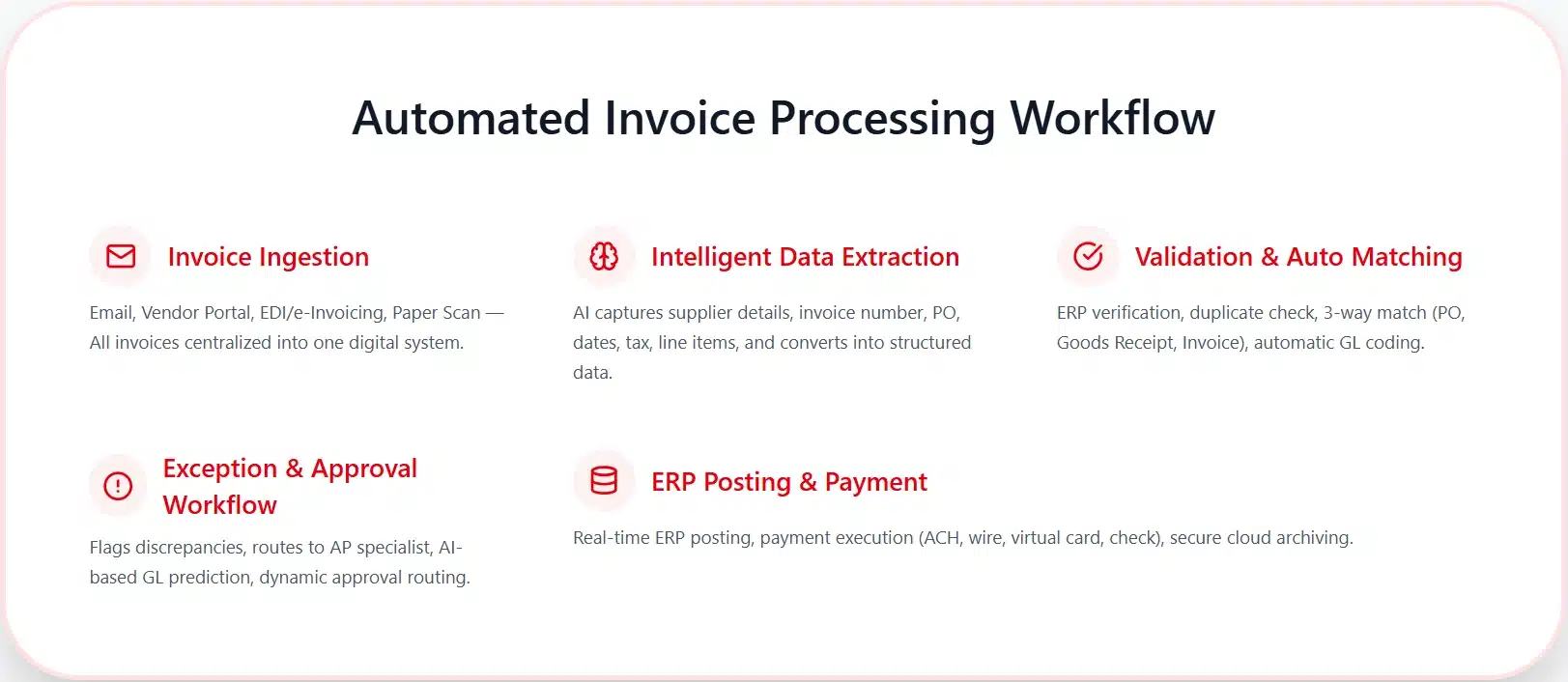
To demystify the technology, it is helpful to walk through the exact, step-by-step lifecycle of an invoice as it travels through a fully automated accounts payable system. While specific software configurations may vary, the fundamental workflow follows a standardized, highly optimized path.
Step 1: Ingestion and Centralization
The process begins with the receipt of the invoice. In an automated environment, the goal is to centralize all incoming invoices into a single digital funnel, regardless of how they arrive.
- Email Ingestion: The software monitors a dedicated AP inbox (e.g., invoices@company.com) and automatically strips the PDF or XML attachments.
- Vendor Portals: Suppliers upload their invoices directly into a secure web portal.
- Electronic Data Interchange (EDI) / e-Invoicing Networks: Structured data is transmitted directly from the supplier’s billing system to the buyer’s AP system via networks like Peppol.
- Paper Scanning: For the few vendors still sending physical mail, invoices are scanned in batches, and the digital images are fed into the system.
Step 2: Intelligent Data Extraction
The IDP engine uses AI and machine learning to scan ingested documents and extract all critical metadata, such as supplier details, dates, and line-item SKUs. These advanced algorithms recognize and structure data into a standardized format. By leveraging historical context, the system ensures that every piece of financial information is accurately captured for digital processing.
Step 3: Validation and Automated Matching
Extracted data is immediately validated against ERP master records to verify vendor status and flag potential duplicate invoices. The system then performs an automated matching process, comparing invoice details against purchase orders and goods receipts to ensure consistency. When data points align within set tolerances, the invoice achieves “straight-through processing” and is automatically coded to the correct general ledger accounts.
Step 4: Exception Handling and Approval Routing
Invoices with discrepancies are automatically flagged as exceptions and routed to specialists for rapid digital review. For non-PO items like utilities, the AI predicts the correct coding based on historical patterns and initiates a dynamic approval workflow tailored to specific departments. Approvers receive automated notifications and can authorize payments instantly via desktop or mobile applications to maintain process momentum.
Step 5: ERP Posting, Payment Execution, and Archiving
Once approved, finalized data is pushed to the ERP in real-time, placing the invoice in the ledger for the next scheduled payment run. The system then executes the payment system through various methods, such as ACH, wire, or virtual cards to maximize efficiency and potential rebates. Finally, the paid invoice and its complete audit trail are securely archived in the cloud for instant retrieval during future audits.
Implementing Invoice Automation in Business
Successfully deploying the technology requires careful planning, strategic alignment, and robust change management. Implementing automation is not merely an IT project, it’s a fundamental transformation of how the finance department operates.
Phase 1: Process Assessment and Standardization
Before implementing invoice automation, thoroughly assess current AP workflows to avoid faster chaos from broken manual processes. Map the invoice lifecycle to identify bottlenecks, redundant approvals, and exceptions while standardizing policies like “No PO, No Pay.” This boosts straight-through processing rates once the automation software is live.
Phase 2: Defining Requirements and Vendor Selection
With standardized processes in place, the organization must define its technical and functional requirements. Key considerations include:
- ERP Integration: The solution must offer deep, real-time, bi-directional integration with the company’s existing ERP system.
- Extraction Accuracy: Evaluate the vendor’s IDP and AI capabilities. Ask for demonstrations using your organization’s actual, complex invoices.
- Scalability: Ensure the software can handle your projected invoice volume over the next five to ten years without significant performance degradation.
- User Experience: The interface for both the AP team and the business approvers must be intuitive to ensure high adoption rates.
Phase 3: Cross-Functional Collaboration and IT Alignment
IT must be involved early to assess security protocols, data privacy compliance, and integration architecture. Procurement must be aligned because the success of automated matching relies heavily on the accuracy of purchase orders and receiving data generated by procurement teams. If procurement processes are sloppy, AP automation will result in high exception rates.
Phase 4: Pilot Testing and Change Management
Rollout phase, start with a pilot program and select a specific department, a specific vendor group, or a specific geographic location to test the system. This allows the project team to identify integration glitches, refine workflow rules, and train the AI engine in a controlled environment. Leadership must communicate that the goal of workflow automation is not to replace human workers, but to eliminate drudgery.
Phase 5: Go-Live and Optimization
Organizations transition from pilot to full deployment with comprehensive data migration and final ERP integration testing. Hyper-care support minimizes disruptions during parallel runs of automated and manual systems. This phase validates scalability across all departments for seamless accounts payable automation.
Phase 6: Performance Monitoring and Continuous Improvement
Teams track KPIs like straight-through processing rates and exception volumes via real-time ERP dashboards post-go-live. Feedback from AP staff drives quarterly AI retraining and workflow refinements. This ensures sustained ROI amid growing volumes and regulatory changes.
Mastering these six phases transforms invoice automation from a technical rollout into a strategic finance evolution, delivering sustained accounts payable automation success. Organizations that prioritize process standardization, cross-functional alignment, and continuous optimization unlock dramatic cost savings and straight-through processing efficiency across their ERP ecosystem.
Conclusion
Automated invoice processing revolutionizes accounts payable automation by replacing manual inefficiencies with intelligent data extraction, AI-driven matching, and seamless ERP invoice management. Organizations achieve drastic cost reductions, near-perfect accuracy, and real-time visibility, turning AP teams into strategic drivers of cash flow and compliance. Embracing straight-through processing (STP) eliminates duplicates, captures early payment discounts, and scales effortlessly for growing enterprises.
Implementing invoice automation demands thorough process assessment, robust ERP integration, and cross-functional collaboration to unlock its full potential in digital finance transformation. From pilot testing to change management, businesses gain quick ROI through optimized workflows and fraud-resistant controls. Start your accounts payable automation journey today to future-proof operations and elevate financial performance.
FAQ about Automated Invoice Processing
-
How does automated invoice processing benefit businesses?
Automated invoice processing helps businesses save time and reduce costs by improving efficiency, minimizing human errors, and speeding up the invoice approval and payment processes. It also enhances visibility and tracking of invoices.
-
What types of invoices can be processed automatically?
Automated invoice processing can handle various types of invoices, including standard invoices, purchase orders, recurring invoices, and expense reports, depending on the capabilities of the software being used.
-
How can I measure the effectiveness of my automated invoice processing system?
You can measure the effectiveness of your automated invoice processing system by tracking key performance indicators (KPIs) such as processing time, error rates, cost savings, and the overall impact on cash flow and supplier relationships.
-
Can automated invoice processing integrate with other business systems?
Yes, many automated invoice processing solutions can integrate with other business systems such as ERP, CRM, and procurement software, allowing for seamless data flow and enhanced operational efficiency.





















