


















Data privacy rarely breaks in one dramatic moment. It usually slips through everyday habits a spreadsheet gets shared just for speed, someone forwards an attachment to the wrong group, or customer details stay in a folder long after anyone needs them.
If you operate in Malaysia, those habits can turn into compliance risk faster than most teams expect. PDPA (Personal Data Protection Act 2010) sets expectations for how you collect, use, store, and disclose personal data in commercial transactions. And yes, that includes the boring stuff: delivery addresses, vendor PIC contacts, payroll files, and applicant CVs.
The easiest way to stay ready is to treat PDPA like operational hygiene. You don’t chase perfection. You build consistent habits and keep evidence you can explain when someone asks.
Key Takeaways
|
Understanding the PDPA Context
PDPA affects you most when personal data moves across real workflows, not when you write a policy. In Malaysia, that movement often happens quickly: sales collects contact details, ops needs delivery info, finance keeps billing records, HR handles payroll, and vendors may touch the same data along the way. That’s normal. The risk shows up when the handoff happens without clear boundaries.
PDPA generally focuses on personal data processed in Malaysia or by entities established there, so your operational footprint matters. If you run a regional setup, you can’t rely on “one standard” in theory while teams handle data differently in practice. One unit follows careful routines, another uses personal tools “for convenience,” and suddenly you lose visibility.
A useful way to think about PDPA is this: you should always be able to answer four questions without guessing. Why did you collect the data, what did you tell the person, who can access it, and when will you remove it? If any of those feels fuzzy, you don’t just “miss documentation.” You lose control.
One uncomfortable self-check: if JPDP asked you tomorrow why you still keep certain records, could you answer confidently?
The Seven Principles of Data Protection
PDPA has seven principles. They’re legal obligations, but you’ll get more value if you treat them as rules that shape your daily decisions.
1. The General Principle
You need valid consent before you process personal data. Silence doesn’t count. You also need a lawful purpose tied to what you do, and you should only process what’s necessary.
If you collect an address for delivery, that fits. If you reuse it for unrelated third-party marketing without permission, you’ve crossed the line.
2. The Notice and Choice Principle
You must inform people in writing about what you collect, why you collect it, and where the data comes from. In Malaysia, your notice should be available in Bahasa Malaysia and English.
Keep the language plain. If your notice reads like a contract, most people won’t understand it, and you’ll struggle to defend it later.
3. The Disclosure Principle
You can’t disclose personal data for purposes outside the original purpose without consent. This includes third parties. Vendors can be necessary, but disclosure still needs boundaries and traceability.
A simple disclosure record helps you stay consistent. When something goes wrong, you won’t spend days reconstructing who received what.
4. The Security Principle
You must take practical steps to protect personal data from loss, misuse, unauthorised access, and accidental disclosure. Practical depends on the type of data and the harm a breach can cause.
That means you protect both physical and digital environments. Lock cabinets for paper files. Tighten digital basics too: access control, encryption where it matters, MFA for sensitive systems, and monitoring for unusual activity.
5. The Retention Principle
Don’t keep data forever just in case. Keep it only as long as necessary for the purpose, then delete it or anonymise it.
Data hoarding feels harmless until the day it turns into the reason you can’t contain an incident.
6. The Data Integrity Principle
You must keep personal data accurate, complete, and up to date. The burden sits with you, not the customer.
If someone updates their address and your records stay outdated, you increase privacy risk and create operational errors at the same time.
7. The Access Principle
People can request access to their personal data and request corrections. You need a clear way to handle Subject Access Requests (SARs).
If you don’t define the process, your frontliners will improvise, and results will vary depending on who handles the request.
The Definitive PDPA Data Compliance Checklist
Compliance works best when you follow the data lifecycle. This checklist keeps it practical, so it doesn’t turn into paperwork that nobody uses.
Phase 1: Collection and Consent
- Start where data enters your business. Small mistakes at collection usually create big clean-up later.
- Make sure your privacy notice is easy to find, readable, and available in Bahasa Malaysia and English. Keep it specific. Tell people what you collect and why.
- Design consent so it’s clear. Use explicit opt-in where it matters. Avoid pre-ticked boxes people miss.
- Collect only what supports a real purpose. If a field feels like nice to have, challenge it.
- Tell people how to withdraw consent without friction. If you make withdrawal hard, you create trust problems even when you stay technically compliant.
Quick gut check: would a normal customer understand what they agreed to in ten seconds?
Phase 2: Processing and Usage
- Once the data enters your systems, teams tend to copy and spread it. That’s where you need discipline.
- Maintain visibility over where personal data sits and who owns each dataset. Ownership prevents not my problem behaviour.
- Limit access by job need. Don’t let convenience become your default control.
- Set expectations with third parties through written agreements that reflect PDPA handling requirements. Don’t treat vendor access as a casual handoff.
- If you transfer data outside Malaysia, treat it as a deliberate decision. Capture approvals, check protections, and keep your reasoning on record.
Phase 3: Storage and Security
- Security fails most often through routine behaviour, not dramatic attacks.
- Protect sensitive personal data with stronger controls, especially payroll and identity-linked records. Use encryption where practical.
- Enable MFA for sensitive systems. Keep admin access tight. Avoid shared logins.
- Monitor bulk exports and unusual access times. Many incidents start with copying, not hacking.
- Keep physical handling disciplined too. Printed documents still leak.
Phase 4: Retention and Disposal
- Retention problems usually come from we’ll clean it later. Later rarely comes.
- Define retention periods by data type. Don’t leave it to memory.
- Run recurring clean-ups so expired records don’t pile up.
- Dispose of records securely. Shred paper properly and wipe devices before disposal or recycling.
Phase 5: Rights and Response
- This phase tests your maturity. You’ll feel it when a request or incident arrives.
- Train staff to recognise SARs and route them correctly.
- Use a consistent correction workflow so updates don’t break downstream processes.
- Maintain a practical incident plan that focuses on containment, investigation, and escalation.
Leveraging Technology for Compliance
Manual compliance breaks when personal data sits in too many places and nobody owns the process. If your team relies on email chains, shared drives, and spreadsheets, you’ll spend more time chasing files than controlling risk.
A centralised system can help you standardise where data lives, how access works, how changes get logged, and how retention rules run. The tool matters less than the discipline it enforces. Your goal is boring but effective: fewer storage locations, fewer uncontrolled exports, clearer access rules, and logs you can trust.
A simple question helps you decide where tech helps most: where do people work around the system today?
Strategic Implementation Guide
PDPA readiness is change management. You’re adjusting behaviour across teams, not just writing policies.
Step 1: Appoint a Data Governance Lead
Choose a clear owner. You don’t need a privacy hero. You need accountability. This lead keeps decisions consistent across teams, especially when trade-offs appear.
Step 2: Conduct a Gap Analysis
Compare your current practices against the seven principles. Look for patterns: unclear consent, over-sharing, broad access, and forever retention. Don’t try to fix everything at once. Rank gaps by real exposure.
Step 3: Develop and Document Policies
Write rules people will actually use. Keep them short. Tie them to workflows. Separate customer-facing notices from internal operating rules.
Step 4: Training and Awareness
Train with scenarios that match real work: exporting customer lists, forwarding payroll files, storing CVs indefinitely, using personal messaging for operational tasks. People remember concrete examples, not abstract warnings.
Step 5: Regular Audits and Reviews
Your workflows change. Vendors change. Tools change. Review your data handling and controls regularly so they stay relevant, not theoretical.
Common Compliance Challenges
Legacy Systems
Older tools often lack encryption and granular access controls. If you can’t replace them quickly, reduce exposure first. Isolate sensitive datasets, tighten access, and restrict exports.
Shadow IT
When official tools feel slow or rigid, people work around them. Policies alone won’t fix this. You need an approved option that still feels easy, plus training that explains the why with real examples.
Cost of Compliance
SMEs feel the cost of security tools, audits, and legal support. Yet the cost of non-compliance can be much higher. Instead of trying to do everything, prioritise the workflows with high sharing and low visibility first.
Which Businesses Need Stricter Controls First?
Not every workflow creates the same level of exposure. If you want the fastest impact, prioritise teams that handle high volumes of personal data and rely heavily on third parties, because that’s where handoffs usually break down.
- Some workflows create more exposure because they combine volume, sensitive details, and frequent third-party handling.
- Retail and e-commerce usually sit at the top. You deal with high volumes of names, addresses, and order history, plus frequent sharing with couriers and marketplaces.
- HR-heavy operations also need tighter controls. Payroll, claims, and employee lifecycle records spread quickly across tools, agencies, and email threads.
- Healthcare and regulated services, such as appointment records and insurance submissions, often involve more sensitive categories and higher security expectations, so mistakes carry heavier impact.
- B2B manufacturing and distribution can look “less personal-data heavy” at first glance, but vendor PIC details, logistics records, and overlapping operational documents still demand discipline.
- If you’re unsure where to start, follow the sharing. The more handoffs you have, the more likely something slips.
Future Trends in Data Privacy (2025 and Beyond)
Expect higher expectations around accountability and evidence. Enforcement typically becomes stricter when regulators move from education to audits and penalties, so staying informally compliant won’t feel safe for long.
AI also changes the conversation. When automated decisions affect customers, people start asking “why.” If your processes can’t explain how personal data influences outcomes at a high level, trust becomes harder to maintain.
Privacy also becomes a differentiator in a practical sense. People may not read your policy, but they notice when you handle issues cleanly or when you fumble a data request.
Industry-Specific Applications of Compliant ERP Systems
Data protection principles stay the same, but the risk points differ by workflow. If you use an ERP or integrated system, configure it to match how your teams operate, not how a template assumes they operate.
- Protecting IP and employee records
Manufacturing workflows may involve proprietary designs and employee safety records alongside customer data. Limit access by role, keep sensitive files inside controlled portals, and log access to technical documents so you can trace unusual behaviour.
- Protecting IP and employee records
Manufacturing workflows may involve proprietary designs and employee safety records alongside customer data. Limit access by role, keep sensitive files inside controlled portals, and log access to technical documents so you can trace unusual behaviour.
- Retail and e-commerce: consent and deletion pressure
Retailers process high volumes across multiple channels. Centralise consent status so you don’t contradict yourself across web forms, support tickets, and offline orders. Build a clean path for deletion or anonymisation that doesn’t break reporting needs.
- Mobile exposure in distribution
Delivery and field teams often access personal data on the move. Reduce exposure by limiting what drivers see per route, masking details after completion, and enforcing mobile security rules consistently.
Detailed Implementation Steps with Metrics and KPIs
Use metrics that change behaviour, not metrics that look impressive.
Step 1: Data Inventory and Classification
Before you improve controls, you need visibility. Map where personal data enters, where it sits, and where it moves. Classify it by sensitivity so you apply stronger controls to higher-risk records.
KPI: Percentage of personal data assets classified. Aim for full coverage before major migrations or system changes.
Step 2: Configuration of Role-Based Access Control (RBAC)
Apply least privilege. Build roles that match real jobs, not generic department access. Keep temporary admin access rare and well-justified.
KPI: Privilege escalation events. Track how often you grant elevated access and why.
Step 3: Establishing Automated Retention Policies
Retention is where good intentions die. Automate flags, archiving, or deletion where possible, and tie it to retention rules you can defend.
KPI: Expired records cleared on time. Measure deletion or archiving within a defined window.
Step 4: Continuous Monitoring and Incident Response
Use audit logs to detect bulk exports, off-hours access, and repeated access failures. Focus on patterns that signal copying or misuse.
KPI: Mean time to detect policy violations. Faster detection usually reduces damage.
Common Pitfalls and Mitigation Strategies
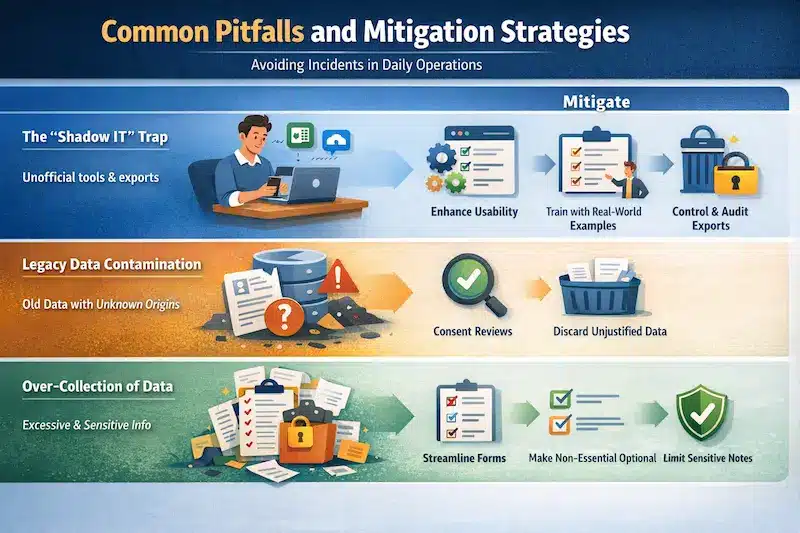
Instead of repeating earlier sections, these pitfalls focus on the moments that typically trigger incidents, especially during system changes and daily work.
The “Shadow IT” Trap
Pitfall: People export to spreadsheets or use personal apps when official processes feel rigid.
Mitigation: Improve usability, train with real scenarios, restrict exports for roles that don’t need them, and keep export logs reviewable.
Legacy Data Contamination
Pitfall: You migrate dirty legacy data collected without clear consent or a defensible purpose.
Mitigation: Run a consent and purpose check during migration. If you can’t justify the dataset, don’t treat it as a clean asset.
Over-Collection of Data
Pitfall: You collect more than you need, then you struggle to protect and retain it properly.
Mitigation: Remove unnecessary fields, make non-essential fields optional, and prevent sensitive details from being entered into free-text notes.
Advanced Best Practices for Data Governance
If you want fewer exceptions and easier audits, build controls that reduce risk by default.
Privacy by Design (PbD)
Embed privacy into workflows from the start. Default visibility should start low, then expand only when a role genuinely needs access. This prevents “everyone can see everything” from becoming normal.
Dynamic Data Masking:
Mask sensitive fields in real time based on user permissions. Support staff may only need partial identifiers, while finance may require full details through controlled, logged access.
Automated Anonymization for Analytics:
Analytics often needs patterns, not identities. Anonymise or pseudonymise data before it moves into BI or reporting layers. You keep insights usable while reducing exposure.
Conclusion
PDPA feels manageable when you treat it as operational hygiene: keep data flows controlled, limit access, and stay ready to explain why you collected data, what you told people, who touched it, and when you removed it. A lifecycle checklist and consistent system controls help you repeat those habits across teams without relying on memory.
Data privacy expectations will continue to evolve across Southeast Asia, including breach notification practices and stronger accountability. If your team wants a clearer starting point, they can book a free consultation to review current practices, identify the biggest compliance gaps, and prioritize realistic fixes.
FAQ About PDPA Compliance in Malaysia
-
What is the penalty for non-compliance with the PDPA in Malaysia?
Non-compliance can lead to fines of up to RM 500,000, imprisonment for up to three years, or both, depending on the offence and severity. In practice, the bigger operational risk is that investigations can also trigger remediation work, reputational damage, and process disruption.
-
Does the PDPA apply to Small and Medium Enterprises (SMEs)?
Yes, the PDPA applies to any individual or organisation that processes personal data in commercial transactions, regardless of business size. SMEs often feel the impact sooner because data handling is usually more decentralised across teams and tools.
-
What is the difference between personal data and sensitive personal data?
Personal data identifies an individual directly or indirectly, such as names, contact details, and identification numbers. Sensitive personal data includes higher-risk categories like health details, religious beliefs, political opinions, or alleged offences, so it typically requires stricter consent and stronger safeguards.





















