












Modern warehousing gets messy when the data can’t keep up. One wrong stock count, one outdated bin location, or one missed picking update is enough to trigger delays, rework, and “phantom inventory” that looks available on paper but isn’t on the rack.
The global WMS market was valued at USD 2.88 billion in 2024 and is expected to reach USD 8.38 billion by 2030. The cloud segment is the fastest growing, with a CAGR of 20.6%. In Asia Pacific, more than 90% of warehouse operators plan to automate picking and replenishment within two years.
This guide covers what cloud WMS actually changes in your daily operations, how it compares to on-premise, and what to check before making the switch.
Key Takeaways
|
What Is WMS Cloud? (Definition and Basic Concepts)
A WMS Cloud is a software solution that manages warehouse operations through an internet-based infrastructure. It is hosted by a third-party provider and accessed via a web browser, eliminating the need for on-site servers.
The core concept is to centralize warehouse data, providing real-time access and visibility to all stakeholders. This allows businesses to focus on operational growth rather than IT infrastructure management.
Cloud vs On-Premise: When Does Each One Make Sense?
This is not a case of cloud always being better. Each setup fits different situations.
Cloud makes more sense when:
- You do not have a large IT team to manage servers and updates
- You run multiple warehouses or plan to open new ones soon
- Your order volume fluctuates by season (Raya, CNY, year-end sales, 11.11/12.12)
- You want to get started quickly without a long hardware procurement process
- Your budget works better as monthly payments instead of one big upfront cost
On-premise makes more sense when:
- You handle sensitive data that regulations require to stay on local servers
- Your warehouse is in a location with unreliable internet
- You need deep customisation that cloud platforms cannot support
- You already own the hardware and have IT staff to maintain it
Most small to mid-sized warehouses in Malaysia fall into the first category. If you are running a 3PL operation, an e-commerce fulfilment centre, or a multi-branch retail business, cloud is usually the simpler path.
Read More: The Ultimate Guide to Warehouse Planning
Key Benefits of Using a Cloud-Based WMS

Implementing a cloud-based WMS delivers transformative benefits that enhance efficiency and strategic decision-making. These advantages range from improved inventory control to significant long-term cost reductions.
- Improved operational efficiency
The system automates manual tasks like data entry and directs staff on optimized picking paths. This reduces human error and allows more orders to be processed with the same resources. - Real-time inventory visibility
It provides a single, accurate view of stock levels across all locations, updated instantly with every transaction. This prevents stockouts and overstocking, ensuring reliable inventory data for decision-making. - Long-term cost reduction
Optimized inventory levels lower carrying costs, while increased labor productivity reduces overtime expenses. Higher order accuracy also minimizes the high costs associated with processing returns. - Effortless scalability
Businesses can easily adapt to growth or seasonal demand by adjusting their subscription plan. This avoids the high costs and delays of scaling physical on-premise infrastructure. - Data-driven decision-making
Built-in analytics tools transform operational data into actionable insights on performance KPIs. This enables managers to identify bottlenecks and make informed strategic decisions for continuous improvement.
Key Features to Look for in a Modern Cloud WMS
When evaluating solutions, it is crucial to select a system with a comprehensive feature set to meet modern operational demands. The right functionalities will provide a solid foundation for current efficiency and future growth.
- Inventory and stock management
This feature provides real-time tracking of stock levels and locations, including support for cycle counting and lot number tracking. It is essential for maintaining accuracy and product traceability across the warehouse. - Inbound and outbound logistics tracking
The system streamlines the management of goods, from receiving and quality inspection to order fulfillment. It supports various picking strategies to ensure orders are processed quickly and accurately. - System integration (ERP, E-commerce)
Seamless integration with systems like ERP and e-commerce platforms automates the flow of data. This ensures financial records and order information are always synchronized across the business. - Reporting and analytics (Business Intelligence)
A modern WMS offers customizable dashboards and reports to monitor key performance indicators. This business intelligence helps identify operational trends and supports strategic planning. - Automation and alerts
This functionality automates routine tasks and provides proactive notifications for critical events, such as low stock levels or expiring products. It allows your team to manage by exception and focus on urgent issues.
A Step-by-Step Guide to WMS Cloud Implementation
A successful WMS cloud implementation requires careful planning and a structured approach to ensure a smooth transition. Following a clear roadmap minimizes disruption and accelerates the realization of benefits.
- Evaluate business needs and processes
Begin by documenting current warehouse workflows to identify pain points and define clear objectives for the new system. This internal assessment will guide the entire project and vendor selection process. - Select the right vendor and solution
Research providers and evaluate their solutions against your defined requirements, requesting live demonstrations to assess usability. Check vendor references to ensure they are a reliable partner for your business. - Plan the project and data migration
Create a detailed project plan with your chosen vendor, outlining key milestones and responsibilities. Develop a strategy for cleaning and transferring all necessary data to the new system to ensure accuracy. - Train the team and go-live
Provide comprehensive training tailored to different user roles to ensure high user adoption. Conduct thorough testing before going live during a period of lower activity to minimize operational disruption. - Post-implementation evaluation
After a few months, review the system’s performance against the initial objectives. Gather user feedback to identify areas for further optimization and ensure you are maximizing your investment.
Cost and ROI Analysis of a WMS Cloud Investment
Before committing to a WMS cloud, a thorough analysis of its cost and potential Return on Investment (ROI) is essential. This involves understanding the subscription-based model and calculating the Total Cost of Ownership (TCO).
A comprehensive ROI analysis justifies the investment by forecasting the tangible financial gains over time. These returns come from direct cost savings and indirect benefits like enhanced customer satisfaction.
1. Pricing model (Subscription)
The primary cost is a recurring subscription fee, typically billed monthly or annually based on usage factors. This predictable operating expense makes budgeting more straightforward than a large capital outlay.
2. Implementation and customization costs
Initial costs include implementation fees for system configuration and data migration services provided by the vendor. Additional costs may arise if your unique workflows require software customization.
3. Calculating total cost of ownership (TCO)
Calculate the TCO over three to five years by including cumulative subscription fees, initial implementation costs, and training. This provides an accurate figure for comparing against an on-premise alternative.
4. Projecting return on investment (ROI)
Project ROI by quantifying expected benefits, such as increased labor productivity and reduced inventory carrying costs. Comparing these financial gains against the TCO will determine the payback period for your investment.
Case Study: Company Success with Cloud WMS
Examining real-world success stories provides tangible proof of a cloud WMS’s transformative impact. Companies across various industries have successfully leveraged this technology to build a scalable foundation for growth.
- Inventory optimization in the F&B industry (BanBan)
BanBan, a growing F&B business, used HashMicro’s WMS to gain real-time visibility into its perishable raw materials. This allowed them to track shelf life accurately, which significantly reduced waste and optimized inventory use. - Efficiency in construction project management (Decorient)
Construction firm Decorient integrated its procurement and project management with HashMicro’s suite. The system provided a centralized platform to monitor materials and vendor transactions, ensuring projects stayed on budget.
Future Trends in Cloud-Based WMS Technology
The landscape of warehouse app management is constantly evolving, driven by rapid technological advancements. Staying informed about future trends ensures that your technology investment remains competitive and valuable for years.
- Artificial intelligence (AI) and machine learning
AI will enable systems to learn from data to optimize inventory slotting and predict labor needs. These algorithms can also enhance order picking paths in real-time for maximum efficiency. - Internet of Things (IoT) integration
IoT devices like sensors and RFID tags will create a connected warehouse, providing real-time data on goods and equipment. This data stream offers unparalleled visibility and control over warehouse conditions. - Predictive analytics for demand forecasting
Future WMS platforms will use predictive analytics to deliver highly accurate demand forecasts. This allows businesses to proactively manage inventory, reducing both stockouts and overstocking.
Optimize Your Business Management with WMS Solutions
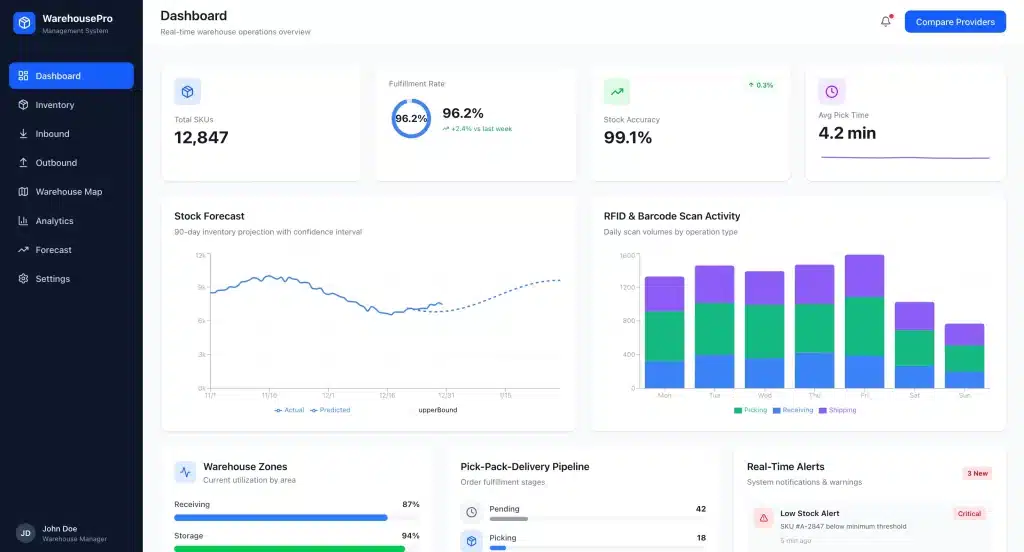 Providers like HashMicro, SAP, and Zoho all offer cloud WMS as part of their ERP suite. Most provide free demos or trial periods, so test with your actual warehouse data before committing.
If you are about to compare providers, these are the capabilities worth checking during a demo. Not all systems include everything, so match this list against your actual warehouse needs.
- RFID and Barcode Integration: This feature uses advanced scanning technology to accelerate the receiving, tracking, and picking of goods.
- Stock Forecasting: It utilizes historical data to predict future inventory needs for better stock level management.
- 3D Warehouse Visualization: The system offers a three-dimensional model of the warehouse layout to help optimize storage strategies.
- Pick, Pack, and Delivery Management: This functionality streamlines the fulfillment process by generating optimized picking routes and automated workflows.
- Real-Time Reporting and Analytics: It provides customizable dashboards and reports on key warehouse metrics for operational insights.
The right features depend on your budget. Before exploring options, get a rough estimate of what you’d need to invest. Check the banner below.
Conclusion
Cloud WMS does not do anything that on-premise WMS cannot do. It just removes the infrastructure headache. No servers to maintain. No update weekends. No hardware limits during peak season.
The right time to switch is when your current system starts holding you back. If you are avoiding opening a second warehouse because the IT setup is too complicated, or if your team loses hours every week to manual workarounds, that is usually the signal.
Start with a pilot. Most offer free trials or demos, test it on one process, like receiving or picking, before rolling it out across the warehouse. If it works on the floor, scale from there.
FAQ about Cloud WMS
-
What is the main advantage of a cloud WMS over on-premise?
The main advantage is flexibility and lower initial cost. A cloud WMS allows businesses to scale resources up or down easily based on demand and operates on a subscription model, avoiding large upfront hardware investments.
-
How does a WMS improve warehouse accuracy?
A WMS improves accuracy by automating data capture through barcode or RFID scanning, minimizing human error in receiving, picking, and cycle counting. It provides a real-time, centralized record of all inventory movements.
-
Is a cloud WMS secure for a large enterprise?
Yes, a cloud WMS is highly secure. Reputable providers invest heavily in advanced security measures, including data encryption, regular security audits, and redundant infrastructure, often providing a higher level of security than a company can achieve on its own.





















