


















Definition and Basic Concepts of Refund Notes
Crucial Difference: Refund Note vs Credit Note
Understanding the difference between a refund note and a credit note is fundamental to proper accounts receivable and accounts payable management. Confusion between the two often leads to discrepancies in bank reconciliation.
Credit Note: This document is issued when goods are returned or prices are corrected, but no physical money is returned to the customer. The value of the return is stored as a “credit” or positive balance in the customer’s account, which can be used to offset future invoice charges. No cash leaves the company’s account.
Refund Note: This document is issued when the seller agrees to refund money in cash, bank transfer, or credit card reversal to the customer. Cash outflow occurs in real terms. The customer’s account balance may have already been cleared (because the invoice has been paid), so this refund is purely a cash outflow transaction.
In the context e-Invoicing in Malaysia, this distinction is further emphasized by different document type codes. The tax system views cash refunds as having a different audit trail than simply reducing an outstanding balance.
The Urgency of Refund Notes in the Era of e-Invoicing in Malaysia
Required Data Structure in MyInvois Documents
For a refund note to be accepted by the MyInvois LHDN system, the document must meet certain data standards. Failure to complete this data will result in validation rejection.
- Original Invoice Reference Number: Must include the UUID of the previously validated e-Invoice. This links the refund to a valid sales transaction.
- Reason for Refund: Specific explanation of why the refund is being made (e.g., damaged goods, service cancellation, pricing error).
- Buyer and Seller Details: TIN (Tax Identification Number), name, and address information that is consistent with the data in the LHDN.
- Refund Amount: The nominal value to be refunded, which cannot exceed the remaining value of the original invoice.
- Tax Details: If the initial transaction involved SST (Sales and Service Tax), this document must detail the portion of tax to be refunded.
Scenarios for Using Refund Notes in Business
The application of this document varies depending on the industry and business model of the company. Understanding when to issue it is key to operational efficiency.
- Return of Defective Goods (Sales Returns)
This is the most common scenario in the retail and manufacturing industries. Customers receive goods, pay in full, but then discover manufacturing defects. If the company’s policy is a “money-back guarantee,” then a refund note must be issued when the money is transferred back to the customer. - Service Cancellation
In service industries such as hospitality or consulting, customers may pay a deposit or the full fee in advance. If the customer cancels the order within the permitted period, the company must refund the funds. This document serves as proof that the cancellation has been processed financially. - Overpayment
Sometimes customers make transfer errors, such as paying a bill of $1,000 with a transfer of $1,050. The difference of $50 must be returned to the customer to maintain the accuracy of the accounts receivable balance. Issuing a refund document ensures that the excess money is not recognized as other income. - Order Fulfillment Failure (Out of Stock)
In the world of e-commerce, it often happens that customers pay for items that are out of stock in the warehouse. Sellers must immediately refund the money. With high transaction volumes, automating the issuance of these documents is crucial to maintaining customer satisfaction.
Accounting and Financial Journal Impact
Accounting records for refund notes involve balance sheet and income statement accounts. Accuracy in journal entries is crucial to ensure that financial statements reflect the actual conditions.
In general, the journal for cash refunds to customers is as follows:
- Debit: Sales Returns and Price Reductions (Reduces Revenue)
- Debit: Output Tax Payable (If there is tax to be adjusted)
- Credit: Cash or Bank (Reduces Current Assets)
If the refund is due to overpayment of accounts receivable, the journal entry may be different:
- Debit: Accounts Receivable / Customer Advances
- Credit: Cash or Bank
Errors in journalizing these transactions often cause the cash balance in the ledger to not match the bank statement. This will complicate the end-of-month reconciliation process and annual audit.
Challenges in Manual Refund Management
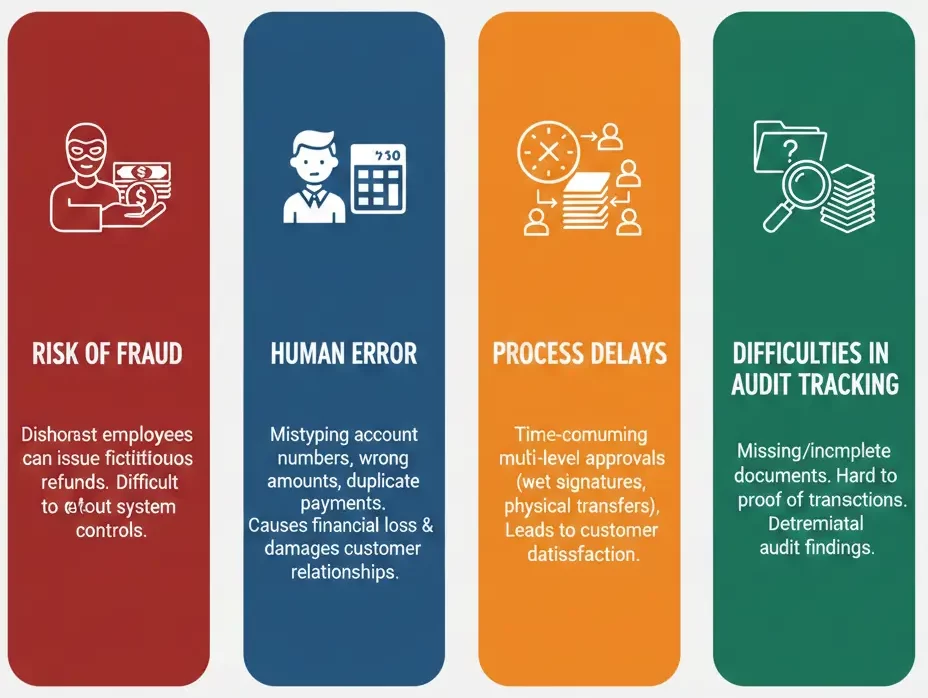
Many companies still manage the refund process manually using spreadsheets or paper forms. This practice carries significant operational risks.
- Risk of Fraud
Refunds are an area that is highly susceptible to asset misuse. Dishonest employees can issue fictitious refunds to their personal accounts if there are no strict system controls in place. Without an integrated system, detecting these fraud patterns is very difficult and often only discovered after losses have mounted. - Human Error
In manual processes, the risk of mistyping account numbers, transferring the wrong amount, or duplicating payments is very high. Fund transfer errors are very difficult to reverse and can damage customer relationships and cause direct financial losses. - Process Delays
Manual processes typically involve time-consuming multi-level approvals (wet signatures, physical document transfers). Delays in refunds are one of the main causes of customer dissatisfaction in the digital age, which demands speed. - Difficulties in Audit Tracking
When auditors request proof of refund transactions from six months ago, manual systems often fail to provide supporting documents quickly. Missing or incomplete documents can lead to audit findings that are detrimental to the company.
Digital Transformation: Refund Note Automation
Adopting ERP or modern accounting software is the solution to replace error-prone manual refund processes. An integrated system manages refunds from start to finish automatically and in a controlled manner.
Refund Notes can be generated automatically from sales return documents, with customer data, invoice references, and item details pulled directly from the database to minimize human error. The system also validates that the refund amount does not exceed the original transaction.
The approval workflow feature allows managers to approve refunds digitally from anywhere, while maintaining strict internal controls. The entire process is recorded in an audit trail to ensure full transparency.
Integration with payment gateways or banking systems allows funds to be transferred directly from the ERP. This closes security gaps because the finance team no longer needs to manually re-enter data on the bank portal.
Steps for Implementing Refund Notes in Accordance with LHDN Standards
For companies in Malaysia, complying with LHDN standards is mandatory. Here is a step-by-step guide to ensure your refund process is compliant with regulations.
- Verify Original Transactions
Before processing a refund, ensure that the original invoice has been validated by MyInvois. Obtain the UUID from the invoice. Without a valid UUID, you cannot issue a refund note that is valid for tax purposes. - Create Digital Documents
Use an accounting system or middleware connected to the MyInvois API to create a draft document. Fill in all required fields such as the reason for the refund, tax details, and the original invoice reference. Ensure that the selected document type code complies with LHDN regulations for Refund Notes. - Internal Validation
Conduct an internal check. Has the returned item been received at the warehouse? Is the customer complaint valid? Managerial approval must be recorded in the system before the document is sent to LHDN. - LHDN Validation (Real-time)
Send document data to LHDN via API. The MyInvois system will validate the format and data in real-time. If successful, LHDN will return the validated document complete with a new UUID and QR code. - Distribution to Customers
Send the validated refund note document (with QR code) to customers. This is legal proof for customers that their refunds have been processed in accordance with tax laws. - Payment Execution
Once the document is valid, the finance department can process the fund transfer. Ensure that the payment reference number at the bank matches the document number to facilitate reconciliation.
Case Study: Efficiency in the Retail Industry
Imagine a large electronics retailer that processes hundreds of returns every month. Using manual methods, their finance team spends 3-4 days each month just matching return forms from stores with bank transfer receipts. Input errors often occur, causing discrepancies in stock and cash.
After switching to an integrated system e-Invoicing, the process changed dramatically. When cashiers at the store scan returned items, the system automatically creates a draft refund note. Store managers give digital approval. The central system validates with the LHDN in seconds, and payment instructions are scheduled automatically.
As a result, reconciliation time was reduced to just a few hours. Customer satisfaction increased because funds were received faster. Most importantly, tax compliance was ensured without additional manual effort from the company’s tax team.
The Future of Return Management
In the future, technology will further simplify this process. The integration of blockchain and smart contracts has the potential to automate instant refunds once certain conditions are met (for example, when a logistics courier scans the returned item upon pickup).
Artificial intelligence (AI) will also play a role in detecting refund anomalies. Algorithms can learn customer return patterns and provide early warnings if there are indications of return fraud, protecting the company’s profit margins.
In Malaysia, as the implementation of MyInvois matures, data integration between sales, banking, and taxation systems will become increasingly seamless. Businesses that have prepared their digital infrastructure today will have a competitive advantage in terms of cost efficiency and operational agility.
Sectoral Implementation: Case Study on the Use of Refund Notes
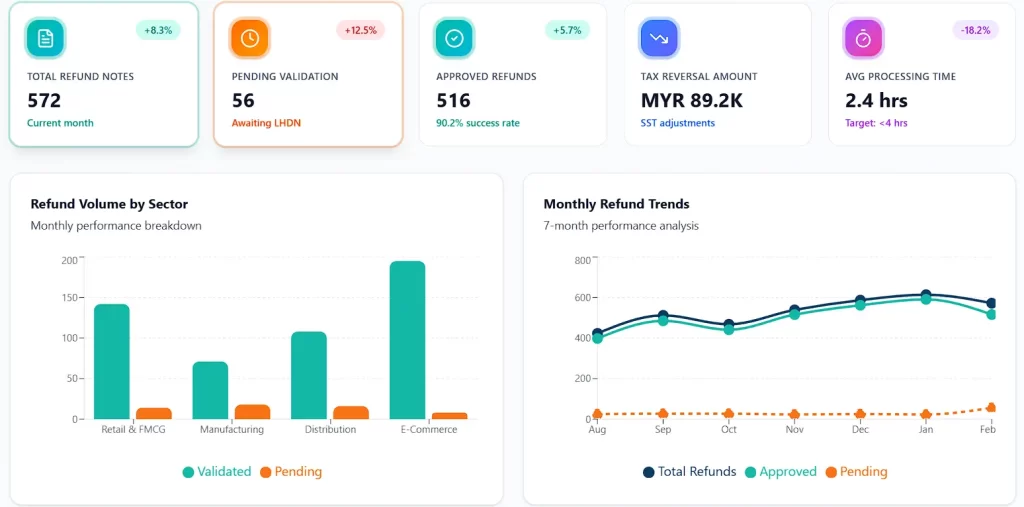
Although the basic principle of refunds is universal, the technical execution and operational challenges vary greatly depending on the industry. The implementation of Refund Notes in ERP systems must be configured to accommodate the unique nuances of each business model, from high-volume retail to manufacturing with large transaction values.
Retail and FMCG (Fast-Moving Consumer Goods) Sector
In the retail industry, transaction volumes are very high with relatively small transaction values. The main challenges here are speed and integration between the Point of Sale (POS) system and the back-end ERP.
Case Scenario: A customer returns ill-fitting clothes at a physical store and requests a cash refund or credit card reversal, rather than an exchange. The cashier must process this return instantly.
ERP Implementation:
- Real-time POS Integration: The system must automatically trigger the creation of a Refund Note in the finance module as soon as the return transaction is authorized at the cash register. This prevents cash discrepancies in the cash drawer at the end-of-day settlement.
- Automatic Stock Validation: The refund document should not be issued before the system verifies that the item has been scanned back into inventory (Goods Receipt). This is a control mechanism to prevent asset leakage.
- B2C E-Invoice Management:For retail in Malaysia, although multiply purchases are allowed for B2C, refunds to customers who request a full tax invoice require the issuance of a specific Refund Note validated by LHDN for their tax claim purposes.
Manufacturing and B2B Industries
Unlike retail, refunds in the manufacturing sector are rarely impulsive. Usually, they are related to warranty claims, mass production defects, or late delivery penalties that are returned to clients.
Case Scenario: An auto parts factory ships 1,000 units of components to an automotive client. 50 units turn out to be defective (NG – Not Good). The client has paid in full in advance. The factory must refund the value of the 50 units via bank transfer.
ERP Implementation:
- Quality Control (QC) Linkage: Refund Notes can only be processed after the QC department validates the defect report and issues a goods disposition document. The ERP must block outgoing payments without reference to this QC document.
- Complex Tax Handling: In large-value B2B transactions, tax calculations (SST or VAT) must be accurate. The Refund Note must automatically reverse the output tax liability previously recorded on the original invoice, ensuring the company does not pay tax on revenue that was not received.
Distribution and Wholesale
Distributors often encounter volume rebates or sales incentives that are paid back to retailers at the end of the period, which technically constitute cash expenditures and require Refund Note documentation if not deducted directly from invoices.
Case Scenario: The distributor provides an annual cashback incentive of 2% to retailers who reach their purchase targets. This payment is made via bank transfer, not deducted from future invoices.
ERP Implementation:
- Automated Rebate Calculation: The sales module in the ERP tracks purchase accumulations and automatically generates a draft Refund Note at the end of the fiscal period.
- Batch Processing: Since distributors may have hundreds of retailers, the system must be able to process Refund Notes in bulk (batch) and upload them to the banking portal for mass payments, as well as to the LHDN portal for simultaneous e-Invoice validation.
E-Commerce and Marketplace
E-commerce faces payment reconciliation complexities due to the existence of intermediaries (payment gateways or marketplace escrow). Refunds often do not come directly from the company’s bank account, but rather deduct the balance in the payment gateway.
ERP Implementation:
- Gateway Reconciliation: Refund Notes in the ERP must be mapped to an intermediary account (clearing account), not directly to the main bank. The system must then match the settlement report from the marketplace with internal records to ensure that marketplace service fees for canceled transactions are also adjusted.
- Partial Refunds: The system must be flexible in handling partial refunds, for example when a customer purchases 3 items in one order (one invoice number) but only returns 1 item. The Refund Note must reference the UUID (Unique Identifier) of the original e-Invoice but only with a partial value.
Technical Implementation Steps and Success KPIs
Adopting effective Refund Note management is not simply a matter of installing a software module. A structured approach is needed to ensure compliance, security, and efficiency. Here is a step-by-step implementation guide along with metrics to measure its success.
Phase 1: Policy and Workflow Configuration
Before touching the system, determine the authorization matrix. Cash disbursements are a high-risk area.
- Tiered Approval: Set nominal limits in the ERP. For example, refunds under RM 500 can be approved by the Supervisor, while those above RM 10,000 require approval from the Finance Manager and Director.
- Mandatory Fields: Configure the system to require the filling in of the reason code and supporting evidence (photo of damaged goods or official report) before the document can be submitted.
Phase 2: Data Integration and E-Invoice Validation
In the context of Malaysian LHDN compliance or other country tax regulations:
- Document Mapping: Ensure that the “Refund Note” document type in the ERP is correctly mapped to the appropriate document type code in the national e-Invoice standard (e.g., Code 02 or similar depending on the applicable XML/JSON schema).
- Reference Validation: The system must be locked so that Refund Notes cannot be created without linking to a valid Original Invoice Number. This prevents “ghost refunds” without a prior sales transaction.
Phase 3: User Acceptance Test (UAT)
Simulate extreme scenarios:
- Multi-currency refunds with different exchange rates at the time of purchase and refund.
- Refunds for invoices that are past their fiscal year (implications for Retained Earnings).
- Cancellation of validated Refund Notes (how to handle Credit Notes for Refund Notes in case of input errors).
Key Performance Indicators (KPIs) for Refund Management
To measure the effectiveness of your new system, monitor the following indicators regularly through your ERP dashboard:
- Refund Cycle Time: The average time required from customer request to receipt of funds. Target: < 3 business days for bank transfers, instant for digital wallets. Slow cycles drastically reduce customer satisfaction.
- Refund Error Rate: Percentage of Refund Notes rejected by the tax authority (LHDN) or failing bank clearing. Target: < 1%. High error rates indicate problems with master data quality or system configuration.
- Cost per Refund Transaction: Operational costs (staff time + bank transaction fees) to process one refund. ERP automation should significantly reduce this figure
- Refund to Sales Ratio: Percentage of refund value to total gross sales. A sudden spike in this ratio could be an early indicator of product quality issues or misleading product descriptions in the catalog.
Common Pitfalls and Risk Mitigation Strategies
Even with the most advanced ERP systems, human error and procedural loopholes can lead to financial losses. Here are the most common risks associated with Refund Notes and how to close the loopholes.
The “Double Dip” Error
Occurs when staff issue a Credit Note to appease a customer, then finance also processes a Refund Note for the same case due to miscommunication. As a result, the refund amount exceeds the original invoice.
Mitigation: Use the Three-Way Matching feature in the returns module of Equip ERP so that the system detects invoices that already have deduction documents. If the total Credit Note and Refund Note exceed the invoice value, the system should automatically block the transaction (hard stop).
Tax Non-Compliance
Errors occur when companies refund funds including tax but do not reclaim output tax, or fail to issue valid e-Invoices, resulting in invalid tax deductions. This poses a risk of penalties and financial losses.
Mitigation: Automate tax journals when Refund Notes are created by debiting the Output Tax account or related adjustment accounts. Ensure that the e-Invoice validation status from the LHDN is received before funds are transferred to maintain tax compliance.
Internal Fraud
Dishonest employees can create fictitious Refund Notes to personal accounts by utilizing old valid invoice data. This risk increases without strict internal controls.
Mitigation: Implement Segregation of Duties by separating account management access and Refund Note approval. The system should also issue warnings if the destination account differs from the original payment or if one account receives refunds from multiple different customers.
Foreign Exchange Rate Discrepancy
The difference in exchange rates between the date of sale and the date of refund can cause discrepancies that interfere with bank reconciliation. Without accurate recording, financial statements become inaccurate.
Mitigation: Establish a clear policy on whether refunds follow the original foreign currency value or the current exchange rate. Configure the ERP to automatically post the discrepancy to the Foreign Exchange Gain/Loss account when the Refund Note is posted.
Advanced Best Practices and Automation
For companies that want to go beyond basic compliance, here are advanced strategies for optimizing refund management.
- Host-to-Host (H2H) Integration with Banking
Instead of downloading CSV files and uploading them to the bank portal (which is prone to manipulation), use Host-to-Host (H2H) integration so that payment instructions from Refund Notes are sent directly to the bank server via an encrypted channel. Payment status (Successful/Failed/Pending) is sent back to the ERP in real time so that documents are automatically updated without manual intervention. - Predictive Analytics for Cash Flow Management
Leverage historical Refund Note data to predict liquidity needs and anticipate spikes in refunds, such as post-holiday periods. The system can alert CFOs to prepare cash reserves, while analyzing return reason trends to support product development and quality control.
Customer Self-Service Portal
Provide an ERP-integrated customer portal so that B2B and B2C customers can submit refunds independently, from selecting invoices to tracking payment status. This solution reduces the burden on customer service teams and minimizes inefficient email communication.
The implementation of advanced Refund Notes is not just about returning money; it is about closing the transaction cycle with perfect data integrity. In an era of digital transparency and strict tax oversight, the ability to prove the validity of every cent that leaves the company is an invaluable asset for business sustainability.
Conclusion
Frequently Asked Question
Refund Note diterbitkan saat uang dikembalikan secara tunai atau transfer kepada pelanggan, sedangkan Credit Note diterbitkan untuk mengurangi saldo tagihan atau memberikan kredit toko tanpa pengeluaran uang tunai.
Ya, dalam era e-Invoicing Malaysia, Refund Note adalah jenis dokumen yang wajib diserahkan ke sistem MyInvois untuk mendapatkan validasi dan UUID agar diakui secara sah oleh otoritas pajak.
Refund Note harus diterbitkan segera setelah keputusan pengembalian dana disetujui, biasanya akibat pengembalian barang, pembatalan jasa, atau koreksi kelebihan pembayaran, dan sebelum uang ditransfer.
Dokumen wajib memuat UUID faktur asli, alasan pengembalian, detail pembeli dan penjual (termasuk TIN), jumlah pengembalian, dan rincian pajak yang relevan.
Secara umum, jurnalnya adalah mendebit akun Retur Penjualan (dan pajak keluaran jika ada) serta mengkredit akun Kas atau Bank, yang mencerminkan pengurangan pendapatan dan aset kas.





















