






Every customer purchase ends at the same moment: the point of sale. A POS transaction is where payment is collected, stock is updated, and the sale becomes part of the business’s financial record.
What makes it more than a simple exchange is the coordination happening behind the counter. Pricing, payment authorisation, inventory adjustment, and financial recording all happen within seconds of a customer confirming their purchase.
This article covers how POS transactions work, the payment methods and hardware involved, and what businesses can do to manage them more effectively.
Key Takeaways
POS transactions connect payments, inventory, and financial data into one seamless process for better accuracy and efficiency.
Each POS transaction follows a structured flow from item capture to payment and data synchronisation, ensuring secure and reliable operations.
POS systems provide real-time visibility into sales, inventory, and financial data, helping businesses make faster and more informed decisions.
Choosing and implementing the right POS system helps streamline operations, reduce errors, and support scalable business growth.
What Is a POS Transaction
A POS transaction is the process that occurs when a customer completes a purchase at the point of sale. It connects payment collection, sales recording, and real-time data updates across all integrated systems.
Whether the sale happens in a physical store, through an online checkout, or on a mobile device, every POS transaction follows the same structured flow. Modern POS systems handle this automatically, reducing manual work and improving accuracy across the business.
Definition and core concept
A POS transaction is the final point in a sales process where payment is collected and the sale is formally recorded. It covers item identification, total calculation, payment processing, and receipt generation.
Integrated software connects sales, inventory, and financial data throughout this process. Each transaction updates records instantly, so businesses always work from accurate, current information.
At the centre of the process sits a point-of-sale application that coordinates item identification, pricing rules, and payment capture in one interface. This ensures transactions record consistently and reduces reliance on manual input.
Why POS transactions matter in business operations
Every completed transaction generates data that supports decisions across the business. Revenue tracking, product performance, and inventory management all depend on reliable, real-time transaction records.
Efficient POS transactions also improve the customer experience directly. Faster checkout, accurate pricing, and secure payment processing contribute to smoother interactions and stronger satisfaction at the register.
How a POS Transaction Works
A POS transaction follows a clear sequence of activities, even if the process appears instant from the customer’s side. Each activity ensures the transaction is accurate, secure, and recorded correctly across all connected systems.
The three activities below cover the full transaction flow from item capture through to data sync.
1. Item capture and pricing
The transaction begins when items are identified and added to the system. In most retail environments, barcode scanners retrieve product details and pricing from the database instantly. Some businesses use RFID or manual selection depending on their setup.
Once items are captured, the system calculates the total, applying any taxes, discounts, or promotional rules. The final amount displays for the customer to review before payment proceeds.
2. Payment authorisation
After the total is confirmed, the system moves to payment processing. For card and digital payments, transaction data is encrypted and sent to a payment gateway for authorisation.
The request passes through the merchant’s bank and the customer’s issuing bank. Within seconds, the system checks available funds and flags any fraud risk. Once approved, the transaction is authorised and the payment completes.
3. Receipt generation and data sync
Once payment succeeds, the system generates a receipt as proof of purchase. Businesses can print this or send it digitally via email or SMS depending on their setup.
At the same time, the transaction triggers updates across connected systems. Inventory adjusts, sales data records, and financial entries update for reporting and reconciliation. This real-time sync keeps all departments working from the same accurate data.
Common Payment Methods in POS Transactions
Modern POS systems support a range of payment methods to match customer preferences. Offering flexible options reduces checkout friction and helps businesses complete more transactions without interruption.
Each method follows its own process, carries different security requirements, and affects operations in distinct ways.
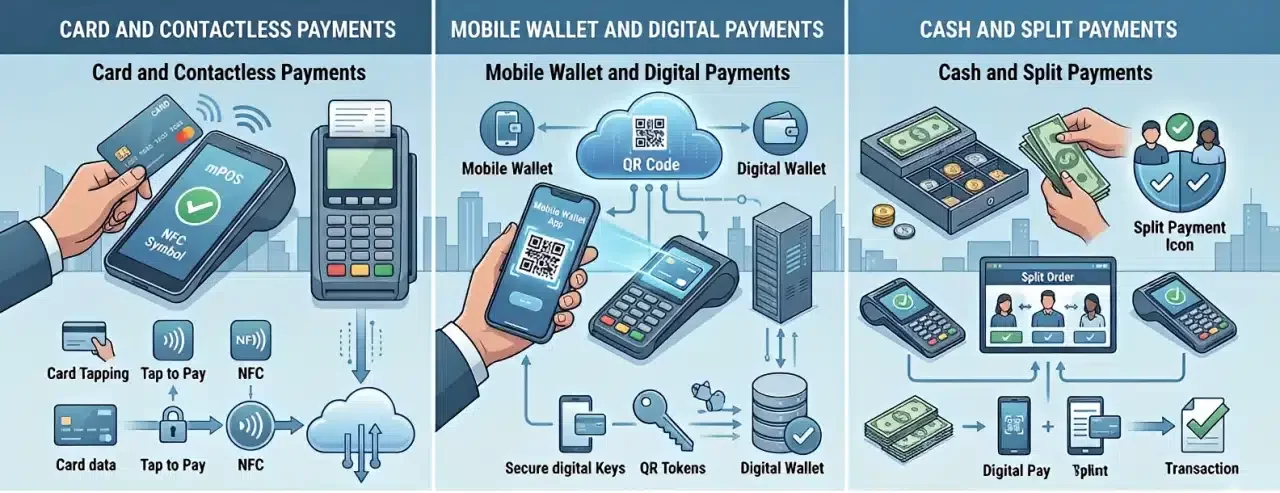
1. Card and contactless payments
Credit and debit cards remain among the most widely used payment methods. Transactions process through chip insertion, card swiping, or contactless tapping using Near Field Communication (NFC) technology.
Contactless payments allow customers to complete smaller purchases without a PIN, which speeds up checkout and reduces queues in busy environments. An EFTPOS solution manages encryption, authorisation, and settlement throughout, protecting card data without exposing it at any point.
2. Mobile wallet and digital payments
Mobile wallets such as Apple Pay and Google Pay let customers pay using a smartphone or wearable device. These use the same contactless technology but add tokenisation and biometric authentication for stronger security.
Rather than transmitting actual card details, mobile wallets generate a secure token for each transaction. This reduces data exposure and makes digital payments one of the safest options at checkout.
3. Cash and split payments
Cash remains common across many businesses, particularly in hospitality and local retail. POS systems manage cash transactions by calculating change automatically and recording each sale accurately.
Many systems also support split payments, where a customer uses more than one method in a single transaction, such as part cash and part card. This flexibility serves different customer preferences without slowing down the checkout process.
Types of POS Transactions
POS transactions occur across different environments depending on how a business operates. The core process stays the same, but the workflow adapts to each sales context.
The three main transaction types are as follows.
In-store transactions
In-store transactions take place at a physical checkout where customers complete purchases with staff present. This is the most traditional form of POS transaction and relies on speed, accuracy, and direct service.
These transactions typically involve barcode scanning, immediate payment, and on-the-spot handover. They also provide natural opportunities for upselling and personalised service during the checkout interaction.
Online and virtual POS
Online transactions occur through websites or mobile applications, where the POS system operates as a virtual interface. It manages pricing, taxes, and payment processing without a physical terminal.
Virtual POS also covers remote payments such as phone orders or manually keyed card transactions. These require stronger verification controls to reduce fraud risk and maintain transaction security.
Refunds and reversals
Refund and reversal transactions handle situations where a completed sale needs adjustment or cancellation. A refund returns funds to the customer after a transaction is finalised.
A reversal typically occurs before the transaction fully settles, such as when a payment fails or an error is identified mid-process. Handling these accurately is important for financial integrity, customer trust, and correct inventory records.
POS Hardware and Devices
POS transactions depend on hardware and software working together at the point of sale. The hardware forms the physical interface between the customer, the staff member, and the payment system.
Choosing the right devices improves transaction speed, security, and operational efficiency across the business.
Card readers and EFTPOS machines
Card readers and EFTPOS machines process electronic payments securely at checkout. These devices support chip insertion, contactless tapping, and card swiping depending on the customer’s preference.
Modern devices use encryption and comply with relevant security standards to protect payment data at every point. Chip authentication and secure PIN entry add further protection during the transaction itself.
Mobile and wireless POS
Mobile and wireless POS devices allow staff to process transactions away from a fixed counter. These systems pair tablets or smartphones with portable card readers for flexible operation.
They are particularly useful in retail, hospitality, and field service environments. Staff can complete payments at the table, on the shop floor, or on location, which reduces queuing and improves the customer experience significantly.
Integrated POS systems
Integrated POS software connects hardware, payment processing, inventory, and financial records into one platform. This gives businesses a unified system for managing transactions, reporting, and operations together.
The integration reduces manual data entry, improves accuracy, and provides real-time insights across departments. Businesses gain a complete view of operations rather than managing data across disconnected tools.
How POS Transactions Support Business Operations
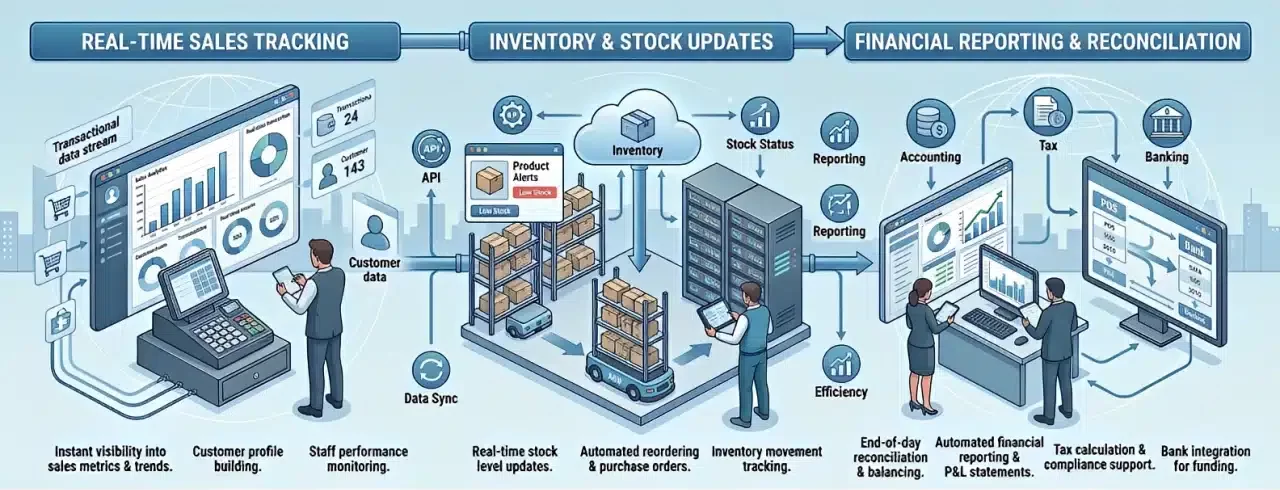
POS transactions do more than record payments. Each completed sale generates data that supports daily operations across sales, inventory, and finance.
Real-time sales tracking
POS systems record every transaction as it happens, giving managers current visibility into revenue, transaction volumes, and product performance. This real-time data supports faster responses to sales trends and demand shifts.
It also helps with staff allocation and planning during peak periods, as managers can identify busy hours from transaction data and adjust resourcing accordingly.
Inventory and stock updates
Each completed transaction automatically adjusts inventory levels across connected sales channels. This removes the need for manual stock entry after each sale and keeps product data consistent across the business.
Accurate inventory data helps prevent stockouts and excess purchasing. It also gives procurement teams clear visibility into demand patterns to support smarter buying decisions.
Financial reporting and reconciliation
When POS, inventory, and accounting systems connect correctly, transaction data flows automatically into financial reports. This simplifies end-of-day reconciliation and reduces errors caused by manual entry.
Businesses can match transaction records against bank statements and payment reports more efficiently, which supports compliance and reduces time spent on financial administration.

Common POS Transaction Issues
Even well-configured POS systems can face disruptions. Most issues trace back to network reliability, hardware performance, or payment gateway dependencies.
Understanding these challenges helps businesses minimise downtime and maintain a smooth checkout experience.
Payment failures and delays
Payment failures occur when transactions are declined or interrupted. Common causes include insufficient funds, expired cards, or security checks flagged by the issuing bank.
Network issues and slow communication with payment gateways can also create delays. Having a clear staff process for handling these situations reduces confusion and keeps the checkout moving.
Connectivity and data sync issues
POS systems depend on stable internet connections to process transactions and sync data across devices. When connectivity drops, transactions may queue for processing until the connection restores.
Sync issues across multiple devices can lead to stock or sales discrepancies. Reliable network infrastructure and a system with offline capability reduce the impact of these disruptions considerably.
Transaction errors and disputes
Checkout errors such as incorrect pricing, duplicate entries, or wrong quantities can create downstream problems in reporting and reconciliation. Catching these immediately prevents them from compounding.
More serious are payment disputes or chargebacks, where customers request reversals through their bank. These cases require proper documentation and clear transaction records to resolve efficiently.
Industry Use Cases of POS Transactions
The core POS process is consistent across sectors, but the specific workflows and priorities differ significantly by industry. The examples below illustrate how different businesses apply POS transactions to their operations.
- Retail: POS transactions focus on speed, inventory synchronisation, and promotional accuracy. Barcode scanning, real-time stock updates, and integrated discount rules help manage high transaction volumes without errors.
- Hospitality and food service: Transactions often include order management, bill splitting, and tipping. POS systems coordinate between front-of-house and kitchen while supporting flexible payment at the table.
- Healthcare and clinics: POS manages patient billing, service payments, and insurance-related transactions. These environments require higher accuracy and compliance with privacy and billing regulations.
Implementing a POS System Successfully
A successful POS implementation requires planning before hardware is installed or software is configured. The four areas below cover what businesses should address before going live.
- Needs assessment: Evaluate transaction volume, operational complexity, and customer flow. Identify hardware requirements such as terminals, receipt printers, and cash drawers, as well as software integrations for accounting and CRM.
- Vendor selection: Choose a provider with reliable performance, transparent pricing, and strong local support. Confirm the system supports modern payment methods and can scale as the business grows.
- Infrastructure and setup: Establish a stable network before installation. Configure all hardware and verify every device connects correctly to the central system before processing live transactions.
- Training and adoption: Provide hands-on training so staff can process transactions confidently and handle common issues without escalation. Strong adoption reduces workarounds and improves consistency across the team.
Common Pitfalls in POS Transaction Management
Poor management practices can undermine an otherwise well-configured POS system. The three pitfalls below have a direct impact on efficiency, security, and data accuracy.
Ignoring security and compliance
Security is a non-negotiable part of transaction management. Failing to implement proper encryption and compliance standards increases the risk of data breaches and payment fraud.
Businesses should ensure their systems follow required security protocols and protect sensitive payment information at every stage. Strong security practices also build customer trust and reduce long-term liability.
Lack of offline capability
POS systems that depend entirely on internet connectivity become a liability during outages. Without offline capability, transactions halt and sales are lost during peak periods.
A system that continues processing during connectivity issues, then syncs automatically when the connection restores, protects revenue and maintains business continuity regardless of network conditions.
Poor inventory synchronisation
When POS transactions do not sync with inventory records in real time, stock discrepancies accumulate. This leads to overselling, inaccurate reporting, and purchasing decisions based on incorrect data.
Real-time synchronisation between POS and inventory systems is essential for accurate operations. Without it, businesses spend unnecessary time on manual stock counts and corrections.
Advanced Trends in POS Transactions
POS technology continues to develop as businesses look for faster, smarter, and more connected transaction systems. The three trends below reflect where many businesses are heading.
AI and predictive analytics
Artificial intelligence analyses transaction data to identify patterns in customer behaviour and sales performance. Businesses use these insights to forecast demand, refine pricing strategies, and plan inventory with greater accuracy.
Predictive analytics lets finance and operations teams base decisions on real data rather than estimates, which reduces waste and improves margins over time.
Omnichannel and unified commerce
Many businesses operate across physical stores, online platforms, and mobile applications simultaneously. Modern POS systems connect all these channels into one unified view of transactions, inventory, and customer data.
This ensures consistent pricing and stock availability regardless of where the customer shops, and gives the business a complete picture of performance across every sales channel.
Biometric and contactless innovations
Contactless payments continue to grow in adoption across retail and hospitality. Biometric authentication such as fingerprint scanning and facial recognition is becoming more accessible as a checkout option.
These technologies reduce friction at the point of sale, speed up the payment process, and strengthen security by reducing reliance on physical cards and manual verification.
Conclusion
POS transactions connect payments, inventory, and business data into one continuous process. When each activity runs accurately, businesses reduce manual work, improve reporting, and deliver a faster and more reliable checkout experience.
A well-managed POS system also gives businesses real-time visibility across sales, stock levels, and financial records. That visibility supports better decisions, faster responses to demand shifts, and more consistent day-to-day operations.
If your business is looking to improve transaction efficiency and gain better control across operations, the right POS system makes a real difference. Book a free consultation with our team to explore POS solutions that support more scalable and efficient business processes.
FAQ About POS Transactions
-
What happens during a POS transaction?
A POS transaction involves capturing purchased items, calculating the total price, processing the payment, and updating inventory and financial records in real time. This process ensures that all business data stays accurate and synchronised.
-
Can POS transactions work without internet?
Some POS systems offer offline functionality that allows transactions to continue during network disruptions. The data is stored temporarily and synchronised once the connection is restored.
-
How do POS systems update inventory automatically?
Each completed transaction automatically deducts sold items from inventory records. This real-time update ensures accurate stock levels across all sales channels without manual input.
-
What causes POS transaction failures?
Failures can occur due to network issues, insufficient funds, expired cards, or payment gateway errors. Proper system setup and stable connectivity help minimise these disruptions.
-
Are POS transactions secure?
Modern POS systems use encryption, tokenisation, and secure payment protocols to protect transaction data. These security measures help reduce fraud risks and protect sensitive customer information.