





Retail ERP is software that connects every part of a retail business, from inventory and point of sale through to purchasing, accounting, and reporting. It pulls all of these functions into one system so that data stays consistent across stores, warehouses, and online channels.
For Australian retailers juggling multiple locations and sales channels, a retail ERP removes the gaps that spreadsheets and disconnected tools leave behind. When stock, sales, and finance share the same records, managers can see what is actually happening and act on it quickly.
This guide explains what retail ERP is, how it works, its core features and benefits, when a business needs one, and how to choose the right system.
Key Takeaways
Retail ERP is an integrated system that manages inventory, POS, purchasing, customers, and accounting from one shared source of truth.
Key retail ERP features include inventory management, POS integration, omnichannel order management, demand forecasting, and integrated accounting.
Benefits for retailers include better stock visibility, faster fulfilment, accurate financials, and stronger decisions from real-time reports.
Choosing a retail ERP means matching the system to your workflows, integration needs, reporting, scalability, and implementation support.
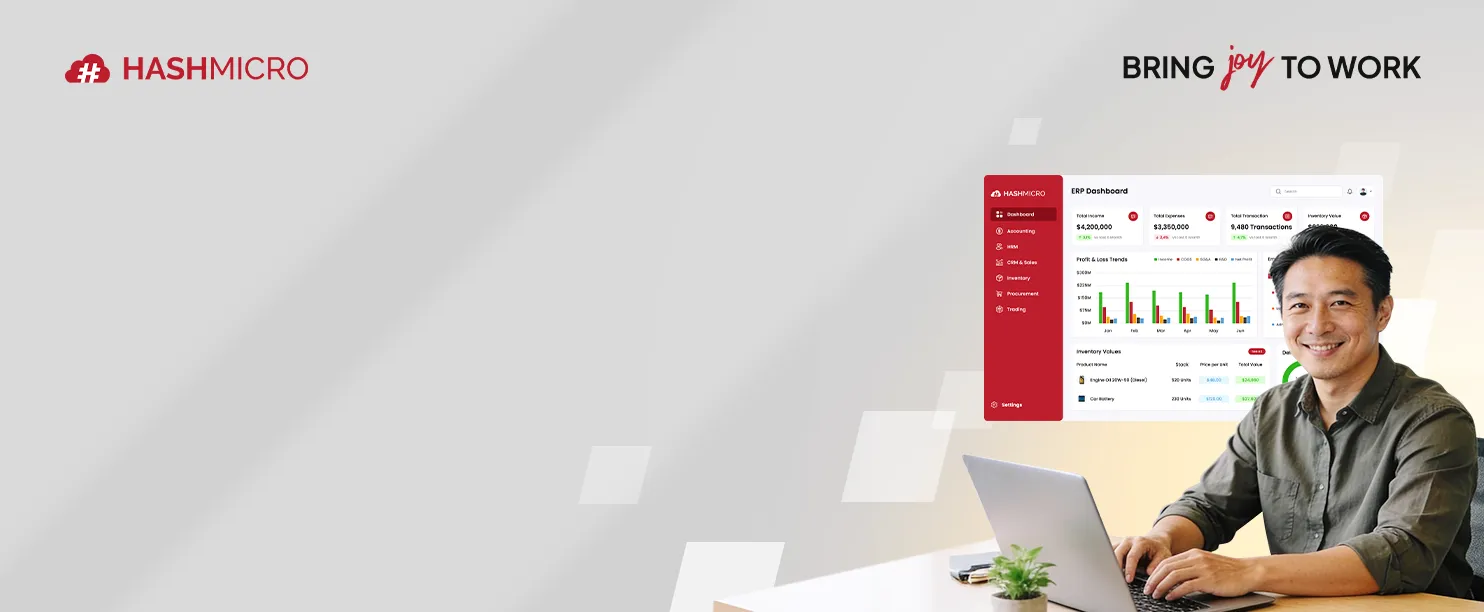
What is Retail ERP?

Retail ERP is an integrated platform that manages the daily operations of a retail business in one place, creating unified operational data flows across inventory, sales, procurement, customer management, and finance.
A general ERP handles broad business processes, while a retail ERP adds tools built for selling goods. These include point of sale, omnichannel order management, and stock control across many locations.
Think of it as the operational backbone of a retailer. Every sale, return, purchase order, and stock movement flows through the system, which keeps reports accurate and decisions grounded in real numbers.
How Does Retail ERP work?

A retail ERP works by linking each operational area to a shared database that updates in real time. The sections below explain how the main components connect and feed information to one another.
1. Centralised retail data
A retail ERP stores product, pricing, customer, and transaction data in one central database. Every store and channel reads from and writes to the same records, which prevents the mismatches that separate systems often create.
For example, when a head office updates a product price, every till and online listing reflects that change straight away. As a result, staff and customers see consistent information wherever they look.
2. Inventory and stock control
The system tracks stock levels across stores, warehouses, and online channels as transactions happen, providing accurate inventory tracking across locations from a single source of truth.
This live view helps retailers avoid both stockouts and overstocking. Managers can also transfer stock between locations based on real demand rather than guesswork.
3. Sales and POS integration
A retail ERP connects directly to the point of sale, so each transaction updates inventory, sales, and accounting records at once, ensuring connected sales transactions throughout the business.
Because the POS and the back office share one system, daily reconciliation becomes far simpler. Therefore, finance teams spend less time matching till totals to the books.
4. Purchasing and supplier management
The system manages purchase orders, supplier records, and goods receipts in one workflow. When stock drops below a set level, the ERP can prompt a reorder or generate a purchase order automatically.
This keeps replenishment timely and reduces manual ordering errors. Buyers can also compare supplier prices and lead times before committing to a purchase.
5. Reporting and analytics
A retail ERP turns daily transactions into reports on sales, margins, stock turnover, and customer behaviour. Managers view dashboards that draw from live data rather than static end-of-month spreadsheets.
For instance, a regional manager can compare store performance side by side and spot a slow-moving product early. Better visibility then leads to faster, more confident decisions.
Retail ERP vs Traditional ERP
Retail ERP and traditional ERP share the same foundation, yet they serve different operational needs. The points below show where a retail-focused system pulls ahead for businesses that sell goods.
Industry-specific retail workflows
Retail ERP includes features built around how shops actually trade, such as promotions, loyalty, and multi-store pricing. A traditional ERP usually needs heavy customisation to handle these same tasks.
This retail focus shortens setup and reduces the gaps between the software and the way staff work. As a result, teams adopt the system faster and rely on fewer workarounds.
Omnichannel and POS requirements
Retailers sell across physical stores, websites, and marketplaces, so they need POS and online channels tied to one stock pool. Retail ERP handles this natively, while traditional ERP often treats POS as an external add-on.
For example, a customer can buy online and return in store without breaking the stock or sales records. That kind of omnichannel flow is difficult to fulfil with a generic system.
Inventory complexity
Retail businesses manage thousands of SKUs across sizes, colours, variants, and locations. Retail ERP is designed for this scale, with variant tracking and location-level stock built in from the start.
A traditional ERP can store inventory, but it rarely handles fast-moving retail variety with the same ease. Therefore, retailers gain cleaner stock data and fewer counting headaches.
Implementation flexibility
Retail ERP often ships with retail templates and presets that speed up deployment. A traditional ERP tends to start from a blank slate, which lengthens the project and raises cost.
This flexibility matters for growing retailers that need to go live without long delays. A quicker rollout also means the business sees value sooner.
To make the contrast easy to scan, the table below sets retail ERP and traditional ERP side by side across the areas that matter most to businesses selling goods.
Key Features of Retail ERP Software
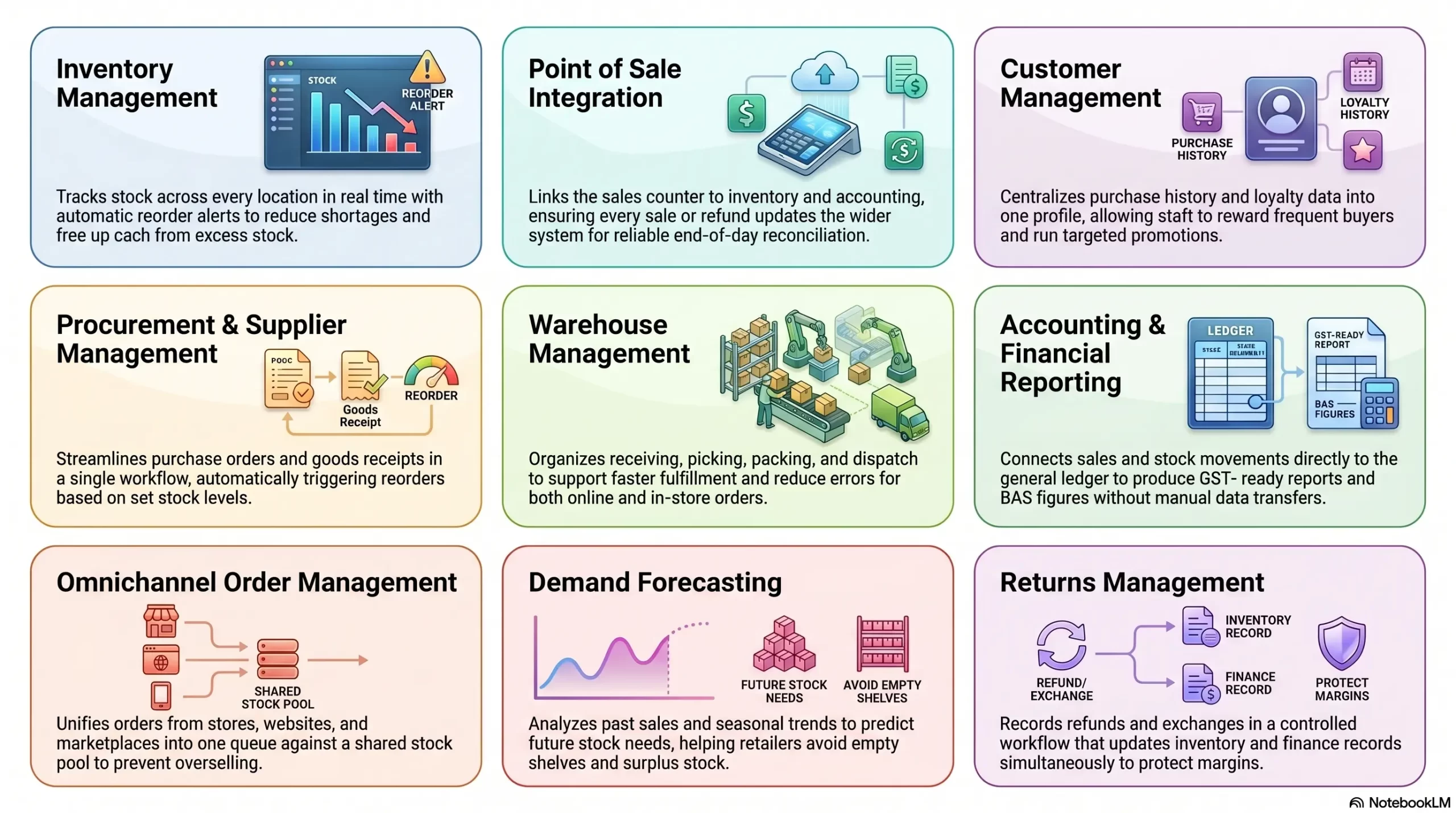
A strong retail ERP brings together the tools a retailer relies on every day. The features below cover the core capabilities to look for when comparing systems.
1. Inventory management
Inventory management tracks stock across every location in real time, with reorder points and automatic alerts. It gives retailers an accurate count of what they hold and where it sits.
This control reduces both shortages and excess stock. Consequently, retailers free up cash that would otherwise sit in unsold goods.
2. Point of sale integration
Built-in POS integration links the sales counter to inventory, accounting, and customer records. Every sale, refund, or exchange updates the wider system without extra data entry.
This connection keeps store and back-office figures aligned throughout the day. As a result, end-of-day reconciliation becomes quick and reliable.
3. Customer management
Customer management stores purchase history, contact details, and loyalty data in one profile. Staff use this information to personalise service and run targeted promotions.
A clear view of each customer helps retailers build repeat business. For example, a store can reward frequent buyers based on their actual spending.
4. Procurement and supplier management
This feature handles purchase orders, supplier records, and goods receipts in a single workflow. The system can trigger reorders automatically when stock falls below set levels.
Streamlined procurement keeps shelves stocked without over-ordering. Buyers also gain a clear record of supplier pricing and delivery performance.
5. Warehouse management
Warehouse management organises receiving, picking, packing, and dispatch across storage sites. It guides staff through each task and records stock movements as they happen.
Accurate warehouse data supports faster fulfilment and fewer picking errors. Therefore, online and in-store orders reach customers sooner.
6. Accounting and financial reporting
Integrated accounting connects sales, purchases, and stock movements directly to the general ledger. Finance teams produce GST-ready reports and BAS figures without manual data transfers.
This integration cuts double entry and reduces reporting errors. Managers then trust the numbers they use to run the business.
7. Omnichannel order management
Omnichannel order management unifies orders from stores, websites, and marketplaces into one queue. Staff process every order against a single, shared stock pool.
This prevents overselling and keeps fulfilment consistent across channels. For instance, click-and-collect and home delivery draw from the same inventory record.
8. Demand forecasting
Demand forecasting uses past sales and seasonal trends to predict future stock needs. The system suggests order quantities that match expected demand.
Better forecasts help retailers prepare for busy periods without tying up cash. As a result, they avoid both empty shelves and surplus stock.
9. Returns management
Returns management records refunds, exchanges, and restocking in a controlled workflow. Each return updates inventory and finance records at the same time.
A clear process keeps returns accurate and quick for both staff and customers. This consistency also protects margins and stock counts.
Benefits of ERP for Retail Businesses
A retail ERP delivers practical gains that show up across the whole business. The benefits below explain why retailers invest in one system rather than many disconnected tools.
Better stock visibility
A retail ERP shows live stock levels across every store, warehouse, and channel. Managers always know what they hold and where it sits.
This visibility reduces lost sales from stockouts and frees cash from excess inventory. Consequently, retailers keep the right products in the right places.
Faster order fulfilment
With connected inventory and orders, staff fulfil purchases quickly and accurately. The system routes each order to the best location for picking and dispatch.
Faster fulfilment improves delivery times and customer satisfaction. Therefore, retailers handle higher order volumes without adding strain.
More accurate financial data
Because sales, purchases, and stock feed straight into accounting, financial records stay accurate. Finance teams avoid the errors that manual transfers usually introduce.
Reliable numbers make tax time and BAS preparation far smoother. As a result, owners make decisions on figures they can trust.
Improved customer experience
Unified customer and stock data lets staff serve shoppers consistently across channels, supporting unified customer shopping journeys whether customers buy online, in-store, or through multiple sales channels.
This consistency builds trust and encourages repeat purchases. For example, a customer enjoys the same service whether they shop online or in store.
Easier multi-store management
A retail ERP lets head office manage pricing, stock, and reporting across every location from one screen, enabling more effective centralised store management as the business grows.
This control keeps standards consistent as the business grows. Owners then add new stores without rebuilding their systems.
Better decision-making with real-time reports
Live dashboards give managers an up-to-date view of sales, margins, and stock performance. They act on current information rather than waiting for monthly summaries.
Quicker insight leads to sharper decisions on pricing, ordering, and promotions. As a result, the business responds to change before it costs money.
When Does a Retail Business Need ERP?
Not every retailer needs an ERP on day one, yet clear signs show when the time has come. The situations below suggest a business has outgrown its current tools.
1. Managing multiple stores
When a retailer runs several locations, separate systems make consistent control difficult. An ERP centralises stock, pricing, and reporting across every store.
This unified view keeps operations aligned as the business expands. Owners then manage all sites without duplicating effort.
2. Frequent stockouts or overstocking
Regular shortages or surplus stock point to weak inventory visibility. A retail ERP tracks stock in real time and signals when to reorder.
Accurate stock control protects both sales and cash flow. Therefore, the business holds the right amount of inventory more often.
3. Disconnected POS and inventory data
When the POS and inventory do not share data, counts drift out of sync. An ERP links them so each sale updates stock instantly.
This connection removes manual reconciliation and reduces errors. As a result, staff trust the figures they see at the counter.
4. Manual reporting
Retailers that build reports by hand spend hours on work the system could automate. An ERP generates live reports from current data in seconds.
Automated reporting frees staff for higher-value tasks. For example, managers analyse results instead of compiling them.
5. Growing omnichannel operations
As online and marketplace sales grow, managing channels separately becomes risky. A retail ERP unifies orders and stock across every channel.
This prevents overselling and keeps fulfilment smooth. Consequently, the business scales its online presence with confidence.
6. Complex supplier and warehouse workflows
When purchasing and warehousing grow complicated, manual processes start to fail. An ERP structures procurement, receiving, and dispatch in one flow.
Organised workflows reduce delays and costly mistakes. Therefore, goods move from supplier to shelf more reliably.
Common Retail ERP Implementation Challenges

Rolling out a retail ERP brings real benefits, yet the project carries a few hurdles. Knowing these challenges early helps a business plan around them.
Data migration
Moving product, customer, and stock data into a new system takes careful preparation. Messy or duplicated records can carry errors into the ERP.
Cleaning data before migration keeps the new system accurate. As a result, the business starts on a reliable foundation.
POS and ecommerce integration
Connecting tills and online stores to the ERP can be technically demanding. Each channel must map correctly to shared stock and sales records.
Planning these connections early prevents sync problems later. Therefore, orders flow smoothly from the first day of use.
Staff training
A new system only works when staff understand how to use it. Without proper training, teams fall back on old habits and workarounds.
Hands-on training and clear guides speed up adoption. Consequently, staff gain confidence and use the system as intended.
Workflow customisation
Every retailer works differently, so the ERP must match real processes. Over-customising adds cost, while under-customising leaves gaps.
Balancing standard features with targeted changes keeps the project practical. The business then gets a system that fits how it trades.
Choosing the wrong system
Selecting an ERP that does not suit retail needs leads to frustration and wasted spend. A poor fit forces teams into manual workarounds anyway.
Careful evaluation against retail requirements avoids this trap. For example, testing key features before buying confirms the fit.
How To Choose The Right Retail ERP System
Choosing a retail ERP works best when a business matches the system to its actual needs. The points below outline what to assess before committing.
Define retail workflows
Start by mapping how the business trades, from purchasing through to sales and returns. A clear picture of these workflows shows which features matter most.
This clarity prevents paying for tools the business will never use. As a result, the search stays focused and efficient.
Check inventory and POS integration
Confirm that the ERP links inventory and point of sale tightly. These two functions sit at the heart of daily retail operations.
Strong integration keeps stock and sales accurate in real time. Therefore, the business avoids the gaps that separate tools create.
Review ecommerce and marketplace integration
Check how well the ERP connects to online stores and marketplaces. Retailers selling across channels need orders and stock to stay unified.
Solid integration prevents overselling and manual updates. Consequently, the business manages every channel from one place.
Compare reporting features
Look closely at the reports and dashboards each system offers. Useful reporting turns daily data into decisions a manager can act on.
Clear, live reporting saves time and sharpens planning. For example, real-time margin data guides smarter pricing.
Review scalability
Make sure the ERP can grow with the business over time. Adding stores, channels, or users should not require a new system.
A scalable platform protects the initial investment. As a result, the business expands without disruptive replacements.
Consider implementation support
Assess the vendor’s training, onboarding, and ongoing support. Strong support reduces the risk of a difficult rollout.
Reliable help keeps the project on track and the team confident. Therefore, the business reaches full use of the system sooner.
Conclusion
A retail ERP brings inventory, sales, purchasing, and finance into one connected system that reflects how a retail business actually runs. By sharing accurate data across stores and channels, it helps retailers cut stock problems, speed up fulfilment, and make decisions on numbers they can trust.
Whether a business runs one busy store or a growing omnichannel operation, the right system pays back the effort of setting it up. To find the retail ERP that fits your stores and sales channels, book a free consultation with our expert today.
Frequently Asked Question
Retail ERP is used to manage a retailer's core operations in one system, including inventory, point of sale, purchasing, customers, and accounting. It keeps data consistent across stores and channels so managers can run the business from accurate, live information.
No, retail ERP suits businesses of many sizes, not just large chains. Small and mid-sized retailers use it to connect stock, sales, and finance, and most systems scale as the business adds stores or channels.
Traditional ERP manages broad business processes, while retail ERP adds tools built for selling goods, such as POS, omnichannel orders, and multi-location stock control. Retail ERP needs less customisation because it already fits how shops trade.
POS software handles transactions at the point of sale, while ERP manages the whole business, including inventory, purchasing, and accounting. A retail ERP usually includes POS as one connected part of a much larger system.
Yes, inventory management is one of the core strengths of retail ERP. It tracks stock in real time across stores and warehouses, flags low stock for reorder, and reduces both stockouts and overstocking.
Retail ERP centralises pricing, stock, and reporting so head office can manage every location from one screen. Each store keeps trading independently while sharing the same data, which keeps standards consistent as the business grows.