







Single Touch Payroll (STP) is the framework that requires Australian employers to transmit wages, PAYG withholding, and superannuation data to the ATO through the Standard Business single touch payroll tools.
STP works by embedding statutory reporting inside the payroll process. Therefore, each pay run generates a pay event file containing year-to-date figures, which the software submits to the ATO via the SBR gateway.
This guide covers the definition of payroll, why Australian businesses need it, the best practices, and everything you need to know for your business to fully comply.
Key Takeaways
STP is a real-time ATO reporting framework that sends wages, PAYG withholding, and superannuation data from payroll software to the ATO.
Implementing STP involves choosing ATO-certified payroll software, linking it through Access Manager, configuring employee master data, and running a test pay event.
The 2026 Compliance Checklist covers verifying software version, auditing employee records, confirming pay item mapping, resolving ATO warnings, and diarising the 14 July finalisation deadline.
Best practices include keeping records accurate, reporting on or before each pay day, automating submissions through payroll or ERP software, and reviewing EOFY finalisation early.

What Is Single Touch Payroll (STP)?

Single Touch Payroll is a digital reporting mandate introduced by the ATO on 1 July 2018 for large employers, extended to all employers by 1 July 2019, and expanded again through Phase 2 from 1 January 2022.
Before STP, employers lodged PAYG withholding monthly or quarterly and issued Payment Summaries (formerly group certificates) at year-end, alongside a Payment Summary Annual Report (PSAR) to the ATO.
The current framework replaces that batch process with real-time lodgement. Every pay run now triggers an automatic transmission to the ATO on or before the payment date, giving live visibility of tax and super.
The system serves three objectives. First, it integrates statutory reporting into normal business processes. Second, it gives employees live visibility of earnings through their myGov account.
Third, it feeds real-time data to Services Australia and the Child Support Agency, so welfare entitlements and child support deductions are calculated against current income rather than historical estimates.
STP relies on Application Programming Interfaces (APIs) embedded in compliant payroll software. When a pay run is finalised, the software compiles an XML or JSON payload and transmits it via the SBR network.
The ATO validates the payload against the employer’s ABN and each Tax File Number, then updates employee records. Successful lodgements usually appear in myGov within minutes.
Why Single Touch Payroll Is Important for Australian Businesses
STP reshapes payroll compliance in Australia by reducing manual reporting, improves accuracy, and gives the ATO a live view of employer obligations, benefiting businesses, employees, and agencies alike.
Single Touch Payroll also strengthens regulatory compliance for HR by sending salary, PAYG, and super data to the ATO every pay cycle, surfacing errors early and keeping Fair Work records accurate.

1. Streamlined payroll reporting to the ATO
Reporting happens automatically through the payroll software at each pay event. Therefore, employers stop duplicating effort across separate BAS statements, PAYG reports, and payment summaries.
The software produces a validated file in a single action. For example, a weekly pay run for 50 employees can be lodged with the ATO in under two minutes, without any spreadsheet manipulation.
2. Greater transparency for employees
Employees can view year-to-date wages, tax, and super in their myGov account at any time during the year. As a result, they spot payroll errors early and raise them before the figures compound.
This visibility also supports loan, rental, and Centrelink applications. For example, banks can verify income directly through the Income Statement rather than requiring historical payslips from the employer.
3. Reduced end-of-year reporting burden
STP removes the need to produce payment summaries or an annual PAYG report. Once the EOFY finalisation declaration is submitted by 14 July, employee Income Statements are marked “tax ready” in myGov.
Therefore, payroll teams reclaim time previously spent on year-end reconciliation. A mid-sized employer saves roughly 20 hours of admin each July by using finalisation rather than manual summaries.
Who Must Use Single Touch Payroll?
According to the Australian Bureau of Statistics, more than 2.6 million actively trading businesses operate in Australia, and every employer among them falls within STP reporting rules.
STP applies to every legal structure that employs staff in Australia, including companies, sole traders, partnerships, trusts, and not-for-profits.
All worker types are covered: full-time, part-time, casual, directors, closely held payees, working holiday makers, and termination or lump sum recipients.
Micro employers with one to four staff follow the same rules. Most now lodge on or before each payday using low-cost STP software.
Full exemptions are rare, limited to employers in remote areas without reliable internet. Short-term deferrals are available for disruptions like natural disasters or outages.
Entities with a WPN rather than an ABN, such as households employing a nanny, operate under transitional rules.
Foreign employers with Australian-based staff must register for an ABN and use compliant software to lodge pay events correctly.
The table below summarises how STP reporting rules apply across different employer types.
| Employer Type | Definition | Reporting Frequency | Concessions Available |
|---|---|---|---|
| Micro Employer | 1–4 employees | On or before each payday | Quarterly reporting available in specific circumstances via registered tax or BAS agent |
| Small Employer | 5–19 employees | On or before each payday | No concessions; standard STP rules apply |
| Large Employer | 20 or more employees | On or before each payday | No concessions; standard STP rules apply |
| Closely Held Payees | Family members, directors, or trust beneficiaries directly related to the paying entity | On or before each payday or quarterly | Quarterly reporting permitted; later EOFY finalisation deadline of 30 September |
Key Components of STP Reporting
The ATO expects a detailed breakdown of pay, tax, super, and employment information at every pay event, so accuracy across each component protects both the employer and the employee.
1. Wages, PAYG withholding, and superannuation data
Employers report gross wages, allowances, bonuses, commissions, and deductions alongside PAYG withholding and the Superannuation Guarantee liability calculated on Ordinary Time Earnings (OTE).
Therefore, payroll calculations must reconcile cleanly against each STP submission. For example, a miscoded allowance can inflate OTE, overstate super liability, and distort an employee’s tax position.
2. Employment details and income types
STP Phase 2 requires granular employment data, such as income type (salary and wages, closely held, working holiday maker, labour hire), employment basis, and tax treatment code.
The tax treatment code is a six-character alphanumeric field that encodes tax scale, residency, study loan status, and Medicare Levy variations. Then the ATO applies the correct withholding rules automatically.
Cessation data is also reported when an employee leaves. The cessation reason code (voluntary resignation, redundancy, dismissal, contract cessation) replaces the old separation certificate used by Centrelink.
3. EOFY finalisation and income statements
At year-end, employers lodge a Finalisation Declaration confirming that all reported year-to-date figures are complete and accurate for each employee.
Once lodged, each employee’s Income Statement in myGov changes from “year-to-date” to “tax ready”. Individuals or their tax agents can then lodge annual returns without waiting for a payment summary.
The finalisation deadline is 14 July for most employers. For example, closely held payees have a later deadline (typically 30 September) to allow for end-of-year adjustments within family businesses.
4. Exemptions and deferral options
Some employers qualify for deferrals when software is not compliant or when disruptions prevent reporting. For example, a ransomware attack disabling a payroll system supports a short-term deferral request.
Deferrals are requested through the ATO’s online services for business or via a registered tax or BAS agent. Therefore, the request must specify the affected pay cycles and the expected resolution date.
What Changed with Single Touch Payroll?
STP has evolved since its 2018 launch. The second iteration, effective from 1 January 2022, expanded the reporting scope and replaced multiple separate obligations with one enriched data feed to the ATO.
1. How Phase 1 and Phase 2 differ in reporting scope
The original rollout captured top-level financial data: gross wages, PAYG withheld, and super liability. This satisfied the ATO but lacked the detail needed by other agencies such as Services Australia.
The updated framework disaggregates gross pay into specific categories. Therefore, a single “gross” figure now splits into ordinary earnings, overtime, allowances, bonuses, paid leave types, and directors’ fees.
The updated framework also embeds the TFN declaration inside the pay event. For example, separate paper or digital TFN declarations are no longer required, reducing onboarding paperwork significantly.
Services Australia, the Child Support Agency, and Home Affairs now receive data directly through STP. As a result, employers issue fewer separation certificates and supporting letters for employee benefit claims.
| Reporting Scope | STP Phase 1 | STP Phase 2 |
|---|---|---|
Financial data captured |
Top-level totals only: gross wages, PAYG withheld, and super liability. | Disaggregated data feeding both ATO and partner agencies. |
Gross pay breakdown |
Reported as a single combined gross figure. | Split into ordinary earnings, overtime, allowances, bonuses, paid leave types, and directors’ fees. |
TFN declarations |
Lodged separately via paper or digital forms. | Embedded directly inside each pay event, removing duplicate paperwork. |
Agency data sharing |
Other agencies relied on employer-issued letters and certificates. | Services Australia, Child Support Agency, and Home Affairs receive data directly. |
Employer admin burden |
Frequent issuing of separation certificates and supporting letters for employee claims. | Reduced paperwork, as agencies source data directly from STP submissions. |
2. STP Phase 2 income and reporting categories
Income splits into six primary categories: salary and wages, closely held payees, working holiday makers, seasonal workers, labour hire, and voluntary agreements. Each record reflects the nature of the engagement.
Allowances must be itemised by type. For example, tool, task, qualification, travel, meals, and laundry allowances each require their own reporting category rather than being lumped into gross pay.
Paid leave is separated, too. Categories include annual leave (O), personal or carer’s leave (S), long service leave (L), ancillary and defence leave (A), workers’ compensation (W), and paid parental leave (P).
Lump sum and termination components carry distinct codes. Lump Sum A covers unused leave on termination, Lump Sum B legacy LSL, Lump Sum D tax-free redundancy, and Lump Sum E backpay from prior years.
Salary sacrifice arrangements must also be split. Therefore, super contributions (type S) and other employee benefits such as novated leases or devices (type O) are reported separately rather than bundled.
How STP Reporting Works for Your Business
STP operates on a year-to-date (YTD) basis. Each pay event sends cumulative YTD totals, not just the current pay period, so every submission effectively overwrites the previous one with updated figures.
This YTD approach is self-correcting. If an underpayment of $50 is discovered in week 2, the week 2 submission contains the corrected YTD total, and no amendment to week 1 is required.
A pay run moves through five technical stages from automated payroll processing to ATO confirmation.
- Calculate and finalise the pay run. The administrator calculates timesheets, applies leave, processes deductions, and finalises the pay run in compliant software.
- Map pay data to ATO categories. The software extracts YTD figures and maps each item to its corresponding ATO reporting category.
- Sign the digital declaration. The user signs a digital declaration confirming that the data is true and correct.
- Transmit the payload to the ATO. The software sends the encrypted payload to the ATO through the SBR gateway.
- Review the ATO response. The ATO responds with a status message: success, partial success (some employees rejected for invalid TFNs or formatting), or full rejection (usually caused by an invalid ABN or disconnected Software ID).
Employers also handle corrections through Update Events. If a post-payment adjustment is needed, an Update Event pushes revised YTD values to the ATO without reissuing the original pay event.
Reports must be lodged on or before each payday. Payroll accuracy at the point of pay matters more than year-end reconciliation, because late or missing events trigger failure-to-lodge penalties.
What Information Do You Need to Report?
Every pay event combines three data layers: employer data, employee demographic data, and year-to-date financial data. Each layer must be validated before submission to avoid rejection or compliance breaches.
Employer data includes the ABN, branch number (usually 001, or another if the business operates multiple registered branches), and the registered business name for ATO account matching.
Employee demographic data covers the Tax File Number, full legal name, date of birth, and residential address. For example, missing a TFN triggers the use of exemption codes such as 000000000 or 111111111.
Employment basis must also be declared: full-time, part-time, casual, labour hire, or non-employee, such as a voluntary-withholding contractor. Master file accuracy, therefore, drives correct STP lodgement.
The tax treatment code captures TFN declaration outcomes. It records whether the employee claims the tax-free threshold, holds a HELP, VSL, or SSL study loan, or qualifies for a Medicare Levy variation.
Cessation data reports the termination date and a standardised reason code. Codes cover voluntary resignation, redundancy, dismissal, contract cessation, and transfer, replacing legacy separation certificates.
Financial data reports gross earnings disaggregated into Phase 2 categories, along with PAYG withholding, Superannuation Guarantee liability, and Reportable Employer Superannuation Contributions (RESC).
Allowances and paid leave amounts are itemised, as outlined in the Key Components section above. Then deductions such as child support, union fees, and workplace giving appear with their own identifiers.
Child support deductions warrant specific attention. Notices issued under section 45 of the Child Support (Registration and Collection) Act 1988 are reported directly through STP to the Child Support Agency.
SG liability represents the amount owed, not the amount remitted. Therefore, the figure lodged through STP and the superannuation actually paid via the clearing house must reconcile before each quarterly deadline.
How to Set Up and Register for STP
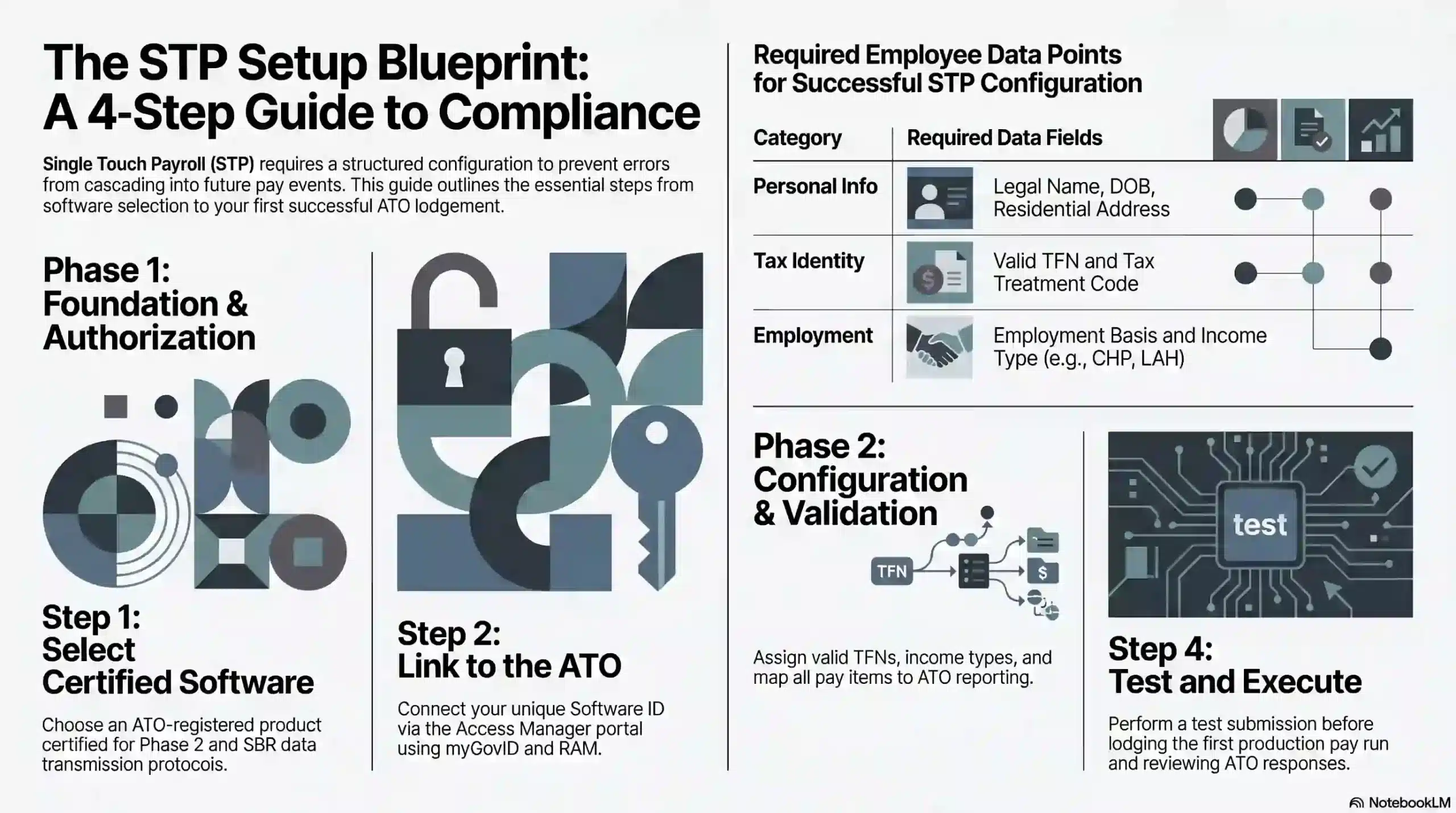
STP setup requires a structured approach because errors in configuration cascade into every future pay event. A careful rollout protects the business from rejected lodgements and ATO penalties.
1. Choosing STP-compliant payroll software
The foundation of STP compliance is choosing software listed on the ATO’s Product Register. The product must be certified for Phase 2 and support the SBR protocol for data transmission.
For micro employers, low-cost standalone apps suffice for basic STP lodgement. Several ATO-approved apps cost under $10 per month and handle fewer than four employees with minimal setup.
Mid-sized and large employers prefer integrated payroll and HR platforms. Embedding payroll inside an ERP or HRIS allows leave, timesheets, awards, and STP to flow through a single data model.
2. Connecting your software to the ATO
After installing the software, the business must link it to the ATO through the Access Manager portal using its myGovID credentials and Relationship Authorisation Manager (RAM).
The connection requires the unique Software ID issued by the vendor. This identifier is registered against the ABN in ATO systems, and without it, pay event lodgements fail at the SBR gateway.
Registered agents can link a client’s software through Online Services for Agents. For example, a BAS agent uses their agent number rather than the employer’s myGovID to authorise lodgements.
3. Configuring your employee details
Accurate master data is the single biggest determinant of STP success. Therefore, each employee record must contain a valid TFN, legal name, date of birth, residential address, and employment basis.
The tax treatment code is derived from the employee’s TFN declaration. Claims for the tax-free threshold, HELP or VSL loans, and Medicare Levy variations all flow through the declaration into the code.
Income type must be assigned at the employee level. For example, working holiday makers require a country code, closely held payees need the CHP flag, and labour hire staff use the LAH income type.
Pay items, allowances, leave categories, and deductions must all be mapped to ATO reporting categories. The software then translates each pay run into a compliant Phase 2 payload automatically.
4. Running your first STP pay event
Before the first live pay event, most employers run a test submission. Therefore, the ATO provides a validation environment that checks data structure and business rules without updating production records.
Once test lodgement succeeds, the first production pay run can be submitted. A payroll officer processes the weekly pay, reviews the draft file inside the software, and then lodges it through the SBR connection.
The ATO response message must be reviewed immediately. As a result, any invalid TFNs, missing fields, or structural errors can be corrected through an Update Event before the next scheduled pay run.
How Often Do You Report Payroll?
The default rule is simple: STP reporting happens on or before every payday. Therefore, weekly payrolls lodge weekly, fortnightly payrolls lodge fortnightly, and monthly payrolls lodge monthly.
The rule applies regardless of business size. A sole trader paying one casual employee weekly lodges a pay event every week, the same as a corporation paying 5,000 employees on the same cycle.
Out-of-cycle payments require their own event. For example, a mid-month bonus, back-pay adjustment, or termination payment outside the regular run must be lodged on or before the day funds are transferred.
Closely held payees have flexibility. Small employers can report these payments on each payday or quarterly, provided the quarterly estimate is reasonable and reconciled at year-end.
Quarterly reporting is also available for micro employers in specific circumstances, generally accessed through a registered tax or BAS agent. The concession requires ATO approval rather than being automatic.
Deferrals apply when an unavoidable disruption prevents lodgement. For example, a prolonged software outage or cyber incident supports a short-term deferral, but the employer must apply and document the cause.
How Australian Businesses Across Industries Use STP
STP applies universally, but industry conditions shape how it is implemented. Casual-heavy rosters, complex allowances, and seasonal workforces each create specific configurations and reporting priorities.
1. Retail and hospitality
Retail and hospitality employers run high-turnover rosters of casuals, part-timers, and penalty rates. STP configurations must handle rapidly changing headcount without delaying pay event lodgement.
Over time, public holiday and weekend loadings must be split from ordinary time earnings. Sunday penalty rates sit within ordinary earnings, while genuine overtime reports under the dedicated overtime category.
Rapid onboarding creates additional risk. For example, a new casual starting mid-week without a completed TFN declaration requires exemption codes, and missing that detail causes STP lodgement rejection.
2. Construction and trades
Construction payroll carries complex allowance structures dictated by enterprise agreements and awards. Therefore, tool, site, travel, meal, and inclement weather allowances must each map to a distinct STP category.
Redundancy schemes such as Incolink produce specific reporting codes. Severance from industry funds is categorised differently from standard redundancy, affecting PAYG treatment and Lump Sum D eligibility.
Closely held payees are common in family-run subcontracting businesses. As a result, directors drawing wages alongside non-family employees must be coded with the CHP income type to keep reporting accurately.
3. Healthcare and professional services
Healthcare employers navigate salary packaging, FBT exemptions for public and not-for-profit providers, and multi-role staff. STP configurations must handle several pay rates and allowances per employee.
RESC and Reportable Fringe Benefits Amounts require precise reporting. For example, a nurse’s salary-packaging meal entertainment must see both figures reported through STP correctly.
Professional services firms often engage contractors under voluntary withholding. The contractor is coded as a non-employee in payroll, with STP capturing PAYG withheld even where super is not payable.
4. Agriculture and seasonal workers
Agricultural employers deal with seasonal peaks, working holiday makers, and labour hire crews. Therefore, STP configurations must tag each worker type with the correct income category from the first pay event.
Working holiday makers require country codes and the WHM tax scale. For example, a backpacker on a 417 visa must be registered with the ATO as a WHM employer, and PAYG withholds at standard rates.
Seasonal Worker Programme participants have their own income type. As a result, growers using Pacific and Timor-Leste labour report these wages separately from permanent employees throughout the harvest.
Common STP Mistakes to Avoid
Even with reliable software, manual errors and process breakdowns cause most STP compliance issues. Understanding the common pitfalls helps payroll teams build controls that prevent expensive rework at year-end.
- Confusing allowances with reimbursements. Allowances are taxable and reportable, while reimbursements of substantiated expenses are generally not. Miscoding inflates gross income and distorts tax and Centrelink outcomes.
- Incorrect termination payment codes. Lump Sum A, Lump Sum B, Lump Sum D, and Employment Termination Payments each carry distinct codes and PAYG treatments. Getting these wrong results in over- or under-withholding of tax.
- Missing the 14 July finalisation deadline. Employees cannot lodge annual returns, and the employer risks failure-to-lodge penalties issued by the ATO.
- Ignoring ATO response messages. A pay event accepted with warnings may contain invalid TFNs that compound across the year, producing a major reconciliation problem in June.
- Failing to lodge Update Events promptly. Correcting an error within 14 days is straightforward, but leaving it for months creates layered discrepancies that are difficult to unwind.
- Incorrect Software ID registration. Businesses switching payroll software must update the Software ID through Access Manager before the first pay event on the new system.
STP Compliance Checklist for 2026
A proper payroll compliance management is a routine operations. The items below cover essential controls that every Australian employer should verify during the 2026 financial year.
A proper payroll compliance management is a routine operation. The items below cover essential controls that every Australian employer should verify during the 2026 financial year.
- Confirm your payroll software is listed on the ATO Product Register and is running the latest Phase 2 update. Check for 2026 version releases supporting updated reporting categories.
- Audit every employee’s master record. Missing TFNs, outdated addresses, incorrect tax treatment codes, and stale employment basis flags can be corrected before the next pay event.
- Verify the mapping of every pay item, allowance, leave type, and deduction to its ATO reporting category. Phase 2 compliance requires no bundled or miscategorised components anywhere in the pay model.
- Review recent ATO response messages across the last 12 months. Unresolved warnings or partial failures should be rectified through Update Events to prevent year-end reconciliation problems.
- Reconcile SG liability reported through STP with the super actually remitted through the clearing house. This ensures quarterly super deadlines align with STP figures.
- Diarise the finalisation deadline of 14 July 2026 to ensure the EOFY finalisation declaration is lodged on time and employee Income Statements switch to “tax ready” in myGov without delay.
- Test your disaster recovery protocol. Confirm that payroll can be restored and STP lodged within 24 hours of a ransomware incident or major software outage.
- Confirm registered agents are linked correctly in Access Manager so your BAS agent or tax agent can lodge Update Events on your behalf without re-authentication delays.
Best Practices for Managing STP in Your Business
Consistent process discipline separates compliant employers from those scrambling at year-end. Adopting the following four practices keeps STP reporting accurate, timely, and audit-ready throughout the year.
1. Employee records are accurate and updated
Employee master data drives every STP submission. Onboarding checklists should confirm TFN declaration, residential address, employment basis, income type, and tax treatment code before the first pay run.
Ongoing maintenance is equally important. For example, address changes, study loan status updates, and transitions from casual to permanent all require prompt master file updates to keep STP output accurate.
2. A Report on or before each pay day without exception
Late STP events attract failure-to-lodge penalties from the ATO. Therefore, build payroll workflows that treat STP lodgement as a non-negotiable part of the pay run, not a separate follow-up task.
Build a clear escalation process for lodgement issues. If the SBR gateway rejects a file, the payroll team should follow a documented 24-hour resolution path that includes vendor and ATO contacts.
3. Payroll software to automate STP submissions
Manual STP handling scales badly as headcount grows. Therefore, a STP-ready HR system or ERP module that automates data mapping, lodgement, and reconciliation removes the bulk of human error risk.
Integrated systems support continuous reconciliation. An ERP linking general ledger, payroll, and STP allows finance teams to reconcile wages, super, and PAYG on a pay-period basis rather than at year-end.
4. EOFY finalisation review before the 14 July deadline
Finalisation is the closing act of the STP year. Reconciliation should begin in early June to identify mismatches between payroll YTD figures, general ledger balances, and super clearing house records.
Final checks protect against late surprises. Verifying RESC totals, lump sum categorisations, and termination payments before 14 July prevents tax return delays and unwanted ATO queries.
How Payroll Software Simplifies STP Compliance
According to ABS data, Australian businesses are increasingly adopting digital tools to manage regulatory obligations.
This shift is especially critical because automated STP lodgement through integrated software reduces manual error and ensures compliance across every pay cycle.
Modern payroll and ERP software removes the manual effort by embedding compliance directly into the pay run. Rather than processing lodgement seperately, the right platform handles it automatically at every stage.
Automatic pay event lodgement means each finalised pay run generates and submits a compliant STP file to the ATO without manual intervention. This eliminates the risk of missed or late lodgements.
ATO gateway integration connects the software directly to the SBR, so pay events are transmitted, validated, and acknowledged in real time. Response messages surface inside the platform
Automated EOFY finalisation compiles year-to-date figures across all employees and lodges the finalisation declaration before the deadline. Employees receive “tax ready” Income Statements in myGov.
Real-time reconciliation aligns payroll figures, PAYG withholding, and superannuation liability as each pay cycle closes. Finance teams can verify that STP submissions match general ledger balances on a pay-period basis.
Centralised employee master data management ensures TFN declarations, tax treatment codes, income types, and employment basis are stored and updated in one place.
Conclusion
Single Touch Payroll sits at the centre of Australian payroll compliance. Therefore, every employer, from sole trader to enterprise, reports wages, PAYG, and super to the ATO in real time on every payday.
The move to Phase 2 raised the technical bar, making accurate master data, precise pay item mapping, and disciplined lodgement core capabilities, thus pushing the importance of payroll management.
Complying with single touch payroll can come with its own obstacles and difficulties. If this challenge concerns you too, you can request a free consultation with us today, so we can assist you in this implementation.
Frequently Asked Question
STP Phase 2 is the expanded version of the reporting framework. It requires employers to disaggregate gross pay into specific categories such as overtime, allowances, paid leave, and bonuses, and embeds TFN declaration data inside each pay event.
STP Phase 2 officially began on 1 January 2022. Software providers and employers were granted transitional deferrals through 2022 and into 2023, but every Australian employer is now expected to report under Phase 2 rules.
Yes. STP is mandatory for virtually every Australian employer, regardless of size, industry, or legal structure. The rules apply to companies, sole traders, partnerships, trusts, not-for-profits, and foreign employers with Australian-based staff.
Non-compliance can trigger ATO failure-to-lodge penalties, interest charges, and audit activity. Employees may also be unable to lodge annual tax returns if finalisation is missed, exposing the business to complaints and reputational damage.