







Businesses face constant pressure to work faster, manage growing amounts of data, and meet higher customer expectations. Manual processes often struggle to keep up with complex operations and increasing workloads.
Business Process Automation (BPA) helps address this challenge by using software and digital tools to handle repetitive tasks and manage workflows more efficiently. It allows companies to run processes smoothly without relying on constant manual input.
Automation is more than just a technology upgrade. It helps organizations reduce errors, improve efficiency, and free employees to focus on more strategic work that supports long-term growth.
Key Takeaways
Learn the core definition and mechanics of BPA.
Understand the distinctions between BPA, RPA, and BPM.
Explore automation in finance, HR, and more.
See how companies apply BPA in real scenarios.

What Is Business Process Automation?

Business process automation uses a business operation platform to handle routine business tasks and workflows. Instead of automating just a single action, it connects multiple steps across departments and systems into one streamlined process. The goal is simple: move data, tasks, and approvals automatically based on clear rules. This reduces manual work and keeps operations running smoothly.
In an automated system, one action can trigger several others. For example, approving a purchase order might automatically update inventory, adjust the budget, notify the vendor, and create a payment record. Tools like ERP systems connect these steps so information flows easily between departments. This helps companies maintain consistency, reduce errors, and complete tasks much faster.
How BPA Differs from RPA and BPM
Organizations exploring digital transformation often come across three related terms: BPA, RPA, and BPM. They work well together, but they are not the same thing. Understanding how each one works helps businesses build a more effective automation plan.
Robotic Process Automation (RPA)
It focuses on specific tasks and uses software bots to copy the actions a person performs on a screen, such as moving data from a spreadsheet to a web form or extracting information from invoices. RPA works at the interface level and handles repetitive, rule-based tasks. Within a larger automated workflow, it often acts like a digital worker responsible for one step.
Business Process Management (BPM)
It takes a broader approach and is a method for analyzing, improving, and managing business processes over time. Instead of focusing on technology alone, BPM looks at how processes should work and identifies ways to improve them. Sometimes that means automation, but it can also mean simplifying steps or removing unnecessary approvals.
Business Process Automation (BPA)
It connects strategy and execution, turns the improved workflows designed through BPM into automated processes using technology. BPA links different systems, so data and tasks move smoothly from one stage to another. While RPA handles individual tasks, BPA manages the entire workflow from start to finish.
What Business Processes Can Be Automated?
Businesses can apply automation to many different processes, but the biggest benefits usually come from tasks that are repetitive, rule-based, and handled in large volumes. By automating them first, companies can quickly improve efficiency and make operations more reliable.
1. Finance and Accounting
Finance teams often deal with large amounts of data entry, reconciliation, and strict compliance requirements. Because many of these tasks follow clear rules, they are well-suited for automation. For example, invoice data can be captured using OCR and automatically entered into an ERP system.
The system can then compare the invoice with the purchase order and receiving report to confirm that the details match. If everything checks out, the invoice moves forward for payment automatically; if not, it gets flagged for review.
2. Human Resources
Human Resources teams manage large volumes of employee data and documents, which makes many of their processes ideal for automation. A good example is employee onboarding, which usually requires coordination between HR, IT, payroll, and department managers. Automation helps streamline these steps and reduce delays.
When a new hire signs an offer letter, the system can automatically create an employee profile, notify IT to prepare equipment, and alert payroll to set up payment details. It can also assign compliance training and necessary paperwork.
3. Procurement and Supply Chain
Supply chain operations rely on constant monitoring of inventory, supplier performance, and demand changes. When handled manually, procurement processes can lead to stock shortages or excess inventory. Automation helps companies manage these activities more efficiently and respond faster to changes.
Automated systems track inventory levels in real time and trigger purchase requests when stock drops below a set level. Depending on company rules, the request may go to a manager for approval or turn directly into a purchase order.
4. Sales and Marketing
Sales and marketing teams rely on speed and consistent communication to convert prospects into customers. Automation helps track leads and ensures that potential customers receive timely responses. It also helps organize the flow of leads to the right sales representatives.
For example, marketing systems can monitor how prospects interact with a website and assign scores based on their activity. When a lead reaches a certain level of interest, the system automatically sends the contact to a sales representative and triggers a follow-up email.
5. IT and Service Management
IT departments often handle a constant stream of support requests, many of which are routine. Automation helps organize and manage these requests more efficiently. Ticketing systems can automatically categorize issues, set priorities, and assign them to the appropriate support team.
Many routine IT tasks can also run through self-service portals. Employees can request password resets, software access, or system permissions without waiting for manual approval. The system checks company policies and either grants access automatically or sends the request to a manager.

Real-World Examples of Business Process Automation
Real-world examples help show how businesses use automation, improving business processes. Many companies use it to simplify complex tasks and reduce delays across departments. Automation connects systems so information can move quickly without manual input.
In manufacturing, teams once relied on manual inventory checks and spreadsheets to plan production. With automation connected to an ERP system, sales data and inventory levels update automatically. The system can then calculate material needs and send purchase orders at the right time.
Automation also helps fast-growing businesses manage large numbers of orders. An e-commerce company can connect its online store, warehouse system, and finance software so they work together smoothly. Platforms like HashMicro support this by keeping company data in one place and allowing departments to coordinate their processes more easily.
Benefits of Business Process Automation
Many companies invest in business process automation to improve how their operations run. While reducing costs is often the first benefit people notice, automation offers much more than that. It helps businesses work more efficiently, stay competitive, and scale their operations as they grow.
1. Unparalleled Operational Efficiency and Speed
Automation helps businesses complete tasks much faster than manual processes. Workflows that once required multiple approvals, emails, or paperwork can move forward automatically in seconds. This reduces delays across many operations.
As a result, companies can speed up important processes like product launches or order processing. Faster workflows also improve cash flow and make it easier for businesses to respond quickly to changes in demand.
2. Drastic Reduction in Errors and Rework
Manual data entry often leads to mistakes, especially when employees repeat the same tasks for long periods. Even a small error in a spreadsheet or report can create larger problems later. Fixing those mistakes also takes time and resources.
Automation helps reduce these risks by following clear rules every time a task runs. Because systems handle the data directly, companies see fewer errors and spend less time correcting problems.
3. Enhanced Compliance and Auditability
Many industries must follow strict regulations and maintain accurate records. When processes rely on emails or paper documents, tracking approvals and decisions can become difficult. This can create challenges during audits.
Automated systems record every action, approval, and change in a digital log. Managers and auditors can easily review who approved something, when it happened, and what changes were made.
4. Scalability Without Linear Cost Growth
As businesses grow, manual processes often require more staff to handle the extra workload. For example, more orders may mean hiring more employees just to process them. This increases operational costs.
Automation allows systems to handle higher volumes of work without needing the same increase in manpower. Once the workflow is set up, it can process thousands of transactions with very little additional cost.
5. Elevated Employee Satisfaction and Strategic Focus
Many employees spend a large part of their day on repetitive administrative tasks. Over time, this type of work can become frustrating and reduce motivation. It also prevents employees from using their skills more effectively.
Automation removes many of these routine tasks. This allows employees to focus on problem-solving, planning, and building relationships, which often leads to higher job satisfaction and better results for the company.
How to Implement Business Process Automation Successfully
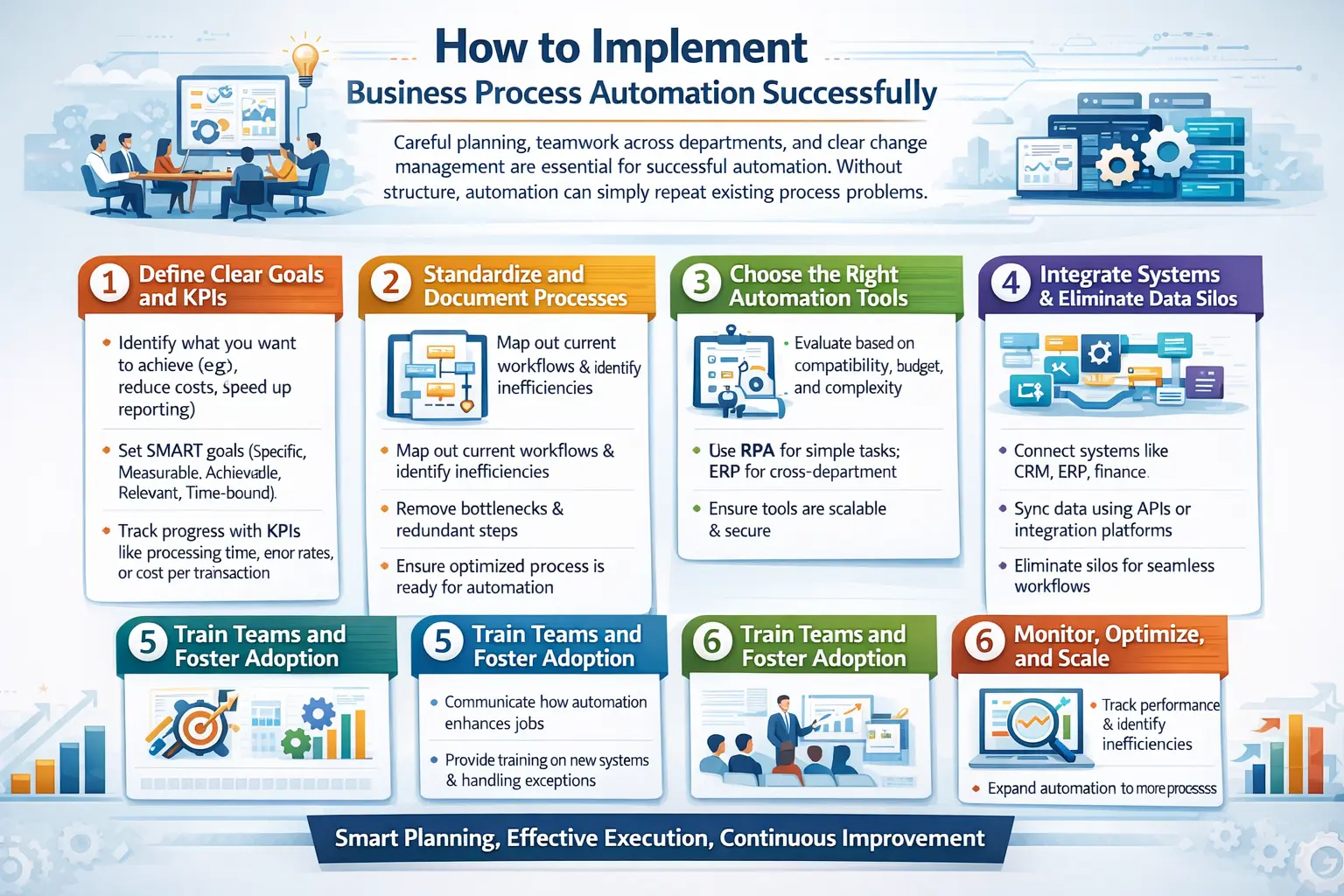
Managing business processes comes with difficulties. Companies need careful planning, teamwork across departments, and clear change management to make it work effectively. Without a structured approach, automation can end up repeating the same problems that already exist in a process.
1. Define Clear Goals and KPIs
Before starting an automation project, companies need to decide what they want to achieve. Some may want to reduce operational costs, speed up financial reporting, or improve customer response times. Clear goals help guide the entire automation effort.
Setting measurable KPIs also helps track progress and results. Metrics like processing time, error rates, or cost per transaction give teams a clear way to measure improvement after automation is implemented.
2. Standardize and Document Existing Processes
Automation works best when the process is already clear and well-organized. If a workflow is inefficient or confusing, automation will only repeat the same problems faster. That’s why businesses should review and improve the process first.
Teams often map out how tasks are currently done and identify unnecessary steps or delays. After removing bottlenecks and simplifying the workflow, the improved version becomes the one ready for automation.
3. Choose the Right Automation Tools
There are many automation tools available, from simple task automation software to full enterprise platforms. The right choice depends on the company’s systems, budget, and long-term needs. Some tools are better for small repetitive tasks, while others support larger cross-department workflows.
For complex operations, many companies rely on ERP platforms with built-in automation features. These systems can connect different departments and allow workflows to run automatically across multiple processes.
4. Integrate Systems and Eliminate Data Silos
Automation works best when data can move smoothly between systems. If information is stored in separate tools that don’t communicate, automation becomes difficult. Connecting systems is an important step in making automation successful.
Businesses often use APIs or integration tools to link systems like CRM, finance, and inventory software. When these systems share data automatically, workflows become faster and more reliable.
5. Train Teams and Foster Adoption
Automation often changes how employees perform their daily tasks. Some team members may worry about new technology or fear their roles will change. Clear communication helps reduce this uncertainty.
Companies should explain that automation removes repetitive work rather than replacing employees. Training also helps staff learn how to use the new systems and focus on higher-value tasks.
6. Monitor, Optimize, and Scale
Automation should continue improving even after it is launched. Teams should monitor performance to see if processes are running as expected. Data and feedback can reveal new bottlenecks or areas for improvement.
Once a workflow works well, companies can expand automation to other departments. Over time, this step-by-step approach helps businesses build a more efficient and connected operation.
Common Challenges in BPA Implementation
Problems like poor data quality, unclear processes, or lack of team support can slow progress. Recognizing these obstacles early helps companies stay on track and get the most value from their automation efforts.
1. Cultural Resistance and Lack of Executive Buy-in
Many automation projects stumble not because of technology, but because people resist change. Without strong support from leadership, it’s hard to secure funding or get departments to work together. Employees may also see automation as a threat, slowing adoption or withholding key insights during process mapping.
Building a culture that views automation as a helpful tool is essential. Leaders need to clearly communicate its benefits and involve teams early, so staff understand how automation can make their work easier rather than replace them.
2. Technical Debt and Legacy Systems
Older, customized systems often struggle to integrate with modern automation tools. Trying to connect outdated software to new platforms can be costly, complex, and time-consuming. Companies must decide whether to patch old systems with APIs or invest in modernizing their core ERP infrastructure first.
Planning this step carefully avoids unexpected delays and ensures automation works smoothly across all departments. Modern systems also make future automation projects faster and easier to implement.
3. Scope Creep and Over-Engineering
It’s easy to get carried away and try to automate everything at once. Overly complex workflows that try to handle every exception can become fragile, difficult to maintain, and prone to failure.
The best approach is to start small with high-impact processes, creating a minimum viable automation first. Once it’s working well, complexity can be added gradually, allowing the system to grow sustainably and deliver reliable results.
Conclusion
Business process automation is no longer just for large multinational corporations; it’s essential for businesses that want to stay competitive and grow. By identifying slow manual processes, redesigning them for efficiency, and using technology to execute them, companies can significantly improve how they operate.
Achieving full automation takes careful planning, a clear strategy, and a focus on continuous improvement. It also requires a cultural shift, letting technology handle routine tasks while employees focus on innovation.
Interested to learn more? Then you can try a free consultation with our experts. Start today, and implement process automation for your business to become even more profitable.

Frequently Asked Question
BPA uses technology to handle repetitive, rule-based tasks and workflows. It helps businesses save time, reduce errors, and make operations more efficient by letting software manage routine processes instead of relying on manual work.
Tasks that are repetitive, high-volume, time-sensitive, and prone to human error are ideal for automation. Examples include invoice processing, payroll, inventory updates, and order tracking.
Success comes from clear goals, documented processes, the right tools, proper system integration, team training, and continuous monitoring. Starting small, improving workflows, and scaling gradually helps achieve lasting results.