







Australian businesses are under pressure to keep operations moving despite rising complexity. According to the latest Australian Bureau of Statistics release, 68% of Australian businesses reported factors that significantly hampered business activity or performance, with skills shortages, compliance pressure, and cash flow constraints among the key challenges.
That pressure often shows up in everyday work. Approvals get stuck, handoffs slow teams down, follow-ups fall through, and document processing takes more time than it should, especially when too many steps still depend on manual coordination.
Workflow automation helps businesses take control of those repetitive processes. By moving routine tasks, approvals, and updates through a structured system, companies can reduce delays, improve accuracy, strengthen visibility across teams, and create more room to scale efficiently.
Key Takeaways
Workflow automation streamlines business processes by automating repetitive tasks, reducing errors, and boosting efficiency.
Automation tools route tasks, integrate data, and provide real-time visibility, freeing teams for strategic work.
Key benefits include cost savings, improved collaboration, and scalability as business needs grow.
Start small with automation, involve stakeholders, and continuously optimise workflows to maximise productivity.

What is Workflow Automation?
Workflow automation is the use of technology to execute routine business processes with minimal manual intervention. It connects tasks, data, and systems so activities move automatically based on predefined rules and triggers.
Instead of relying on emails, spreadsheets, or manual handoffs, workflow automation standardises how work progresses across departments. This improves process consistency, reduces human error, and increases operational efficiency.
In modern organisations, workflow automation often supports functions such as employee onboarding, approvals, document routing, and cross functional coordination. When implemented correctly, it helps teams work faster while maintaining better visibility and control over daily operations.

How Workflow Automation Works in Practice
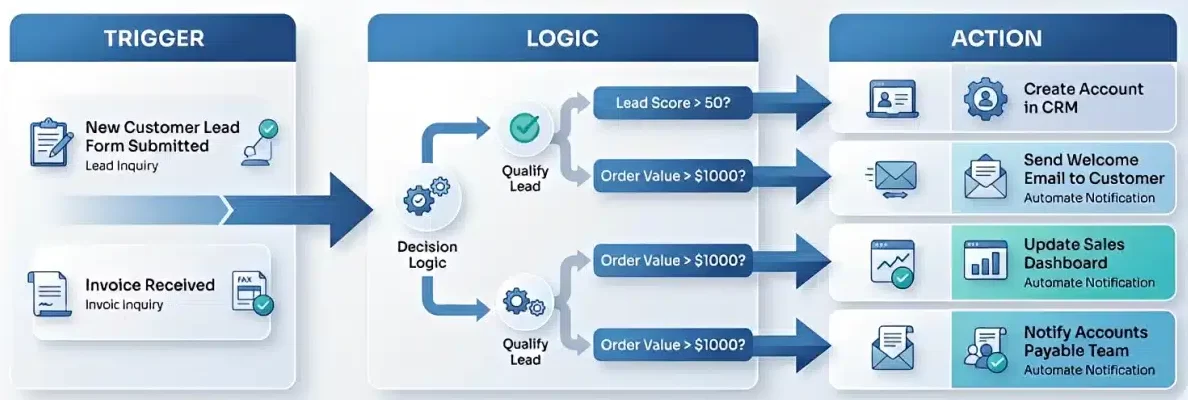
Workflow automation works by structuring business processes into rule based sequences that move data automatically between systems. Although the interface may appear simple, the backend depends on coordinated logic, integrations, and data flows to execute tasks accurately and consistently at scale.
The Architecture of a Workflow
Most automated workflows follow a trigger action framework, where a defined event initiates a specific response from an integrated employee management software. This structure allows organisations to standardise repetitive processes while maintaining decision accuracy, often by leveraging a business process integration platform.
Core components typically include:
- Trigger
The trigger is the starting point of automation. It may be time based, event driven, or condition based, such as when a form is submitted or inventory drops below a threshold. In advanced ERP environments, triggers can be multi layered and activated by real time data combinations. - Conditions and Logic
After activation, the workflow evaluates if then rules to determine the next step. For example, an expense under a set limit may be auto approved, while higher amounts are routed for managerial review. This logic enables automation to handle exceptions in a controlled way. - Actions
Actions execute the required outcome, such as sending notifications, updating records, generating documents, or pushing data to external systems via API.
The Role of Integration
Workflow automation delivers the most value when connected across the technology stack. Integration allows CRM, accounting, and inventory systems to exchange data through APIs, reducing silos and maintaining a single source of truth across the organisation.
Visual Modelling and Mapping
Before implementation, workflows are typically mapped using visual flowcharts. This step helps teams identify redundant steps and process gaps. By refining the workflow first, organisations ensure automation improves efficiency rather than simply digitising inefficient manual processes.
Key Benefits of Workflow Automation
Workflow automation is widely adopted because it delivers measurable business value through a modern payroll administration. For businesses operating in high cost and highly regulated environments, automation helps improve speed, accuracy, and operational control when compared with manual processes.
Enhanced Operational Efficiency
Automation significantly improves operational efficiency by removing manual handling delays. Tasks such as approvals, data routing, and notifications can be completed in seconds rather than days.
Faster workflows enable companies to respond to customers more quickly, maintain inventory continuity, and close financial cycles with greater consistency.
Reduction of Human Error
Manual data entry remains a major source of operational risk. Even small input mistakes can lead to reporting issues, shipment errors, or financial discrepancies.
Workflow automation reduces this risk by transferring data directly between systems and auto populating required fields, improving accuracy and supporting regulatory compliance.
Cost Reduction and Resource Optimisation
Although automation requires upfront investment, it delivers long term efficiency gains. Organisations can scale transaction volumes without proportionally increasing administrative headcount.
Reduced rework, fewer penalties, and improved cash flow timing further strengthen the financial impact of automation initiatives.
Improved Visibility and Accountability
Automated workflows provide real time status tracking across business processes. Managers can quickly identify delays, monitor workload distribution, and resolve bottlenecks earlier.
Built in audit trails record every action within the workflow, supporting stronger governance and simplifying compliance reviews.
Employee Satisfaction and Retention
Automation removes repetitive administrative work that often reduces employee engagement. When routine tasks are automated, teams can focus on analysis, collaboration, and higher value activities.
This shift typically improves job satisfaction, supports retention, and helps organisations maintain a more productive workforce.
Workflow Automation Examples by Department
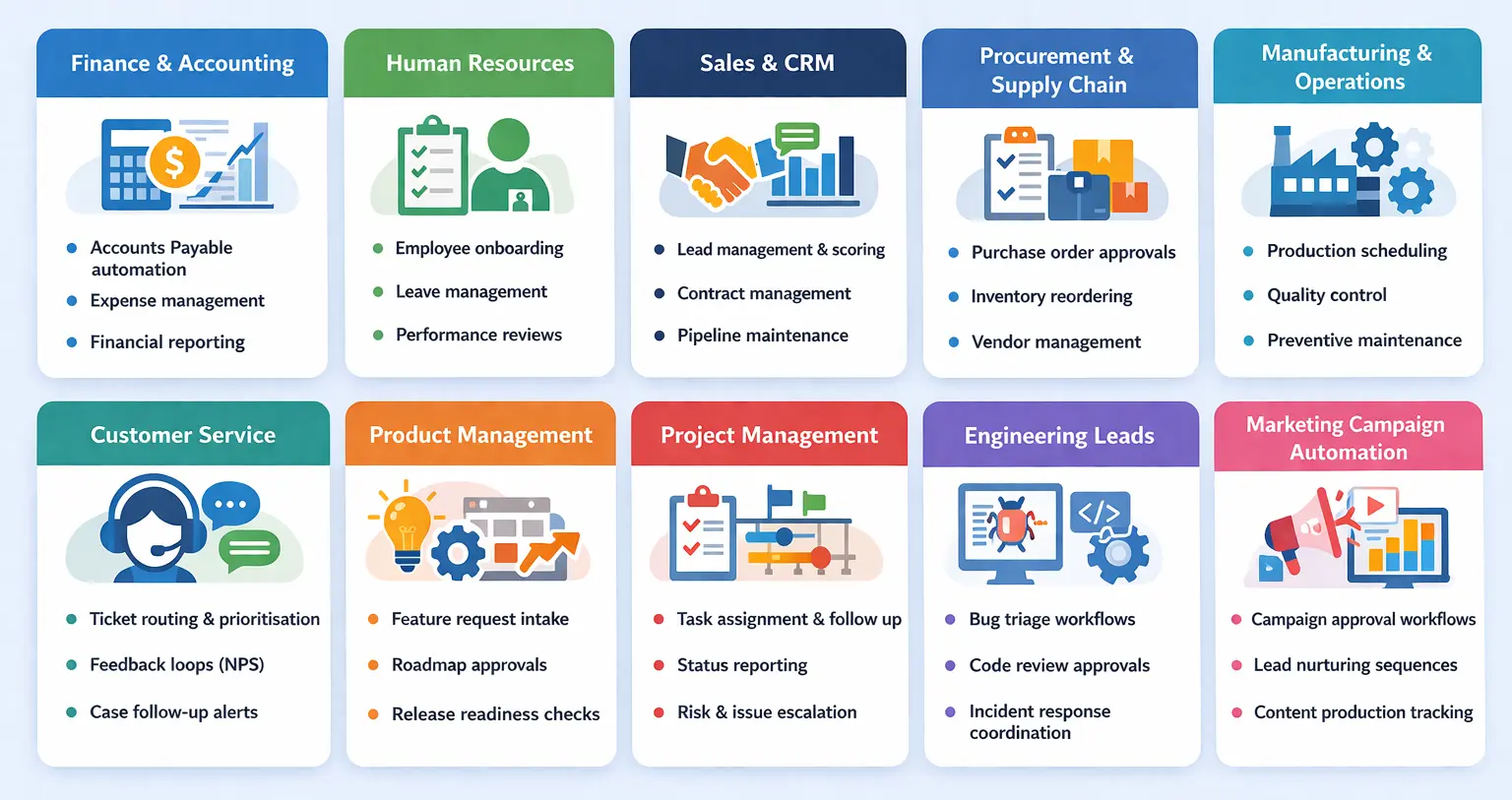
To understand the real impact of workflow automation, it helps to look at how different departments apply it in daily operations. The following examples show how automation improves speed, accuracy, and coordination across key business functions.
Finance and Accounting
Finance teams benefit strongly from automation because most processes follow strict rules and deadlines.
- Accounts Payable automation: OCR scans incoming invoices, extracts key data, and performs three way matching with PO and GRN. If matched, payment is scheduled automatically; if not, the system alerts the responsible manager.
- Expense management: Employees upload receipts via mobile apps, and the system reads, categorises, and validates expenses against company policy. Approved claims sync directly to the general ledger for faster reimbursement.
- Financial reporting: Automated reconciliation runs continuously, enabling scheduled generation of profit and loss, balance sheet, and cash flow reports without manual compilation.
Human Resources
HR workflows handle sensitive data and cross team coordination, making automation especially valuable.
- Employee onboarding: Once a contract is signed, workflows send digital forms to the new hire while notifying IT and facilities to prepare access and equipment. This ensures day one readiness.
- Leave management: Employees submit requests through a portal, the system checks balances in real time, routes approvals, updates calendars, and syncs payroll automatically.
- Performance reviews: Automated reminders trigger self assessments and manager reviews based on review cycles, ensuring evaluations stay consistent and well documented.
Sales and CRM
In sales environments, automation reduces admin work so teams can focus on revenue generating activities.
- Lead management and scoring: Leads are scored based on behaviour. When thresholds are met, the system assigns the lead to a sales rep and creates follow up tasks automatically.
- Contract management: Customer data populates contract templates, sends them for e signature, and once signed, updates the opportunity status and triggers invoicing.
- Pipeline maintenance: Workflows flag stagnant deals or move inactive opportunities into nurture stages, helping managers maintain accurate forecasts.
Procurement and Supply Chain
Automation strengthens control and responsiveness across purchasing and inventory operations.
- Purchase order approvals: Requests are routed automatically based on value thresholds. Once approved, the PO is generated and sent to the vendor without manual handling.
- Inventory reordering: Systems monitor stock levels continuously and trigger reorder recommendations or automatic POs when safety stock thresholds are reached.
- Vendor management: Supplier onboarding collects required documents through secure portals and monitors performance against agreed SLAs.
Manufacturing and Operations
On the shop floor, automation connects planning systems with real production conditions.
- Production scheduling
Workflows analyse orders, materials, and machine capacity to generate optimised schedules and automatically adjust when disruptions occur. - Quality control
If defect rates exceed thresholds, the system can halt production and notify quality teams immediately to prevent larger losses. - Preventive maintenance
Maintenance work orders are triggered based on usage data, with spare parts reserved and downtime scheduled during low production periods.
Customer Service
Automation ensures customer inquiries are handled quickly and consistently.
- Ticket routing and prioritisation
Incoming tickets are categorised and routed to the correct team automatically, with priority adjusted based on SLA tiers. - Feedback loops
After case closure, the system sends NPS surveys. Negative responses trigger alerts for follow up by customer success teams.
Product Managers
Product managers work across teams, priorities, and release timelines. Workflow automation helps them keep product development organised, reduce follow up work, and maintain visibility across requests and decisions.
- Feature request intake: The system collects requests from sales, support, and internal teams through standard forms. It tags, prioritises, and routes submissions to the right product owner for review.
- Roadmap approvals: When product teams update roadmap priorities, the workflow sends changes to relevant stakeholders for review and sign off. Product managers can keep decisions documented and aligned.
- Release readiness checks: Before launch, automation tracks dependencies across product, engineering, QA, marketing, and customer support. The workflow flags missing tasks before the release date.
- Stakeholder updates: Product managers can trigger automatic status updates for internal stakeholders when milestones change, release dates shift, or major features move into production.
Engineering Leads
Engineering leads manage technical execution, dependencies, incident response, and delivery quality. Workflow automation helps them reduce coordination overhead and keep technical teams focused on execution.
- Bug triage workflows: The system classifies incoming bugs by severity, component, or environment, then routes them to the correct engineering team for action.
- Code review approvals: Automation assigns reviewers based on ownership rules, tracks pending pull requests, and escalates overdue reviews to maintain delivery pace.
- Incident response coordination: When monitoring tools detect an outage or failure, the workflow creates an incident ticket, alerts the on call team, and records response steps automatically.
- Deployment readiness: Before deployment, workflows verify approvals, testing status, rollback plans, and release notes. Engineering leads reduce release risk and improve change control.
- Technical debt tracking: Engineering workflows can flag unresolved issues, outdated dependencies, or recurring defects and assign them into structured backlog reviews.
Project Managers
Project managers depend on accurate status updates, task ownership, timeline control, and risk visibility. Workflow automation helps them reduce reporting effort and maintain stronger project governance.
- Task assignment and follow up: When a project phase starts, the system assigns tasks to team members, sets deadlines, and sends reminders as due dates approach.
- Status reporting: The workflow pulls progress data from project tools and generates regular project status report drafts for review. Project managers spend less time compiling updates manually.
- Risk and issue escalation: When a project risk reaches a defined threshold, the workflow alerts sponsors or department heads and logs mitigation actions for tracking.
- Change request approvals: Project teams submit scope, budget, or timeline changes through a workflow that routes each request to the relevant approver and records decision history.
- Milestone tracking: The system tracks milestone completion, flags delays, and notifies stakeholders when project timelines slip or dependencies shift.
Marketing Campaign Automation
Marketing teams manage deadlines, approvals, channel coordination, and performance tracking across multiple campaigns. Workflow automation helps them move faster while keeping campaign execution consistent.
- Campaign approval workflows: When marketers prepare campaign briefs, content, or ad creatives, the workflow routes them to managers, legal teams, or brand reviewers based on approval rules.
- Lead nurturing sequences: Once a prospect downloads a guide or fills in a form, the system triggers email sequences, follow up tasks, and audience segmentation automatically.
- Content production tracking: Marketing teams can automate content requests, draft reviews, publication approvals, and distribution schedules across blogs, email, and social channels.
- Performance alerts: If campaign results fall below target metrics such as open rate, conversion rate, or cost per lead, the workflow notifies the team to review and adjust quickly.
- Cross team coordination: Marketing automation can notify sales teams when qualified leads enter the pipeline, so handovers happen faster and follow up remains consistent.
How to Implement Workflow Automation Step by Step

Implementing workflow automation requires structured planning and clear process visibility, often using a HRM solution for enterprise. Without a defined roadmap, organisations risk digitising inefficient workflows. The phased approach below helps ensure automation delivers measurable operational value.
1. Discovery and Audit
Start by analysing the current manual process. Focus on workflows that are repetitive, rule based, and prone to error. Interview the teams involved to understand where delays and risks occur.
Key questions to assess:
- What triggers this process?
- Where do bottlenecks typically occur?
- How much time is spent on data entry versus decision making?
- What is the business impact of an error?
Tip: Begin with a high volume, low complexity workflow to generate early wins and stakeholder confidence.
2. Process Mapping
Visual mapping clarifies how the workflow actually operates. Use BPMN diagrams or simple flowcharts to document both the current state and the improved future state.
Define clearly:
- Triggers: what initiates the workflow
- Actions: what the system executes
- Logic or conditions: how decisions branch
This step often reveals redundant activities that should be removed before automation.
3. Tool Selection
Choose a platform that fits your technical maturity, integration needs, and scalability goals. Workflow automation tools typically fall into three categories: Built-in automation, Integration platforms (iPaaS), and integrated enterprise solutions, that combine multiple business functions into a single system
Many organisations choose a cloud-based business solution to enable scalability, remote access, and seamless updates while supporting workflow automation across departments.
4. Design and Build
Translate the approved workflow into the automation platform. Build the primary success path first, then layer in exception handling for edge cases such as missing data or unavailable approvers.
A structured build approach reduces rework during later testing stages.
5. Pilot Testing and Validation
Avoid full scale rollout initially. Test the workflow with a controlled pilot group and monitor performance closely.
Validate:
- Logic accuracy: routing behaves as expected
- Data integrity: information transfers correctly
- User experience: the process is genuinely faster and clearer
Early validation prevents costly downstream fixes.
6. Change Management and Rollout
User adoption is critical to automation success. Communicate clearly that automation removes repetitive work rather than roles. Provide training, quick reference guides, and clear support channels.
Well managed rollout reduces resistance and accelerates benefits.
7. Monitor and Optimise
Workflow automation is continuous, not one time. Track KPIs such as cycle time, error rates, and throughput using built in analytics.
Use these insights to refine logic, remove new bottlenecks, and expand automation coverage over time.
8. Mistakes to avoid when implementing workflow automation
Many workflow automation projects fail because businesses automate broken processes, build overly complex logic, or overlook user adoption. Before automating, simplify the workflow first so you do not speed up inefficient steps.
Keep the design practical by focusing on common scenarios and sending rare exceptions to manual review. Strong integration also matters, because weak connections between ERP, CRM, HR, or finance systems can break automated flows and create data silos.
Just as important, assign clear ownership and maintain documentation so teams can manage workflow automation reliably as it scales.
Advanced Workflow Automation Trends

Workflow automation is moving beyond basic task routing and becoming a more intelligent operational layer for modern businesses. By combining AI, analytics, and automation, companies can improve decision-making, reduce manual effort, and build workflows that adapt more effectively to changing business needs.
- Intelligent process automation: Combines rule-based workflows with AI and machine learning to process unstructured data, classify emails, and route tasks automatically with less manual review.
- Intelligent document processing: Uses advanced OCR and AI to extract data from PDFs, images, and handwritten files, helping businesses speed up invoicing, contract handling, and other document-heavy workflows.
- Process mining and discovery: Analyses system activity to show how workflows actually run, so teams can identify bottlenecks, uncover inefficiencies, and prioritise high-impact automation opportunities.
- Citizen development governance: Allows business users to build workflows through no-code platforms while maintaining control through access rules, approved components, and governance standards.
Features to Look for in Workflow Automation Solutions
Not every workflow automation tool is built the same — and choosing the wrong one can cost your business time, money, and momentum. Before you commit, make sure the solution you pick ticks these essential boxes.
- Ease of use: Choose a platform with a clean, intuitive interface that your team can pick up without weeks of training. The faster your people get comfortable, the sooner you start seeing real returns on your investment.
- Integration capabilities: Demand seamless connectivity with the tools your business already relies on, from communication platforms to development and design apps. Strong integrations eliminate data silos and keep information flowing smoothly across every department.
- Customisation and flexibility: Opt for a solution that moulds itself around your unique processes, not the other way around. A truly flexible tool lets you tailor workflows to match your strategic goals and adapt as your operations evolve.
- Scalability: Invest in a platform built to grow alongside your business. Whether you’re onboarding new team members, adding complex workflows, or handling surging data volumes, the right tool performs reliably at every stage of growth.
- Reporting and analytics: Prioritise built-in reporting that delivers real-time, actionable insights into your workflow performance. Data-driven visibility empowers your team to spot bottlenecks early and continuously refine operations.
- Security: Insist on enterprise-grade protection, including encryption, granular access controls, and comprehensive audit logs. Your automation tool should safeguard sensitive data and ensure only authorised users can access critical workflows.
- Mobile accessibility: Select a solution that keeps your team productive on the go. A fully optimised mobile experience ensures staff can review tasks, collaborate, and push work forward from anywhere, whether they’re in the office, on-site, or working remotely.
Conclusion
Workflow automation has become a critical capability for organisations seeking greater speed, accuracy, and operational control. When processes are structured and connected properly, businesses can reduce manual workload while improving visibility across departments.
The greatest impact comes from aligning automation with clear workflows, strong integration, and user adoption. Organisations that take a phased, well governed approach are better positioned to scale automation without creating new operational risks.
As business complexity continues to grow, investing in workflow automation will be key to maintaining efficiency and resilience. If you want help evaluating the right approach, get free consultation with our team today.

Frequently Asked Questions About Workflow Automation
-
What is workflow automation in business?
Workflow automation is the use of technology to execute routine business processes automatically based on predefined rules and triggers. It connects tasks, data, and systems so work moves faster with minimal manual intervention.
-
How does workflow automation improve operational efficiency?
Workflow automation improves efficiency by eliminating manual handoffs, speeding up approvals, and reducing repetitive data entry. Automated workflows allow organisations to complete processes faster while maintaining better accuracy and visibility.
-
Which business processes are best suited for workflow automation?
Processes that are repetitive, rule based, and high volume are typically the best candidates. Common examples include employee onboarding, invoice approvals, purchase requests, leave management, and customer ticket routing.
-
What should organisations prepare before implementing workflow automation?
Organisations should first analyse and simplify existing workflows, map the process clearly, and ensure systems can integrate properly. Strong change management and user training are also essential to achieve successful adoption.
-
How is workflow automation different from business process automation?
Workflow automation focuses on automating specific tasks or workflow steps, such as approvals, notifications, or document routing. Business process automation is broader because it automates entire end-to-end processes across multiple workflows, systems, and departments.