







Imagine running an operation where your inventory data in London syncs instantly with your sales team in New York, without owning any server. This has become the standard for modern enterprises leveraging cloud technology. This feature is no longer a luxury but a necessity for survival and growth.
Traditional ERPs, with their heavy infrastructure and slow update cycles, are increasingly becoming a hindrance for agile companies. As companies strive for greater efficiency and lower operational costs, the shift towards cloud-based solutions has accelerated significantly.
To stay competitive in the market, you too should take into consideration transitioning into a cloud-based system. We will tell you exactly everything there is to know about cloud ERP and how you can elevate your business even further.
Key Takeaways
What is Cloud ERP? It serves as the backbone of modern digital infrastructure, offering scalability and remote accessibility that legacy systems cannot match.
Cloud ERP's Main Feature sets include advanced automation and real-time analytics that drive smarter decision-making.
Cloud ERP vs On-Premise ERP comparisons reveal significant differences in cost structures, maintenance requirements, and deployment speeds.
Challenges of Cloud ERP implementation, such as data migration and change management, must be navigated carefully for success.
What is Cloud ERP?

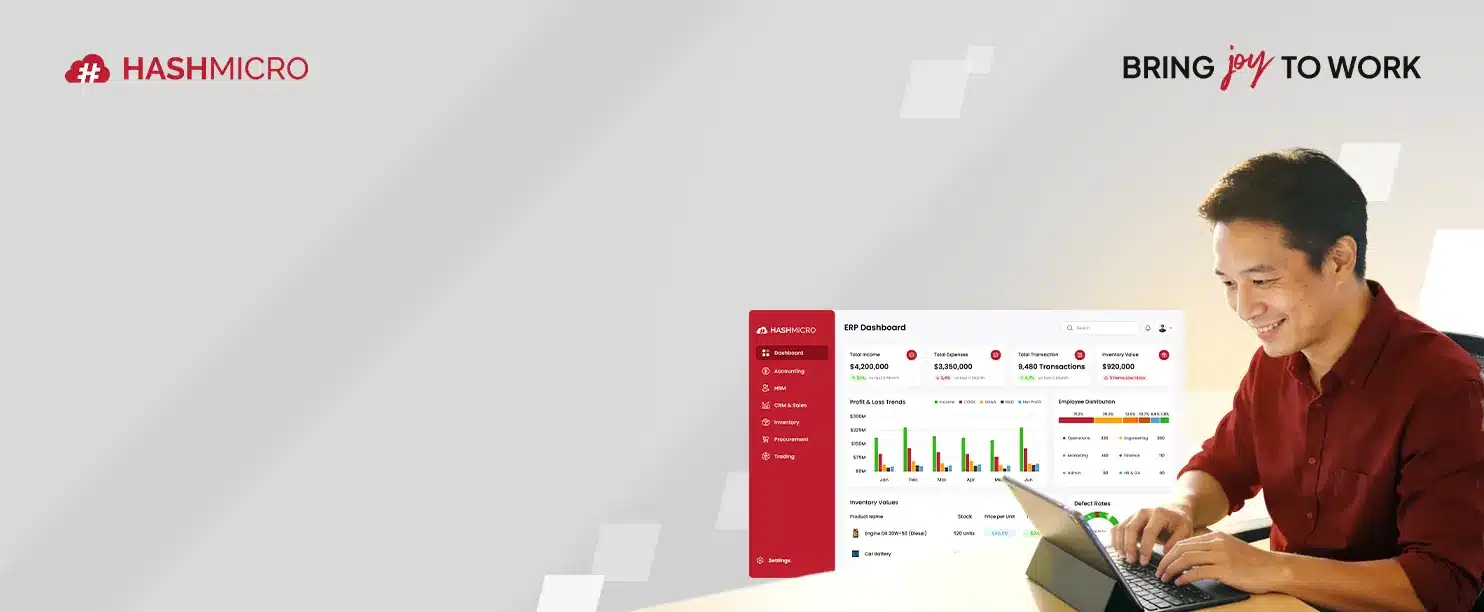
Cloud ERP (Enterprise Resource Planning) is a cloud hosted business management platform that integrates finance, procurement, sales, and operations into one connected system. Companies access it via the internet without owning physical servers or infrastructure.
As our Managing Director, Ricky Halim, said,

Cloud solutions are maintained by the vendor. This includes security updates, server maintenance, and data backups, allowing the client company to focus purely on using the software to run their business, unlike on-premise ERP, which requires manual updates.
In 2026, the definition has expanded to include hybrid models. These setups allow companies to keep sensitive financial or proprietary data on private servers while utilizing the public cloud for less critical, high-volume operations.
Ultimately, this technology democratizes access to enterprise-grade tools. The subscription-based model of cloud software lowers the barrier to entry, allowing small and medium-sized enterprises (SMEs) to compete with larger players by utilizing the same powerful tools for resource planning and data analysis.
Cloud ERP’s Main Feature
The distinct advantages of cloud-based systems lie in their actionable ERP modules designed for real-time automation, analytics, and cross-functional visibility that traditional on-premise systems struggle to deliver.
1. Dashboard And Reporting
Cloud ERP transforms reporting through real-time dashboards powered by in-memory computing. Data is available the moment it is created, allowing faster analysis and decision-making.
Dashboards are role-based and customizable, showing users only the metrics relevant to their responsibilities. Predictive analytics and visual tools like trend lines and heat maps make insights easier to understand and act on.
2. Business Automation
Modern cloud ERP systems automate complex workflows using predefined logic and AI, significantly reducing manual data entry and human error. Automation runs continuously, ensuring processes move forward without delays.
Tasks such as procurement, approvals, and order creation are triggered automatically when conditions are met. Sales and marketing workflows are also streamlined, ensuring leads and opportunities are handled without administrative friction.
3. System Integration
Cloud ERPs use an API-first architecture, making integration with external systems fast and reliable. This allows seamless connections with banks, logistics providers, and third-party platforms.
E-commerce and IoT integrations further extend automation by syncing orders, inventory, and machine data in real time. These connections create a unified digital ecosystem that supports accurate reporting and smarter decisions.
4. Mobile Access
Cloud ERPs are accessible through browsers and mobile apps, enabling secure access from anywhere. Features like multi-factor authentication and encryption protect data without limiting flexibility.
Mobile access improves warehouse efficiency and executive responsiveness. Employees scan inventory on handheld devices, while leaders can approve transactions and review reports on the go.
Benefits of Cloud ERP
Adopting a cloud ERP offers a multitude of advantages. These benefits fundamentally alter the cost structure and agility of a business. As companies face increasing pressure to optimize, the arguments for cloud adoption become increasingly compelling compared to traditional models.
- Cost Efficiency and Financial Flexibility
One of the most cited benefits is the shift from Capital Expenditure (CapEx) to Operational Expenditure (OpEx). Traditional ERP implementations require massive upfront investments in servers, database licenses, and cooling infrastructure.
Cloud ERP operates on a subscription model. This frees up capital that can be invested in growth areas like R&D or marketing. Additionally, the hidden costs of on-premise systems, like electricity costs and hardware replacements, are absorbed by the vendor.
- Scalability and Growth Support
Adding new users, opening a new branch, or increasing storage capacity can be done in minutes with a cloud-based ERP, rather than weeks of purchasing and installing new hardware. This scalability ensures that the software never bottlenecks the company’s growth potential.
- Rapid Implementation and Deployment
On-premise ERP projects are known for dragging on for yearswhile cloud ERPs can often be deployed in a fraction of the time. This allows businesses to start realizing the benefits of the system much sooner, improving the Return on Investment (ROI) of the project.
- Enhanced Security and Compliance
Cloud vendors invest billions in security protocols that individual companies cannot match. They utilize top-tier cybersecurity experts, encryption, and rigorous third-party audits. Furthermore, they handle compliance with evolving data regulations, ensuring that the software always remains compliant.
- Disaster Recovery and Business Continuity
Cloud ERPs replicate data across multiple geographically dispersed data centers. If one server fails, another takes over instantly, ensuring data is always secure. In the event of disasters, employees can continue working in a safer location, minimizing downtime and financial loss.
- Collaboration and Remote Work
The cloud fosters collaboration by providing a unified platform accessible to everyone. Teams in different time zones can work on the same documents and projects simultaneously.
When implemented correctly, it functions as a unified business handling system that eliminates version conflicts, improves collaboration, and enables faster cross-department decision making.
Cloud ERP vs On-Premise ERP
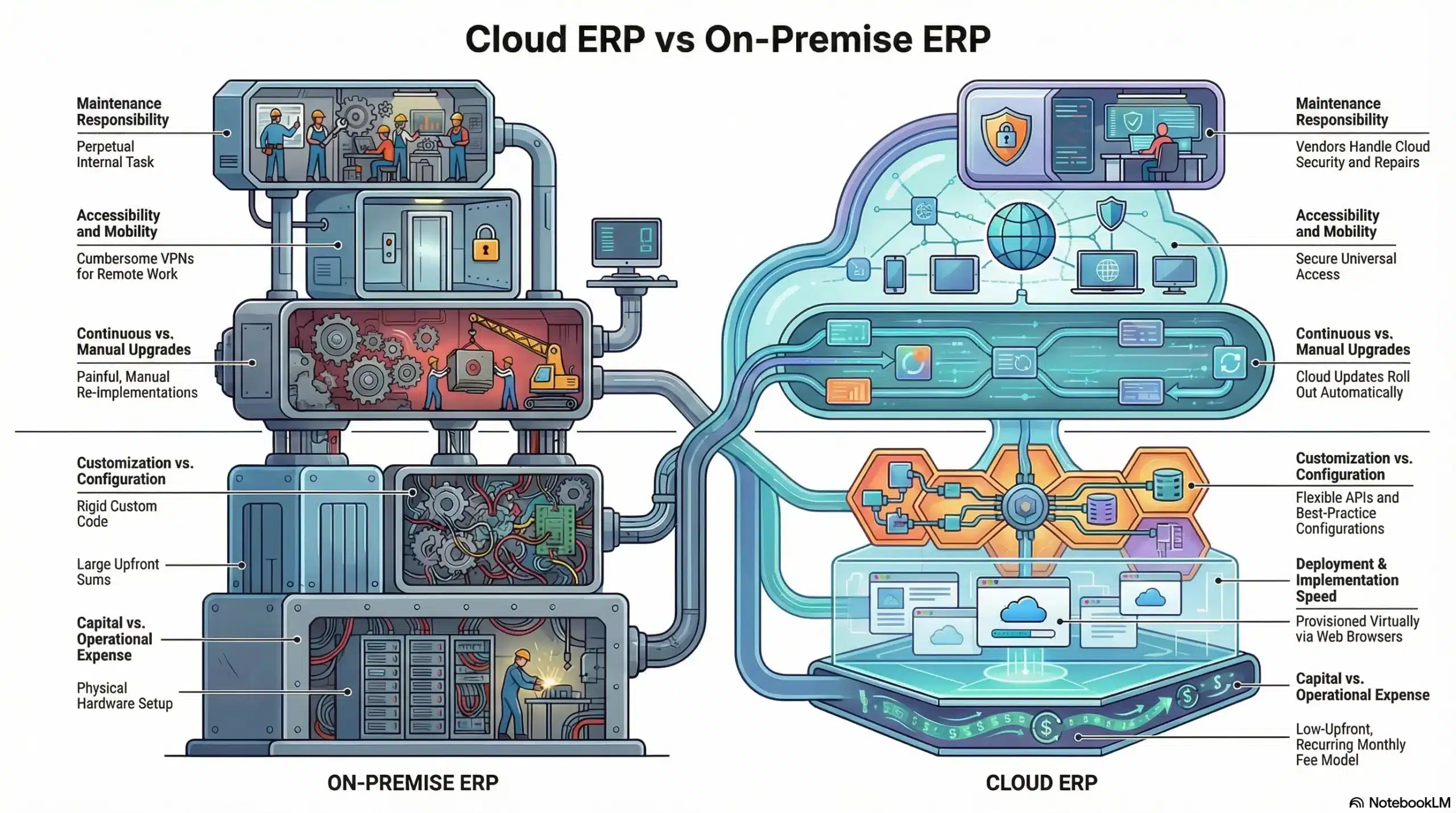
While the trend is heavily favoring the cloud, understanding the distinct differences is vital for making an informed choice, as this decision is one of the most significant technology decisions a company will make. The comparison hinges on four main pillars: cost structure, control, maintenance, and accessibility.
- Cost Structure: Renting vs. Owning
With on-premise ERP, you pay a large sum upfront. You are then responsible for all maintenance, repairs, and upgrades. Over time, the asset is yours, but the upkeep is perpetual.
Cloud ERP is like renting a high-end apartment. You pay a monthly fee that covers the living space, maintenance, security, and amenities. The upfront cost is low, but the recurring cost continues as long as you use the service. For cash-flow-conscious businesses, this is often superior.
- Deployment and Implementation Speed
On-premise deployments are heavier and prone to delays, as they involve procuring hardware, configuring networks, and installing software on individual workstations.
Cloud deployment is largely virtual. The environment is provisioned by the vendor, and access is granted via web browsers. This significantly reduces the technical friction of getting the system running, allowing the project team to focus on business process mapping rather than IT plumbing.
- Maintenance and Upgrades
Upgrading is a major pain point for on-premise users. Upgrading to a new version often feels like a re-implementation, requiring data migration, testing, and potential downtime. Consequently, many companies stay on old versions for years, missing out on new features and security patches.
Cloud ERPs utilize a continuous delivery model. Updates are rolled out automatically in the background, often with no downtime. This ensures the business is always running the most secure and feature-rich version available.
- Customization and Control
This is the one area where on-premise historically held an edge, because you can alter it to do exactly what you want. However, heavily customized on-premise systems are nightmares to upgrade because the custom code often breaks with new updates.
Cloud ERPs offer customization through configuration and APIs rather than code alteration. While this might seem restrictive, it enforces best practices and ensures that the system remains upgradeable. Modern cloud platforms are increasingly flexible, narrowing this gap significantly.
- Accessibility and Mobility
On-premise systems are designed to be accessed from the office network. Accessing them remotely usually requires a VPN (Virtual Private Network), which can be slow and cumbersome.
Cloud ERPs are designed from the ground up to be accessed securely from anywhere. In a world where remote work is standard, the friction of VPNs can significantly reduce productivity, giving Cloud ERP a clear advantage in user experience.
What Australian Businesses Should Look for in a Cloud ERP System
For Australian companies, choosing a Cloud ERP is not just about features and scalability. The system must align with local tax rules, payroll regulations, data privacy laws, and national cybersecurity standards to ensure long-term compliance and operational stability.
BAS and GST Support
A Cloud ERP should natively support BAS reporting and GST calculations to reduce compliance risk. Built-in tax codes, automated GST mapping, and audit-ready reports help ensure accurate submissions.
STP-Ready Payroll Integration
Australian payroll must comply with Single Touch Payroll (STP) requirements. An ERP should integrate payroll that can submit real-time payroll data directly to the ATO.
Peppol eInvoicing Capability
Peppol eInvoicing enables secure, standardized invoice exchange between businesses and government agencies. Cloud ERP systems should support Peppol to reduce errors, speed up payments, and meet government procurement requirements.
Privacy Act and APP-Aware Data Controls
Data handling must comply with the Australian Privacy Act and the Australian Privacy Principles (APPs). ERP systems should offer data access controls, audit logs, and clear data residency options.
Security Aligned with the Essential Eight
Cybersecurity should align with the Australian Cyber Security Centre’s Essential Eight framework. This includes access control, patch management, and strong authentication standards.
Challenges of Cloud ERP
While the benefits are substantial, migrating to or implementing a cloud-based system is not without its hurdles. Acknowledging these challenges is the first step toward a successful implementation.
- Data Migration Complexities
Moving data from legacy systems to the cloud is often unstructured, duplicated, or incomplete. Migrating this data requires significant cleansing and mapping efforts. This process often takes longer than anticipated and requires deep knowledge of both the old and new data structures.
- Internet Dependency and Latency
Cloud ERPs rely entirely on internet connectivity. If the internet goes down, operations will risk being halted. While internet reliability has improved globally, outages still occur.
Furthermore, for companies in regions with poor internet connections, the system might feel slower compared to a local server. Businesses must invest in redundant internet connections (failover lines) to mitigate this risk, which adds to the operational cost.
- Security Concerns and Data Sovereignty
While cloud vendors generally offer superior security, the perception of risk remains a barrier. Trusting a third party with sensitive financial and customer data requires high commitment. Additionally, data sovereignty laws dictate where data can physically reside.
Companies must ensure their cloud vendor has data centers in compliant jurisdictions. Navigating this legal landscape can be difficult for multinational corporations.
- Organizational Change Management
Implementing a new ERP usually involves changing established business processes. Employees who have used the same legacy system for ten years may resist the new workflow. Successful implementation requires a effective change management strategy, including extensive training and communication.
- Hidden Costs and Subscription Creep
While the upfront cost is low, subscription fees accumulate over time. Vendors may charge extra for additional storage, premium support, or advanced modules. Furthermore, as the company grows and adds more users, the monthly bill increases.
Companies need to carefully model the Long-Term TCO (Total Cost of Ownership) to ensure the cloud model remains financially viable over a 5-to-10-year horizon compared to the sunk costs of an on-premise system.
Advanced Best Practices for 2026 and Beyond
As Cloud ERP matures, leading companies are adopting advanced strategies to maximize value.
1. Composable ERP Architecture
A Composable ERP strategy involves using the core ERP for essential records (finance, general ledger) while connecting specialized applications for other functions, such as a specialized CRM for sales or a niche HR tool for talent management.
This is made possible by robust API layers, allowing businesses to swap out modules as their needs change without disrupting the core system.
2. AI and Machine Learning Integration
Advanced users are leveraging the AI embedded in modern Cloud ERPs. This includes “Intelligent General Ledger” features that can auto-categorize transactions based on historical patterns, or supply chain “Control Towers” that use machine learning to predict shipping delays caused by weather or geopolitical events.
Conclusion
The transition to Cloud ERP can be a pivotal moment in your company’s digital transformation journey. By centralizing data, automating workflows, and enabling remote access, these systems provide the foundation for scalable growth and operational excellence.
However, the decision to adopt this isn’t easy. It requires a clear understanding of the company’s specific needs and a commitment to managing the changes that comes with new technology. With proper research and preparation, the benefits of this change will outweigh the costs of using cloud ERP.
If you are evaluating your transition strategy, consider scheduling a no-cost consultation to assess operational fit, long-term scalability, and the total cost implications before making a decision.
Frequently Asked Question
Cloud ERP is hosted on the vendor's servers and accessed via the internet, offering lower upfront costs and automatic updates. Traditional ERP is installed on the company's own servers, requiring significant hardware investment and manual maintenance.
Yes, reputable cloud providers invest heavily in enterprise-grade security, including encryption, firewalls, and regular audits. They often provide higher security standards than individual companies can achieve with on-premise servers.
Modern cloud systems offer extensive configuration options and API integrations to tailor workflows. While they avoid deep code changes to maintain upgradeability, they are highly flexible for diverse industry requirements.
Implementation time varies by company size but is generally faster than on-premise solutions. Small businesses may go live in a few months, while larger enterprises might take six months to a year for full deployment.
Cloud ERP requires an internet connection to access real-time data. However, robust systems have data redundancy and failover protocols. Businesses typically use backup internet lines to ensure uninterrupted access during ISP outages.