







ERP software brings accounting, purchasing, payroll, and inventory into one connected system, so teams work from the same data. For businesses in Australia, this makes it easier to assess best erp software australia options that support compliance and steady growth.
Key Takeaways
|

What is ERP?
Enterprise Resource Planning (ERP) is a business management platform that works by integrating key functions into shared workflows and a central database, so one action updates everything that depends on it.
Businesses adopt ERP software because disconnected systems slow down decisions and create unnecessary admin work, especially as operations grow across states or channels. In practical terms, it gives teams a shared view of what’s happening across the business.
For Australian businesses that operate across multiple states, an ERP software becomes the single source of truth for finance, inventory, dispatch, and ATO reporting. Rather than a month-end reconciliation between Sydney spreadsheets and Melbourne warehouse reports, every team works from one real-time dataset inside one platform.
The History of ERP System
The history of ERP began in 1913, when Ford Whitman Harris introduced the economic order quantity (EOQ) model to improve production scheduling. For many years, this paper-based method helped manufacturers plan inventory more efficiently.
In 1964, Black and Decker became the first company to use a material requirements planning (MRP) system that combined EOQ principles with a mainframe computer. This shift made production planning faster and more accurate than manual methods.
By 1983, MRP had evolved into MRP II, which integrated functions like purchasing, scheduling, and materials planning into one system. As technology advanced, these ideas expanded beyond manufacturing into finance, HR, and customer management, leading to the rise of ERP in 1990.
How Does an ERP System Work?
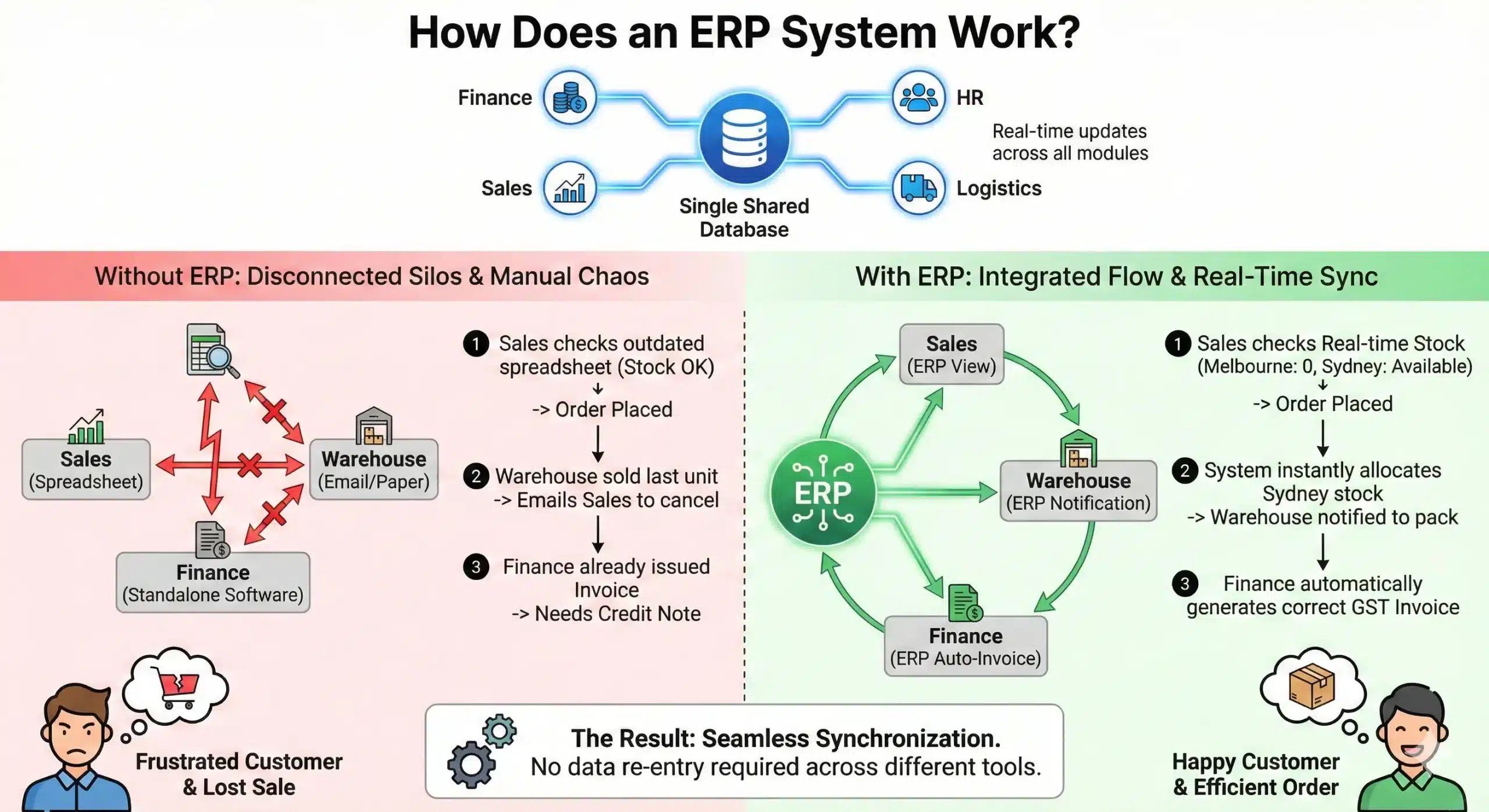
An ERP software uses a single shared database that connects all departments. Instead of separate records in marketing, warehouse, and finance, all modules like Finance, HR, Sales, and Logistics update the same data in real time.
To picture it, imagine a Melbourne-based wholesaler with warehouses in Perth and Sydney. Without ERP, when a customer in Tasmania places an urgent order:
- The sales team checks a spreadsheet that says stock is available (but the spreadsheet was last updated yesterday).
- The order has been placed, but the warehouse in Melbourne sold the last unit an hour ago.
- The warehouse team has to email sales to cancel the order.
- Finance has already issued an invoice that now needs a credit note.
- The customer is frustrated and goes to a competitor.
With an ERP Software, the workflow changes dramatically:
- The sales representative checks the ERP application and sees real-time stock levels across all warehouses.
- They see Melbourne is out of stock, but the system automatically flags that the Sydney warehouse has the item.
- The order is placed, and the system instantly allocates that stock in Sydney (preventing anyone else from selling it).
- The Sydney warehouse receives a pick-and-pack notification immediately.
- The finance module automatically generates an invoice that complies with current GST standards.
Integration is what makes this synchronization possible, so teams don’t have to re-enter the same data across different tools.
ERP vs Accounting Software
Although ERP and accounting software are often used interchangeably, they serve different purposes, especially for Australian businesses balancing daily operations and compliance.
Accounting software is designed to manage financial tasks such as tracking income and expenses, as well as handling GST, BAS, and STP reporting. For many small businesses, this is enough to stay compliant with Australian Taxation Office (ATO) requirements and manage day to day finances.
ERP, however, goes beyond finance by bringing multiple business functions into one system. In addition to accounting, it connects inventory, procurement, sales, and operations, allowing teams to work more efficiently without relying on separate tools, forming part of broader erp solutions adopted by growing companies.
The key difference lies in visibility and scalability. Accounting software mainly shows past financial performance, while ERP provides real time insights across the entire business. As companies grow, especially across multiple locations, ERP helps standardise processes and support better decision making.
ERP Modules That Matter Most for Australian Businesses
ERP Softwares are modular, and you only pay for what you need. You can start with the foundation and add more modules as your business grows. While a comprehensive system offers dozens of modules, the following are the most critical ERP modules for Australian enterprises.
1. Finance and Accounting
This module manages core financial workflows, including general ledger, payables, receivables, and fixed assets. It helps keep reporting consistent by tying transactions back to the same financial rules and approvals. For businesses running multiple entities, it also supports consolidated reporting across companies without manual spreadsheet merges.
For Australian businesses, it handles day-to-day compliance needs such as GST calculations and BAS preparation. If you trade internationally, it can simplify multi-currency invoices, payments, and reconciliation.
2. Human Resources (HR) and Payroll
HR and payroll modules bring employee records, leave, payroll, and onboarding into one place. They help reduce manual admin by standardising approvals, pay runs, and employee changes across teams.
In Australia, this module is often chosen for its support for Single Touch Payroll (STP) reporting and for keeping payroll data organised to meet ATO requirements. It can also link labour costs to departments, projects, or locations, so managers can understand where time and money are being spent.
3. Supply Chain Management (SCM)
SCM covers the upstream side of operations: purchasing from suppliers, managing purchase orders, tracking supplier performance, and planning deliveries into your business. It helps procurement teams buy more consistently by using clearer reorder points and supplier lead times.
This is especially useful in Australia, where distance and freight timing between states can affect service levels. When configured well, SCM can also reduce rushed orders by improving planning and supplier coordination.
4. Inventory Management
Where SCM handles what comes in from suppliers, Inventory Management handles what happens once stock is inside your warehouses. It tracks quantities, movements, and stock accuracy, often using barcode scanning, serial numbers, or batch tracking when required.
For businesses operating across states, it supports transfers between locations without losing visibility. The result is fewer stock discrepancies, smoother fulfilment, and better control over holding costs.
5. Customer Relationship Management (CRM)
An ERP-connected CRM keeps sales and service teams aligned with what’s actually happening operationally. Beyond contact notes, it can show order history, invoice status, and delivery progress in the same workspace.
That means fewer back-and-forth messages with finance or operations when customers ask for updates. It also helps teams offer more relevant recommendations because they can see what the customer has bought, paid for, and received.
6. Manufacturing
Manufacturing modules support planning and execution, from materials and work orders to production scheduling. They help teams manage bills of materials and track what was used versus what was planned.
For Australian manufacturers, this is particularly relevant when managing imported raw materials with long lead times or fluctuating AUD exchange rates. The module makes production costing clearer because labour, machine time, and materials are captured during the process rather than estimated afterwards, helping reduce waste and align output with actual demand.
7. Project Management
Project management modules are useful for construction, engineering, and professional services where work is delivered in stages. They track tasks, milestones, time, and resource allocation so managers can see progress without chasing updates.
In Australia’s construction and infrastructure sector, this module is often used to manage progress claims, retention amounts, and staged billing against contracts. When linked to finance, it becomes easier to monitor budgets and spot margin issues early, while work is still underway, rather than after the project is complete.
Types of ERP Systems
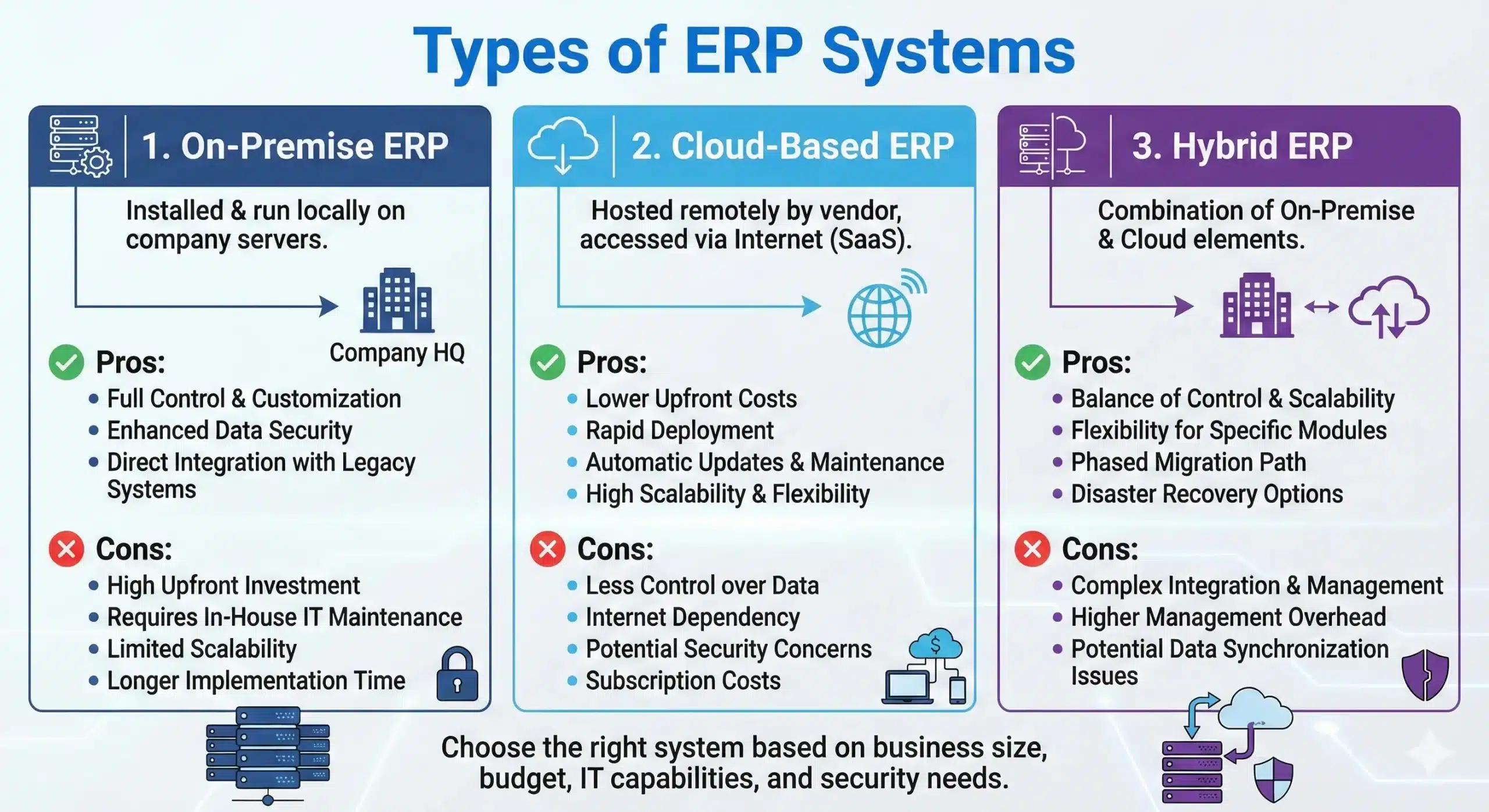
Not all ERP system solutions are deployed the same way. Your deployment choice shapes cost, accessibility, and how much control you keep. In Australia, businesses typically choose one of three approaches.
1. Cloud ERP (SaaS)
Cloud ERP runs on the vendor’s servers, and you access it through the internet. Most providers offer it as Software as a Service (SaaS), so you pay a monthly or annual subscription fee.
- Pros: You start with lower upfront costs (more OpEx than CapEx), get automatic updates, access the system from anywhere, and scale users or features as you grow.
- Cons: You usually get less deep customization than on-premise, and your data sits off-site (although reputable vendors use strong, enterprise-grade security).
- Best for: SMEs and modern enterprises seeking speed, flexibility, and reduced IT workload.
2. On-Premise ERP
An on-premises ERP software is installed on your own servers and hardware, and your team manages maintenance and security. It’s the traditional model many larger companies started with.
- Pros: You keep full control over data, configurations, and custom workflows, and you can run it internally without relying on the public internet.
- Cons: You pay higher upfront costs for infrastructure and licences, you need IT resources to maintain and update the system, and remote access often requires additional setup (such as a VPN).
- Best for: Large organizations with strict internal controls or sites with unstable connectivity, such as some remote operations.
3. Hybrid ERP
As the name suggests, this is a mix of both. For example, a business might keep sensitive financial data on an on-premises server (two-tier ERP) while using cloud modules for sales or CRM to support teams in the field.
- Pros: You balance flexibility with control by placing different functions where they fit best.
- Cons: You face greater complexity because you must integrate systems and maintain multiple environments.
- Best for: Businesses transitioning from legacy systems or those with tighter data-handling requirements.
Benefits of ERP Software for Australian Businesses

ERP software delivers value by reducing daily friction and giving leaders clearer visibility without extra admin. Many companies comparing best erp system australia options prioritise reporting accuracy, compliance, and scalability.
1. Less manual compliance work for finance and payroll
ERP application helps teams capture GST and transaction data more consistently, making BAS preparation more straightforward and less reliant on last-minute reconciliation. It also supports payroll workflows aligned with ATO requirements, including Single Touch Payroll (STP) Phase 2 and superannuation reporting, so payroll teams spend less time rechecking and rekeying data.
2. Faster, more confident decisions because information stays current
Many businesses don’t lack data; they lack timely data that teams can trust. ERP program keeps sales, stock, purchasing, and finance updates connected, so leaders don’t wait weeks for a clear view of performance.
When demand shifts in one state, teams can respond earlier by reallocating stock, adjusting purchasing, or changing delivery priorities based on current conditions.
3. Higher productivity by reducing repeat work and handovers
ERP software automates routine tasks such as invoice creation, purchase order generation, approvals, and reconciliation steps that often get repeated across tools. That frees people to focus on work that actually moves the business forward, like improving customer experience, managing suppliers, or lifting margins.
With tighter inventory tracking, businesses also reduce waste and avoid tying up cash in unnecessary stock.
4. Smoother growth across multiple sites, entities, and markets
As soon as a business operates multiple locations or legal entities, spreadsheets and disconnected systems can create confusion about reporting, access, and approvals. ERP supports multi-entity structures, so each site can operate day-to-day while leadership still sees consolidated reporting at the group level.
Implementing ERP is useful for Australian companies expanding into New Zealand or Asia, where currencies and operational setups vary, but leadership still needs one consistent view of performance.
5. A practical migration path from legacy systems
Most organisations don’t want a “big bang” system change, and they don’t need one. ERP, especially in the cloud, lets teams modernise in stages by improving the most painful areas first, then expanding module by module.
Many businesses also extend the value of existing systems by integrating cloud applications to close gaps, rather than rebuilding everything from scratch.
6. Modern capabilities that keep improving over time
Cloud ERP platforms evolve continuously because vendors roll out updates and improvements as part of the subscription, instead of relying on occasional major upgrade projects.
This makes it easier to adopt better analytics, smarter automation, and newer SaaS capabilities over time without disrupting operations. It also supports a modern user experience that teams expect, which helps attract and retain talent across roles, not just in IT.
7. Fewer add-ons and simpler reporting relationships
Legacy setups often rely on third parties or additional tools to produce reporting and operational insights. ERP can reduce those dependencies by bringing reporting, analytics, and workflow visibility into the same platform that runs the transaction data.
That shortens the distance between “what happened” and “what to do next,” especially for finance and operations teams.
8. Stronger security posture with clearer access control
When data lives across spreadsheets and separate systems, it’s hard to control who can see what, and it’s easy for sensitive files to travel further than intended. ERP centralises access and uses role-based permissions so people only see what they need for their job.
Cloud providers also typically support this with dedicated security resources, continuous monitoring, and resilient backup practices that many SMEs struggle to maintain internally.

Australian ERP Adoption Snapshot and Local Case Study
ERP adoption continues to rise across medium-sized businesses. Many companies now adopt integrated systems as part of broader erp solutions strategies to improve efficiency and compliance.
Local data shows ERP adoption continues to rise across Australian businesses. The Australian Bureau of Statistics reports that over 72 per cent of medium-sized businesses now use integrated systems for finance, inventory, or payroll rather than standalone tools. Compliance obligations and multi-location operations drive this shift.
Industry research from IBISWorld also indicates that wholesale and manufacturing businesses face margin pressure when finance and supply chain systems are not connected. As a result, many companies now treat ERP as core operational infrastructure.
Case study: Victorian food distributor
A Melbourne-based food distributor supplies hospitality venues across Victoria and New South Wales. Each warehouse previously managed stock separately, while the finance team relied on month-end reconciliation.
After implementing a cloud ERP system, the business unified sales, inventory, and finance data. Stock accuracy improved within weeks, invoice disputes declined, and management gained real-time visibility into margins by state.
Industries in Australia That Rely on ERP Systems
ERP adoption varies by industry, however operational complexity remains the common driver. As businesses grow, ERP helps maintain control without increasing manual administration.
The following sectors rely heavily on ERP systems for daily operations:
- Manufacturing
ERP supports bills of materials, production planning, and accurate costing. This is critical when managing imported inputs with long lead times. - Wholesale and Distribution
ERP manages multi-warehouse inventory, purchasing, and fulfilment. It reduces stock shortages and excess holding. - Retail and E-commerce
Retailers use ERP to connect point-of-sale data with inventory and finance. This ensures consistent stock and sales reporting across channels. - Construction and Engineering
ERP tracks project costs, progress claims, and margins. This improves control over long-term contracts. - Professional Services
ERP links timesheets, billing, and financial reporting. Profitability analysis becomes clearer and more reliable.
Common ERP Challenges
ERP delivers strong value, but businesses should understand common challenges early. Awareness improves planning and long-term outcomes.
- Poor data quality at implementation
ERP highlights existing data issues. Without data clean-up, reporting accuracy suffers. - Change management pressure
ERP alters daily workflows. Without training and ownership, adoption slows. - Excessive customisation
Over-customisation increases cost and complicates future upgrades. - Unclear success measures
Without defined objectives, businesses struggle to assess ERP value.
ERP Deployment Models
ERP systems differ not only by capability, but also by deployment approach. The right model affects cost, data control, and scalability.
The table below compares common ERP deployment models used in Australia:
| Features | Cloud ERP | On-Premise ERP | Hybrid ERP |
|---|---|---|---|
| Hosting Location | Vendor-hosted | Internal servers | Mixed (cloud and internal) |
| Upfront Cost | Low | High | Medium |
| Ongoing Maintenance | Vendor-managed | In-house IT team | Shared responsibility |
| Customisation Level | Moderate | High | High |
| Scalability | High | Limited by infrastructure | Moderate to high |
| Remote Access | Easy via internet | Requires additional setup | Partial cloud access |
ERP Trends 2026
ERP platforms are shifting from static systems into tools that actively support decision-making. Vendors now embed analytics directly into workflows, so managers see insights while approving orders, reviewing budgets, or checking stock. This reduces delays caused by separate reporting cycles.
Finance automation continues to expand across ERP systems. Tasks such as invoice matching, approvals, and reconciliations rely more on rules and intelligent logic, which reduces manual effort and improves accuracy in day-to-day reporting.
ERP vendors are also investing in industry-focused solutions. These pre-configured systems reflect common workflows in manufacturing, retail, or services, which shortens implementation time and reduces the need for heavy customisation.
Integration capabilities are improving as well. ERP platforms now connect more easily with banking systems, logistics providers, and e-commerce tools, helping businesses reduce reliance on manual uploads and third-party connectors.
Usability remains a strong focus going forward. Cleaner interfaces and simpler navigation support adoption across teams, which helps ERP deliver value beyond finance and IT functions.
When Should a Business Use an Accounting System or Upgrade to an ERP System?
Most businesses start simple, but growth quickly adds complexity. Knowing when to move from an accounting system to an ERP can make all the difference in staying efficient and scalable.
1. When Does a Business Need an Accounting System?
Most Australian businesses start with an accounting system when their financial processes are still simple and manageable. It provides enough structure to track transactions, stay compliant with Australian Taxation Office (ATO) requirements, and understand basic performance without adding unnecessary complexity. An accounting system is usually sufficient when:
- Your financial processes are still straightforward:
You mainly need to track income, expenses, and generate basic financial reports without complex operational workflows. - Compliance can be handled without heavy automation:
BAS (Business Activity Statement) and STP (Single Touch Payroll) reporting are manageable using simple tools, with minimal risk of frequent errors or delays. - Your team size is small and roles are clearly defined:
There’s little overlap between departments, so data sharing and coordination are still easy to manage manually. - You don’t need real-time operational visibility:
Periodic reports are enough to understand performance, and decisions don’t rely on instant, cross-department data. - Operations are still manageable with separate tools:
Using different systems for sales, inventory, or finance doesn’t yet create major inefficiencies.
2. When Should a Business Upgrade to an ERP System?
As a business grows, the limitations of using separate tools become more noticeable, especially in Australia, where admin and compliance demands can quickly increase. The shift to an ERP system happens when those tools no longer support daily operations efficiently, and teams spend more time managing systems than driving growth. ERP becomes worth considering when:
- Managing compliance manually becomes a constant headache:
Relying on separate tools for BAS, STP, and tax reporting increases the risk of errors and missed deadlines. ERP connects these processes to improve accuracy and efficiency. - Your team spends too much time on repetitive admin:
Tasks like reconciliation, approvals, and reporting take longer each month due to disconnected systems. - You lack real-time visibility into performance:
It becomes difficult to quickly access data like stock levels, margins, or sales performance across locations. - Data is duplicated across multiple tools:
Different departments maintain separate records, leading to inconsistencies and errors. - Expansion outpaces your current systems:
Managing multiple locations, warehouses, or interstate operations adds complexity that basic tools can’t handle.
Conclusion
ERP is no longer something only large Australian enterprises consider. Many growing businesses now use ERP software to tighten operations, keep reporting cleaner, and support compliance without relying on manual workarounds.
ERP connects teams and closes gaps that slow decision-making, such as data silos and inconsistent records. With clearer visibility across finance, supply chain, and workforce activities, leaders act faster and manage growth with more control.
Implementing ERP takes planning and strong internal alignment, but it pays off when the system supports your day-to-day reality. If your business is exploring the next step, try a free consultation with us to map the right approach for your operations and priorities.
Frequently Asked Questions About ERP
-
What is the best ERP system for small businesses in Australia?
The best ERP for a small business depends on specific industry needs and budget. Cloud-based ERPs are generally preferred for SMEs due to lower upfront costs and scalability. Look for systems that offer local Australian compliance features, such as STP Phase 2 and BAS automation.
-
How much does an ERP system cost in Australia?
ERP costs vary widely based on deployment type (cloud vs. on-premise), number of users, and required modules. For SMEs, cloud subscriptions can range from a few hundred to several thousand dollars per month, while large enterprise implementations can cost hundreds of thousands in licensing and consulting fees.
-
What is the difference between CRM and ERP?
CRM (Customer Relationship Management) focuses specifically on managing interactions with customers and sales data. ERP (Enterprise Resource Planning) is broader, covering the entire organization, including finance, inventory, HR, and supply chain. Most ERPs include a CRM module, but a standalone CRM does not handle back-office functions like accounting.
-
How long does it take to implement an ERP system?
Implementation timelines depend on the complexity of the business and the software. A small, out-of-the-box cloud ERP can be implemented in 3-6 months. Larger, complex implementations for manufacturing or multi-entity corporations often take 6-12 months or longer to fully deploy and stabilize.
-
Is ERP software hard to learn?
Modern ERP softwares are designed with user experience in mind, making it easier to learn than legacy systems. However, because they cover complex business processes, adequate training is essential. Success depends heavily on the quality of training provided during the implementation phase.
-
What’s the difference between ERP and MRP?
MRP focuses on production planning and materials management. It helps manufacturers calculate what materials they need and when to order them. ERP includes MRP capabilities but extends far beyond manufacturing by integrating finance, payroll, inventory, sales, and reporting into one system. In short, MRP supports production, while ERP runs the entire business.
-
What is a two-tier ERP system?
A two-tier ERP system uses two ERP platforms at different levels of the business. A company might run a core ERP at head office while subsidiaries or remote sites use a lighter cloud ERP. These systems integrate with each other, allowing local flexibility while leadership still maintains consolidated visibility and control.