






A CRM database is the central place where a business stores customer details, sales activity, communication records, and buying behaviour. It helps Australian businesses manage customer relationships with cleaner data, faster follow-ups, and better visibility across sales and service teams.
When customer information lives in one system, teams can see who a customer is, what they need, and what happened in past conversations. Therefore, a CRM database becomes more than a contact list. It becomes the base for stronger customer management and more informed sales decisions.
Key Takeaways
A CRM database stores customer details, sales activity, communication records, and buying behaviour in one shared system.
A CRM database can hold contact information, interaction history, transaction data, and behavioural insights for better customer management.
Operational, analytical, and collaborative CRM databases help businesses manage sales tasks, reporting, and team coordination.
A CRM database becomes more useful when leads increase, follow-ups become harder to track, and teams need real-time customer visibility.
What Is a CRM Database?

A CRM database is a structured system that stores and manages customer information inside customer relationship management software. It keeps contact details, sales notes, purchase history, communication records, and customer preferences in one searchable location.
Businesses use a CRM database to track every customer touchpoint from first enquiry to repeat purchase. For example, a sales team can check past emails, quote history, and open opportunities before contacting a lead again.
A good CRM database also helps teams avoid scattered records across spreadsheets, inboxes, and personal notes. As a result, staff can work from the same data and give customers a more consistent experience.
What a CRM Database Stores

A CRM database stores different types of customer data that support sales, marketing, and service work. The most useful records usually fall into four main categories.
1. Contact information
Contact information includes names, phone numbers, email addresses, company names, job titles, and billing details. This data helps teams identify customers and reach them through the right channel.
For Australian businesses, accurate contact data also supports proper invoicing, account management, and customer service. Therefore, teams should keep these fields clean and update them whenever details change.
2. Interaction history
Interaction history records calls, emails, meetings, support tickets, notes, and follow-up activity. It gives staff a clear view of past conversations before they contact a customer again.
For example, a salesperson can see whether a lead requested a demo, asked for pricing, or raised a concern. This context helps the team respond with more relevant information.
3. Transaction data
Transaction data covers quotes, invoices, orders, subscriptions, payment status, and purchase history. It shows what customers bought, when they bought it, and how much they spent.
This data helps businesses identify repeat buyers, high-value customers, and inactive accounts. Then, teams can prioritise follow-ups based on real commercial activity.
4. Behavioural insights
Behavioural insights show how customers interact with emails, websites, campaigns, products, and sales materials. These insights help businesses understand customer interest and buying intent.
For example, a lead who opens pricing emails and visits product pages several times may need a faster sales follow-up. A CRM database helps teams spot these signals without relying on guesswork.
Types of CRM Databases
Different CRM databases support different business needs. Most systems fall into operational, analytical, or collaborative categories.
Operational CRM database
An operational CRM database focuses on daily customer-facing work. It supports sales pipelines, lead tracking, task management, service tickets, and marketing campaigns.
This type suits businesses that need better control over customer activity and follow-up tasks. For example, a sales team can use it to track leads from enquiry to signed deal.
Analytical CRM database
An analytical CRM database focuses on reporting and customer insights. It helps businesses study sales performance, customer behaviour, campaign results, and revenue trends.
This type works well for managers who need data-driven decisions. For example, a business can analyse which industries generate the highest conversion rate or which customer segments create the most revenue.
Collaborative CRM database
A collaborative CRM database helps different teams share customer information. Sales, marketing, finance, and support teams can access the same customer records and reduce internal data gaps.
This type is useful when customer service depends on several departments. For instance, a support team can check sales notes before handling a complaint, while finance can review account status before sending reminders.
How a CRM Database Works
A CRM database works by collecting customer data from different sources and storing it in one structured system. These sources can include website forms, email campaigns, phone calls, sales notes, accounting software, and ecommerce platforms.
Once the data enters the CRM, the system organises it into customer profiles. Each profile may include contact details, communication history, open deals, past purchases, assigned staff, and next actions.
The CRM then helps teams use that data through search, filters, reminders, reports, and automation. For example, a salesperson can filter leads by location, deal value, or enquiry date, then follow up with the most relevant prospects first.
Many CRM databases also connect with other business software. This integration helps teams link customer records with invoices, stock availability, delivery status, or support history.
Benefits of a CRM Database for Australian Businesses
A CRM database gives Australian businesses a clearer way to manage customer relationships and sales activity. It also reduces the risk of losing important details when staff change roles or manage large contact lists.
- Better customer visibility: A CRM database gives staff one place to view contact details, past conversations, purchase history, and open tasks.
- Faster follow-ups: Sales teams can set reminders, track enquiries, and respond before leads go cold.
- Cleaner customer data: Standard fields and data entry rules reduce duplicate records, missing details, and outdated contact information.
- Stronger sales management: Managers can monitor pipelines, deal stages, conversion rates, and team activity from one dashboard.
- More relevant marketing: Marketing teams can segment contacts by interest, location, purchase history, or engagement level.
- Improved customer service: Support staff can review previous interactions before responding, which helps customers avoid repeating the same issue.
- Better reporting: A CRM database turns customer activity into reports that support sales forecasting and management decisions.
- Easier compliance control: Clear data ownership, access rules, and audit trails help businesses manage customer information more responsibly.
CRM Database vs Spreadsheet: When to Make the Switch
Spreadsheets can work for very small contact lists, but they become harder to manage as customer data grows. A business should consider moving to a CRM database when manual tracking starts slowing down sales or causing errors.
A spreadsheet may be enough when a business has a small number of contacts, limited follow-ups, and one person managing customer records. However, it becomes risky when several staff edit the same file or track conversations across separate tools.
A CRM database becomes the better option when leads increase, sales cycles become longer, or customers need ongoing service. It also helps when managers need real-time reports instead of manually updated files.
The switch usually makes sense when teams notice duplicate contacts, missed follow-ups, unclear ownership, or poor visibility over sales activity. At that point, a CRM database helps bring structure back into customer management.
The table below compares both options directly so you can identify which setup fits your current situation.
The table below compares both options directly so you can identify which setup fits your current customer management needs.
How to Build and Manage a CRM Database
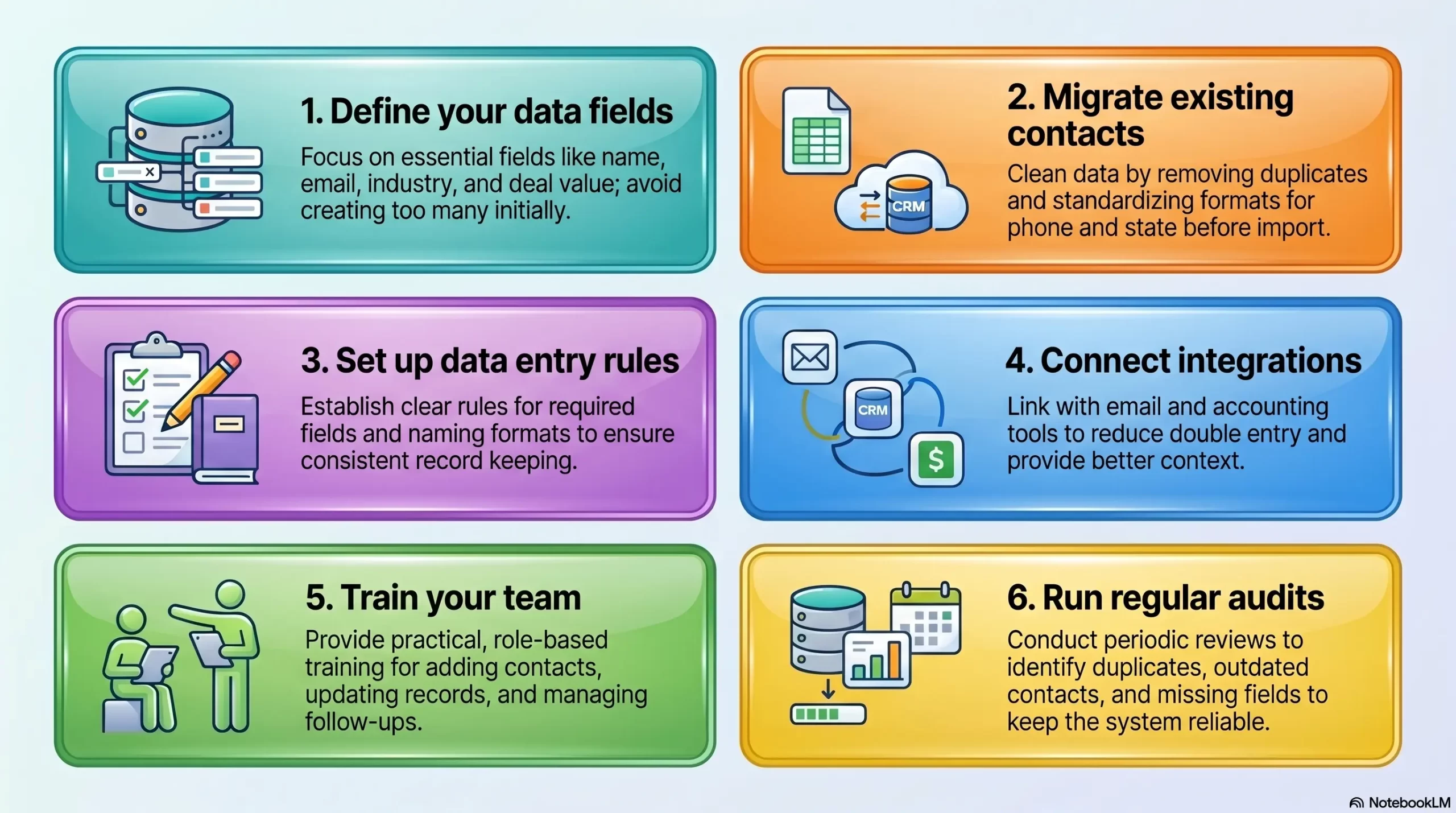
A CRM database works best when the business sets clear rules before adding large amounts of data. The following actions help keep customer records accurate, useful, and easy to maintain.
1. Define your data fields
Start by deciding which customer details your team needs to record. Common fields include name, company, email, phone number, industry, location, lead source, deal value, and customer status.
Avoid creating too many fields at the start. Instead, focus on data your team will actually use for sales, reporting, or service work.
2. Migrate existing contacts
Move existing contacts from spreadsheets, email lists, or old systems into the CRM database. Before importing, clean the data by removing duplicates, correcting errors, and standardising formats.
For example, use consistent state names, phone number formats, and customer categories. Clean data makes the CRM easier to search and report on later.
3. Set up data entry rules
Create clear rules for how staff should enter and update customer information. These rules may cover required fields, naming formats, lead stages, customer status, and ownership.
Good data entry rules prevent messy records. They also help new staff understand how to use the CRM database without creating inconsistent data.
4. Connect integrations
Connect the CRM with tools your business already uses, such as email, accounting software, ecommerce platforms, website forms, or customer support systems. Integrations reduce double entry and keep records up to date.
For example, connecting CRM and accounting data can help sales teams see invoice status before contacting a customer. This gives staff better context during each conversation.
5. Train your team
Train staff on how to add contacts, update records, log interactions, and manage follow-ups. A CRM database only works well when the team uses it consistently.
Keep training practical and role-based. Sales staff may need pipeline training, while support staff may need guidance on customer history and ticket notes.
6. Run regular audits
Review the CRM database regularly to find duplicate records, outdated contacts, missing fields, and inactive leads. These audits keep the system reliable as customer data grows.
Set a simple schedule, such as monthly or quarterly reviews. Then, assign responsibility so data quality does not become an afterthought.
How HashMicro CRM Supports Your Customer Database
HashMicro CRM helps businesses manage customer data, sales activity, and follow-ups in one connected platform. It gives teams a central database for leads, customers, opportunities, quotations, and communication records.
The system supports lead management, pipeline tracking, customer segmentation, sales reporting, and quote-to-invoice workflows. As a result, teams can move from enquiry to sale without switching between disconnected tools.
HashMicro CRM also connects with other HashMicro modules, including accounting, inventory, procurement, and sales management. This helps businesses link customer activity with stock availability, invoices, payments, and operational data.
For growing Australian businesses, this integrated approach reduces manual updates and improves visibility across departments. Instead of storing customer information in separate spreadsheets, teams can manage customer relationships from one reliable source.
Conclusion
A CRM database helps businesses store customer information, track interactions, manage sales activity, and improve customer service. It gives teams the structure they need to work from accurate data instead of scattered notes and spreadsheets.
For small businesses, a basic CRM database can improve follow-ups and contact management. For growing companies, an integrated CRM system such as HashMicro can connect customer data with sales, accounting, inventory, and wider business operations.
If you want to see how HashMicro CRM fits your current setup, book a free consultation with the team today.

Frequently Asked Question
Retail ERP is used to manage a retailer's core operations in one system, including inventory, point of sale, purchasing, customers, and accounting. It keeps data consistent across stores and channels so managers can run the business from accurate, live information.
No, retail ERP suits businesses of many sizes, not just large chains. Small and mid-sized retailers use it to connect stock, sales, and finance, and most systems scale as the business adds stores or channels.
Traditional ERP manages broad business processes, while retail ERP adds tools built for selling goods, such as POS, omnichannel orders, and multi-location stock control. Retail ERP needs less customisation because it already fits how shops trade.
POS software handles transactions at the point of sale, while ERP manages the whole business, including inventory, purchasing, and accounting. A retail ERP usually includes POS as one connected part of a much larger system.
Yes, inventory management is one of the core strengths of retail ERP. It tracks stock in real time across stores and warehouses, flags low stock for reorder, and reduces both stockouts and overstocking.
Retail ERP centralises pricing, stock, and reporting so head office can manage every location from one screen. Each store keeps trading independently while sharing the same data, which keeps standards consistent as the business grows.