




Australian businesses are investing heavily in physical assets, with the ABS estimating $158.4 billion in capital expenditure for 2026–27. ABS data also show that 59% of businesses used cloud technology in 2021–22, while only 4% used ERP software, highlighting growing demand for asset management software Australia businesses can use to improve control and visibility.
That creates problems when asset records are split across spreadsheets, emails, and separate tools. Without reliable asset tracking software, teams can waste time checking asset location, condition, ownership, and service history instead of acting on clear, accurate information.
A better system keeps those records in one place, allowing operations, maintenance, and finance teams to work faster and report with more confidence. Modern asset management software Australia solutions also help businesses respond earlier before small issues become costly disruptions.
Key Takeaways
|
Our Top Picks at a Glance (Shortlist)
Time is a critical resource for Australian operations managers. We have curated a shortlist of the top performers based on scalability, local support, and feature depth.
All recommendations on this list are manually evaluated by our editorial team based on hands-on testing, demo sessions, and verified customer feedback from Australian businesses. We do not accept payment for placement or ranking on this list.
Best Because
MaintainX helps frontline teams manage work orders faster with a mobile-first maintenance platform.

Best Because
IBM Maximo supports complex asset operations with advanced IoT and predictive maintenance capabilities.

Best Because
SafetyCulture helps teams improve compliance and safety with checklist-based asset inspections.
Best Because
Asset Panda offers flexible no-code asset tracking with custom workflows for different asset types.
What is Asset Management Software?
Asset management software is a system used to track and manage business assets throughout their lifecycle, from purchase to disposal. It stores key information in one place, including asset location, condition, ownership, maintenance history, and value.
Asset management software also helps businesses manage each stage of the asset lifecycle, from procurement and installation through to maintenance, upgrades, and disposal. Centralised lifecycle visibility helps teams improve planning, reduce downtime, and maintain more accurate asset records over time.
For businesses with multiple sites, warehouses, or departments, asset management software Australia helps improve visibility and reduce data gaps between teams. Integrated asset tracking software gives businesses stronger control over equipment, vehicles, IT devices, and other valuable assets.
Using the right system can reduce lost assets, prevent duplicate purchases, improve maintenance planning, and support faster audits or reporting. It also helps businesses make smarter decisions about repairs, replacements, and long-term asset use.
Types of Asset Management Software Do You Need?
The right type of software depends on what assets you manage and how complex your operations are. Some businesses need maintenance-focused systems, while others need IT tracking or finance-led asset control.
| Software Type | Best For | Key Features | Ideal Businesses |
|---|---|---|---|
| Enterprise Asset Management (EAM) | Managing operational equipment and infrastructure | Preventive maintenance, work orders, asset lifecycle tracking, downtime control | Manufacturing, construction, logistics, utilities |
| IT Asset Management (ITAM) | Tracking IT hardware and software | Device tracking, software licenses, compliance, lifecycle management | Offices, tech firms, multi-site businesses |
| Fixed Asset Management Software | Managing financial assets for accounting | Depreciation, disposals, tax reporting, audit records | SMEs, finance teams, accountants |
| Maintenance Management Software (CMMS) | Managing repairs and servicing | Maintenance scheduling, technician tasks, service history | Facilities, hospitality, healthcare |
| ERP Asset Management Modules | Businesses needing integrated operations | Asset tracking linked with procurement, finance, inventory | Growing or enterprise businesses |
Choosing the best fit depends on whether your priority is maintenance efficiency, IT control, financial reporting, or full business integration.
Key Features to Look for in Asset Management Software
For Australian businesses, basic asset tracking is no longer enough. The right system should support maintenance, finance, compliance, and cross-team visibility in one platform.
- Automated asset discovery and tracking: The software should automatically detect IT assets or support barcode, QR, RFID, and IoT tracking for physical assets, so teams can see asset locations and statuses in real time.
- Preventive/predictive maintenance and work orders: Choose a system that creates work orders based on time, usage, or condition data to support a continuous condition monitoring strategy and reduce unexpected asset failures.
- Depreciation and financial lifecycle management: The platform should accurately handle depreciation methods, revaluations, transfers, and disposals to support reporting and reduce manual spreadsheet work.
- Vendor, warranty, and contract management: A good system stores warranty terms, service contracts, and SLA deadlines in one place, with alerts for expiries, renewals, and missed service targets.
- Integration with ERP, accounting, and inventory systems: The software should connect with finance, procurement, and inventory systems to ensure asset data remains consistent across departments.
- Role-based access and audit trail: Look for role permissions and activity logs to control who can edit records and to track every asset change for accountability and audits.
- Asset lifecycle and disposal tracking: The software should track the full lifecycle, from purchase and assignment to retirement and disposal, so records stay accurate for operations and finance.

20 Best Asset Management Software in Australia
We have analyzed the leading platforms available to Australian businesses, focusing on their utility, interface, and ability to handle local requirements.
1. MaintainX
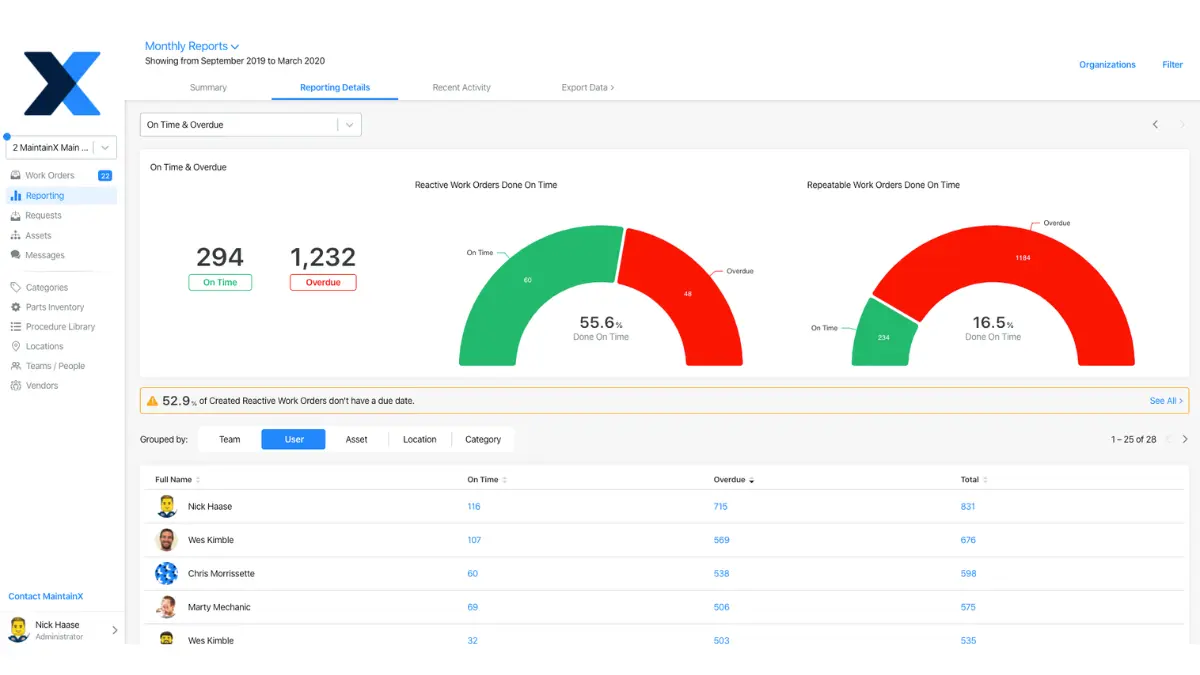
MaintainX is a mobile-first digitization platform designed to replace paper work orders and clipboards with a streamlined app. It excels in connecting the shop floor to the top floor, ensuring that maintenance technicians have immediate access to asset history and procedures.
For Australian manufacturing and logistics companies, MaintainX offers a user-friendly interface that requires minimal training. Its strength lies in its communication features, allowing teams to chat and share photos of asset issues in real-time within the context of a work order.
Key Features:
- Digital Work Orders: Create, assign, and track maintenance tasks with unlimited photos and procedure checklists.
- Parts Inventory: Track spare parts consumption directly associated with specific asset repairs to monitor costs.
- Reporting Dashboards: Visualize mean time to repair (MTTR) and other critical KPIs to identify bottlenecks.
| Pros | Cons |
| ✓ Exceptionally intuitive mobile interface. ✓ Built-in chat functionality improves collaboration. ✓ Free tier available for small teams. |
× Reporting can be limited in lower tiers. × Less focus on financial depreciation. × Inventory features are basic compared to ERPs. |
Pricing: MaintainX operates on a freemium model. Paid plans start at AUD $25 per user/month for the Essential plan, with Enterprise features available at higher prices.
Compatible with: iOS and Android for field teams, with a browser-based version for desktop access.
Best for: Maintenance teams needing mobile-first work order management, preventive maintenance, and real-time asset tracking.
2. SafetyCulture (formerly iAuditor)
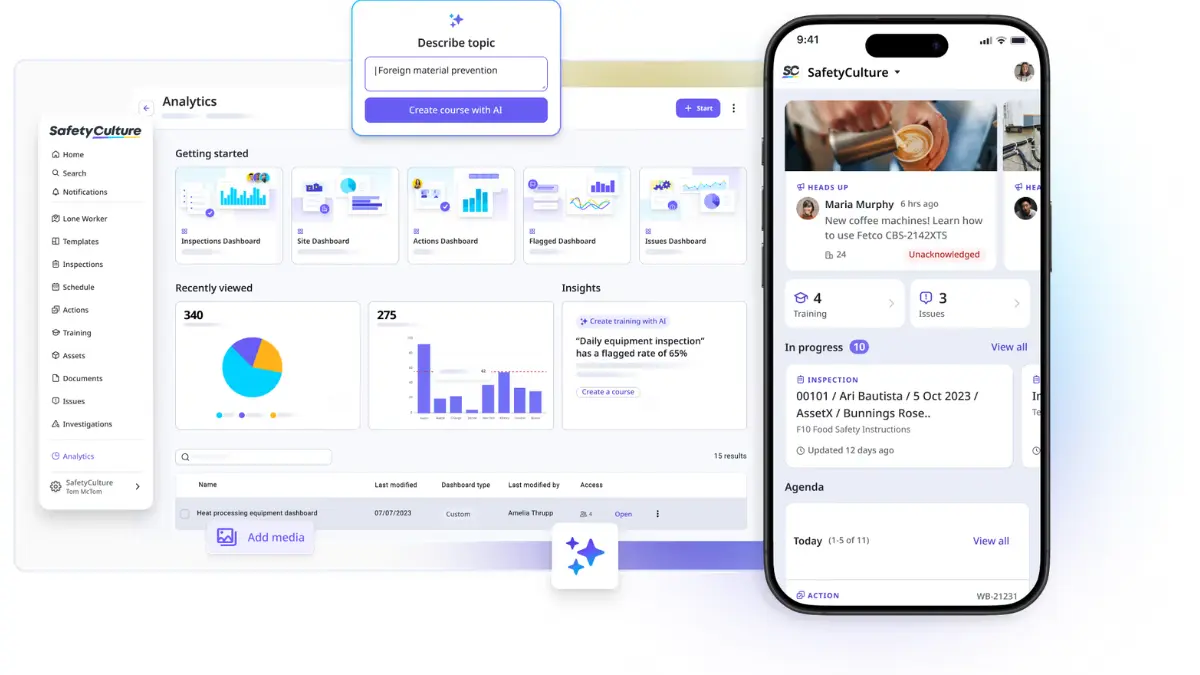
SafetyCulture is an Australian-born unicorn that has revolutionized inspection-driven asset management. While primarily known for safety checklists, its asset management capabilities allow organizations to build a comprehensive history of inspections against every piece of equipment.
This platform is particularly strong for industries with strict regulatory requirements, such as construction and food processing. It ensures that every asset is not only tracked but also safe to operate and compliant with Australian Standards.
Key Features:
- Customizable Inspections: Drag-and-drop builder to create specific asset inspection forms compliant with local regulations.
- Sensors and Telemetry: Integration with IoT sensors to monitor temperature, humidity, and location in real-time.
- Issue Resolution: collaborative actions that allow users to report a defect on an asset and track it to closure.
| Pros | Cons |
| ✓ Best-in-class inspection interface. ✓ Strong local Australian support. ✓ Easy integration with IoT hardware. |
× Primarily inspection-focused, not a full EAM. × Limited financial asset lifecycle tools. × Can get expensive for large user bases. |
Pricing: Offers a free tier for small teams. Premium plans start at approximately AUD $29 per user/month, billed annually.
Compatible with: iOS and Android mobile apps, with a web version for teams that prefer browser-based access.
Best for: Businesses focused on inspections, compliance checks, safety processes, and operational accountability.
3. IBM Maximo
IBM Maximo is widely regarded as the gold standard for Enterprise Asset Management (EAM) in heavy industries. It utilizes the IBM Watson AI engine to provide cognitive insights, predicting asset failure by analyzing massive datasets from IoT devices.
For large Australian mining conglomerates and utility providers, Maximo offers unparalleled depth. It combines asset maintenance, supply chain management, and health and safety in a single, albeit complex, platform.
Key Features:
- Predictive Maintenance: Uses AI to analyze vibration, temperature, and usage data to predict failures weeks in advance.
- Asset Health Scoring: Aggregates data to provide a single health score for assets, aiding in replacement planning.
- Visual Inspection: Integrates with computer vision to identify defects in equipment automatically.
| Pros | Cons |
| ✓ Unmatched scalability for global enterprises. ✓ Powerful AI and IoT integration capabilities. ✓ Deep industry-specific configurations. |
× Extremely high implementation cost. × Steep learning curve for average users. × Requires dedicated administrators. |
Pricing: Pricing is quote-based and typically involves significant licensing fees and implementation costs, often exceeding AUD $100,000 for enterprise deployments.
Compatible with: Supports iOS, Android, and Windows devices, making it suitable for mixed mobile environments.
Best for: Large enterprises requiring advanced enterprise asset management, predictive maintenance, and complex infrastructure control.
4. Asset Panda
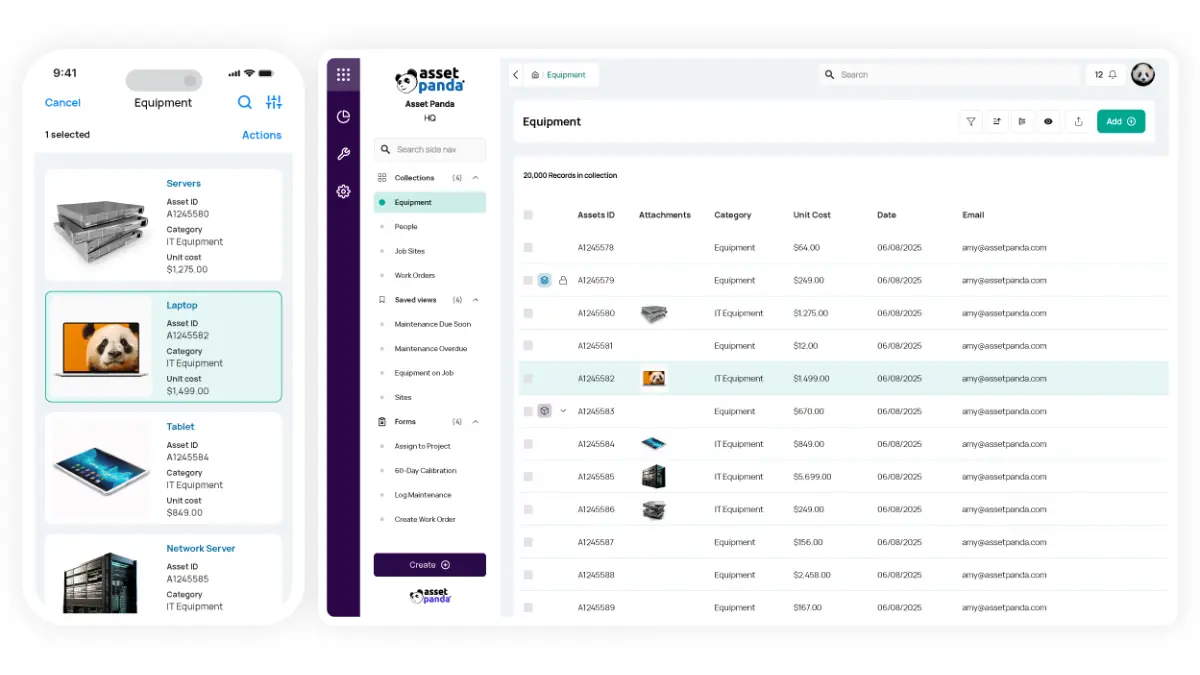
Asset Panda allows for extreme configurability, marketing itself as a “no-code” platform where you can design your own asset tracking workflows. It is particularly popular among mid-sized Australian businesses that need to track IT equipment, tools, and furniture.
The platform’s strength is its flexibility; it adapts to your naming conventions and processes rather than forcing you to adapt to the software. The mobile app includes a built-in barcode scanner, making audits fast and efficient.
Key Features:
- Custom Fields and Forms: Create unlimited custom fields to track specific data points relevant to your industry.
- Role-Based Access: Granular control over who can see and edit specific asset categories or locations.
- Audit Trails: Detailed history logs of every change made to an asset record for accountability.
| Pros | Cons |
| ✓ Highly customizable without coding. ✓ Unlimited users on most plans. ✓ Excellent mobile app scanning features. |
× Interface can feel cluttered if over-customized. × Support response times vary. × Reporting can be complex to set up. |
Pricing: Asset Panda uses a quote-based model primarily based on the number of assets tracked, not the number of users.
Compatible with: Available on the web and on iOS and Android, useful for audits, scans, and day-to-day updates on the go.
Best for: Businesses wanting flexible cloud-based asset tracking with barcode scanning and custom workflows.
5. HashMicro
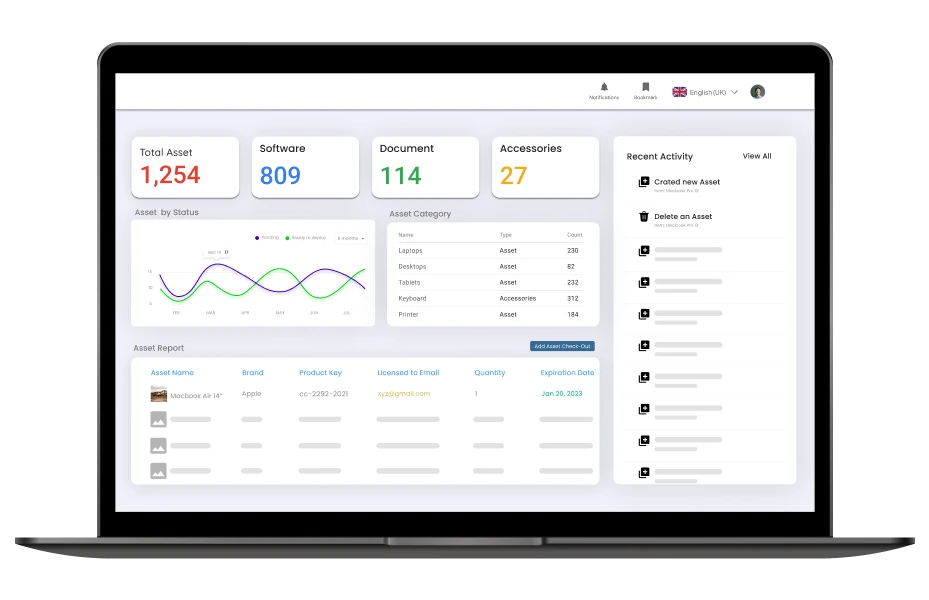
HashMicro offers a comprehensive, AI-integrated Asset Management solution that stands out for its seamless integration with a broader ERP suite. Designed for the APAC market, it addresses the specific needs of Australian businesses regarding tax compliance, depreciation calculation, and maintenance scheduling.
Unlike standalone tools, HashMicro connects asset data directly with finance, procurement, and HR modules. This holistic approach ensures that when an asset is purchased, it is automatically capitalized, and when maintenance is performed, the costs are immediately reflected in financial reports.
Key Features:
- Automated Depreciation Calculation: automatically calculates asset value reduction using various methods compliant with ATO standards, eliminating manual spreadsheet errors.
- Asset Maintenance Management: Schedules routine maintenance based on time or usage, automatically assigning work orders to technicians and tracking completion.
- Barcode and QR Code Tracking: Generates and scans unique codes for instant asset identification, location updates, and audit reconciliation via mobile devices.
- Multi-Site Asset Management: Centralises asset tracking, maintenance scheduling, and lifecycle visibility across multiple branches, warehouses, or operational sites from one system.
- Asset Leasing Management: Tracks leased assets, contract expirations, and payment schedules to prevent penalties and manage renewals effectively.
| Pros | Cons |
| ✓ Seamless integration with Finance and Procurement. ✓ Highly competitive pricing for the feature set. ✓ User-friendly interface designed for non-technical staff. ✓ Robust reporting for Australian tax compliance. |
× May be overkill for micro-businesses with few assets. × Full potential is realized only when using the ERP suite. |
Pricing: HashMicro offers a competitive pricing model with a focus on affordability for mid-to-large enterprises. Pricing is transparent and typically involves a one-time implementation fee with subscription options.
Compatible with: Supports iOS and Android mobile access, alongside web-based access for day-to-day use across teams.
Best for: Growing businesses needing integrated asset management with inventory, procurement, accounting, and ERP connectivity.
Click the banner below to try out our free price simulator to find the best ERP that aligns with your budget.
6. SAP Enterprise Asset Management (EAM)
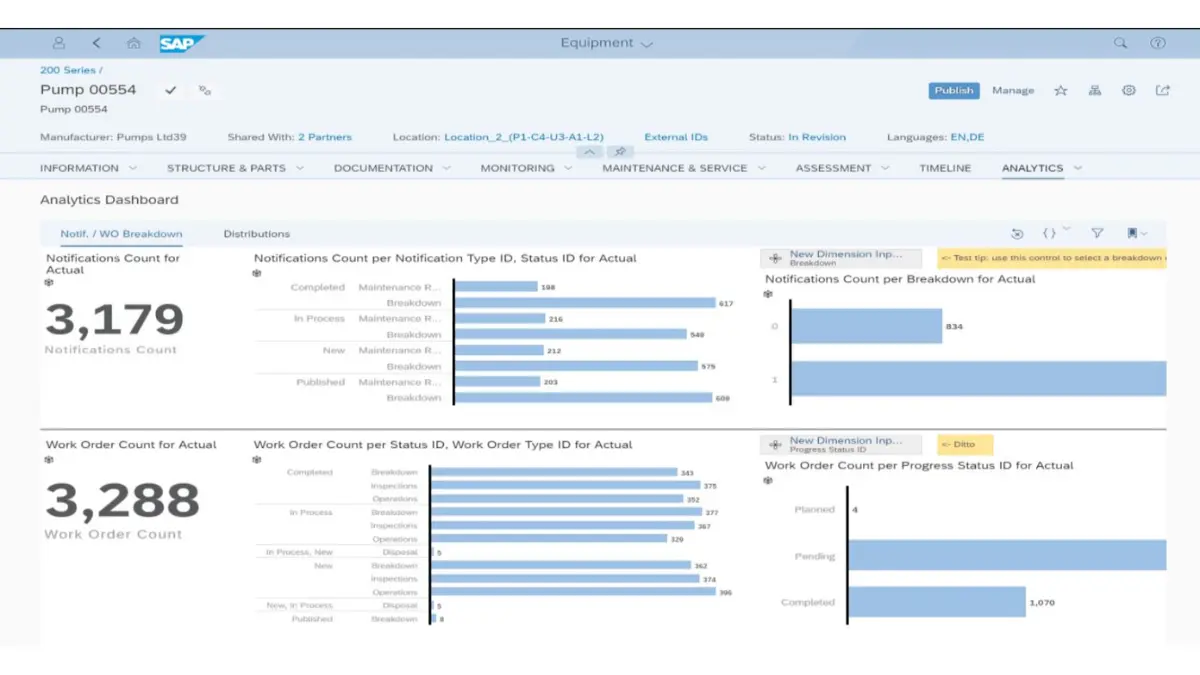
SAP EAM is a powerhouse solution deeply embedded within the SAP ecosystem. For organizations already running SAP S/4HANA, this is the logical choice for asset management, providing a unified view of the entire business operation.
It excels in connecting the “shop floor” to the “top floor,” ensuring that asset performance directly informs financial planning and supply chain decisions. The depth of data integration allows for sophisticated scenario planning and investment analysis.
Key Features:
- Asset Network Collaboration: A cloud-based collaborative network that allows owners, manufacturers, and service providers to share asset data.
- Environment, Health, and Safety (EHS): Deep integration with safety protocols to ensure asset operations comply with strict regulations.
- Mobile Asset Management: empowering field workers with mobile tools to execute work orders and update data offline.
| Pros | Cons |
| ✓ Best-in-class integration for SAP users. ✓ Handles extreme complexity and volume. ✓ Global support and massive partner network. |
× Prohibitive cost for SMEs. × Implementation can take months or years. × UI is often considered complex and dated. |
Pricing: Enterprise-grade pricing. Costs are significant and based on modules, users, and deployment metrics.
Compatible with: Designed for iOS, Android, and Windows, especially for mobile-heavy asset and service workflows.
Best for: Large organisations needing enterprise-grade asset lifecycle management integrated with SAP operations.
7. Oracle Enterprise Asset Management
Oracle EAM is a robust contender designed to support asset-intensive industries like utilities, public sector, and manufacturing. It focuses on maximizing return on assets (ROA) by improving utilization and reducing costs through proactive maintenance.
A key advantage of Oracle EAM is its deep integration with Oracle Financials. This allows for precise tracking of maintenance costs against specific budgets, providing CFOs with granular visibility into capital expenditures.
Key Features:
- Preventive Maintenance Strategies: Supports complex maintenance hierarchies and strategies based on calendar, usage, or condition.
- Work Request Management: Streamlined portal for employees to report issues, which are then triaged into work orders.
- Inventory Integration: direct link to spare parts inventory to ensure materials are available before maintenance is scheduled.
| Pros | Cons |
| ✓ Strong financial and supply chain integration. ✓ Scalable for multinational operations. ✓ Comprehensive analytics and reporting. |
× Interface can be rigid. × Requires specialized Oracle expertise to manage. × High Total Cost of Ownership (TCO). |
Pricing: Quote-based, typically targeting large enterprises with substantial budgets.
Compatible with: Accessible through a browser, with Oracle mobile app support available on iOS and Android in E-Business Suite environments.
Best for: Enterprises managing large-scale assets, maintenance planning, and finance-linked operations.
8. Kynection
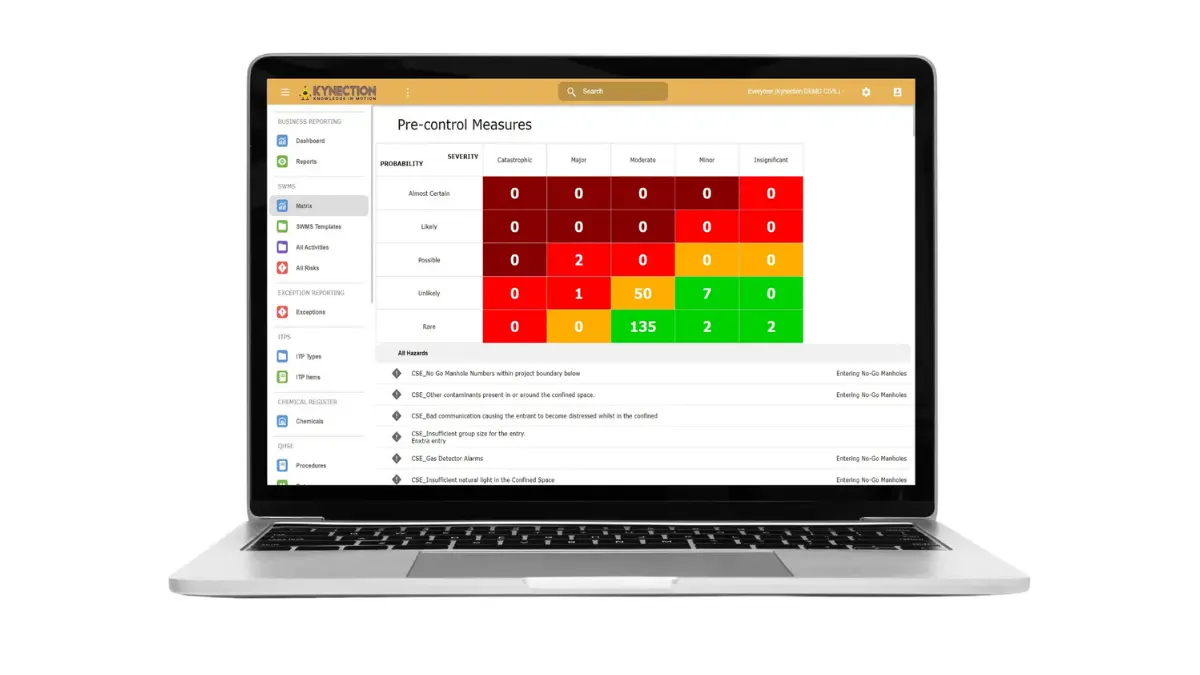
Kynection is a proud Australian provider offering a “One System” approach. It is particularly popular in the transport, civil, and construction sectors, offering modules that range from asset management to chain of responsibility (CoR) compliance.
Being local, Kynection understands the specific challenges of Australian businesses, such as NHVR (National Heavy Vehicle Regulator) compliance. Their asset module is tightly coupled with fleet management and mobile forms.
Key Features:
- Fleet and Plant Management: specialized tools for tracking vehicles and heavy machinery, including pre-start checks.
- NHVR Compliance: Features designed specifically to help transport companies meet Australian heavy vehicle regulations.
- Mobile Forms: Digital pre-starts and fault reporting directly from the driver’s phone.
| Pros | Cons |
| ✓ Local Australian support and hosting. ✓ Tailored for transport and civil industries. ✓ All-in-one platform reduces software sprawl. |
× UI can feel utilitarian. × May lack depth for non-transport industries. × Customizations can take time. |
Pricing: Quote-based. Generally accessible for mid-sized Australian businesses.
Compatible with: Available on iOS and Android through the Kynection app, with browser access for broader back-office use.
Best for: Field service, construction, and industrial businesses needing workforce mobility, compliance, and asset visibility.
9. Sage Fixed Assets
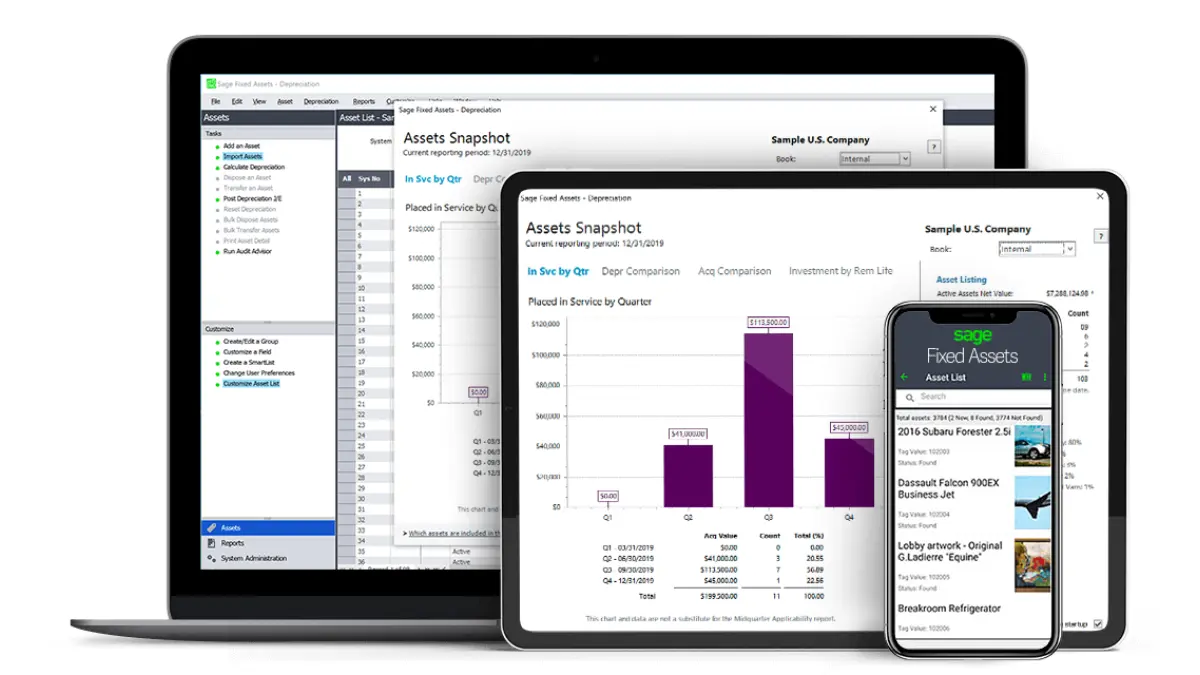
Sage Fixed Assets focuses heavily on the accounting lifecycle of assets. While it includes tracking capabilities, its primary power lies in managing depreciation, tax rules, and fixed asset accounting compliance.
For Australian finance teams, Sage provides peace of mind regarding ATO compliance. It manages the entire lifecycle from acquisition to disposal, ensuring that the balance sheet is always accurate and audit-ready.
Key Features:
- Depreciation Automation: Includes over 50 depreciation methods and supports custom schedules.
- Construction in Progress (CIP): Manages complex capital projects and seamlessly converts them to fixed assets upon completion.
- Disposal Management: Calculates gains or losses on asset disposal automatically.
| Pros | Cons |
| ✓ Excellent for finance and accounting teams. ✓ Deep compliance features. ✓ Integrates well with Sage ERP products. |
× Weak on physical maintenance management. × Not designed for operational technicians. × Interface is traditional/desktop focused. |
Pricing: Pricing varies by module (Depreciation, Tracking, Planning) and deployment method.
Compatible with: Primarily suited to Windows environments, with online access available through Sage Fixed Assets Online.
Best for: Businesses focused on fixed asset tracking, depreciation management, and financial reporting accuracy.
10. Fiix
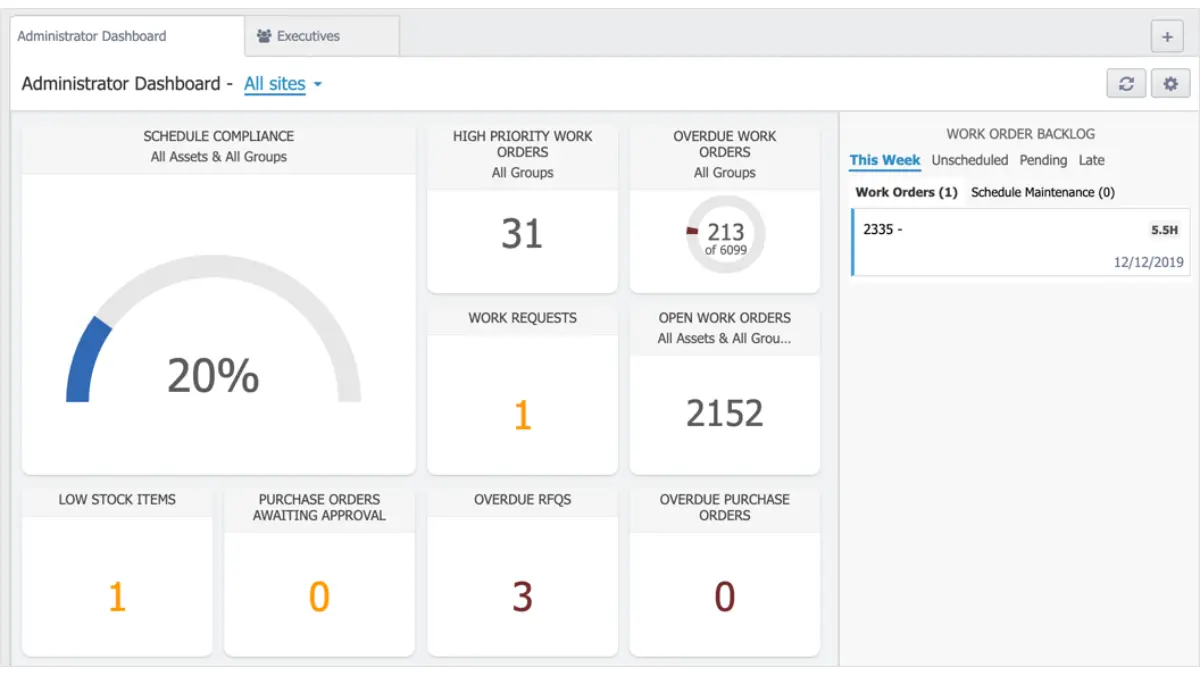
Fiix, by Rockwell Automation, is a cloud-native CMMS that emphasizes ease of use and connectivity. It is designed to help maintenance teams organize assets, manage work, and connect to other business systems.
Fiix uses AI to help users analyze data and find trends in asset performance. It is a strong choice for manufacturing plants in Australia looking to modernize their maintenance operations without a heavy on-premise installation.
Key Features:
- AI-Powered Insights: “Fiix Foresight” analyzes maintenance data to suggest improvements and predict failures.
- Integration Hub: Pre-built connectors for major ERPs and IoT platforms to centralize data.
- Guest Request Portal: Allows anyone in the organization to submit a maintenance request without a license.
| Pros | Cons |
| ✓ Modern, clean user interface. ✓ Strong focus on connectivity and API. ✓ Excellent mobile app for technicians. |
× Reporting can be tricky for complex custom needs. × Costs increase significantly with advanced AI features. × Less focus on financial depreciation. |
Pricing: Starts at roughly AUD $45 per user/month, with enterprise plans available.
Compatible with: iOS and Android via its mobile app, and the web for desktop visibility when teams need it.
Best for: Maintenance teams wanting CMMS software with preventive maintenance and asset performance insights.
11. Limble
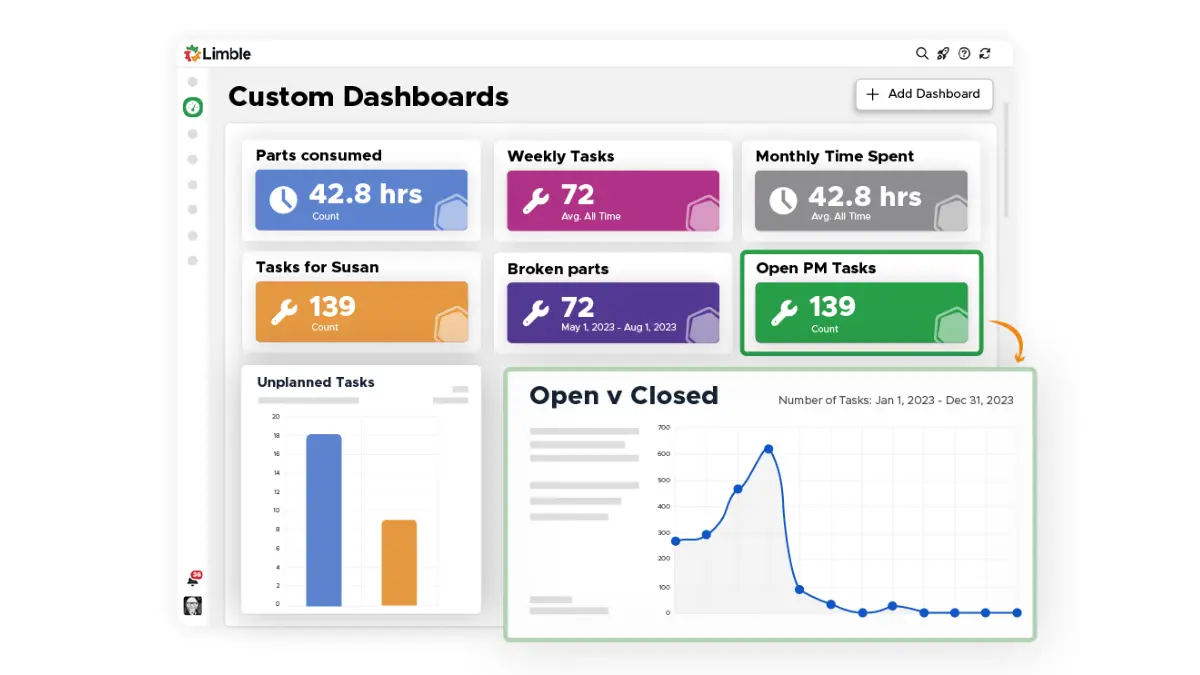
Limble is a CMMS built specifically for technicians, by technicians. It boasts one of the highest adoption rates in the industry because it simplifies the workflow for the person holding the wrench.
For Australian facility managers, Limble reduces the administrative burden. Its mobile app allows technicians to start a timer, view instructions, and close work orders in seconds, ensuring data is actually captured.
Key Features:
- QR Code Instant Work Requests: Place QR codes on assets so anyone can scan and report an issue instantly.
- Modular Dashboard: Drag-and-drop widgets to see exactly the metrics you care about (e.g., overdue PMs).
- Vendor Management: Share work orders directly with external contractors and track their time.
| Pros | Cons |
| ✓ Extremely easy to use and deploy. ✓ High technician adoption rates. ✓ Excellent customer support. |
× Advanced enterprise features may be lacking. × Limited integration options compared to big EAMs. × Inventory costing is basic. |
Pricing: Starts around AUD $40 per user/month.
Compatible with: Runs on iOS and Android in the field, while the web platform works across major browsers such as Chrome, Edge, Firefox, and Safari.
Best for: Mid-sized businesses seeking easy-to-use maintenance software with strong preventive maintenance tools.
12. AVEVA Enterprise
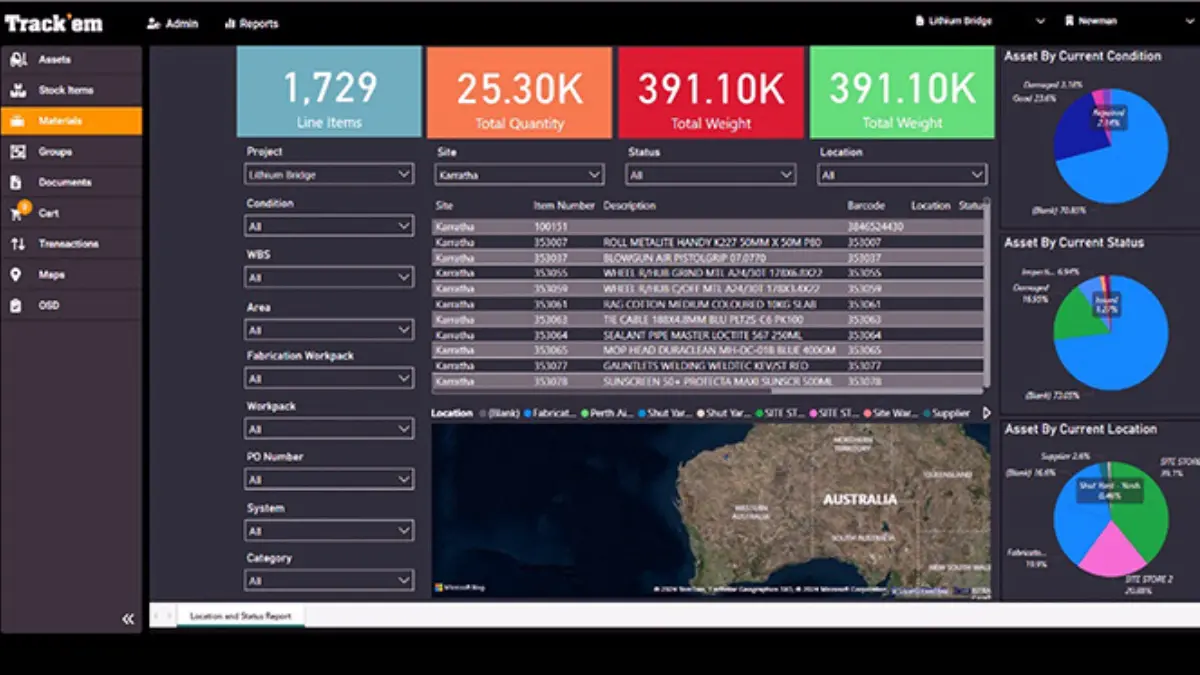
AVEVA focuses on the “Digital Twin” concept, creating a virtual replica of physical assets to simulate performance. It is a high-end solution used in process industries like oil & gas, chemicals, and power generation.
In Australia’s resource sector, AVEVA helps operators visualize complex asset relationships. It unifies engineering, operations, and maintenance data to optimize performance across the entire asset lifecycle.
Key Features:
- Digital Twin Technology: Visualize asset performance in 3D and simulate operational changes before applying them.
- Unified Operations Center: A “system of systems” that converges IT and OT (Operational Technology) data.
- Asset Strategy Optimization: Uses risk-based maintenance (RBM) methodologies to balance risk, cost, and performance.
| Pros | Cons |
| ✓ Cutting-edge visualization and simulation. ✓ Deep engineering integration. ✓ Proven in high-risk industries. |
× Very high complexity and cost. × Requires significant engineering data to be effective. × Not suitable for general asset tracking. |
Pricing: Enterprise quoting only. Significant investment required.
Compatible with: Primarily web-based, with mobile-enabled operations available through AVEVA Mobile Operator.
Best for: Industrial and manufacturing companies needing operational intelligence and complex asset performance management.
13. Freshservice
Freshservice is a unified service management platform that combines IT service workflows with asset tracking and lifecycle visibility. It is especially useful for businesses that want to manage hardware, software, contracts, and support requests in one connected environment.
For Australian businesses with distributed IT infrastructure, Freshservice helps teams keep track of assets across offices, remote users, and cloud environments. Its strength lies in automation, which helps reduce manual admin work and improves response time when asset issues affect daily operations.
Key Features:
- Automated Discovery: Detects and registers assets across on-premise and cloud environments for better visibility.
- Asset Lifecycle Management: Tracks assets from acquisition and deployment through to retirement.
- Contract and Alert Management: Helps teams stay on top of renewals, warranties, and service-related notifications.
| Pros | Cons |
| ✓ Strong fit for businesses that want ITSM and asset management in one platform. ✓ Good automation for discovery, alerts, and workflow routing. ✓ Easy to scale for growing service teams. |
× More focused on IT and service workflows than heavy physical assets. × May feel broader than needed for simple asset tracking. × Advanced capabilities can raise costs as needs grow. |
Pricing: Starter plan starts at around AUD $27/user/month.
Compatible with: Available on iOS and Android for mobile access, with web-based access for everyday use across teams.
Best for: IT teams managing hardware assets, service requests, and internal support operations.
14. InvGate
InvGate is an IT-focused asset and service management platform built to help businesses control hardware, software, licenses, and device allocation from one system. It gives teams a clearer view of asset ownership, usage, and lifecycle across the organisation.
For Australian companies with growing IT estates, InvGate is a practical option for improving software compliance and device tracking without relying on scattered spreadsheets. Its service management connection also makes it easier to link asset records with tickets, incidents, and internal requests.
Key Features:
- Asset Inventory and Monitoring: Tracks IT assets and gives teams a real-time overview of their status and allocation.
- Software License Management: Helps businesses control software usage, licensing, and metering more accurately.
- Analytics and Drag-and-Drop Workflows: Supports reporting and custom workflow design for service and asset processes.
| Pros | Cons |
| ✓ Strong visibility for hardware, software, and license management. ✓ Useful integration between asset and service workflows. ✓ Supports multiple platforms, including Windows environments. |
× Primarily designed for IT assets rather than operational equipment. × Less suitable for maintenance-heavy industries like manufacturing or utilities. × Pricing is not publicly available. |
Pricing: Available upon request.
Compatible with: Supports iOS, Android, Windows, and web access, which suits teams working across both desktop and mobile environments.
Best for: Organisations needing IT asset management combined with service desk and compliance tools.
15. AssetExplorer
AssetExplorer by ManageEngine is a web-based IT asset management tool designed to help businesses monitor hardware, software, licenses, and ownership records from purchase to disposal. It is a practical choice for teams that need better visibility without moving into a full enterprise asset management suite.
For Australian businesses with large volumes of laptops, servers, and software licenses, AssetExplorer can simplify compliance and inventory control. It works best for organisations that want centralised IT asset records and purchasing visibility at a relatively accessible entry point.
Key Features:
- IT Asset Inventory Management: Tracks hardware and software assets across the business from a central register.
- Contract and License Management: Helps teams monitor renewals, entitlements, and software compliance.
- Purchase Order and CMDB Support: Connects procurement records with configuration and asset data for stronger control.
| Pros | Cons |
| ✓ Free version available for businesses with lighter needs. ✓ Strong license, contract, and purchase tracking for IT assets. ✓ Suitable for teams that want structured asset visibility at lower entry cost. |
× Focused more on IT assets than physical maintenance workflows. × Interface may feel less modern than some newer platforms. × Limited fit for businesses that need deep operational asset management. |
Pricing: Paid plans start at approximately AUD $1,366 as a one-time fee for 250 IT assets.
Compatible with: Available on Android, Windows, and web, which works well for teams managing assets from both browser and desktop setups.
Best for: Businesses wanting affordable IT asset discovery, license management, and network asset visibility.
16. ManagerPlus
ManagerPlus is a customisable asset and maintenance management solution that helps businesses manage equipment, work orders, inspections, and inventory from one platform. It is built for organisations that want stronger maintenance control without stepping into the complexity of a large enterprise EAM.
For Australian businesses in facilities, operations, and field service environments, ManagerPlus offers a practical mix of preventive maintenance and asset tracking. Its broad feature set also makes it suitable for teams that need service history, inspection scheduling, and inventory visibility in one place.
Key Features:
- Preventive Maintenance Scheduling: Helps teams plan routine servicing and reduce avoidable breakdowns.
- Facility and Fixed Asset Management: Tracks both equipment and site-based assets across operations.
- Inventory and Service History: Links parts usage and past maintenance records for better decision-making.
| Pros | Cons |
| ✓ Well-rounded feature set for maintenance, inventory, and asset records. ✓ Good fit for businesses that want preventive maintenance tools. ✓ Mobile access supports field-based updates. |
× Per-user pricing can become costly for larger teams. × May require setup effort to tailor workflows properly. × Less focused on accounting-led asset management than finance-oriented tools. |
Pricing: Lightning Plus starts at approximately AUD $122/user/month, while Lightning Experience starts at approximately AUD $179/user/month.
Compatible with: Runs on iOS and Android for mobile users, with web access available for office-based teams and managers.
Best for: Maintenance-heavy businesses needing preventive maintenance, inspections, and equipment lifecycle tracking.
17. UpKeep
UpKeep is a mobile-first maintenance and asset operations platform built to help teams manage work orders, preventive maintenance, and asset data from anywhere. It is especially popular with maintenance teams that need fast updates in the field rather than desktop-heavy workflows.
For Australian businesses with technicians across multiple sites, UpKeep makes it easier to capture maintenance activity, update asset records, and respond faster to equipment issues. Its mobile-first design is a major advantage for teams that rely on speed, visibility, and day-to-day usability on the ground.
Key Features:
- Work Order Management: Create, assign, and complete maintenance tasks with photos, checklists, and real-time updates.
- Preventive Maintenance Automation: Automates recurring maintenance schedules to help reduce reactive repairs and downtime.
- Asset Lifecycle Tracking: Monitors asset history, downtime, and maintenance activity from one system.
| Pros | Cons |
| ✓ Strong mobile experience for technicians and field teams. ✓ Good fit for preventive maintenance and work order workflows. ✓ Easier to adopt than many large-scale EAM platforms. |
× More maintenance-focused than finance-focused. × Advanced analytics and capabilities sit in higher tiers. × Costs can rise as teams scale and require more features. |
Pricing: Essential plan starts at approximately AUD $29/user/month.
Compatible with: Supports iOS and Android mobile access, with web access available for teams that also work from desktop.
Best for: Mobile maintenance teams needing simple work order management and fast field asset updates.
18. Asset Vision
Asset Vision is an infrastructure and field asset management platform focused on maintenance visibility, inspections, and condition monitoring across distributed operations. It helps businesses manage infrastructure assets, field servicing, and operational records from one centralised system.
For Australian councils, utilities, and infrastructure operators, Asset Vision provides strong GIS mapping and mobile field capabilities. Its mobile-first workflows help teams capture asset data faster while improving maintenance coordination across sites.
Key Features:
- GIS Asset Mapping: Visualise asset locations and conditions through integrated geospatial mapping tools.
- Mobile Field Inspections: Capture inspections, photos, and maintenance updates directly from field devices.
- Preventive Maintenance Scheduling: Automate recurring maintenance schedules to reduce unexpected asset failures.
| Pros | Cons |
| ✓ Strong GIS and field asset visibility. ✓ Designed for Australian infrastructure operations. ✓ Mobile-friendly inspection workflows. |
× Less suitable for finance-heavy asset tracking. × Can require setup customisation. × More infrastructure-focused than general business assets. |
Pricing: Pricing is quote-based depending on asset volume, deployment scope, and required modules.
Compatible with: Supports web-based access alongside iOS and Android mobile field applications.
Best for: Infrastructure operators, councils, and field service organisations needing GIS-based asset visibility and maintenance management.
19. Pinnacle CMMS
Pinnacle CMMS is a maintenance management platform designed to improve equipment reliability, preventive maintenance scheduling, and technician workflow visibility. The system focuses on helping maintenance teams manage servicing activities and operational assets more efficiently.
For Australian maintenance teams, Pinnacle CMMS offers practical work order tracking and maintenance planning tools without the complexity of large enterprise EAM systems. Its interface is designed to support faster technician adoption and day-to-day operational use.
Key Features:
- Preventive Maintenance Scheduling: Automate recurring servicing schedules based on time or equipment usage.
- Work Order Tracking: Monitor maintenance requests, technician assignments, and repair history from one dashboard.
- Asset Performance Reporting: Track downtime, maintenance trends, and equipment reliability metrics.
| Pros | Cons |
| ✓ Practical preventive maintenance tools. ✓ Easier to deploy than large EAM systems. ✓ Good visibility for maintenance operations. |
× Less focused on financial asset management. × Advanced analytics may require higher tiers. × Limited suitability for IT asset management. |
Pricing: Pricing is available upon request depending on users, assets, and deployment requirements.
Compatible with: Available through web browsers with support for mobile maintenance access.
Best for: Maintenance teams needing preventive maintenance scheduling, work order tracking, and operational asset visibility.
20. MEX Maintenance
MEX Maintenance is a CMMS and asset maintenance platform built for maintenance-heavy industries such as manufacturing, mining, and facilities management. It helps businesses manage preventive maintenance, compliance, and equipment servicing from one connected system.
For Australian businesses with large maintenance workloads, MEX Maintenance provides strong work order management and asset history tracking. Its flexibility also supports multi-site operations and complex maintenance environments.
Key Features:
- Maintenance Scheduling: Plan recurring maintenance activities and reduce reactive repairs.
- Asset History Tracking: Maintain detailed records of servicing, inspections, downtime, and repairs.
- Inventory and Spare Parts Management: Track maintenance inventory usage and parts availability across operations.
| Pros | Cons |
| ✓ Strong maintenance history visibility. ✓ Good fit for maintenance-heavy industries. ✓ Supports multi-site maintenance operations. |
× Interface may feel traditional for some users. × Setup complexity can increase for larger deployments. × Less modern UI compared to newer CMMS platforms. |
Pricing: Pricing is quote-based depending on operational requirements and deployment scale.
Compatible with: Supports browser-based access with mobile support for maintenance teams and field operations.
Best for: Manufacturing, mining, and facilities teams needing preventive maintenance, compliance tracking, and asset servicing visibility.
Quick Comparison Table
| Features | MaintainX | SafetyCulture | IBM Maximo | Asset Panda | HashMicro | SAP |
|---|---|---|---|---|---|---|
| User-Friendly Interface | ||||||
| Pricing | ||||||
| Learning Curve | ||||||
| Connection Quality | ||||||
| Ease of Integration |
How Does Asset Management Software Help Your Business?
As your business grows, managing assets manually becomes harder to control and easier to get wrong. Asset management software helps solve that by giving teams clearer visibility, faster access to records, and better control over maintenance, usage, and costs.
- Gives you full visibility over every asset: Asset management software helps your team see where assets are, who is using them, and what condition they are in, so nothing gets lost, overlooked, or underused.
- Makes maintenance more proactive: Instead of waiting for equipment to fail, the system helps you schedule servicing on time, reduce breakdowns, and keep operations running with fewer disruptions.
- Improves record accuracy: By replacing spreadsheets and manual updates, the software keeps asset data more consistent and reliable, which makes reporting, audits, and day-to-day decisions much easier.
- Strengthens inventory control: With barcode, QR, RFID, or GPS-based tracking, businesses can monitor tools, spare parts, vehicles, and equipment more accurately and avoid stock confusion.
- Extends asset value across the lifecycle: Better tracking from purchase to disposal helps businesses use assets more effectively, plan replacements at the right time, and get more value from every investment.
- Prevents unnecessary spending: When you know what assets you already own and how often they are used, you can avoid duplicate purchases and focus your budget on areas that need it more.
- Helps teams work faster and with more confidence: Operations, maintenance, and finance teams can access the same up-to-date information in one place, which speeds up coordination and reduces back-and-forth checking.
How to Pick the Best Asset Management Software?
Choosing the best asset management software is not about picking the platform with the longest feature list. It is about selecting a system that fits your asset types, team workflow, and reporting needs.
The right asset management software Australia solution should help operations, maintenance, and finance teams work from a single source of truth. If your business needs deeper tracking from purchase to servicing and disposal, you may need asset lifecycle management software rather than basic asset tracking software.
1. Match the software to your asset volume and complexity
Start by reviewing your asset portfolio. The best option depends on how many assets you manage and how complex they are to maintain.
- High volume, low complexity (laptops, scanners, office equipment): prioritise fast audits, barcode tagging, and simple asset tracking software workflows.
- Lower volume, high complexity (machinery, plant equipment): prioritise maintenance history, work orders, uptime tracking, and reliability data.
This helps narrow your choice between lightweight tracking tools, IT-focused platforms, or full EAM systems.
2. Compare total cost, not just subscription price
Many businesses compare monthly pricing first, but software costs go beyond the subscription fee. You also need to consider implementation, training, integrations, support, and internal rollout time.
A lower upfront cost can become expensive if setup is slow or requires extra tools. When comparing asset management software Australia options, focus on total cost of ownership over time.
3. Check how well it fits your existing systems
Your software should not operate in isolation. It should connect with accounting, procurement, inventory, or ERP systems so asset data stays accurate across teams.
If finance, operations, and maintenance all use separate tools with no integration, reporting becomes slower and more error-prone. Strong system compatibility is a major factor when choosing long-term software.
4. Consider integration across systems
Modern asset management software should integrate smoothly with existing business tools. Good integration keeps asset data flowing between finance, operations, and procurement without manual reconciliation.
Many systems connect with platforms like Xero and MYOB to sync financial records with asset data. This improves reporting accuracy and gives teams clearer visibility into costs, depreciation, and lifecycle performance.
5. Ensure compliance with ISO 55001 standards
When evaluating asset management software, it is important to consider alignment with ISO 55001, the international standard for asset management systems. ISO 55001 provides a structured framework for managing asset lifecycle, risk, and performance.
Software that supports ISO 55001 principles helps businesses improve governance, maintain compliance, and ensure long-term asset value. It also ensures that processes are standardised and auditable across the organisation.
6. Check offline access capabilities
Not all operations happen in environments with stable internet access. For businesses with field teams, warehouses, or remote sites, offline access is an important feature.
Asset management software should allow users to capture data, update asset records, and log maintenance activities even without connectivity. Once the system reconnects, data should sync automatically to ensure no information is lost.
7. Scalability and multi-site readiness
Businesses with multiple locations or growing asset volumes should choose software that can scale without creating reporting gaps between sites. Centralised multi-site visibility helps operations, maintenance, and finance teams manage assets more consistently across branches, warehouses, or field locations.
The system should also support role permissions, standardised workflows, and consolidated reporting as operations expand. This becomes increasingly important for businesses managing distributed teams, shared equipment, or large maintenance workloads.
Conclusion
The asset management software Australia market includes everything from simple asset tracking software to advanced platforms with maintenance, finance, and compliance features. The best choice depends on your asset types, team workflows, and reporting requirements.
A good system should be easy for teams to use daily and reliable for audits, planning, and performance tracking. If you need end-to-end visibility from purchase to disposal, the right asset lifecycle management software can improve control, reduce downtime, and support smarter decisions.
Before you decide, compare system fit, total cost, integrations, and ease of adoption. For tailored guidance, book a free consultation with our professional experts to find the right asset management software for your business.
FAQ About Asset Management Software
-
What is the difference between EAM and CMMS?
CMMS (Computerized Maintenance Management System) focuses mainly on maintenance scheduling and work orders. EAM (Enterprise Asset Management) is broader, covering the full asset lifecycle, including finance, procurement, planning, maintenance, and disposal.
-
How much does asset management software cost in Australia?
Costs vary widely depending on features, users, and deployment scope. Simple tracking tools may start at around AUD $10–$30/user/month, mid-range CMMS platforms often range from AUD $40–$100/user/month, while enterprise systems usually use custom pricing and may include separate implementation fees.
-
Why is depreciation management important for Australian businesses?
Accurate depreciation management helps businesses meet ATO requirements and claim the correct tax deductions for asset wear and tear. It also keeps financial reports and balance sheet values more accurate for audits, planning, and compliance.
-
Can I use spreadsheets for asset management?
Yes, but only for very small asset registers with low complexity. As your business grows, spreadsheets become harder to manage because they are prone to manual errors, lack audit trails, and cannot automate maintenance reminders or lifecycle tracking.
-
What is the best software for tracking IT assets?
For IT-focused tracking (such as laptops, servers, and software licenses), dedicated ITAM tools are often a better fit because they are built for device lifecycle and license management. If you need to manage IT assets together with operational equipment, furniture, or machinery, a broader asset management or EAM platform may be more practical.
-
What is ISO 55001 and do I need it?
ISO 55001 is an international standard for asset management systems that provides a structured framework for managing asset lifecycle, risk, and performance. While not mandatory, it is useful for organisations that want to improve governance, ensure compliance, and maintain consistent asset management practices across operations.