







Large companies in many Australian industries today are leveraging an integrated system for business to solidify their position in the market. It is more than adopting new software; it reshapes workflows, data ownership, and how teams collaborate day to day.
This shift is rarely straightforward and demands careful planning, strong project leadership, and clear priorities. Without a structured approach, companies can run into cost blowouts, delays, and avoidable disruption across departments.
When the rollout is handled well, ERP connects previously siloed functions into one operating view. It delivers real-time operational insight and gives the business a stable platform to scale with confidence.
Key Takeaways
|

What Is ERP Implementation?
ERP implementation refers to the structured process of introducing an enterprise resource planning system into a business. It aligns software capabilities with core functions such as finance, HR, operations, and sales. The goal is to improve efficiency, visibility, and decision making across the company.
This process goes beyond simple installation. It includes requirement analysis, system configuration, data migration, and user testing. According to the Australian Bureau of Statistics, 85% of Australian businesses used ICTs in 2021–22, 59% adopted cloud technology, and 4% used ERP software, showing a strong digital foundation for wider ERP adoption.
A successful implementation depends on clear objectives, realistic timelines, and effective change management. Businesses often need to redesign workflows and train users properly. When done well, ERP systems support long term growth and operational control.
ERP Deployment Life Cycle
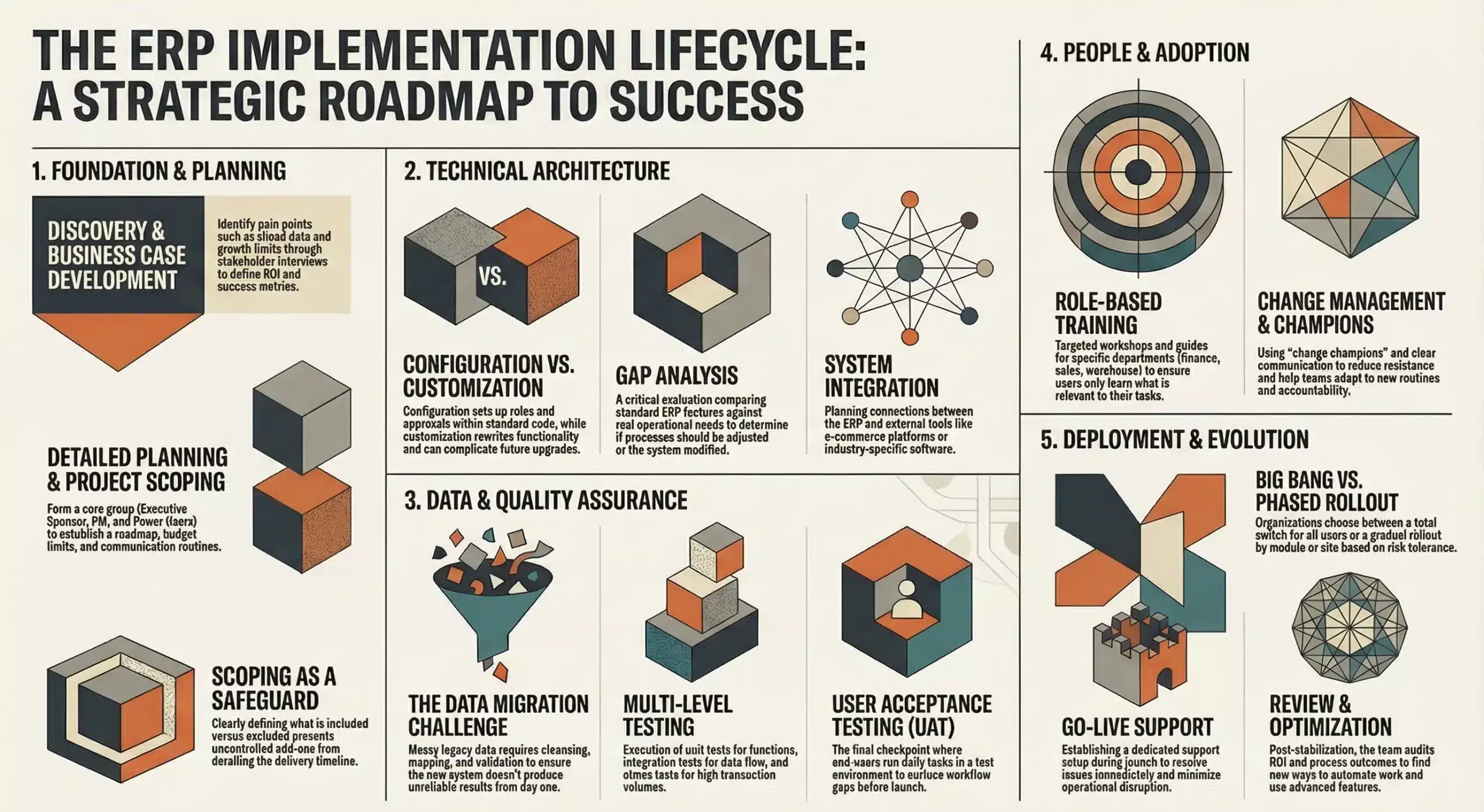
The ERP implementation lifecycle is a structured framework that guides businesses through deployment. While methods vary (Agile, Waterfall, or hybrid), the core phases are similar and help keep the project aligned with business goals without missing critical steps.
1. Discovery and Business Case Development
The discovery phase sets the project’s direction before any software is chosen. Teams identify the real reasons for change by mapping pain points like siloed data, manual errors, and limits to growth through stakeholder interviews.
Next, the project team builds a business case that clarifies ROI, total cost of ownership, and strategic impact. It also defines scope and success metrics so leadership aligns early on what the ERP must achieve.
2. Planning and Project Scoping
After the business case is approved, the team moves into detailed planning and forms the core project group, including an executive sponsor, project manager, and departmental power users. They build a project roadmap that sets timelines, milestones, resources, and budget limits.
Scoping is the safeguard in this phase because uncontrolled add-ons can derail delivery and inflate costs. The team defines what is included and excluded, chooses a delivery method, and establishes communication routines to keep stakeholders aligned.
3. System Design and Configuration
In this phase, the team designs how the ERP will run the business day to day, starting with a gap analysis between standard features and real operational needs. Any mismatch is resolved by choosing the best option: configure the system, adjust the process, or only customize when truly necessary.
Configuration means setting up roles, approvals, and reporting without changing the core code, while customization rewrites functionality and can complicate future upgrades. The team also plans integrations with critical tools like e-commerce platforms or industry-specific systems.
4. Data Migration
Data migration is often the hardest part of an ERP rollout because legacy data is usually messy, duplicated, or incomplete. If low-quality data is moved as-is, the new system will produce unreliable results from day one.
The work typically starts with cleansing to remove outdated records, followed by mapping old fields to the new ERP structure. After extraction and loading, teams validate the data to ensure accuracy for reporting and future forecasting.
5. Testing and Quality Assurance
Before go-live, the ERP must be thoroughly tested to confirm it works reliably across real scenarios. This typically includes unit tests for individual functions, integration tests for cross-module and external data flow, and sometimes stress tests for high transaction volumes.
The key checkpoint is User Acceptance Testing (UAT), where end users run day-to-day tasks in a realistic test environment. Their feedback surfaces workflow gaps and usability issues, and the system should not launch until critical problems are fixed and users approve it.
6. Training and Change Management
Phase 6 focuses on getting people ready, because adoption is what makes ERP work in practice. Training is role-based, so finance, sales, and warehouse teams learn only what they need through workshops, e-learning, and quick guides.
Change management runs alongside training to reduce resistance caused by new routines and accountability. Clear communication, early issue handling, and internal “change champions” help teams accept the system and use it consistently.
7. Go-Live and Deployment
Go-live is when the enterprise modular software becomes the real system of record and teams start processing live transactions. Deployment can be a “big bang” switch for everyone at once or a phased rollout by module or site, depending on complexity and risk tolerance.
During launch, teams often run a dedicated support setup to resolve issues fast and keep operations moving. Strong communication and quick user assistance are essential to minimize disruption in the first days.
8. Post-Implementation Review and Optimization
The work continues after go-live, starting with stabilization to resolve leftover issues and help users build confidence. Once performance is steady, the team reviews results against the original business case, including ROI, timelines, and process outcomes.
After that, the focus shifts to optimization as teams uncover better ways to automate work and use advanced features. Continuous improvement keeps the ERP aligned with growth and changing business needs.
How Long to Implement an ERP System?
| Aspect | SME / Simpler ERP Project | Large / Complex ERP Project |
|---|---|---|
| Company size | Small to medium-sized business | Large business |
| Operational complexity | Low to moderate complexity | High complexity |
| User count | Around 10–100 users | Around 100+ users |
| Deployment model | Cloud-based, standardised setup | Phased or highly integrated setup |
| Estimated timeline | Around 3 to 6 months | Around 12 months to several years |
Australian business leaders often ask how long an ERP implementation takes, and the honest answer is that it varies. Timelines depend on company size, operational complexity, user count, and whether its a cloud-based management system or on-premise.
For SMEs adopting a cloud ERP with minimal customisation, projects commonly take around 3 to 6 months. Using prebuilt templates and standard workflows helps teams reach value faster with core modules.
Larger companies with complex supply chains, manufacturing needs, or compliance requirements may need 12 months to several years. These rollouts often include heavy data work, integrations, and phased deployments to reduce risk.
Delays usually come from poor data quality, scope creep, or limited internal capacity. A realistic plan must include time for testing, cleansing data, and supporting teams through the operational change.
Key Principles for a Successful ERP Rollout
Success in ERP projects is rarely a matter of luck. It is the result of adhering to proven strategies that mitigate risk. While every company is unique, the following best practices are universally applicable and can significantly increase the probability of a successful deployment.
- Secure executive sponsorship early: Appoint a visible executive sponsor early to remove roadblocks, approve key decisions, and drive cross-team adoption.
- Invest in change management: Run structured change management with consistent communication and user involvement so employees understand the impact and actually use the system.
- Prioritize data quality before migration: Clean and standardize data from the start to prevent inaccurate reports and lost user trust after go-live.
- Don’t over-customize: Stick to standard ERP features where possible and customize only when it delivers clear competitive value and won’t complicate upgrades.
- Plan for post-go-live support: Prepare strong post-launch support and training to reduce the productivity dip and keep improving the system after deployment.
Common ERP Implementation Challenges (and How to Avoid Them)

Even with the best planning, challenges will arise. Being aware of these common pitfalls allows project teams to develop mitigation strategies proactively.
1. Scope creep: New feature requests can inflate timelines and costs, so enforce strict scope control and park non-critical ideas in a “phase two” list. Evaluate every change request against the business case and schedule before approving it.
2. Insufficient training: Generic or rushed training drives errors and off-system workarounds, so keep it role-based and close to go-live. Give users a sandbox to practise safely.
3. Data integration issues: Integrations can fail due to mismatched data formats or sync gaps, so test integrations thoroughly. Bring technical experts in early to spot compatibility risks before they block progress.
4. Employee resistance: Some staff may fear loss of control or job security, so involve key influencers in design and testing. When their input is used, adoption improves and resistance drops.
How to Choose the Right ERP Implementation Partner in Australia
The right partner acts as a trusted advisor, guiding the business through the technical and cultural complexities of the project.
1. Industry expertise
Choose a partner with proven experience in your sector so they understand operational realities and Australian regulatory requirements. Industry knowledge helps them anticipate risks and deliver practical solutions faster.
2. Local support and presence
A partner with an Australian presence can support critical phases like workshops, UAT, and go-live more effectively. Local knowledge of ATO and employment rules also ensures compliance from day one.
3. Methodology and cultural fit
Evaluate whether their delivery approach, whether agile or structured, aligns with your company’s culture. Strong cultural fit supports smoother collaboration and better project momentum.
4. Vendor agnostic vs specific
Confirm the partner has deep certification and strong access to the chosen ERP vendor’s ecosystem. Always check references from similar Australian businesses before making a final decision.
Conclusion
ERP implementation can be demanding, but it fundamentally upgrades how an Australian business runs day to day. The effort is significant, yet the payoff is clear: tighter operations, better visibility, and a platform built to scale.
Treat the erp implementation life cycle as your guardrails, not a checklist to rush through. When each phase is owned properly, you reduce costly surprises and keep the project tied to real business outcomes.
The real win is not “going live,” but changing how teams work with cleaner data, clearer processes, and stronger accountability. To achieve success in this implementation, you can try out our free consultation services and be the business leaders you can be.

Frequently Asked Questions About ERP Implementation
-
What is the average cost of an ERP implementation in Australia?
-
Why do ERP implementation projects fail?
Common reasons for failure include poor project management, lack of executive sponsorship, insufficient training, and resistance to change from employees. Additionally, poor data quality and undefined project scope (scope creep) often lead to budget overruns and delays.
-
How should a business prepare for data migration?
Preparation should start with a comprehensive data audit to identify duplicate, obsolete, or incorrect records. Businesses must cleanse their data before migration, map legacy fields to the new system structure, and establish validation rules to ensure only high-quality data enters the new ERP.
-
Does an ERP implementation require a dedicated project manager?
Yes, appointing a dedicated project manager is highly recommended. Implementing an ERP is a complex, full-time job that involves coordinating resources, managing timelines, mitigating risks, and communicating with stakeholders. Relying on staff to manage this alongside their regular duties often leads to burnout and project delays.