
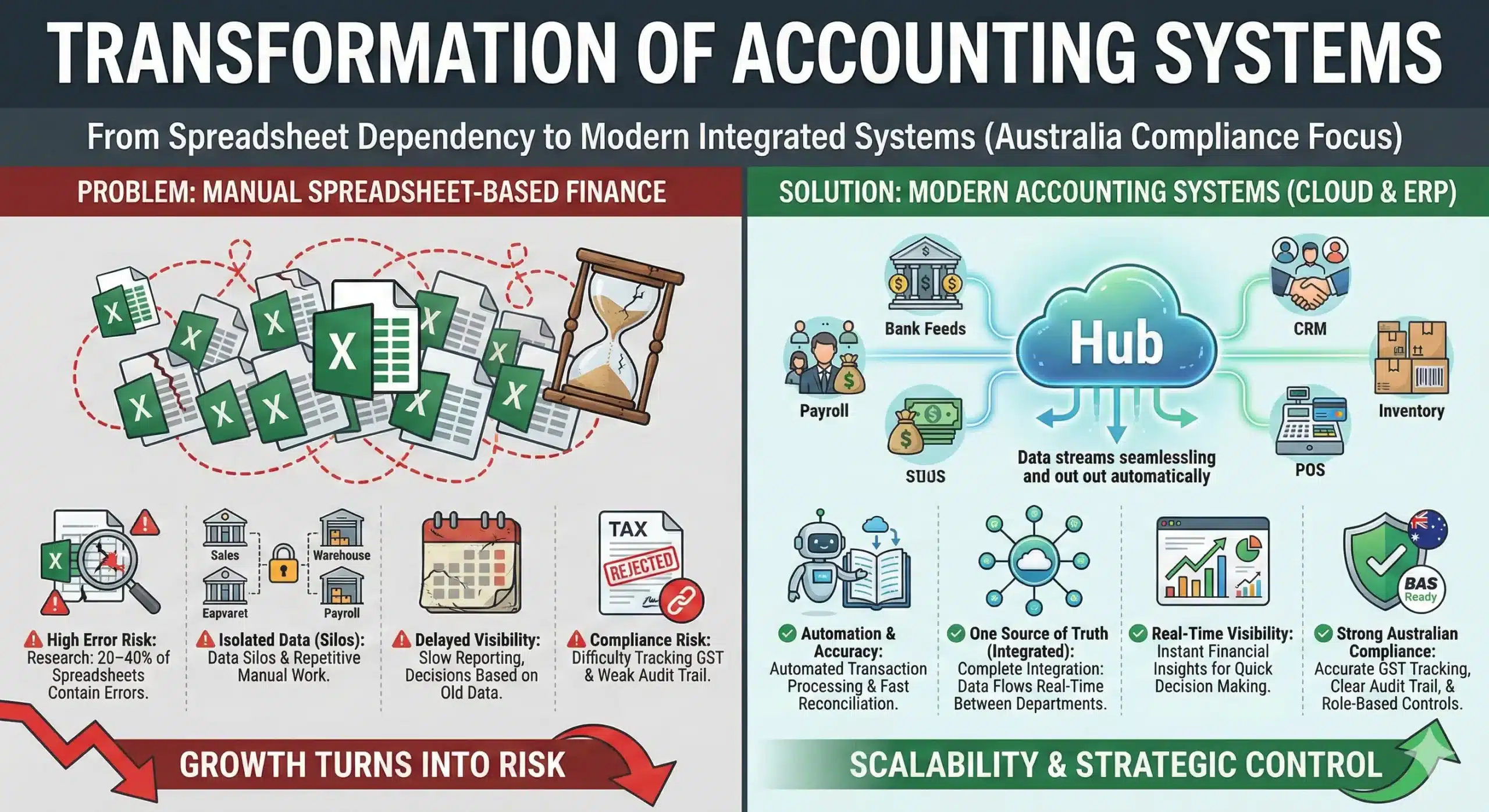
When finance runs on spreadsheets, growth quietly turns into risk. Research has found that 20–40% of spreadsheets contain errors, and those mistakes often show up only after cash, tax, or reporting decisions have already been made.
A modern accounting system solves that by centralising transactions, automating reporting, and giving leaders real-time visibility, exactly why Australian guidance promotes digital record keeping to help businesses track income and expenses more efficiently.
Key Takeaways
Accounting system is a structured process (often powered by software) that records, classifies, and reports transactions so finance data stays accurate and decision-ready.
Strong accounting protects cash flow, supports compliance, and gives leaders clear visibility to plan budgets, control costs, and make faster business decisions.
Good accounting relies on consistent GST treatment, clean audit trails, clear approvals, and reporting that stays reliable as transaction volume and business complexity grow.
What is an Accounting System?
An accounting system is a structured set of processes and accounting software that records, classifies, and summarizes financial transactions to produce accurate, timely financial reports. It uses double-entry bookkeeping to keep accounts balanced, then turns day-to-day activity into clear visibility into profit, cash flow, and financial position.
Modern business accounting software goes beyond basic bookkeeping by linking invoicing, payroll, and inventory into a single workflow, reducing errors and removing data silos. With cloud accounting and software, teams can access live data, collaborate more quickly, and maintain stronger control over compliance and planning.
Types of Accounting Systems

There are four main types of accounting systems used by businesses today, each designed to support different operational complexity and growth stages. Choosing the right structure affects reporting accuracy, internal controls, scalability, and long-term cost efficiency.
What works for a micro-business may fail under multi-entity consolidation or heavy transaction volumes. Below is a practical breakdown to help you evaluate which model fits your business environment:
1. Manual accounting system
A manual accounting system records transactions by hand in physical ledgers using paper invoices and receipts as source documents. It is simple to understand and inexpensive to set up, which makes it viable for very small businesses with minimal monthly transactions.
However, it relies entirely on human accuracy, so errors in posting, calculation, or duplication are common and difficult to detect early. As transaction volume grows, manual processes slow down reporting cycles, limit visibility, and create compliance risks.
2. Computerised accounting system
A computerised accounting system uses installed accounting software to automate journal entries, calculations, and financial reporting. It improves speed and consistency by reducing manual data entry and generating structured reports such as profit and loss statements or balance sheets instantly.
Most business accounting software in this category includes modules for invoicing, accounts payable, accounts receivable, payroll, and basic inventory tracking. While more efficient than manual systems, standalone desktop tools may still create silos if they do not integrate smoothly with other operational systems.
3. Cloud-based accounting system
Cloud accounting stores financial data on secure remote servers that users access via the internet rather than local hardware. This structure enables real-time collaboration between finance teams, managers, and external accountants without sending files back and forth.
Modern cloud accounting software often connects directly to bank feeds, payment gateways, and other applications, reducing reconciliation time and improving cash flow visibility. It is especially effective for growing businesses with multiple locations or remote teams that need centralised, live financial data.
4. Enterprise Resource Planning (ERP) System
An ERP system integrates accounting, procurement, inventory, project management, HR, and other operational workflows into a single, unified platform. Instead of financial data sitting in isolation, every transaction updates across departments in real time, which strengthens reporting accuracy and internal controls.
This type of accounting system supports multi-entity consolidation, advanced costing methods, and complex approval workflows required by medium to large organisations. Although implementation requires more planning and investment, ERP delivers long-term scalability and strategic visibility that standalone systems cannot provide.
Key Features of a Modern Accounting System
A modern accounting system is not just a bookkeeping tool, it is a financial control hub that supports accuracy, visibility, and structured decision-making. The right accounting software should reduce manual work, strengthen governance, and provide reliable data that scales with business growth.
- Automated transaction processing: Strong business accounting software captures transactions automatically through bank feeds, invoice matching, or system integrations. This reduces manual entry errors and keeps financial data consistent across the organisation.
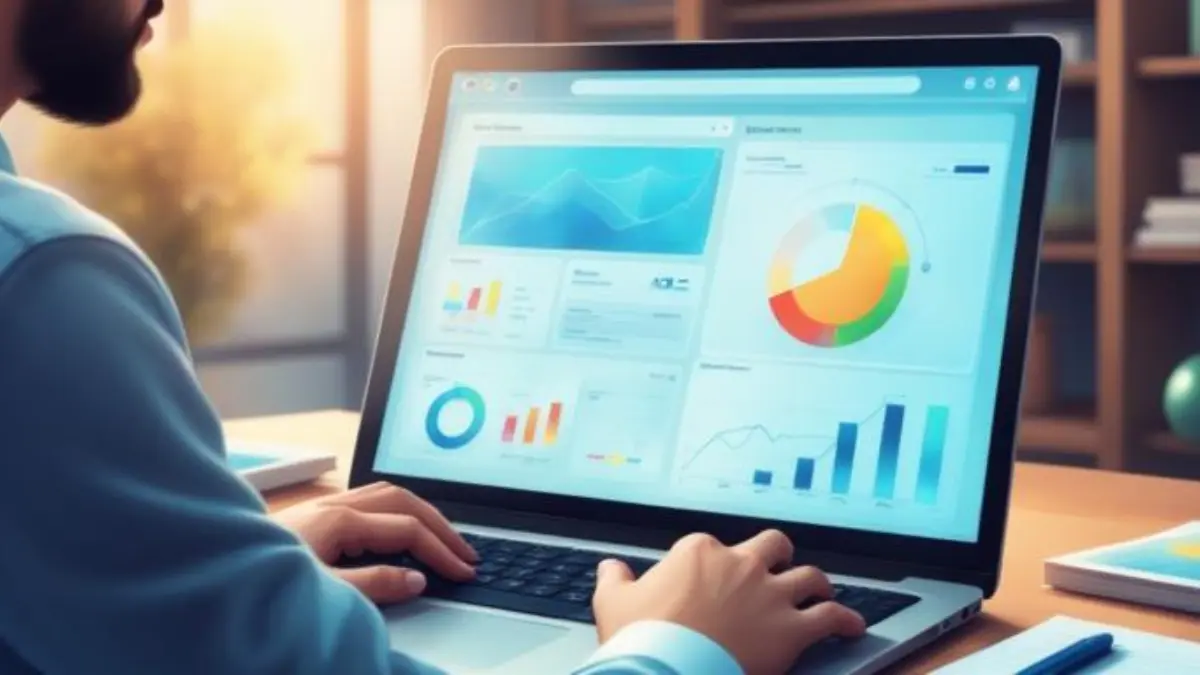
- Real-time financial reporting: Modern systems provide dashboards and live reports that reflect current cash flow, receivables, payables, and profitability. With cloud accounting, decision-makers can review updated figures without waiting for month-end consolidation.
- Integrated accounts payable and accounts receivable: An effective accounting system connects AP and AR workflows directly to the general ledger, ensuring accurate financial tracking. This integration supports faster invoice processing, automated reminders, and improved cash-flow discipline.
- Multi-entity and multi-currency support: For growing organisations, cloud accounting software should handle multiple entities and currencies within a unified reporting structure. This enables consolidated reporting and clearer financial visibility across subsidiaries or regions.
- Role-based access and audit trail: Modern accounting software enforces governance through role-based permissions and detailed activity logs. These controls protect sensitive data while ensuring every financial change remains traceable.
- Integration capabilities: A scalable accounting system integrates with payroll, procurement, POS, CRM, and banking platforms to avoid data silos. Seamless integrations reduce reconciliation work and keep operational and financial data aligned.
- Compliance and tax management: Reliable business accounting software supports accurate tax coding, structured reporting, and exportable compliance reports. This helps finance teams prepare regulatory submissions efficiently while maintaining internal control.
- Scalability and performance: Modern cloud accounting platforms are built to handle higher transaction volumes without slowing down performance. As the business grows, the system adapts without requiring disruptive migrations.
Cloud Accounting vs Traditional Accounting: Which Is Right for You?
This decision comes down to how you want your accounting system to run, who maintains it, and how quickly your finance data needs to move across teams and tools. Both models can work well, but the best fit depends on governance requirements, IT capacity, integration needs, and the complexity of growth. Use the two options below as a practical decision guide.
Cloud Accounting
Cloud accounting uses cloud accounting software hosted on remote servers and accessed through the internet, so teams can work from anywhere with consistent, live data. Providers typically manage updates, backups, and security controls, which reduces internal IT workload and keeps the accounting software current.
This model suits organisations that depend on integrations, bank feeds, payroll, procurement, POS, or CRM, as connectivity reduces manual reconciliations and improves financial visibility. Cloud is often the stronger choice when your business accounting software must support multiple locations, fast decision cycles, and scalable reporting as the business grows.
Traditional Accounting (On-Premise)
Traditional systems run your accounting system on company-owned servers and are maintained by your internal IT team, which gives you direct control over infrastructure and custom environments. This approach can fit organisations with strict internal policies, legacy integrations that work best on local networks, or requirements that favour keeping systems fully in-house.
However, the trade-off is that responsibility for updates, patches, backups, disaster recovery, and security monitoring sits with your team, not the vendor. Traditional accounting software can still scale, but expansion typically requires more planning and investment, especially when you add entities, users, or integrations.
What Your Accounting System Must Handle Regarding Australian Compliance
Australian compliance goes beyond recording transactions, it requires accurate GST treatment, BAS-ready reporting, and strong internal controls that hold up under review. For medium to large organisations, the real differentiator is whether the accounting system can maintain reporting accuracy and governance discipline as transaction volumes and approval layers grow.
- GST tracking and BAS readiness: Your accounting software should apply GST codes correctly at the transaction level and produce clear, structured summaries for BAS preparation. Finance teams must be able to export detailed GST reports, reconciliation data, and supporting transaction listings without relying on manual spreadsheet adjustments.
- Audit trail and role-based access: A compliant accounting system maintains a complete audit trail that records who created, edited, or approved each transaction. Role-based permissions then reinforce governance by restricting sensitive actions, such as posting journals or modifying tax settings, to authorised users only.
- Multi-entity consolidation for group companies: For businesses operating across multiple entities, business accounting software should support consolidated reporting and a consistent chart of accounts. Built-in intercompany visibility reduces reconciliation gaps and shortens the group-level reporting cycle.
- Document retention and approval controls: Every financial entry should link to its supporting documents, such as invoices, contracts, or purchase orders, stored directly within the system. With structured approval workflows inside cloud accounting software, organisations strengthen internal control while keeping compliance processes efficient and traceable.
ERP Benefits When You Outgrow Standalone Business Accounting Software
An ERP is an integrated accounting system that connects finance with operational workflows, such as procurement, inventory, projects, and HR, on a single platform. When standalone business accounting software creates silos, an ERP helps teams run on a single set of numbers with greater control and faster decision cycles.
- One source of truth across departments: ERP links operational activity directly to your accounting software, so finance reports reflect what is actually happening in purchasing, inventory, and project delivery. This reduces reconciliation work and prevents teams from operating on conflicting spreadsheets.
- Stronger controls and approval workflows: ERP embeds approvals and segregation of duties into the workflow, so spending and postings follow policy by default. This improves governance compared to standalone tools, where approvals often live in email threads and are hard to audit.
- Deeper costing and profitability visibility: ERP supports more granular costing, by project, site, department, product line, or customer, so leaders can see true profitability, not just top-line revenue. This level of detail helps finance teams explain margin drivers and tighten budget accountability.
- Multi-entity and intercompany management: ERP makes multi-entity reporting and intercompany transactions easier to manage within a single structure, improving consolidation accuracy. Instead of manual eliminations, finance teams can run cleaner group reporting with fewer close-cycle bottlenecks.
- Operational automation that reduces rework: ERP automates handoffs like “purchase request → PO → goods receipt → supplier bill,” which cuts manual checks and duplicate data entry. Fewer touchpoints mean fewer exceptions and faster processing for high-volume teams.
- Better integration without patchwork tools: Standalone systems often rely on many add-ons, creating fragile integrations and inconsistent data definitions. An ERP reduces dependence on patchwork stacks by keeping core workflows on a single platform, while still supporting APIs when needed.
- Scalable reporting and real-time visibility: When ERP is delivered through cloud accounting or cloud accounting software models, teams can access consistent reporting with controlled permissions across locations. This supports faster decision-making because reporting updates as transactions happen, not after manual consolidation.
What a “Good” Accounting System Looks Like in Daily Operations
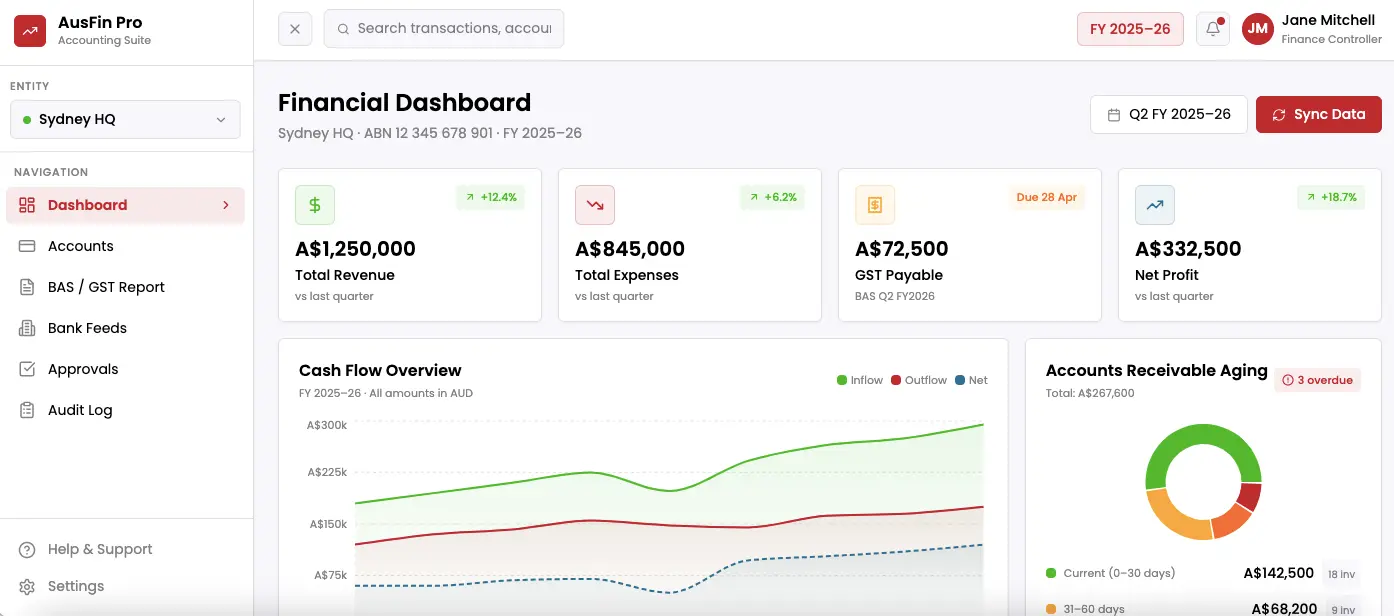
A “good” accounting system feels invisible in daily work because it removes small frictions that quietly drain time, rekeying invoices, chasing approvals, and fixing mismatched numbers. Instead of waiting for month-end to discover issues, teams see clean, current data that supports decisions while keeping controls in place.
In practice, strong business accounting software connects finance with operational reality, so invoicing, payables, inventory, and projects feed the same source of truth. With cloud accounting software, finance leaders can review performance across entities, locations, and departments without stitching reports together from spreadsheets.
At a larger scale, the right setup also supports governance, clear approvals, audit trails, and role-based access, without slowing the team down. For organisations that need deeper integration beyond standalone accounting software, the HashMicro Accounting solution can support unified workflows across finance and operational modules while maintaining consistent reporting.
Key features to expect in daily operations:
- Real-time general ledger with automated journal entries
- Accounts payable and receivable with approval workflows
- Invoice and billing automation with configurable templates
- Bank feeds and faster reconciliation with matching rules
- Inventory and COGS tracking that updates financials automatically
- Multi-entity and intercompany consolidation with configurable dimensions
- Project/job costing with profitability by project, client, or department
- Budgeting, forecasting, and dashboard reporting for leadership
- Audit trail, role-based access, and segregation of duties controls
- API integrations with payroll, POS, CRM, and payment gateways
How to Choose the Right Accounting System for Your Australian Business
Choosing the right accounting system means selecting a setup that matches your transaction volume, control requirements, and reporting expectations—while keeping GST/BAS processes clean and scalable. The best accounting software is the one your team can run consistently, with minimal manual work and strong governance built in.
- Start with transaction volume and workflow complexity: Estimate how many invoices, bills, bank transactions, and adjustments your team processes each month, then map the workflows behind them. When complexity includes inventory, projects, or multi-step approvals, basic business accounting software can become a bottleneck quickly.
- Check Australian compliance fit early: Confirm the system supports GST treatment and produces BAS-ready reports that are easy to review and export for advisers or internal controls. A compliant accounting system reduces end-of-period clean-up because tax coding and reporting structure are built into daily work.
- Validate controls: Choose accounting software with role-based access so tasks like posting journals, changing tax codes, and approving payments sit with the right people. A strong audit trail should show who changed what and when, which protects governance as the team grows.
- Decide on cloud vs on-prem based on Governance and IT capacity: If you want faster rollout, easier collaboration, and fewer infrastructure responsibilities, cloud accounting is usually the most practical choice. If your organisation requires tight in-house infrastructure control and can support patching, backups, and security internally, traditional setups may fit better than cloud accounting software.
- Prioritise reporting that answers leadership questions: Look beyond standard financial statements and confirm you can report by entity, department, site, project, or product line as needed. A modern accounting system should turn operational activity into decision-ready reporting without heavy spreadsheet work.
- Review integration needs before you commit: List the systems that must connect, banking, payroll, POS, procurement, CRM, and inventory, and test how reliably data moves between them. The best business accounting software reduces reconciliation workload by keeping integrations stable and definitions consistent.
- Plan for scale and total cost of ownership: Compare not only subscription price, but also implementation effort, training, support, add-ons, and the cost of switching later. An accounting system that scales cleanly often costs less over time because it prevents repeated migrations and manual workarounds.
Conclusion
A modern accounting system helps businesses move beyond basic record-keeping by turning daily transactions into reliable, decision-ready financial insight. With the right setup, teams reduce manual rework, strengthen controls, and gain clearer visibility over cash flow, compliance, and performance.
Cloud-based platforms add flexibility and speed by enabling real-time collaboration, secure access controls, and seamless integrations with tools such as payroll, POS, and inventory systems. When paired with automation and AI features, finance teams can process invoices faster, spot anomalies earlier, and forecast with more confidence.
If you want a clearer recommendation based on your transaction volume, reporting needs, and compliance priorities, book a free consultation with our professional team. We can help you map the right accounting system approach and rollout plan so your finance operations stay efficient and audit-ready.

FAQ About Accounting Systems
-
What is the difference between bookkeeping and an accounting system?
Bookkeeping focuses on recording daily transactions such as receipts, invoices, and payments. An accounting system goes further by automating posting, reporting, controls, and compliance so leaders can rely on structured financial insight.
-
Is cloud accounting safe for sensitive financial data?
Yes, reputable cloud accounting platforms use controls such as encryption, multi-factor authentication, access permissions, and regular backups. Security still depends on strong internal governance, especially role-based access and approval workflows.
-
When should a business upgrade from spreadsheets to an accounting system?
Upgrade when spreadsheets start creating rework—frequent errors, slow month-end close, limited reporting, or poor visibility over cash flow and receivables. Higher transaction volume, inventory tracking, or multi-entity reporting are also clear signs you need accounting software.
-
Can an accounting system integrate with other business software?
Yes, modern accounting systems can integrate with payroll, POS, procurement, CRM, inventory, and payment gateways to keep data consistent. Integration reduces manual reconciliation and helps finance teams close faster with fewer discrepancies.
-
What is the role of AI in modern accounting systems?
AI helps automate routine finance work such as invoice capture, transaction categorisation, and exception handling based on rules and patterns. It also supports anomaly detection and forecasting so teams can spot risks early and plan cash flow more accurately.