
Keeping stakeholders informed without drowning them in detail is one of the harder skills in project management. A well-written project status report solves this problem: it gives everyone from the project sponsor to the delivery team a clear, consistent view of where the project stands, what is on track, and what needs a decision.
This guide covers everything Australian project managers need in 2026, including the different report types, what to include, free templates, real examples, and the best practices that keep reports useful rather than ceremonial.
Key Takeaways A project status report communicates a project's current health to stakeholders at a defined point in time, covering milestones, budget, risks, and decisions required from leadership. Weekly, monthly, executive, progress, and RAG health reports each serve a different audience and reporting purpose, so choosing the right format matters as much as the content itself. Every strong status report contains seven components: project overview, RAG status, completed milestones, upcoming tasks, risks and issues, budget update, and key decisions required. Effective reporting follows a repeatable process: define a cadence, gather live data, assign honest RAG ratings, highlight the top risks, tailor the format to your audience, and follow up on decisions promptly.
What Is a Project Status Report?
A project status report is a structured document that communicates a project’s current state to its stakeholders at a defined point in time. It typically covers progress against milestones, budget and resource status, risks, and any decisions the team needs from leadership.
Status reports serve two purposes at once. First, they keep sponsors and executives informed without requiring them to attend every meeting. Second, they create a documented record of project health that teams can use to spot trends and course-correct before small problems grow.
Most project managers produce status reports on a regular cadence, whether weekly, fortnightly, or monthly, depending on the project’s complexity and stakeholder expectations. The format and level of detail vary, but the goal is always the same: clarity and actionability.
Types of Project Status Reports
Not every project needs the same kind of report. The right format depends on your audience, your reporting frequency, and how much detail your stakeholders actually use.
Below are the five most common types of project status reports used by Australian project teams.
Weekly project status report
A weekly status report gives the delivery team and project manager a tight, regular view of progress. It covers what was completed in the past week, what is planned for the week ahead, and any blockers that need immediate attention.
Weekly reports work best for fast-moving projects or during high-risk delivery periods. They keep the team accountable and surface issues quickly enough for the project manager to act before the next milestone is at risk.
Monthly project status report
A monthly report zooms out from weekly activity to show overall trajectory. It suits longer projects where stakeholders do not need weekly updates but still want confidence that the project is on track.
Monthly reports typically include a budget summary, milestone progress, and a forecast of whether the project will deliver on time and within budget. They often go to senior sponsors or governance committees rather than the delivery team.
Executive project status report
An executive report strips status reporting back to the essentials: overall health, key milestones, risks requiring decisions, and financial performance. It is designed for readers who have limited time and need the signal without the noise.
Most executives prefer a single page or a brief slide deck, so this format prioritises visual indicators like RAG traffic lights over detailed narrative. The writing is direct, the data is current, and the required actions are explicit.
Project progress report
A project progress report tracks completion against the original project plan. It shows which deliverables are done, which are in progress, and which have not yet started, often alongside percentage completion figures.
This format is particularly useful for clients and external stakeholders who want a clear answer to the question: “How far along are you?” It focuses on output rather than internal team activity.
Project health report (RAG status)
A RAG status report uses the Red, Amber, Green framework to give stakeholders an at-a-glance view of project health across multiple dimensions: schedule, budget, scope, risks, and team capacity.
Green means on track, Amber means at risk but manageable, and Red means the area needs immediate intervention. This format is widely used in programme offices and portfolio reviews because it makes cross-project comparison fast and consistent.
What To Include In a Project Status Report
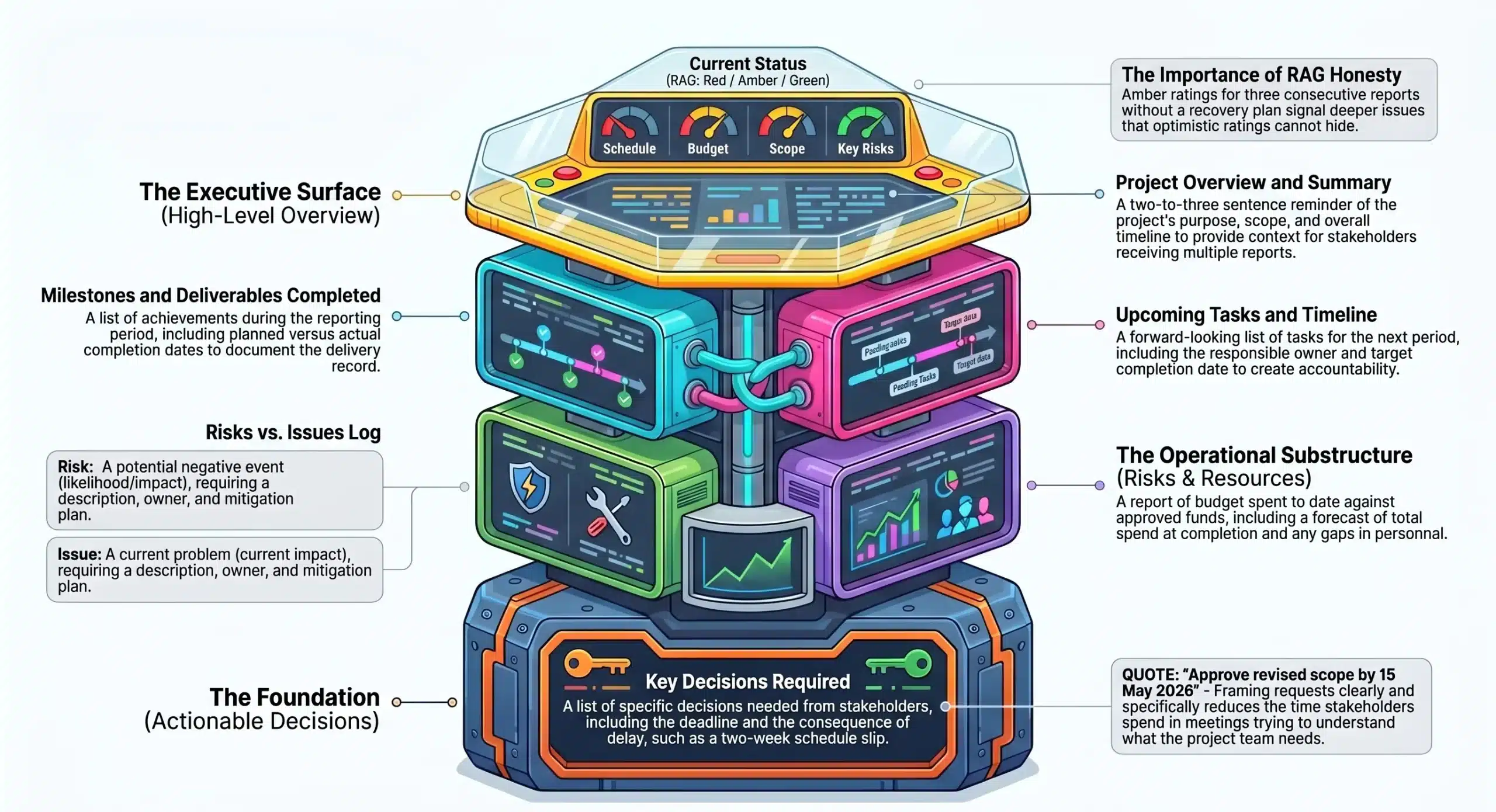
A good project status report does not list everything that happened. It surfaces the information stakeholders need to stay informed, make decisions, and remove blockers.
The following seven components appear in most well-structured project status reports.
Project overview and summary
Start every report with a brief reminder of the project’s purpose, scope, and overall timeline. This context matters because stakeholders who receive multiple reports may need a quick refresh before diving into the detail.
Keep the summary to two or three sentences. Include the project name, the reporting period, and a one-line statement of current overall status, for example: “The project is on track to deliver by 30 June 2026.”
Current status (RAG: Red / Amber / Green)
The RAG status gives your stakeholders an immediate read on project health before they read a single word of narrative. Assign a separate RAG indicator for schedule, budget, scope, and key risks.
Be honest with your RAG ratings. A project that shows Amber across the board for three consecutive reports without a recovery plan signals deeper issues that optimistic ratings cannot hide.
Milestones and deliverables completed
List every milestone or deliverable achieved during the reporting period. Include the planned completion date and the actual date so stakeholders can see whether work is landing on time.
Completed milestones give the report a positive foundation and remind stakeholders of the progress made, not just the problems ahead. Furthermore, they build the documented delivery record that supports project closure.
Upcoming tasks and timeline
Show what the team plans to complete in the next reporting period. Include the task or milestone name, the responsible owner, and the target completion date.
This section sets expectations and creates accountability. When the next report comes out, stakeholders can immediately compare planned versus delivered and understand whether the team is maintaining its pace.
Risks and issues log
A risk is something that might happen and could affect the project negatively. An issue is something that has already happened and is affecting the project right now. Both belong in every status report.
For each risk and issue, note the description, its likelihood or current impact, the owner responsible for managing it, and the current mitigation or resolution action. Stakeholders who can help should know exactly what they are being asked to do.
Budget and resource update
Report the budget spent to date against the approved budget and flag any variances with an explanation. Include a forecast of total spend at completion so stakeholders can see whether the project will land within its financial envelope.
Resource updates cover whether the team has the people it needs to deliver. If a key resource is unavailable, on leave, or has rolled off the project, note the impact and the plan to address the gap.
Key decisions required
This section is often the most important for sponsors and executives. It lists the specific decisions the project needs from stakeholders, along with the deadline for each decision and the consequence of delay.
Framing decisions clearly reduces the time stakeholders spend in meetings trying to understand what you need from them. Therefore, every request should be specific: “Approve the revised scope by 15 May 2026 to avoid a two-week schedule delay.”
Free Project Status Report Templates
To save you time, we have put together seven ready-to-use templates that cover the most common reporting scenarios. Each one follows the structure above and includes placeholder fields you can customise to your project.
Weekly project status report template
This template is designed for fast turnaround. It covers the current RAG status, this week’s completed tasks, next week’s priorities, blockers, and a one-line budget note.
The weekly format keeps to a single page so the team can complete it in under 15 minutes and stakeholders can read it in under five.
Weekly project status report template
Executive project status report template
Built for senior audiences, this template leads with an overall RAG summary and three key facts: schedule health, budget health, and the top risk. The narrative section limits to three bullet points per category.
The layout uses colour-coded status indicators and a decisions-required box at the top, so executives see their action items immediately on opening the document.
Executive project status report template
Project progress report template
This template tracks deliverables against the project plan. It includes a milestone completion table with planned versus actual dates, a percentage completion bar, and a summary of work remaining.
It suits client reporting, programme board packs, and governance reviews where delivery progress is the primary question.
Project progress report template
RAG status report template
The RAG template provides a structured view of project health across five dimensions: schedule, budget, scope, risks, and team. Each dimension receives its own RAG rating and a brief narrative explaining the current position.
This format works well in portfolio environments where a programme management office needs to compare health across many concurrent projects at once.
RAG status report template
Project closure report template
A closure report documents the formal end of a project. It summarises what was delivered against what was planned, captures final budget figures, lists outstanding actions or handover items, and records sign-off from the project sponsor.
Completing a closure report properly protects the project team and creates an accurate record for future projects of similar scope.
Project closure report template
Post-mortem / lessons learned report template
This template guides the team through a structured reflection on what went well, what did not, and what the business should do differently next time. It captures lessons at three levels: process, people, and tools.
Lessons learned reports are most valuable when they go into a shared knowledge base rather than sitting in a folder no one opens. Therefore, the template includes a distribution field and a nominated owner for each lesson.
Post-mortem / lessons learned report template
Agile sprint status report template
For teams working in sprints, this template replaces the traditional milestone format with a sprint summary view. It covers sprint goal completion, velocity, the current backlog status, and any impediments the Scrum Master is tracking.
The agile template translates sprint-level activity into language that non-technical stakeholders can understand, which is particularly useful when reporting to a business sponsor unfamiliar with agile delivery methods.
Agile sprint status report template
Project Status Report Examples
Seeing a completed report is often more useful than reading a list of what to include. Below are two examples drawn from scenarios common in Australian businesses.
IT infrastructure upgrade project (Australian SME)
Project: Cloud migration for a 200-person professional services firm
Reporting period: Week 6 of 16
Overall RAG: Amber
Summary: The project completed server assessment and vendor selection on schedule. However, the data migration timeline has shifted by one week due to a delay in the client’s legacy data clean-up. The team has absorbed two days of the delay through parallel workstreams. Current forecast puts go-live at risk if clean-up is not completed by 12 May 2026.
Milestones completed this period:
- Vendor contract signed (planned: Week 5, actual: Week 6)
- Test environment provisioned (planned: Week 6, actual: Week 6)
Upcoming milestones:
- Legacy data clean-up complete (due: 12 May 2026, owner: Client IT Lead)
- Migration dry run (due: 19 May 2026, owner: Project Delivery Lead)
Top risk: Data quality issues in legacy system may extend clean-up beyond 12 May (Amber, owner: Client IT Manager)
Decision required: Client to confirm extended access to legacy system by 8 May 2026 or accept a two-week go-live delay.
Budget: $142,000 spent of $220,000 approved. On track.
Marketing campaign project status report
Project: National brand awareness campaign launch
Reporting period: Month 2 of 4
Overall RAG: Green
Summary: Creative production is complete and assets have received brand team approval. Media placements are confirmed across digital, out-of-home, and radio channels. The campaign is on track to launch on 1 June 2026.
Milestones completed this period:
- Creative brief approved (Week 3)
- All static and video assets delivered (Week 7)
- Media plan signed off (Week 8)
Upcoming milestones:
- Campaign live date: 1 June 2026
- Mid-campaign performance review: 15 June 2026
Top risk: Radio script approval pending one stakeholder sign-off (Green, due 2 May 2026)
Decision required: None at this time.
Budget: $88,000 spent of $210,000 approved. On track.
How To Write a Project Status Report
Writing a status report that stakeholders actually read takes practice and a clear process. The following sequence works for most project types and team sizes.
1. Define your reporting cadence
Decide how often you will send status reports before the project starts. Weekly reports suit high-risk or fast-moving projects; monthly reports suit longer, more stable engagements.
Set this expectation with stakeholders at project kick-off so they know when to expect updates and hold space in their schedules to review and respond. Consistency matters more than frequency.
2. Gather data from your project plan
Pull current data from your project schedule, budget tracker, risk register, and issue log before you write a single word. Reporting from memory introduces errors and undermines the credibility of your update.
If your team uses project management software, most platforms generate progress data automatically. Therefore, your job becomes interpretation and communication rather than data collection.
3. Assign your RAG status
Once you have the data, assign a RAG status to each area of the project. Be honest and consistent in your ratings, because inflating Green ratings to avoid difficult conversations erodes trust quickly.
Use the same RAG definitions throughout the project so stakeholders develop a reliable sense for what Amber actually means on your reports. If your Amber consistently becomes Red within two weeks, your definitions need recalibrating.
4. Highlight risks and blockers
Identify the two or three risks or issues that genuinely need stakeholder attention and describe them clearly. Avoid burying the most important risk in the fifth item of a long list.
Each risk entry should answer three questions: what is the risk, what is the potential impact, and what is the team doing about it? Keep descriptions to two sentences maximum.
5. Tailor the report to your audience
A delivery team needs task-level detail. An executive sponsor needs a one-page summary. A client wants progress against deliverables. Writing the same report for every audience wastes their time and yours.
Maintain one master document with all the detail, then produce a summarised version for senior stakeholders. This approach saves time and ensures every audience gets the level of information they can use.
6. Distribute and follow up
Send the report at the same time each week or month so stakeholders know when to expect it. Use email, a project portal, or your project management platform to distribute it, depending on your team’s workflow.
Follow up on any decisions or actions within 24 hours if you have not received a response. Delayed decisions are one of the most common causes of project slippage, and a timely nudge often resolves a blocker that would otherwise sit unaddressed for days.
Best Practices for Project Status Reporting in Australia

Effective status reporting is as much about process and habit as it is about format. The following practices reflect what works in Australian project environments specifically.
Align with Australian project management standards (AIPM)
The Australian Institute of Project Management (AIPM) sets out competency frameworks and reporting standards that many government and enterprise clients expect project managers to follow. Aligning your reports with AIPM guidance adds credibility when working on public sector or regulated industry projects.
For projects funded under Commonwealth or state government programmes, reporting templates may also need to meet specific requirements set by the funding body. Therefore, check your contract documentation early and build those requirements into your standard template.
Adapt reporting for distributed and remote teams
Many Australian project teams now operate across cities, states, and time zones. Status reporting for distributed teams needs to account for asynchronous communication, so the report itself carries more weight than it does in co-located environments.
Include clear owner names against every action and decision. When team members cannot discuss a report in person, the written record needs to be unambiguous enough to act on without a follow-up conversation.
Match report format to stakeholder expectations
Some stakeholders want a PDF they can read at their desk. Others want a live dashboard they can check on demand. A few prefer a brief verbal summary followed by a written record.
Ask your key stakeholders at project kick-off how they prefer to receive status updates. Matching your format to their preference dramatically increases the chance that they will read, engage with, and respond to your reports.
Keep reports concise and action-oriented
A long report that no one reads is worse than no report at all. Aim for the minimum length that communicates everything stakeholders need to know and nothing they do not.
Every section of the report should either inform or prompt an action. If a section does neither, remove it. The best status reports create clarity and momentum rather than serving as a record of how busy the team was.
Use project management software to streamline reporting
Manual status reporting takes time that project managers could spend on actual project work. Modern project management tools generate status data automatically from task completion records, timesheets, and budget tracking modules.
HashMicro’s project management solution, for example, pulls live data from your project plan into a report format your team can review and distribute in minutes. As a result, your status reports are always based on current data and take a fraction of the time to produce.
Conclusion
A clear project status report keeps every stakeholder aligned, reduces the time spent in update meetings, and gives your team a structured way to flag risks before they become crises. When reporting is consistent and honest, trust builds across the project and decisions happen faster.
HashMicro’s project management software pulls live data from your project plan and generates status reports automatically, so your team spends less time compiling updates and more time delivering results. Book a free consultation with our team today to see how it fits your projects.
A good project status report template should cover the project overview, current RAG status, milestones completed during the reporting period, upcoming tasks and owners, a risks and issues log, a budget and resource update, and a section for key decisions required from stakeholders. Including all seven components ensures your report informs and drives action rather than simply documenting activity. The right cadence depends on your project's pace and stakeholder expectations. Weekly reports suit fast-moving or high-risk projects where issues need to surface quickly. Monthly reports work better for longer, more stable projects where sponsors need periodic confidence rather than constant updates. The most important factor is consistency: sending reports at the same time each cycle builds a rhythm stakeholders can rely on. RAG stands for Red, Amber, and Green, and it is a traffic-light system used to communicate project health at a glance. Green means the area is on track, Amber means it is at risk but manageable with current mitigations, and Red means it needs immediate escalation or intervention. Most project status reports assign a separate RAG rating to schedule, budget, scope, and key risks so stakeholders can see exactly where the problem areas sit. A project status report gives a broad view of overall project health, covering budget, risks, decisions, and team capacity alongside delivery progress. A project progress report focuses specifically on what has been completed against the original plan, usually showing percentage completion and milestone tracking. Status reports suit executive sponsors, while progress reports suit clients and delivery teams who want output-focused updates. A standard template works for both, but agile projects need a few adjustments. Replace milestone tables with sprint summaries that show velocity, backlog status, and sprint goal completion. Keep the RAG status, risks log, and decisions-required sections because those are useful regardless of delivery method. The key is translating sprint-level detail into language your non-technical stakeholders can understand.Frequently Asked Question